
QN77S95C - Television SAMSUNG - Free user manual and instructions
Find the device manual for free QN77S95C SAMSUNG in PDF.
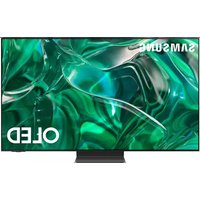


Pick your language and provide your email: we'll send you a specifically translated version.
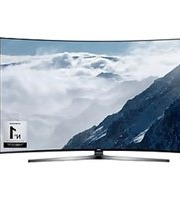
| Product Type | QD-OLED 4K Smart TV |
| Brand | Samsung |
| Model | QN77S95C |
| Screen Size | 77 inches (diagonal) |
| Display Technology | Quantum Dot OLED (QD-OLED) |
| Resolution | 3840 x 2160 (4K UHD) |
| Refresh Rate | 120 Hz (144 Hz in Game Mode) |
| Processor | Neural Quantum Processor with 4K AI Upscaling |
| HDR Support | Quantum HDR OLED+ (HDR10+, HLG) |
| Sound Output | 70 W total (wattage approximate) |
| Audio Features | Object Tracking Sound+, Dolby Atmos |
| Operating System | Tizen Smart TV |
| HDMI Ports | 4 (2x HDMI 2.1, 2x HDMI 2.0) |
| USB Ports | 3 |
| Connectivity | Wi-Fi 6, Bluetooth 5.2, Ethernet, Dual-band |
| Power Supply | AC 100-240 V, 50/60 Hz |
| Power Consumption (Typical) | Approximately 150 W (standby <0.5 W) |
| Dimensions (Without Stand) | 1716.5 x 984.4 x 26.4 mm (W x H x D) |
| Dimensions (With Stand) | 1716.5 x 1045.5 x 318.2 mm (approximate) |
| Weight (Without Stand) | Approximately 31.2 kg |
| Weight (With Stand) | Approximately 36.8 kg |
| Energy Efficiency Class | Class G (EU regulation) |
| Included Accessories | One Connect Box, SolarCell Remote, power cable |
| Mounting | VESA compatible (400 x 300 mm) |
| Cleaning | Wipe screen with a soft, dry microfiber cloth; avoid chemical cleaners |
| Security | Kensington lock slot, Tizen security |
Frequently Asked Questions - QN77S95C SAMSUNG
What is the refresh rate of the Samsung QN77S95C?
The Samsung QN77S95C features a native 120 Hz refresh rate, which can be boosted to 144 Hz when Game Mode is enabled, providing exceptionally smooth motion for fast-paced content.
Does the QN77S95C support Dolby Vision?
No, Samsung TVs use HDR10+ rather than Dolby Vision. The QN77S95C supports HDR10+, HLG, and Quantum HDR OLED+ for vibrant high dynamic range content.
How can I clean the OLED screen of my TV?
To clean the screen, first turn off the TV and wait for it to cool. Use a soft, dry microfiber cloth to gently wipe the surface. Do not use water, alcohol, or chemical cleaners. For stubborn marks, lightly dampen the cloth with water (just a few drops) and wipe again.
What ports are available on the Samsung QN77S95C?
The TV includes 4 HDMI ports (2 with HDMI 2.1, 2 with HDMI 2.0), 3 USB ports, an Ethernet port, an optical digital audio output, a RF antenna input, and built-in Wi-Fi and Bluetooth 5.2. HDMI 1 and 2 support eARC and 4K at 144Hz.
How do I mount the TV on a wall?
The QN77S95C is compatible with VESA mounts of size 400 x 300 mm. Use the provided screw kit (or appropriate M8 screws) and a wall mount that can support a weight of at least 31 kg. Always follow the wall mount manufacturer's instructions.
Can I use the TV as a computer monitor?
Yes, the QN77S95C works with a PC via HDMI. Connect your computer to any HDMI port, then set the input to PC mode for proper text clarity. The TV supports up to 4K resolution at 144 Hz with VRR, making it an excellent choice for productivity and gaming.
How do I update the TV’s software?
To update the firmware, go to Settings > Support > Software Update and select Update Now. Make sure the TV is connected to the internet. You can also enable Auto Update in the same menu to receive updates automatically while in standby.
What is the One Connect Box included with this TV?
The One Connect Box is a separate hub that houses all external ports and connects to the TV via a slim, nearly invisible cable. This allows the TV panel to be exceptionally thin and simplifies cable management.
How do I reset the TV to factory settings?
To factory reset, go to Settings > General > Reset. You need to enter your PIN (default is 0000) and confirm the reset. This erases all personal settings and installed apps, returning the TV to its original state.
What is the power consumption in standby mode?
The Samsung QN77S95C consumes less than 0.5 W in standby mode, although it may use a small amount of power for network standby (approximately 2 W). With the Eco Mode and Auto Power Off features, you can further reduce energy usage.
User questions about QN77S95C SAMSUNG
0 question about this device. Answer the ones you know or ask your own.
Ask a new question about this device
No questions yet. Be the first to ask one.
Download the instructions for your Television in PDF format for free! Find your manual QN77S95C - SAMSUNG and take your electronic device back in hand. On this page are published all the documents necessary for the use of your device. QN77S95C by SAMSUNG.
USER MANUAL QN77S95C SAMSUNG
Manual assistant
Powered by Anthropic
Waiting for your message
Product information
Brand : SAMSUNG
Model : QN77S95C
Category : Television