
Talkabout T4300 - Walkie-talkie MOTOROLA - Free user manual and instructions
Find the device manual for free Talkabout T4300 MOTOROLA in PDF.


Pick your language and provide your email: we'll send you a specifically translated version.
| Product Type | Two-way radio (walkie-talkie) |
| Brand | Motorola |
| Model | Talkabout T4300 |
| Radio Type | FRS/GMRS dual-band handheld transceiver |
| Number of Channels | 22 channels |
| Privacy Codes | 38 CTCSS privacy tones |
| Operating Range | Up to 7 miles (11 km) in optimal conditions |
| Frequency Band | 462-467 MHz (UHF) |
| Output Power | 1.5 Watts (maximum) |
| Battery Type | AA alkaline (or NiMH rechargeable) |
| Battery Quantity | 3 batteries |
| Battery Life | Up to 20 hours with alkaline batteries |
| Dimensions (H x W x D) | 5.2 x 2.3 x 1.5 inches (132 x 58 x 38 mm) |
| Weight (with batteries) | 3.7 oz (105 g) |
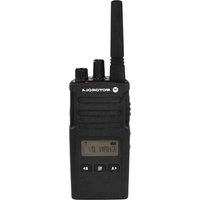
| Display | Liquid crystal display with battery meter |
| Backlight | Yes, for improved visibility in low light |
| Water Resistance | Splash resistant (IP54 rating) |
| Key Features | VOX hands-free operation, scan function, roger beep |
| Included Accessories | Belt clip, owner's manual |
| Cleaning Instructions | Wipe with a soft, dry cloth; do not immerse in water |
| Safety Approvals | Complies with FCC regulations for GMRS/FRS |
| Repairability | Belt clip and battery cover are replaceable; service by authorized technicians |
Frequently Asked Questions - Talkabout T4300 MOTOROLA
How do I change channels on the Motorola Talkabout T4300?
Use the rotary channel selector located on the top of the radio. Rotate it to choose one of the 22 available channels. The current channel number will appear on the display. Make sure all radios in your group are set to the same channel to communicate.
What batteries are required for the T4300?
The T4300 operates on 3 AA batteries. You can use standard alkaline batteries or rechargeable NiMH batteries. Insert them according to the polarity markings inside the battery compartment. Rechargeable batteries can be charged using an optional charger, but the T4300 does not include a charging cradle by default.
How does the privacy code feature work?
The privacy code feature adds a CTCSS tone (Continuous Tone-Coded Squelch System) to your transmissions. You can set one of 38 privacy codes to reduce interference from other users on the same channel. To set it, press the menu button until the code setting appears, then use the up/down buttons to select a code. Remember that all radios must share the same channel and privacy code to communicate.
What is the maximum range of the T4300?
Under ideal conditions (open area, line of sight), the T4300 can reach up to 7 miles (11 km). However, actual range depends on obstacles like buildings, trees, and terrain. In typical suburban environments, expect 2 to 3 miles. For the best performance, hold the radio upright and avoid placing it in your pocket or near your body.
Can I use the T4300 for hands-free communication?
Yes, the T4300 supports VOX (voice-activated transmission). To enable VOX, press the menu button repeatedly until the VOX icon appears, then press the up arrow to turn it on. You can also adjust the VOX sensitivity level for quieter or louder environments. When VOX is active, the radio transmits automatically when you speak, so you don't need to press the PTT button.
How do I clean and maintain the device?
To clean the talkabout, turn it off and remove the batteries. Use a soft, dry cloth to wipe the exterior. Do not use harsh chemicals or solvents. Keep the charging contacts and battery terminals dry. Avoid exposing the radio to extreme temperatures or submersion in water. If the radio is exposed to rain, dry it thoroughly before use.
Why won't my radio transmit or receive?
First, check that the batteries are installed correctly and have sufficient charge. Verify that you are on the same channel and privacy code as the other radio. If you're using a headset, ensure it is properly connected. Also, make sure the keypad lock is not activated, as it prevents transmission. If the radio still doesn't work, try resetting it by turning it off and removing the batteries for a few minutes.
What is the power output and does it require a license?
The T4300 has a maximum output power of 1.5 watts on both FRS and GMRS frequencies. It operates on UHF frequencies (462-467 MHz). In the United States, it may be used on FRS channels (1-14) without a license. For GMRS channels (15-22), a FCC GMRS license is required. Users outside the U.S. should check local regulations.
How do I set up the scan function?
To scan channels, press the scan button (often marked with a magnifying glass icon). The radio will quickly scan through all channels and stop when it detects a transmission. You can also stay on that channel by pressing the PTT button or resume scanning by pressing the scan button again. The scan function is useful for monitoring multiple channels.
Is the T4300 water-resistant?
The T4300 is splash-resistant and not suitable for submersion. It can withstand light rain and moisture, but it does have an IP54 rating, meaning it is protected against dust and splashing water from any direction. Do not expose it to heavy downpours or submerge it in water. If it gets wet, wipe it dry immediately.
User questions about Talkabout T4300 MOTOROLA
0 question about this device. Answer the ones you know or ask your own.
Ask a new question about this device
No questions yet. Be the first to ask one.
Download the instructions for your Walkie-talkie in PDF format for free! Find your manual Talkabout T4300 - MOTOROLA and take your electronic device back in hand. On this page are published all the documents necessary for the use of your device. Talkabout T4300 by MOTOROLA.
USER MANUAL Talkabout T4300 MOTOROLA
Manual assistant
Powered by Anthropic
Waiting for your message
Product information
Brand : MOTOROLA
Model : Talkabout T4300
Category : Walkie-talkie