
Chroma 410A - Computer Case Azza - Free user manual and instructions
Find the device manual for free Chroma 410A Azza in PDF.


Pick your language and provide your email: we'll send you a specifically translated version.
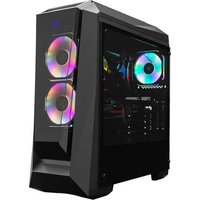
| Product Type | ATX Mid-Tower Computer Case |
| Brand | Azza |
| Model | Chroma 410A |
| Main Color | Black |
| Chassis Design | Mid-Tower |
| Side Panel | Tempered Glass |
| Case Material | Steel, ABS Plastic, Tempered Glass |
| Dimensions (L x W x H) | 450 mm x 210 mm x 480 mm |
| Weight | 6.5 kg |
| Motherboard Compatibility | ATX, Micro-ATX, Mini-ITX |
| Expansion Slots | 7 |
| Internal Drive Bays | 2x 3.5in, 2x 2.5in |
| Front I/O Ports | USB 3.0 x2, USB 2.0 x2, HD Audio |
| Power Supply Support | Bottom-mounted ATX PSU, up to 180 mm |
| Max GPU Length | 350 mm |
| Max CPU Cooler Height | 160 mm |
| Pre-installed Fans | 4x 120 mm RGB Fans (3 front, 1 rear) |
| Fan Mounting Options | Front: 3x 120 mm / 2x 140 mm; Top: 2x 120 mm; Rear: 1x 120 mm |
| Radiator Support | Front: 240 mm; Rear: 120 mm |
| Cooling and RGB Features | Airflow-optimized mesh, RGB fans and front strip |
| Maintenance and Cleaning | Use a soft dry cloth; clean magnetic dust filters regularly |
| Safety Precautions | Place on a stable surface; keep liquids away from electrical components |
| Spare Parts and Repairability | Replaceable fans, filters and tempered glass panel |
| General Information | Designed for high-performance RGB builds |
Frequently Asked Questions - Chroma 410A Azza
What power supply unit is compatible with the Azza Chroma 410A?
The case supports standard ATX power supplies in a bottom mount. Choose a certified PSU with a maximum length of 180 mm for a clean fit.
Can I install a liquid cooler in this case?
Yes, you can mount a 240 mm radiator at the front and a 120 mm radiator at the rear. Always confirm radiator thickness does not interfere with the graphics card.
How many RGB fans are included?
The Chroma 410A comes with four 120 mm RGB fans: three pre-installed in the front and one at the rear.
How do I control the RGB lighting?
The fans can be synced with motherboard RGB software (ASUS Aura, MSI Mystic Light, etc.). If no motherboard header is available, use the built-in controller and its preset modes.
Is the tempered glass side panel easy to clean?
Use a microfiber cloth and a gentle glass cleaner. Spray the cleaner onto the cloth rather than directly on the panel to avoid liquid dripping into the case.
Which motherboards fit the Chroma 410A?
It supports ATX, Micro-ATX and Mini-ITX motherboards, giving you flexibility for most modern builds.
How many storage drives can I install?
The case has two 3.5-inch bays and two 2.5-inch mounting positions. This is enough for several HDDs and SSDs.
What is the maximum GPU size allowed?
You can install graphics cards up to 350 mm long. Check overall GPU thickness and the front radiator/fan depth before assembly.
What maintenance does the case require?
Clean the magnetic dust filters monthly and wipe the internal surfaces with a dry lint-free cloth. Avoid using water or compressed air too close to sensitive components.
Are replacement parts available for this case?
Yes, parts such as fans, dust filters, screws and the tempered glass panel can be ordered from Azza’s support network or authorized resellers.
User questions about Chroma 410A Azza
0 question about this device. Answer the ones you know or ask your own.
Ask a new question about this device
No questions yet. Be the first to ask one.
Download the instructions for your Computer Case in PDF format for free! Find your manual Chroma 410A - Azza and take your electronic device back in hand. On this page are published all the documents necessary for the use of your device. Chroma 410A by Azza.
USER MANUAL Chroma 410A Azza


Manual assistant
Powered by Anthropic
Waiting for your message
Product information
Brand : Azza
Model : Chroma 410A
Category : Computer Case