
NWZ-E343 - Mp3 player SONY - Free user manual and instructions
Find the device manual for free NWZ-E343 SONY in PDF.


Pick your language and provide your email: we'll send you a specifically translated version.
| Product Type | MP3 Player / Digital Audio Player |
| Brand | Sony |
| Model | NWZ-E343 |
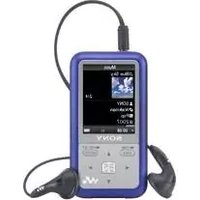
| Display | 2.0-inch QVGA TFT Color Display |
| Internal Storage | 4 GB Flash Memory |
| Audio Formats | MP3, WMA, AAC, Linear PCM |
| FM Tuner | Built-in FM Radio with 30 Presets |
| Voice Recording | Built-in Microphone for Voice Memos |
| Battery | Internal Rechargeable Lithium-Ion Battery |
| Music Playback Time | Up to 30 Hours |
| FM Radio Time | Up to 15 Hours |
| Charging Time | Approximately 2 Hours |
| I/O Interface | USB 2.0 for Data Transfer and Charging |
| Headphone Jack | 3.5 mm Stereo Mini Jack |
| Signal-to-Noise Ratio | Approx. 90 dB |
| Dimensions (H x W x D) | 92 x 44 x 9.1 mm |
| Weight | Approx. 52 g |
| Accessories Included | Stereo Headphones, USB Cable |
| Maintenance and Cleaning | Clean with a soft, dry cloth; avoid solvents |
| Safety Precautions | Do not expose to water, extreme heat or direct sunlight |
| Spare Parts and Repairability | Contact authorized Sony service for repairs |
Frequently Asked Questions - NWZ-E343 SONY
How do I transfer music files to my Sony NWZ-E343?
Connect the player to your computer using the included USB cable. Your device will appear as a removable drive. Drag and drop MP3 or WMA files into the music folder. Use Sony's Media Go software for easier management.
What audio formats are supported?
The NWZ-E343 supports MP3, WMA, AAC, and Linear PCM audio files. It does not support Apple's FairPlay DRM-protected files.
How long does the battery last and how do I charge it?
The internal lithium-ion battery provides up to 30 hours of music playback or about 15 hours of FM radio. Charge via the included USB cable connected to a computer or USB wall charger. Full charge takes approximately 2 hours.
Can I record voice memos with this device?
Yes, the NWZ-E343 has a built-in microphone. Go to the Home menu, select Voice Recording, and press the record button. Audio is saved in a WAV format.
How do I listen to FM radio?
Connect the included earphones to act as an antenna. Select FM Radio from the main menu. You can auto-tune to available stations and save your favorites as presets.
How can I extend battery life?
Lower the volume, disable the backlight after a few seconds, and use airplane mode if available. Stop playback when not in use. Also, using lower bitrate MP3 files can slightly extend playback time.
What should I do if the device freezes or turns off unexpectedly?
Press and hold the RESET button (usually on the back) with a paperclip. If that fails, charge the device for at least 10 minutes, then try again. If the problem persists, contact Sony support.
Is the storage expandable?
No, the NWZ-E343 has 4 GB of internal memory and does not support microSD cards. You need to manage your music library within that space.
How do I organize playlists on the device?
You can create playlists using Media Go or Windows Media Player on your computer, then sync them to the device. Within the player, you can also create playlists from the Playlist menu.
Can I use the NWZ-E343 as a USB mass storage device?
Yes, connect it to a computer via USB, and it will be recognized as a removable drive, allowing you to drag-and-drop files without installing software.
User questions about NWZ-E343 SONY
0 question about this device. Answer the ones you know or ask your own.
Ask a new question about this device
No questions yet. Be the first to ask one.
Download the instructions for your Mp3 player in PDF format for free! Find your manual NWZ-E343 - SONY and take your electronic device back in hand. On this page are published all the documents necessary for the use of your device. NWZ-E343 by SONY.
USER MANUAL NWZ-E343 SONY


Manual assistant
Powered by Anthropic
Waiting for your message
Product information
Brand : SONY
Model : NWZ-E343
Category : Mp3 player