BHC-20 - Tripod Oben - Free user manual and instructions
Find the device manual for free BHC-20 Oben in PDF.


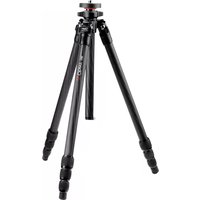
| Product Type | Tripod |
| Brand | Oben |
| Model | BHC-20 |
| Maximum Height | 145 cm |
| Minimum Height | 35 cm |
| Folded Length | 58 cm |
| Number of Leg Sections | 3 |
| Leg Lock Type | Twist lock |
| Head Type | Ball head |
| Load Capacity | 5 kg |
| Tripod Weight | 1.6 kg |
| Material | Aluminum alloy |
| Camera Mount | 1/4-inch screw |
| Pan Range | 360 degrees |
| Tilt Range | -60 to +90 degrees |
| Power Source | Manual operation, no batteries required |
| Maintenance | Wipe with a dry cloth; regularly tighten locks |
| Safety | Do not exceed load capacity; ensure locks are secure |
| Spare Parts | Replacement leg locks, mounting plate, rubber feet |
| Compatibility | DSLR and mirrorless cameras with a 1/4-inch thread |
| Accessories Included | Ball head, quick release plate, carrying bag |
Frequently Asked Questions - BHC-20 Oben
User questions about BHC-20 Oben
0 question about this device. Answer the ones you know or ask your own.
Ask a new question about this device
Download the instructions for your Tripod in PDF format for free! Find your manual BHC-20 - Oben and take your electronic device back in hand. On this page are published all the documents necessary for the use of your device. BHC-20 by Oben.
USER MANUAL BHC-20 Oben
Two-Way Aluminum Ballhead

You're on steady ground®
INTRODUCTION
Thank you for choosing Oben
The Oben BHC-20 is a durable aluminum two-way ballhead that's ideal for photo applications as well as on-the-go image making. This ballhead boasts a 20-pound weight capacity, which can support a DSLR with a large lens, and features a 90° notch for rapid switching from landscape to portrait orientation.
Compact, lightweight, and rugged construction makes the BHC-20 a good addition to tripods for remote interviews as well as landscape and nature shoots. An independent pan lock with fluid motion and a 360° scale etched into the surface facilitates silky-smooth pan shots and ensures accurate positioning for panoramic photos.
Warnings:
- Please read and follow these instructions and keep this manual in a safe place.
- Do not exceed the ballhead's maximum load capacity.
- Ensure that all appropriate locks are engaged when necessary.
- The ballhead should not be used in or near salt water. Dry the ballhead if it becomes wet.
- Remove the camera from the ballhead during setup or transport.
- All images are for illustrative purposes only.
Visit our website at ObenSupports.com for more Oben products.
OVERVIEW

A Main locking knob
B Quick-release plate
© Bubble level
D 1/4-20 mounting screw
E Quick-release knob
⑤ 360° panoramic base
G Pan locking knob
H 90° notch
OPERATION
Mounting the Ballhead to a Tripod

-
Tighten all the knobs on the head.
-
Align the tripod's stud with the ballhead socket and turn the ballhead clockwise until it's securely attached.
Make sure the head is flush with the tripod's mounting plate before proceeding.
Converting the Mounting Thread
For tripods with a 1/4-inch threaded mounting stud: Screw the included reducer bushing into the head's threaded mounting socket and tighten by hand or with a slotted screwdriver.
OPERATION
Attaching the Quick-Release Plate
- Turn the quick-release knob counterclockwise to loosen the clamp and remove the quick-release plate from the ballhead.
- Attach the plate to the camera's threaded 1/4-20 socket. Hand tighten or use the included hex key to tighten the screw.


Warning: Some manufacturers' plates do not meet our specifications and may not lock your equipment securely into the Oben quick-release clamp. Please test all camera and lens plates made by other manufacturers to ensure compatibility.
OPERATION
Mounting a Camera to the Ballhead
-
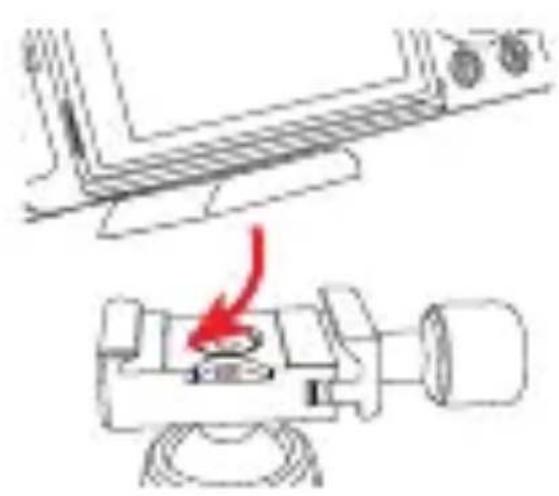
Make sure the locking and pan knobs are tightened and loosen the quick-release knob.
-
Mount the camera to the ballhead by inserting one edge of the quick-release plate into the clamp.

-
Lower the other side until the quick-release plate is lying flat in the clamp.
-
Tighten the quick-release knob until the quick-release plate does not slide in the clamp.
OPERATION
Main Locking Knob Operation
Turn the knob clockwise to unlock the head and counterclockwise to lock it.
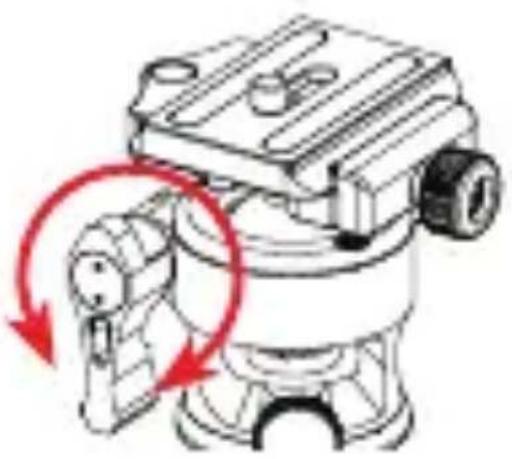
Important!: Always use one hand to support the camera while adjusting the ballhead. Make sure the ballhead lock is engaged before releasing the camera. Make sure the knob is firmly tightened before letting go of the camera.
OPERATION
Panoramic Base
The ballhead's base independently rotates 360°.

Turn the pan locking knob counterclockwise to unlock the base, rotate the base to the desired position, and tighten the pan locking knob until secure.
Degree markings on the base can be used to accurately set up panoramic shots.
SPECIFICATIONS
| Camera Mounting | 1/4-20 screw (Arca-type quick-release plate) |
| Head Type Ballhead | |
| Maximum Load | 20 lb. (9.1 kg) |
| Base Diameter 1.69 in. (43 mm) | |
| Pan 360° | |
| Tilt 90° | |
| Independent Pan Lock | Yes |
| Height 2.7 in. (6.8 cm) | |
| Weight 6.3 oz. (179 g) | |
FIVE-YEAR LIMITED WARRANTY
This Oben product is warranted to the original purchaser to be free from defects in materia ls and workmanship under normal consumer use for a period of five (5) years from the original purchase date or thirty (30) days after replacement, whichever occurs later. The warranty provider's responsibility with respect to this limited warranty shall be limited solely to repair or replacement, at the provider's discretion, of any product that fails during normal use of this product in its intended manner and in its intended environment. Inoperability of the product or part(s) shall be determined by the warranty provider. If the product has been discontinued, the warranty provider reserves the right to replace it with a model of equivalent quality and function. This warranty does not cover damage or defect caused by misuse, neglect, accident, alteration, abuse, improper installation or maintenance. EXCEPT AS PROVIDED HEREIN, THE WARR ANTY PROVIDER MAK ES N EITH ER ANY EX PR ESS WAR RAN TIES NOR ANY IM PLIED WARR ANTIES, INCLU DING BUT NOT LIMITED TO A NY IMPLIED WARRANTY OF MERCHANTABILITY OR FITNESS FOR A PARTICULA R PURPOSE. This warranty provides you with specific legal rights, and you may also have additional rights that vary from state to state. To obtain warranty coverage, contact the Oben Customer Service Department to obtain a return merchandise authorization ("R MA") number, and return the defective product to Oben along with the RMA number and proof of purchase. Shipment of the defective product is at the purchaser's own risk and expense.
For more information or to arrange service, visit www.obensupports.com or call Customer Service at 212-594-2353.
Oben is a registered trademark of the Gradus Group.
© 2026 Gradus Group LLC. All Rights Reserved.

www.obensupports.com

GG3

- TWO-WAY ALUMINUM BALLHEAD
- INTRODUCTION
- THANK YOU FOR CHOOSING OBEN
- WARNINGS
- OVERVIEW
- OPERATION
- MOUNTING THE BALLHEAD TO A TRIPOD
- CONVERTING THE MOUNTING THREAD
- ATTACHING THE QUICK-RELEASE PLATE
- MOUNTING A CAMERA TO THE BALLHEAD
- MAIN LOCKING KNOB OPERATION
- PANORAMIC BASE
- SPECIFICATIONS
- FIVE-YEAR LIMITED WARRANTY
Brand : Oben
Model : BHC-20
Category : Tripod