
KFMC 3844 FD - Refrigerator MIELE - Free user manual and instructions
Find the device manual for free KFMC 3844 FD MIELE in PDF.


| Product Type | Refrigerator-freezer combination |
| Brand | Miele |
| Model | KFMC 3844 FD |
| Energy Efficiency Class | E |
| Annual Energy Consumption | 221 kWh/year |
| Total Net Capacity | 347 L |
| Refrigerator Net Capacity | 240 L |
| Freezer Net Capacity | 107 L |
| Freezing Capacity | 10 kg/24h |
| Storage Time in Case of Power Failure | 15 h |
| Noise Level | 35 dB(A) |
| Climate Class | SN-T |
| Dimensions (H x W x D) | 177.0 x 60.0 x 66.0 cm |
| Weight | 72 kg |
| Power Supply | 220-240 V, 50 Hz |
| NoFrost Technology | Yes, automatic defrosting in both compartments |
| Dynamic Cooling | Yes (PerfectFresh) |
| SuperCool Function | Yes |
| SuperFrost Function | Yes |
| Door Alarm | Yes |
| Child Lock | Yes |
| Control Type | Electronic touch controls |
| Lighting | LED interior lighting |
| Maintenance | Clean exterior with stainless steel cleaner; interior with mild detergent |
| Spare Parts Availability | Genuine parts available for up to 10 years |
Frequently Asked Questions - KFMC 3844 FD MIELE
User questions about KFMC 3844 FD MIELE
0 question about this device. Answer the ones you know or ask your own.
Ask a new question about this device
Download the instructions for your Refrigerator in PDF format for free! Find your manual KFMC 3844 FD - MIELE and take your electronic device back in hand. On this page are published all the documents necessary for the use of your device. KFMC 3844 FD by MIELE.
USER MANUAL KFMC 3844 FD MIELE
Operating and installation instructions Fridge-freezer
It is essential to read the operating and installation instructions before setup, installation, and commissioning. This prevents both personal injury and damage to the appliance.
Warnings and safety notes ...... 4
Sustainability and environmental protection 15
How to save energy 16
Installation...... 17
Ordering printed installation instructions.... 17
Fastening the refrigeration appli- ance in the building-in niche...... 17
Building-in dimensions 18
Installation site 19 Climate range 20
Before installation 20
Load-bearing capacity of the niche floor 20
Side-by-side installation.... 21
Ventilation.... 21
Door hinging change 21
Safety notes for the mains water connection.... 21
Water filter.... 23
Electrical connection 25
Familiarisation.... 27
Your KFMC 3844 R/L refrigeration appliance 27
Your KFMC 3844 FD refrigeration appliance 29
Main menu on display KFMC 3844 R/L, KFMC 3844 FD. 31
Symbols in the display.... 32
Operation.... 32
Networking.... 33
Interior lighting (SmartLight)...... 34
SuperCool & AirClean 🌿 1 .... 34
SuperFreeze 34
QuickIce.... 34
Holiday mode.... 35
Eco mode.... 35
Sabbath mode 36
Charcoal filter (AirClean System).... 37
Camera (FoodView) 37
Door assistant Push2open 37
Temperature alarm in the freezer zone.... 38
Door alarm 39
Adjusting the interior fittings.... 39
Removing or moving the door shelves 39
Removing or moving the shelves 40
Removing the MasterFresh Pro drawer 40
Inserting the MasterFresh Pro drawer 41
Removing the DailyFresh ExtraCool drawer 41
Inserting the DailyFresh ExtraCool drawer 41
Removing containers from the freezer drawer 42
Placing containers in the freezer drawer 42
Removing the ice cube container 42
Accessories supplied.... 43
Optional accessories.... 43
Commissioning 44
Before using for the first time...... 44
Connecting the refrigeration appliance.... 44
Inserting the charcoal filter (AirClean System) into the holders in the fridge zone.... 44
Requirements for networking ..... 46
Switching the refrigeration appli- ance on 47
Performing Initial commissioning .... 47
Switching on the cameras 47
Switching off cameras.... 48
Selecting a water filter.... 48
Switching the refrigeration appli- ance off.... 48
To note when switching off for longer periods of time.... 48
Operation.... 50
Temperature in the fridge zone...... 50
Temperature in the freezer zone..... 50
Temperature display.... 51
Switching on the Holiday mode function.... 51
Switching off the Holiday mode function.... 51
Switching on the Eco mode function.... 51
Switching off the Eco mode function.... 51
Switching on the Sabbath mode function.... 52
Switching off the Sabbath mode function.... 52
Storing food in the fridge zone .... 52 Different storage zones..... 52
Should food be stored loose or in packaging? 53
Storing food in the MasterFresh Pro drawers 53
Selecting the right setting for the MasterFresh Pro drawer ..... 53
Creating a favourite for the individual setting in the MasterFresh Pro drawer.... 54
DailyFresh ExtraCool drawer 54
Freezing and storing fresh food..... 55
Ice cube maker .... 55 Ice cube maker activation.... 56
Switching the ice cube maker off 56
Adjusting settings 57
Opening the Settings menu...... 57
Settings: Overview 57
General.... 58
Display brightness 58
Sounds 58
Security 58
Networking.... 58
WiFi.... 58
Connection 58
Appliance function 59
Cameras....59
Interior lighting.... 59
Filter management 59
Door assistant Push2open...... 59
Automatic SuperFreeze...... 59
Information.... 59
Data plate 59
Software 60
Legal Information...... 60
Service.... 60
Cleaning and care 61
Cleaning agents.... 61
Preparing the refrigeration appli- ance for cleaning 61
Cleaning the interior of the appli- ance.... 61
Cleaning the camera.... 62
Cleaning the water filter (mesh filter).... 64
Cleaning the door seal.... 66
Cleaning the ventilation openings ... 66
After cleaning.... 66
Automatic defrosting.... 67
Troubleshooting 68
Interior lighting 75
Noises.... 76
Customer Service Department..... 78
Contact in the event of a fault...... 78
EPREL database.... 78
Warranty.... 78
Information.... 79
EU Conformity declaration 79
UK Conformity declaration.... 79
This refrigeration appliance complies with current safety requirements. Inappropriate use can, however, lead to personal injury and material damage.
Please read the operating and installation instructions carefully before using the refrigeration appliance for the first time. They contain important information on installation, safety, use and maintenance. This is to protect yourself from injury, and from damaging your refrigeration appliance.
In accordance with standard IEC 60335-1, Miele expressly and strongly advises that you read and follow all information provided on installing the refrigeration appliance, as well as the warning and safety notes.
Miele cannot be held liable for injury or damage caused by non-compliance with these instructions.
Keep these operating and installation instructions in a safe place and pass them on to any future owner.
⚠️ Risk of injury and damage due to very heavy refrigeration appliance tipping over.
The refrigeration appliance is very heavy and can tip forwards when the appliance doors/drawers are open.
Do not remove the refrigeration appliance from the pallet until the preparations for installing it are complete.
Keep the appliance doors/drawers shut until the refrigeration appliance has been built in and secured in its niche in accordance with the installation instructions.
Correct application
This refrigeration appliance is intended for use in the home and in similar environments; for example:
– In shops, offices and similar work settings
– On agricultural estates
— By the guests in hotels, motels, bed and breakfasts, and other typical home settings.
This refrigeration appliance is not intended for outdoor use.
This appliance is intended for domestic use only for cooling and storing food and drink as well as for storing deep frozen food, freezing fresh food and for making ice.
Any other usage is not supported by the manufacturer and could be dangerous.
This refrigeration appliance is not suitable for storing and keeping cool medicines, blood plasma, laboratory preparations or similar substances or products that are subject to the Medical Device Directive. Incorrect use of the refrigeration appliance for such purposes may cause deterioration of the items stored. The refrigeration appliance is also not suitable for use in areas where there is a risk of explosion. Miele cannot be held liable for damage caused by improper or incorrect use or operation of the appliance.
The appliance can only be used by people with reduced physical, sensory or mental capabilities, or lack of experience and knowledge, if they are supervised whilst using it, or have been shown how to use it in a safe way and recognise and understand the consequences of incorrect operation.
Safety with children
Children under 8 years of age must be kept away from the refrigeration appliance unless they are constantly supervised.
Children 8 years and older may only use the appliance unsupervised if they have been shown how to use it in a safe way and recognise and understand the consequences of incorrect operation.
Children must not be allowed to clean or maintain the appliance unsupervised.
▶ Please supervise children in the vicinity of the appliance and do not let them play with it.
The appliance door hinges can cause injury. Keep children away at all times.
Danger of suffocation. Whilst playing, children may become entangled in packaging material (such as plastic wrapping) or pull the packaging material over their head, presenting the risk of suffocation. Keep packaging material away from children.
Technical safety
The coolant circuit has been checked for leaks. The refrigeration appliance complies with statutory safety requirements and the appropriate EU directives.

If the cooling circuit is damaged, refrigerant and oil can escape and ignite.
▶ Warning: fire hazard/flammable materials. This symbol is on the compressor and indicates flammable materials. Do not remove this sticker.
The refrigerant inside the appliance (details on the data plate) is environmentally friendly but flammable.
The use of this refrigerant does, however, sometimes lead to a slight increase in the noise level of the appliance. In addition to the noise of the compressor, you might be able to hear the refrigerant flowing around the cooling circuit. Unfortunately, this cannot be avoided, but it does not affect the performance of the refrigeration appliance.
When transporting and installing the refrigeration appliance, ensure that no parts of the cooling circuit are damaged. Splashes of refrigerant can damage the eyes and leaking refrigerant can ignite.
In the event of damage:
- Avoid naked flames or anything which creates a spark.
- Disconnect the refrigeration appliance from the mains electricity supply.
- Ventilate the room where the refrigeration appliance is located for several minutes.
- Contact the Miele Customer Service Department.
The more refrigerant there is in a refrigeration appliance, the larger the room it should be installed in. In the event of a leakage, if the appliance is in a small room, there is the danger of a combustible gas/air mixture building up. For every 8 g of refrigerant at least 1 m³ of room space is required. The amount of refrigerant in the refrigeration appliance is stated on the data plate inside the appliance.
If the ventilation cross-sections are covered or blocked, a combustible gas/air mixture can form if the cooling circuit is damaged. It is essential to observe the required ventilation cross-sections. The ventilation cross-sections must not be covered or blocked in any way.
To avoid the risk of damage to the appliance, make sure that the connection data (fuse rating, frequency and voltage) on the data plate corresponds to the household supply.
Check that this is the case before connecting the appliance. Consult a qualified electrician if in any doubt.
The electrical safety of this appliance can only be guaranteed when correctly earthed. It is essential that this standard safety requirement is met. If in any doubt please have the electrical installation tested by a qualified electrician.
▶ Temporary or permanent operation on an autonomous power supply system or a power supply system that is not synchronised with the mains power supply (e.g. island networks, back-up systems) is possible. A prerequisite for operation is that the power supply system complies with the specifications of EN 50160 or an equivalent standard.
The function and operation of the protective measures provided in the domestic electrical installation and in this Miele product must also be maintained in isolated operation or in operation that is not synchronised with the mains power supply, or these measures must be replaced by equivalent measures in the installation. As described, for example, in the current version of BS OHSAS 18001–2 ISO 45001.
The socket must not be concealed behind the refrigeration appliance and must be easily accessible so that the appliance can be quickly disconnected from the electrical supply in case of an emergency.
If the mains connection cable is damaged, disconnect the refrigeration appliance from the mains power supply immediately. Close the stopcock for the water inlet. Contact the Miele Customer Service Department.
If the electrical connection cable supplied is damaged, it must only be replaced by an original spare part to prevent a hazard for the user. Miele can only guarantee the safety of the appliance when original Miele spare parts are used. For safety reasons, such replacement may only be carried out by a qualified specialist or the Miele Customer Service Department.
Do not connect the appliance to the mains electrical supply by a multi-socket adapter or extension lead. These are a fire hazard and do not guarantee the required safety of the appliance.
If moisture gets into electrical components or into the mains connection cable, it could cause a short circuit. Therefore, do not operate this refrigeration appliance in areas which are exposed to moisture (e.g in a garage or utility room).
This appliance must not be used in a non-stationary location (e.g. on a ship).
Do not use a damaged appliance. It could be dangerous. Check the appliance for visible signs of damage.
For safety reasons, this appliance may only be used after it has been built in.
The appliance must be disconnected from the power supply during installation, maintenance and repair work, and during installation work on the mains water connection. It is only completely isolated from the power supply when:
- the mains fuses are switched off, or
- the screw-out fuse is removed (where applicable), or
- the mains cable has been unplugged. Pull on the plug and not the cable when disconnecting it from the power supply.
▶ Unauthorised installation, maintenance and repairs, or a faulty mains water connection can cause considerable danger for the user. Installation, maintenance and repairs, installation work on the mains water connection, and all repairs on the Ice/Water dispenser (depending on the model) must only ever be carried out by technicians authorised by Miele.
The ice-cube maker must only be connected to a cold water supply.
▶ Miele cannot be held liable for damage caused by a faulty mains water connection.
When installing the water hose, make sure that the water hose is neither kinked nor damaged.
Only use the water hose supplied. The water hose must not be shortened, extended or replaced with another water hose. Never use a water hose that has already been used.
Risk of injury. Rotating parts in the ice cube maker may cause injuries. Never reach under or into the ice cube maker.
While the appliance is under warranty, repairs should only be undertaken by a Miele authorised service technician. Otherwise the warranty is invalidated.
▶ Faulty components must only be replaced with genuine Miele original spare parts. Miele can only guarantee the safety standards of the appliance when Miele replacement parts are used.
This refrigeration appliance is supplied with a special lamp to cope with particular conditions (e.g. temperature, moisture, chemical resistance, abrasion resistance and vibration). This lamp must only be used for the purpose for which it is intended. The lamp is not suitable for room lighting. Replacement lamps may only be fitted by a Miele authorised technician or by the Miele Customer Service Department. This refrigeration appliance contains several light sources with at least energy efficiency class E.
Risk of injury. Ensure that you do not come into contact with moving parts on dispensing mechanism of the ice cube maker or the heating element on the ice cube maker.
Proper installation
▶ Install the refrigeration appliance in accordance with the installation instructions.
▶ Always wear protective gloves when transporting and installing the refrigeration appliance.
The refrigeration appliance is very heavy and can tip forwards when the appliance doors/drawers are open:
- At least 2 people are required to transport or move the refrigeration appliance.
- At least 2 people are required to install the refrigeration appliance.
- Never leave the refrigeration appliance unattended while it is being installed.
- Always use the anti-tip brackets provided to secure the refrigeration appliance in the niche (installation accessories).
▶ Only install the refrigeration appliance in a solid, rectangular and level housing unit, positioned on an even and level floor.
The refrigeration appliance is supplied with a fixed door hinging. Under no circumstances should you attempt to change the door hinging yourself. If you need to change the door hinging to the other side, please contact the Miele Customer Service Department.
Correct use
This refrigeration appliance is designed for use within specific ambient temperatures (climate range). Do not use in ambient temperatures for which it is not designed. The climate range is stated on the data plate in the interior cabinet of the refrigeration appliance. A lower ambient temperature will cause the compressor to switch off for longer periods, meaning that the refrigeration appliance is unable to maintain the required temperature.
The ventilation cross-sections must not be covered or blocked in any way. This can impair the proper ventilation of the appliance, increase the energy consumption and cause damage to the components.
Risk of damage due to greasy or oily foods. If the refrigeration appliance or the appliance door is used for storing food which contains fat or oil, make sure that it does not come into contact with plastic components. Any spillages of oil or fat could cause stress cracks to the plastic and cause it to break or split.
▶ Refrigeration appliance components which are made of metal or look like metal can contain aluminium. If acidic food comes into contact with aluminium, aluminium ions can be released into the food. Do not store food loose in the refrigeration appliance.
Risk of fire and explosion due to flammable mixes of gases. Do not store explosive materials in the refrigeration appliance or any products containing propellants (e.g. spray cans). Electrical components can cause flammable mixes of gases to ignite. The spray cans in question can be identified by the contents printed on the can or by a flame symbol. Electrical components can cause escaping gases to ignite.
Danger of explosion. Do not operate any electrical equipment (e.g. an electric ice-cream maker) inside the refrigeration appliance. This can cause sparking and explosion.
Risk of injury and damage. Do not store cans or bottles containing carbonated drinks or liquids which could freeze in the freezer zone, the MasterFresh Pro drawer or the DailyFresh ExtraCool drawer. Otherwise they could burst.
Risk of injury and damage. When cooling drinks quickly in the freezer zone, make sure bottles are not left in for more than one hour. Otherwise they could burst.
Danger of injury. Never handle frozen food or the metal parts of the appliance with wet hands. Your hands may freeze to the frozen food or to the metal.
Danger of injury. Do not take ice cubes out with your bare hands and never place ice cubes or ice lollies in your mouth straight from the freezer zone. The very low temperature of the frozen food can cause frost burn to the lips and tongue.
Do not refreeze partially or fully defrosted food. Consume defrosted food as soon as possible, as it will lose its nutritional value and spoil if left for too long. Defrosted food may only be re-frozen after it has been cooked.
Observe the manufacturer's "use-by" dates and storage instructions given on food to avoid the risk of food poisoning. Storage times will depend on several factors, including the freshness and quality of the food, as well as the temperature at which it is stored.
To ensure that fresh food placed in the freezer freezes through to the core as quickly as possible, the maximum freezing capacity must not be exceeded. The maximum freezing capacity for freezing within a 24-hour period is given on the data plate: “Freezing capacity ... kg/24 hrs”.
Do not sit, stand or lean on the shelves or drawers when they are pulled out. This could damage the refrigeration appliance.
In areas which may be subject to infestation by cockroaches or other vermin, pay particular attention to keeping the appliance and its surroundings clean at all times. Any damage caused by cockroaches or other vermin will not be covered by the warranty.
Accessories and spare parts
▶ Only use original Miele accessories. If other parts are used, warranty, performance and product liability claims will be invalidated.
▶ Miele will guarantee to supply functional spare parts for a minimum of 10 years and up to 15 years following the discontinuation of your refrigeration appliance.
Cleaning and care
Do not use any oils or grease on the door seals, as these will cause the seals to deteriorate and become porous with time.
▶ Warning. Do not use any mechanical tools or other types of aid which are not recommended by the manufacturer to accelerate the defrosting process.
Do not use a steam cleaning appliance to clean or defrost this appliance.
Steam could reach electrical components and cause a short circuit.
▶ Sharp edged or pointed objects will damage the evaporator, causing irreversible damage to the appliance. Do not use sharp edged or pointed objects to
- remove frost and ice,
- separate frozen food or remove ice trays.
Do not place electric heaters or candles in the appliance to defrost it. These can damage the plastic parts.
Do not use defrosting sprays or de-icers. Defrosting sprays and de-icers can contain substances which could damage the plastic parts or which might cause a build-up of explosive gases and pose a danger to health.
Transport
▶ To avoid damage to the refrigeration appliance, always transport it upright and in its packaging.
Danger of injury and damage to the appliance. The refrigeration appliance is very heavy and must be transported by two people.
Before transporting the refrigeration appliance, remove the charcoal filters (AirClean system) and the filter retainers from the fridge zone.
Check that the charcoal filter is intact before inserting it into the fridge zone. Never use a damaged charcoal filter.
Disposal of your old appliance
Children playing could become trapped in the refrigeration appliance and could suffocate.
- Remove the appliance door(s).
-
Remove the drawers.
-
Leave the shelves in the refrigeration appliance so that children cannot climb inside.
- If your old refrigeration appliance has a door lock, destroy it. This will prevent the risk of children playing accidentally locking themselves in the appliance and endangering their lives.
Risk of electric shock!
- Cut the plug off the mains connection cable.
- Cut the mains connection cable off the old appliance.
Dispose of the plug and mains connection cable separately from the old appliance.
During and after disposal, make sure that the refrigeration appliance is not placed near petrol or other flammable gases and liquids.
Risk of fire due to escaping oil or refrigerant.
The refrigerant and oil inside the appliance are flammable. In high enough concentrations, escaping refrigerant or oil can ignite if they come into contact with an external heat source.
During disposal, make sure that the cooling circuit is not damaged. This prevents refrigerant and oil escaping in an uncontrolled manner (see the data plate for details of the refrigerant).
▶ Splashes of coolant can damage the eyes. Be careful not to damage any part of the pipework whilst awaiting disposal, e.g. by
- puncturing the coolant channels in the condenser,
- bending any pipework, or
- scratching the surface coating.
Symbol on the compressor (depending on model)
This information is only relevant for recycling. There is no risk during normal operation.

The oil in the compressor can be fatal if swallowed or if it penetrates the airways.
Warnings and safety notes
Symbol on the back of the refrigeration appliance (depending on the model)
This or a similar sticker is only relevant for recycling. Do not remove the sticker.

The note refers to foamed-in panels in the appliance door and/or housing.
Disposing of the packaging material
The packaging material is used for handling and protects the appliance from transport damage. The packaging material used is selected from materials which are environmentally friendly for disposal and can generally be recycled.
Recycling the packaging material reduces the use of raw materials. Use material-specific collection points for valuable materials and take advantage of return options. Your Miele dealer will take the packaging material away.
Disposing of your old appliance
Electrical and electronic appliances contain many valuable materials. They also contain certain materials, compounds and components which were essential for their correct functioning and safety. These could be hazardous to human health and to the environment if disposed of with household waste or if handled incorrectly. Please do not, therefore, dispose of your old appliance with household waste.
Take care not to damage your refrigeration appliance before or during disposal in an authorised, environmentally friendly manner.
This is to ensure that refrigerant in the cooling circuit and oil in the compressor is contained, and will not leak into the environment.
Instead, please make use of officially designated collection and disposal points to dispose of and recycle electrical and electronic appliances in your local community, with your dealer or
with Miele, free of charge. By law, you are solely responsible for deleting any personal data from the old appliance prior to disposal. You are legally obliged to remove any old batteries which are not securely enclosed by the appliance and to remove any lamps without destroying them, where this is possible. These must be taken to a suitable collection point where they can be handed in free of charge. Please ensure that your old appliance poses no risk to children while being stored for disposal.
How to save energy ...
Installation site The refrigeration appliance has to cool more often at higher ambient temperatures and consumes more energy in the process. Therefore:
- Install the refrigeration appliance in a well-ventilated room.
- Do not install the refrigeration appliance near to a heat source (heater element, cooker).
- Protect the refrigeration appliance from direct sunlight.
- Ensure an ideal ambient temperature of 20\ °C .
- Clean the ventilation openings on a regular basis to remove any dust.
Temperature setting The colder the temperature, the higher the energy consumption. The following settings are recommended:
- 4 to 5 °C in the refrigerator section.
- -18 °C in the freezer zone
Use Energy consumption is increased by heat input and impeded air circulation. Therefore:
- Only open the appliance door/appliance doors when necessary and for as short a time as possible. Arrange the food in such a way that makes it easy to find in the appliance.
- Always close the appliance door/appliance doors properly after opening.
- Allow hot food and drinks to cool down before placing them in the refrigeration appliance.
- Store food well packaged or covered.
- Do not overfill the compartments to allow air to circulate.
- When placing food in the appliance, make sure that it is kept away from the back.
- Place frozen food in the fridge zone to defrost.
- When placing food in the appliance, make sure that the ventilation slots in the fridge zone are not blocked.
Carry out the installation in accordance with the installation instructions (see QR code).

Material number 12616290 – KFMC 3844 R/L

Material number 12616340 – KFMC 3844 FD
Ordering printed installation instructions
You can order printed installation instructions free of charge from Miele. All the contact information you need for Miele can be found at the end of this document. Quote the model identifier and the serial number from the data plate when placing your order.
Fastening the refrigeration appliance in the building-in niche
⚠️ Risk of damage and danger of injury due to the refrigeration appliance tipping over.
This refrigeration appliance is very heavy and can tip forwards when the appliance door is open.
Keep the appliance door(s) closed until the refrigeration appliance has been built in.
Secure the niche firmly to the wall behind and/or above it with several screws.
It is essential that you secure the refrigeration appliance in the niche using the enclosed anti-tip bracket in accordance with the installation instructions.
Only this can ensure that the refrigeration appliance will not tip over.

Building-in dimensions
![≥635 2134 914 895 610 30 185 [mm] 2123-2171](/content/2026/08/1625771/images/6a14affa859e422b13cb84677889cf51f69d158555975bc9a846e70f41f8de6f.jpg)
Installation site
⚠️ Fire risk and risk of damage from appliances which give off heat.
Appliances which give off heat can catch fire and set fire to the refrigeration appliance.
The mains connection cable must not come into contact with heat sources. This refrigeration appliance must not be installed underneath a hob.
⚠️ Fire risk and danger of damage from open flames.
Open flames can set fire to the refrigeration appliance.
Keep open flames (e.g. a candle) away from the refrigeration appliance.
⚠️ Risk of fire and damage due to improper installation.
If the mains plug and mains connection cables touch the back of the refrigeration appliance, they may be damaged by vibrations and cause a short circuit.
Mains plugs or mains connection cables must not touch the refrigeration appliance.
Mains connection cables must not be trapped or damaged.
Do not connect any other appliances to sockets located directly behind this refrigeration appliance.
Do not place or operate multi-socket adapters, distributor strips or other electronic devices (such as halogen transformers) behind the appliance.
This appliance should be installed in a dry, well-ventilated room.
Only install the refrigeration appliance in a solid, rectangular and level housing unit, positioned on an even and level floor.
⚠️ Risk of damage due to high humidity.
In environments with high humidity, condensation can build up on external refrigeration appliance panels. This condensation can cause corrosion on external appliance panels. Install the refrigeration appliance in a dry and/or air-conditioned room with sufficient ventilation.
After installation, please make sure that the appliance door/appliance doors closes/close properly and the refrigeration appliance is installed in accordance with these installation instructions. It is essential to comply with the specified ventilation cross-sections.
When deciding on the installation site, please bear in mind that your refrigeration appliance will consume more energy if installed near to a heater, a cooker or another appliance that gives off heat. Avoid direct sunlight. Higher ambient temperatures increase energy consumption as the compressor runs for longer.
If installation near a heat source is unavoidable, observe the following minimum safety distances between the appliance and the heat source:
- At least 3 cm to electric or gas stoves
- At least 30 cm to oil or coal-based stoves
If it is not possible to observe these minimum safety distances, an isolation plate must be installed between the refrigeration appliance and the heat source.
Climate range
This refrigeration appliance is designed for use within specific ambient temperatures (climate range). Do not use in ambient temperatures for which it is not designed.
A lower ambient temperature leads to the compressor switching off for longer periods. This can cause the internal temperature in the refrigeration appliance to rise with the risk of food deteriorating and going off.
The climate range is stated on the data plate in the interior cabinet of the refrigeration appliance.
| Climate range Ambient temperature | |
| SN 10 to 32 °C | |
| N 16 to 32 °C | |
| ST 16 to 38 °C | |
| T 16 to 43 °C | |
| SN-ST 10 to 38 °C | |
| SN-T 10 to 43 °C |
A refrigeration appliance from the SN climate range can operate without any difficulties in rooms with a cooler ambient temperature (down to +5 °C).
Before installation
Do not install a damaged refrigeration appliance.

Risk of damaging the floor from ad.
Moving the refrigeration appliance can cause damage to the floor.
Move the refrigeration appliance carefully on floors that are sensitive to scratching.
Load-bearing capacity of the niche floor
To ensure the safe installation of the refrigeration appliance and to guarantee its correct functioning, the floor of the niche where the appliance is to be installed must be smooth and even.
It must be made from strong, rigid material.
Because the refrigeration appliance is extremely heavy when fully loaded, it is essential that the floor it stands on is able to bear its weight. If necessary, seek the advice of an architect or construction expert.
When fully loaded, the weight of the refrigeration appliance is approx.:
| KFMC 3844 R/L 525 kg |
| KFMC 3844 FD 578 kg |
Side-by-side installation
Your refrigeration appliance can be installed with another refrigeration appliance next to it as it is equipped with integrated heaters in the side panels.
Tip: Please contact your dealer for specific information about which combinations will work with your refrigeration appliance.
The side-by-side installation kit can be purchased from the Miele Customer Service Department or your Miele dealer.
Ventilation
⚠️ Fire risk and risk of damage due to inadequate ventilation.
If the refrigeration appliance is not ventilated sufficiently, the compressor will run more frequently and for longer periods. This causes increased energy consumption and an increased compressor operating temperature, which can result in damage to the refrigeration appliance.
Please ensure that there is adequate ventilation around the refrigeration appliance:
It is essential to observe the required ventilation cross-sections.
The ventilation cross-sections must not be covered or blocked in any way.
Clean the ventilation areas regularly to remove dust and dirt.
Air at the back of the refrigeration appliance gets warm. The appliance housing unit must therefore be constructed to allow sufficient space for ventilation.
Door hinging change
⚠️ Risk of damage and injury when changing the door hinging.
Changing the door hinging single-handedly can cause damage to the appliance and injury.
The refrigeration appliance is supplied with a fixed door hinging. Under no circumstances should you attempt to change the door hinging yourself.
If you need to change the door hinging to the other side, please contact the Miele Customer Service Department.
Safety notes for the mains water connection
Follow the installation instructions supplied for the mains water connection.
⚠️ Risk of injury and material damage if mains water connection is not connected properly.
Failing to connect the mains water connection properly can result in personal injury and/or material damage.
The appliance may only be connected to the mains water connection by suitably qualified specialists.
⚠️ Disconnect the refrigeration appliance from the mains power supply before connecting it to the mains water supply.
Close the stopcock before connecting the refrigeration appliance to the mains water supply.
⚠️ Risk to health and risk of damage due to contaminated water.
The quality of the incoming water must conform to the requirements for drinking water in the country where the refrigeration appliance is being used.
Connect the refrigeration appliance to the drinking water supply.
This refrigeration appliance meets the requirements of IEC 61770 and EN 61770.
Connection to the water supply must comply with the applicable regulations in the country where the appliance is being installed. All units and systems used to supply water to the refrigeration appliance must also comply with the applicable regulations in the respective country.
The water supply to the refrigeration appliance
The refrigeration appliance is only suitable for connection to a cold water supply, which
- is connected directly to the mains water supply to guarantee circulation of water in the cold water line.
Avoid connection to a water supply in which the water might stagnate.
Stagnant water in the water supply can affect the taste of water and ice cubes.
- withstands the operating pressure.
- complies with hygiene regulations.
The water pressure must be between 200 and 800 kPa (2 and 8 bar).
Excessive water pressure in the pipe can cause damage to the refrigeration appliance.
Install a pressure reducing valve if the water pressure in the pipe exceeds 800 kPa (8 bar).
Contact a plumbing specialist if you are unsure of your water pressure.
A stopcock must be provided between the water supply pipe and the water supply of the building to ensure that the water supply can be cut off if necessary.
Make sure that the stopcock remains accessible after the refrigeration appliance has been installed.
⚠️ Risk of damage to the ice cube maker.
If the water supply is interrupted while the ice cube maker is switched on, the electronic module may be damaged. The water supply pipe may also freeze up.
Switch off the ice cube maker if the water supply is to be interrupted (e.g. during holidays).
Water filter
The water system will only function if a water filter is installed in the refrigeration appliance.
The refrigeration appliance is supplied with a water filter (mesh filter) that filters fresh water for making ice cubes.
The mesh filter filters particulates from the mains water – not bacteria or microbes.
The mesh filter does not have to be changed. However, to ensure the highest quality of the ice cubes, it is essential to clean the mesh filter regularly. A notification on the display will remind you to do so.
You can replace the mesh filter installed in your refrigeration appliance with an active charcoal filter. Unlike the mesh filter, the active charcoal filter does not need to be cleaned but must be replaced approximately every 3 years.
The active charcoal filter improves the taste and smell of the ice cubes by removing chlorine and other substances from the mains water.
If you wish to use an activated charcoal filter instead of a mesh filter, you must adjust the ⚙️ Settings: ≡ ▶ ⚙️ Settings ▶ Appliance function ▶ Filter management ▶ Filter type.
New active charcoal filters are available from the Miele Customer Service Department, your Miele dealer or via the Internet.
Only use original Miele accessories. If other parts are used, warranty, performance and/or product liability claims will be invalidated.
Changing the active charcoal filter (optional accessories)
Air in the system can cause water to gush out and the filter cartridge to spring out when it is removed. Take great care when changing the water filter.
Depending on the quantity of ice cubes produced, the active charcoal filter needs to be changed approximately every 6 months. A notification on the display will remind you to do so. If you have not used the refrigeration appliance or the ice cube maker much in the last few weeks or months, or if the ice cubes smell unpleasant, replace the active charcoal filter.
Please note:
- If an external water filter is attached to your household water supply, use the previously installed mesh filter in place of an active charcoal filter.
- After inserting a new water filter (mesh filter and active charcoal filter), dispose of all ice cubes produced in the next 24 hours following the change.

■ Fold up the cover at the bottom of the refrigeration appliance.

■ Turn the filter cartridge 90° anticlockwise until it is in the vertical position ① and slide it out carefully ②. Caution. The filter cartridge may be under pressure.
■ Remove the protective cap from the new filter cartridge.

■ Loosen the cap from the old filter cartridge ① and pull the cap off ②.
■ Put the cap on the new filter cartridge ③.
■ Empty the old filter cartridge.
Tip: The old filter cartridge can be disposed of with household waste.

■ Slide the new filter cartridge into the filter opening as far as it will go, making sure the cap is vertical.

■ Turn the filter cartridge clockwise 90° as far as it will go until it is in the horizontal position ①.
⚠️ Risk of damage caused by water rushing out.
If the filter cartridge is not fitted correctly, there is a risk of water leaking out of the refrigeration appliance.
When inserting the new filter cartridge, be sure to turn it as far as the marker.
■ Fold the cover back down ②.
Once the active charcoal filter has been replaced, the filter display must be reset. A notification on the display will remind you to do so.
After inserting a new active charcoal filter, dispose of all ice cubes produced in the next 24 hours.
Electrical connection
The refrigeration appliance must only be connected to an earthed socket using the mains connection cable supplied.
The socket must be easily accessible after the refrigeration appliance has been installed. If the socket is not easily accessible, ensure that a suitable means of disconnection is provided on the installation side for each pole.
Risk of fire from overheating.
Connecting the refrigeration appli- ance to a multi-socket plug adapter or to an extension lead can overload the cable.
For safety reasons, do not use an extension lead or multi-socket adapter.
The electrical installation must comply with VDE 0100 requirements.
For safety reasons, we recommend using a type ☐ residual current device (RCD) in the assigned electrical installation for connecting the refrigeration appliance.
If the mains connection cable is damaged, it must only be replaced with a specific mains connection cable of the same type (available from the Miele Customer Service Department). For safety reasons, such replacement may only be carried out by a qualified specialist or the Miele Customer Service Department.
These operating instructions and the data plate indicate the nominal power consumption and the appropriate fuse rating. Compare this information with the data of the on-site electrical connection. If in any doubt, consult a qualified electrician.
Temporary or permanent operation on an autonomous power supply system or a power supply system that is not synchronised with the mains power supply (e.g. island networks, back-up systems) is possible. A prerequisite for operation is that the power supply system complies with the specifications of EN 50160 or an equivalent standard. The function and operation of the protective measures provided in the domestic electrical installation and in this Miele product must also be maintained in isolated operation or in operation that is not synchronised with the mains power supply, or these measures must be replaced by equivalent measures in the installation. As described, for example, in the current version of VDE-AR-E 2510-2.
Connecting the appliance

■ Insert the plug connector into the socket at the back of the refrigeration appliance.
Make sure that the plug connector has clicked into position correctly.
■ Insert the plug of the refrigeration appliance into the socket.
The refrigeration appliance is now connected to the electricity supply.
Your KFMC 3844 R/L refrigeration appliance

① On/Off switch
② Interior lighting (SmartLight):
The interior lighting adapts to the lighting conditions in the room.
③ Camera (FoodView):
The camera takes photos of the interior of the fridge zone.
④ Door shelves
⑤ Adjustable shelf
⑥ Gallon bin: place large bottles and containers here.
⑦ Ice cube container
⑧ Freezer drawer: for storing large items of food to be frozen.
⑨ Water filter
⑩ Freezer zone automatic door opener (Push2open)
Pressing lightly against the appliance door of the freezer zone automatically opens the appliance door by a gap.
⑪ Ice cube maker (IceMaker)
⑫ MasterFresh Pro drawers:
For storing fruit, vegetables, dairy products, meat and fish at 0\ °C and an ideal humidity level.
⑬ DailyFresh ExtraCool drawer:
Use this low-temperature drawer to store food that goes off quickly.
⑭ Display
⑮ Holder for the charcoal filter (AirClean system)
⑯ Ventilation slots:
When placing food in the fridge zone, make sure that the ventilation slots are not blocked.
⑰ 2 cameras (FoodView):
The cameras take photos of the door shelves and in the MasterFresh Pro drawers.
⑱ Fridge zone automatic door opener (Push2open)
Pressing lightly against the appliance door of the fridge zone automatically opens the appliance door by a gap.
Your KFMC 3844 FD refrigeration appliance

① On/Off switch
② Interior lighting (SmartLight):
The interior lighting adapts to the lighting conditions in the room.
③ Camera (FoodView):
The camera takes photos of the interior of the fridge zone.
④ Door shelves
⑤ Adjustable shelf
⑥ Gallon bin: place large bottles and containers here.
⑦ Ice cube container
⑧ Freezer drawer: for storing large items of food to be frozen.
⑨ Water filter
⑩ Freezer zone automatic door opener (Push2open)
Pressing lightly against the appliance door of the freezer zone automatically opens the appliance door by a gap.
⑪ Ice cube maker (IceMaker)
⑫ MasterFresh Pro drawers:
For storing fruit, vegetables, dairy products, meat and fish at 0\ °C and an ideal humidity level.
⑬ DailyFresh ExtraCool drawer:
Use this low-temperature drawer to store food that goes off quickly.
⑭ Display
⑮ Holder for the charcoal filter (AirClean system)
⑯ Ventilation slots:
When placing food in the fridge zone, make sure that the ventilation slots are not blocked.
⑰ Camera (FoodView):
The camera takes photos of the interior of the fridge zone.
⑱ 2 cameras (FoodView):
The cameras take photos of the door shelves and in the MasterFresh Pro drawers.
⑲ Door pillar with integrated heating (condensation protection)
⑳ Fridge zone automatic door opener (Push2open)
Pressing lightly against the appliance door of the fridge zone automatically opens the appliance door by a gap.
Main menu on display KFMC 3844 R/L, KFMC 3844 FD
![graph TD A["MasterFresh Pro"] --> B["IceMaker"] C["Water droplets"] --> D["Water droplets"] E["Water droplets"] --> F["Water droplets"] G["Water droplets"] --> H["Water droplets"] I["Water droplets"] --> J["Water droplets"] K["Water droplets"] --> L["Water droplets"] M["Water droplets"] --> N["Water…](/content/2026/08/1625771/images/f7a22f6cdfde046acc28df7d9abb327c99b70af976459d2e1bd83977bc187903.jpg)
① Make the Settings, check the filter levels (Water filter, AirClean System), call up the Notifications and Tips (e.g. how to use, replace or reactivate the AirClean System or how to replace or clean the Water filter)
② Main menu
③ Switch the Standard, Eco mode, Sabbath mode and Holiday mode functions on and off
④ Display the required temperature for the Freezer zone, set the temperature; switch the SuperFreeze function on and off ❄
⑤ Switching the ice cube maker and the QuickIce function on and off
⑥ Display and select the setting in the right MasterFresh Pro drawer
⑦ Display and select the setting in the left MasterFresh Pro drawer
⑧ Display the required temperature for the Fridge zone, set the temperature, switch the SuperCool & AirClean function 🌐 on and off
⑨ Pull-down menu with quick access to various functions (e.g. checking the filter levels (Water filter, AirClean System), switching Sensor lock on and off)
Symbols in the display
Various different symbols are used on the display.
| See the operating instructions | |
| Delete last character | |
| → | Next step |
| ← | Go back |
| √ | OK |
| √ | Accept |
| ← | Back |
| × | Close window |
| ≡ | Menu |
| ♡ | Favourites |
| i | Information |
| ! | Note |
| ◦ | Context menu |
| ∅ | Edit |
| Delete | |
| √ | Process successfully completed |
Operation
Navigating the display
Your refrigeration appliance display shows the different refrigeration areas/functions of your refrigeration appliance.
The display can be scratched by pointed or sharp objects, e.g. pens. Only touch the display with your fingertips.
■ Touch the required refrigeration area or function on the display to select settings.
A subsection opens or the function is selected directly by being highlighted in colour.
■ To display additional functions, swipe your finger in the required direction on the display.
Touch ⓘ to see useful information about the selected function.
Exiting a menu level
You are in a menu.
■ Depending on the menu, select ✗ Close window or ⇔ Back.
The higher-level menu is displayed.
Adjusting parameters
You can switch parameters on or off or adjust them on a scale (e.g. the temperature).
Selecting or deselecting parameters
Activated parameters are highlighted in colour.
■ Touch the parameter that you wish to select or deselect.
■ Confirm with OK.
The parameter is saved.
Changing parameters on a scale
■ Select the parameter you want to change.
■ Move the scale to the left or right until the required value is highlighted.
■ Confirm with OK.
The value is saved.
Displaying the context menu
When you are in certain menus, a context menu can be displayed. This allows you to rename or move Favourites, for example.
■ To open the context menu, press and hold a Favourite or select ⚙️ Context menu.
■ Make the change you want.
■ To close the context menu, select × Close window.
Displaying the pull-down menu
The pull-down menu provides quick access to certain functions such as switching the network connection or the keypad lock on and off. You can also open filter statuses and notifications via the pull-down menu.
■ Open the pull-down menu by pulling it down from the top edge of the display.
■ Select the function you want.
The selected function will light up white.
■ Touch ✗Close window to close the pull-down menu.
Networking
Your refrigeration appliance is equipped with an integrated WiFi module. The WiFi module makes it possible to connect to your home network and to use the Miele app on a mobile device.
Once your refrigeration appliance has been connected via WiFi, the connection is automatically re-established every time it is switched on.
Make sure that your WiFi network signal is strong enough in the place where you intend to install your refrigeration appliance.
Integrating the refrigeration appliance into your WiFi network increases energy consumption.
Smart Extras via the Miele app*
Networking via the Miele app gives you access to numerous Smart Extras, including:
- Access status information.
- Use additional helpful functions.
- Keep your refrigeration appliance up to date with the latest Miele developments via software updates.
You can find more detailed information about Smart Extras on the Miele website, in the Apple App Store ® or in the Google Play Store ™ .
*This is a separate digital offer from Miele & Cie. KG. The range of functions can vary depending on the model and the country. Acceptance of the Terms and Conditions and Privacy Policy for Miele digital products & services in the Miele app required. Miele reserves the right to change or discontinue the digital offer at any time.
Interior lighting (SmartLight)
Your refrigeration appliance has automatic interior lighting. The automatic interior lighting in the fridge zone automatically adapts to the lighting conditions in the room.
To ensure that the cameras can function correctly, the interior lighting must be set to maximum brightness.
When the automatic interior lighting is switched on, its intensity might not be sufficient to assure the quality of the camera images taken.
If this is the case, switch the automatic interior lighting off: ≡ ▶ Settings▶ Appliance function▶ Interior lighting▶ Automatic.
Then set the controller manually to maximum brightness ⚙️.
SuperCool & AirClean 🌿
When the SuperCool & AirClean function ⚙ 18 is switched on, the temperature in the fridge zone drops to 2 °C.
Select this function for the rapid chilling of large amounts of fresh food or drink.
If you want to rapidly chill large amounts of fresh food or drinks, the SuperCool & AirClean function ✉ must be switched on before placing food or drinks in the fridge zone.
Tip: You should also activate the SuperCool & AirClean function ✦ temporarily if you are storing strong-smelling food in the fridge zone. When the SuperCool & AirClean function ✦ is selected, the charcoal filter works even harder to further reduce odours in the fridge zone.
The SuperCool & AirClean function 🌿 will switch itself off automatically after max. 6 hours.
SuperFreeze
When the SuperFreeze function ✿ is switched on, the temperature in the freezer zone drops to -30 °C. Select this function before freezing fresh food weighing 2 kg or more. This helps food to freeze quickly and retain its nutrients, vitamins, flavours and appearance.
In addition, the QuickIce function is activated in the ice cube maker and ice cube production speeds up.
The SuperFreeze ✿ function should be switched on around 4–6 hours before placing food in the freezer.
The SuperFreeze ✿ function will switch itself off automatically after max. 54 hours. The quantity of fresh food placed in the freezer will determine the duration before it switches off.
If you place a large amount of food in the freezer zone and the temperature in the freezer zone rises, the Automatic SuperFreeze function switches on automatically for a while.
Ideally, place the food in the right-hand section of the freezer drawer for this purpose.
QuickIce
When the ice cube maker is switched on, you can select the QuickIce function.
When the QuickIce function is switched on, ice cube production speeds up.
The temperature in the freezer zone drops to -30°C .
The QuickIce function will switch itself off automatically after max. 48 hours.
Holiday mode
The Holiday mode function is useful when you go on holiday, for example, if you do not wish to switch off the fridge zone completely or do not need a high degree of cooling.
The fridge zone therefore remains in operation while saving energy.
When the Holiday mode function is switched on:
- The fridge zone and the MasterFresh Pro drawers are regulated to a temperature of 14 °C.
- The temperature in the DailyFresh ExtraCool drawer increases to approx. 12 °C.
- No settings can be selected in the MasterFresh Pro drawer.
- The SuperCool & AirClean ❄ and SuperFreeze ❄ functions are switched off.
- The freezer zone remains switched on at the previously set temperature.
- The ice cube maker is switched off temporarily.
Tip: Food which does not go off quickly can be stored in the refrigeration appliance for some time at this moderate refrigerator temperature, providing it is wrapped.
This also prevents the build-up of odours and mould, which can occur if the fridge zone is switched off and the appliance door is closed.
⚠️ Health risk caused by decomposing food.
The shelf life and quality of food in the fridge zone may deteriorate if the temperature remains above 4 °C for an extended period.
Only ever switch on the Holiday mode function for a limited period.
Do not store any temperature-sensitive food which goes off easily, such as fruit, vegetables, fish, meat and dairy products, during this time.
Once you have switched off the Holiday mode function, clean the fridge zone and reactivate the charcoal filters.
Eco mode
The Eco mode function is useful if you do not need a high degree of cooling in the fridge zone and in the freezer zone. Energy consumption is lower than in normal operation.
When the Eco mode function is switched on:
- The fridge zone is regulated to a temperature of 6 °C; the temperature in the MasterFresh Pro drawers is increased to around 3 °C.
- The temperature in the DailyFresh ExtraCool drawer increases to approx. 4 °C.
- The freezer zone is regulated to a temperature of -18°C .
- The QuickIce function is switched off.
- The SuperCool & AirClean ⚙️ and SuperFreeze ⚙️ functions are switched off.

Health risk caused by decompos- od.
The shelf life and quality of food in the fridge zone may deteriorate if the temperature remains above 4 °C for an extended period.
Only ever switch on the Eco mode function for a limited period.
Do not store any temperature-sensitive food which goes off easily, such as fruit, vegetables, fish, meat and dairy products, during this time.

Health risk caused by decompos- od.
Storing food at a temperature higher than -18 °C in the freezer zone for an extended period of time may impair the shelf life and quality of the food. Only ever switch on the Eco mode function for a limited period.
When switching to the Eco mode function, check that the food in the freezer zone is already properly frozen.
Do not freeze any new food while the Eco mode function is switched on.
Sabbath mode
The refrigeration appliance has a Sabbath mode function to support the observance of religious customs.
Switching on the Sabbath mode function temporarily switches off the following features:
- Interior lighting
- All visual and audible signals
- The cameras: the camera does not take any photos and no photos are displayed in the Miele app.
- Reminders (e.g. to change or clean the water filter): the set time interval is paused.
- The door assistant (Push2open)
- All other functions including Super-Freeze ⚙, SuperCool & AirClean ⚙ 1 and the ice cube maker
When the Sabbath mode function is switched on, you cannot make any settings on your refrigeration appliance or via the Miele app. Only Sabbath mode can be switched off.
Charcoal filter (AirClean System)
The charcoal filters in the AirClean System neutralise unpleasant odours in the fridge zone and stop odours from being transferred to the food.
Tip: We recommend selecting the SuperCool & AirClean function ⚙ § temporarily if you are storing strong-smelling food in the fridge zone. When the SuperCool & AirClean function ⚙ § is selected, the charcoal filter works even harder to further reduce odours in the fridge zone.
The charcoal filters in the AirClean System can be reactivated in the oven or a similar domestic appliance with an oven function in a sustainable way and used again (a notification reminding you to reactivate them appears on the display approximately every 6 months).
The charcoal filters can be reactivated approximately 5 times; they must be replaced with new ones after approximately 3 years. A notification on the display will remind you to do so.
Used charcoal filters can be disposed of with normal household waste.
New charcoal filters are available from the Miele Customer Service Department, your Miele dealer or via the Internet (see “Familiarisation”, “Optional accessories”).
Camera (FoodView)
Your refrigeration appliance is supplied with several cameras in the fridge zone.
Every time you open and close the fridge zone doors, the cameras take photos of the inside of the fridge zone and the door shelves.
Every time you open and close a MasterFresh Pro drawer, the cameras take photos of the content of the MasterFresh Pro drawer.
When the refrigeration appliance is in use, it is possible that users, people or the area around it will be captured by the cameras and appear in the images in the Miele app. The images are processed for the purpose of being made available in the Miele app. Information about data processing is available here: ≡▶ Settings▶ Information▶ Legal Information ▶ Open source licenses ▶ Miele ▶ Camera.
Door assistant Push2open
The Door assistant function enables you to open the appliance door if your refrigeration appliance has a handleless furniture front.
Pressing lightly against the centre of the appliance door automatically opens the appliance door by a gap. If the appliance door is then not pulled fully open within 3 seconds, the appliance door closes again.
Do not manually open, press or hold onto the appliance door during automatic opening and closing.
Ideally, always open the appliance door fully before closing it again.
⚠️ Risk of damage to the door assistant if the appliance door is opened or closed prematurely.
If you open or close the appliance door prematurely, the door assistant may be damaged.
Do not obstruct the appliance door while it is opening.
Do not pull on the appliance door while the appliance door is opening automatically.
Do not press the appliance door shut once it has opened by a gap.
However, if you have closed the appliance door, leave it closed for 5 minutes. The door assistant is realigning itself.
Temperature alarm in the freezer zone
The refrigeration appliance has been fitted with a temperature alarm so that the temperature in the freezer zone cannot rise unnoticed.
If the temperature in the freezer zone becomes too warm, a message appears in the display and the highest temperature that has been reached is shown. An alarm will also sound until the cause of the alarm is rectified or the alarm is switched off.
Before you switch the temperature alarm off, you must determine the cause and rectify it.
The set temperature determines when the appliance recognises a temperature as being too warm.
The audible and visual signals may be activated in the following situations:
- You switch on the refrigeration appliance and the temperature in the freezer zone differs greatly from the set temperature.
- Too much warm ambient air enters the freezer when you are rearranging or taking out frozen food.
- You are freezing large amounts of food at once.
- You are freezing warm food.
- A power cut has occurred.
- The refrigeration appliance has a fault.
⚠️ Health risk caused by decomposing food.
If the temperature in the freezer remains above -18 °C for a long time, the frozen food can start to defrost. This will reduce the storage life of the food.
Check whether the frozen food has started to defrost. If it has, check that the food is safe to use and if it is, then use it as soon as possible or cook it before freezing it again.
Door alarm
The refrigeration appliance is fitted with a door alarm to avoid increased energy consumption and food becoming warm if the door is left open.
A door alarm will sound if an appliance door is left open for too long.
As soon as the appliance door is closed, the door alarm will stop.
The audible door alarm can also be deactivated: ≡▶ Settings▶ General ▶ Sounds ▶ Signal tones.
Adjusting the interior fittings
The stainless steel surfaces are very susceptible to scratching.
Be careful when handling the door shelves, storage shelves, and drawers in the refrigeration appliance and make sure that the stainless steel surfaces are not damaged.
Fully open the appliance doors when you want to move or remove door shelves, storage shelves and drawers.
Removing or moving the door shelves
Only move or remove the door shelves when they are empty.

Do not move the bottom door shelf. The door shelf must remain in the lowest position.
■ Lift the door shelf on both sides so that it is lifted over the guide with the retainers on the sides.
■ Remove the door shelf or place the door shelf in the required position with the retainers in the guide at the same height again.
■ Make sure that the door shelf is straight.
Tip: The clip-on containers in the door shelves can be removed completely for filling, emptying or cleaning.
Removing or moving the shelves
The retainers for the shelves can scratch the rear panel of the fridge zone if they are attached at an angle. Take care to install the shelves horizontally and hook the retainers in fully.

■ Raise the shelf slightly so that the shelf is lifted with the retainers over the guide at the back.
■ Pull the shelf out to the front.
■ Remove the shelf or place the shelf in the required position, with the retainers engaged in the guide.
Removing the MasterFresh Pro drawer
The MasterFresh Pro drawer is on telescopic runners and can be pulled out fully for filling and emptying.
The MasterFresh Pro drawer can be completely removed for cleaning purposes:

■ Pull the MasterFresh Pro drawer out as far as it will go.
■ Press the drawer stops out on both sides at the bottom of the MasterFresh Pro drawer ①.
■ Lift up the MasterFresh Pro drawer 2 to remove it.
Inserting the MasterFresh Pro drawer

■ Push both telescopic runners in as far as they will go.

■ Place the MasterFresh Pro drawer on the telescopic runners and push in the MasterFresh Pro drawer as far as it will go so that the drawer stops on both sides engage.
Removing the DailyFresh ExtraCool drawer
The DailyFresh ExtraCool drawer is on telescopic runners and can be pulled out some distance for filling and emptying.
The DailyFresh ExtraCool drawer can be completely removed for cleaning purposes:

■ Pull the DailyFresh ExtraCool drawer out as far as it will go.
■ Press the drawer stops out on both sides at the bottom of the DailyFresh ExtraCool drawer ①.
■ Lift up the DailyFresh ExtraCool drawer ② to remove it.
Inserting the DailyFresh ExtraCool drawer

■ Push both telescopic runners in as far as they will go.

■ Place the DailyFresh ExtraCool drawer on the telescopic runners and push in the DailyFresh ExtraCool drawer as far as it will go so that the drawer stops on both sides engage.
Removing containers from the freezer drawer
Tip: If the opening angle of the appliance door is limited to 90° , remove the pin from the door hinge(s) beforehand.

■ Pull the freezer drawer out as far as it will go ①.
■ Release the retainers on both sides of the container by turning the slots in the retainers into a horizontal position with a suitable object ②.
■ Pull the container upwards to remove it ③.
Placing containers in the freezer drawer

■ Place the container in the freezer drawer from above ①.
- Secure the container by turning the slots in the retainers on both sides of the container into a vertical position ②.
■ Push the freezer drawer all the way back in ③.
■ If you have removed the pin from the door hinge(s): reinsert the pin into the door hinge(s) from above.
Removing the ice cube container

■ Pull the freezer drawer out as far as it will go.
■ Tilt the ice cube container forwards and pull the ice cube container up and out to remove it.
Caution. Ice cube production does not stop when the ice cube container is removed.
Accessories supplied
Ice cube scoop
Appliance plug
Charcoal filter (Longlife AirClean system)
Water filter (IntensiveClear mesh filter)
Optional accessories
Products specially tailored to your refrigeration appliance – such as appliance care products and accessories – are available from the Miele online shop, from Miele Customer Service or from your Miele specialist dealer.
You can access the Miele online shop via the following QR code:
Before using for the first time
■ Remove all packaging material and protective foil.
■ Remove all advertising materials and labels from the inside of the refrigeration appliance.
■ Clean the inside of the appliance and the accessories.
Tip: Reactivating the charcoal filters before inserting them into the fridge zone for the first time, improves the quality of the charcoal filters (see „Cleaning and care – Reactivating the charcoal filter (AirClean system) in the oven“).
Connecting the refrigeration appliance
■ Connect the refrigeration appliance to the mains power supply as described in “Installation – Electrical connection”.
Inserting the charcoal filter (AirClean System) into the holders in the fridge zone

Risk of mould.
For hygiene reasons, the charcoal filters must not be left in the fridge zone for more than 6 months without being reactivated or replaced.
Place the charcoal filters in the fridge zone just before commissioning the refrigeration appliance.
Your refrigeration appliance is supplied with 2 charcoal filters in the fridge zone.
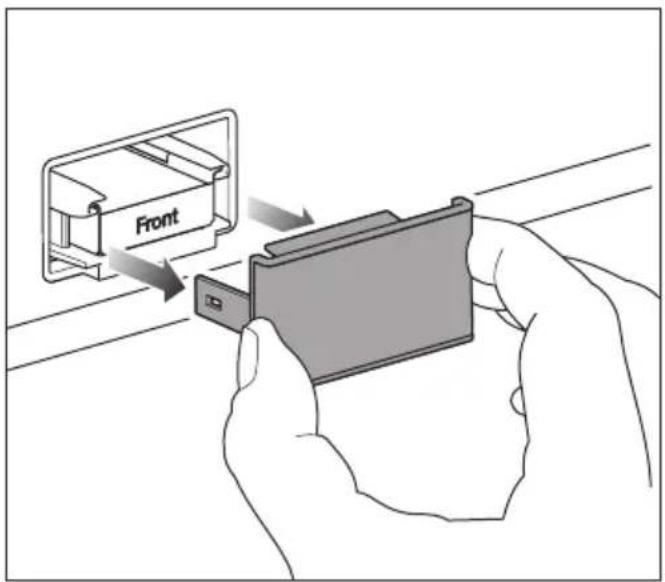
■ Remove the cover from each charcoal filter.

■ Remove the retainer for the charcoal filter from the holder.

■ To replace a charcoal filter, remove the used charcoal filter from the retainer and dispose of the charcoal filter with normal household waste.
Please note: do not dispose of the retainer for the charcoal filter as the retainer will be reused.
■ Clean the retainer for the charcoal filter under running water and then dry it with a cleaning cloth.

■ Take the charcoal filter out of its packaging together with the filter protection.
⚠️ Risk of damage as a result of incorrect handling.
The charcoal filters are breakable.
When handling the charcoal filters, be careful not to drop them.
Do not press down on the honeycomb structure of the charcoal filters.
Before using the charcoal filter, check it for any visible damage. Never use a damaged charcoal filter.
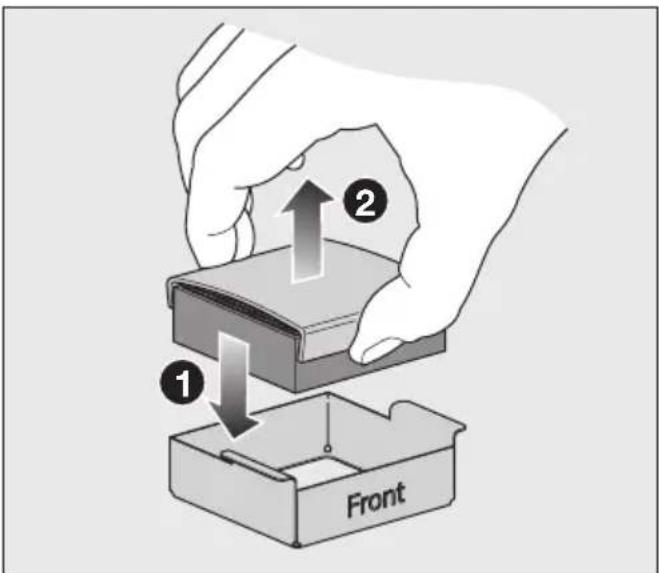
■ Insert the new charcoal filter into the retainer ①.
■ Remove the filter protection ②.
■ To improve the quality of the charcoal filters, reactivate them before inserting them into the fridge zone for the first time (see “Cleaning and care” – “Reactivating charcoal filters (AirClean system) in the oven”).

■ Insert the charcoal filter and retainer into the holder.
■ Clean the cover by hand with a damp cloth, not in the dishwasher.
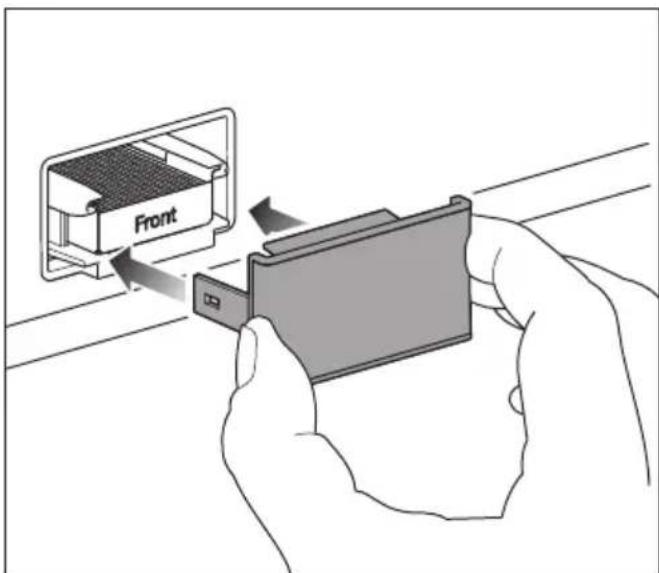
■ Place the cover on the retainer.
The charcoal filters in the AirClean System contain active charcoal. Active charcoal can leave significant marks.
■ Wash your hands with soap and water after inserting the charcoal filter.
The AirClean System is now active. The charcoal filters must be reactivated approx. every 6 months or replaced after approx. 3 years. A notification on the display will remind you to do so.
Tip: Activate the SuperCool & AirClean function temporarily if you are storing strong-smelling food in the fridge zone. When the SuperCool & AirClean function is selected, the charcoal filter works even harder to further reduce odours in the fridge zone.
Requirements for networking
Note the following requirements for networking:
- A home network is available at the installation site.
Have the WiFi password ready. - The Miele app is available on a mobile device.
- You have a user account in the Miele app.
You can also carry out the networking at a later date. Skip the "Networking menu option during commissioning.
Switching the refrigeration appliance on
■ Open the upper appliance door.
■ Switch on the refrigeration appliance by firmly pressing in the On/Off switch once.
■ Close the appliance door and wait for 3 minutes.
The refrigeration appliance will power up slowly.
Keep the appliance door(s) closed during this process.
The refrigeration appliance will adjust to the preset temperature.
To enable the temperature to get sufficiently cold inside the refrigeration appliance, allow the appliance to run for a few hours before placing food in it. Do not place food in the refrigeration appliance until it has reached the preset temperature.
Do not place food in the freezer zone until it has reached the preset temperature (min. -18 °C).

Danger of damage due to unat-d operation.
Do not switch the refrigeration appli- ance on if you are going to be away for a long period of time.
Do not leave the refrigeration appli- ance unattended for a long period of time while it is switched on.
Performing Initial commissioning
After switching on the refrigeration appliance, Initial commissioning is completed.
■ Follow the instructions on the display.
Initial commissioning cannot be cancelled. Initial commissioning can be interrupted by switching off the refrigeration appliance. After switching on the refrigeration appliance again, Initial commissioning must be resumed.
Switching on the cameras
The cameras in your refrigeration appli-ance are switched off as standard.
To enable the cameras to take photos of the inside of the fridge zone, your refrigeration appliance must be networked and registered in the Miele app.
The photos can then be viewed in the Miele app.
Before the cameras can be switched on via the display, you must first agree to the data privacy statement in the Miele app.
■ Switch on the cameras via the display: ≡▶ Settings▶ Appliance function▶ Cameras.
You will be prompted to consent to the data privacy statement before being able to switch on the cameras via the display.
To ensure that the cameras can function correctly, the interior lighting must be set to maximum brightness.
When the automatic interior lighting is switched on, its intensity might not be sufficient to assure the quality of the camera images taken.
If this is the case, switch the automatic interior lighting off: ≡ ▶ Settings▶ Appliance function▶ Interior lighting▶ Automatic.
Then set the controller manually to maximum brightness ⚙️.
Switching off cameras
■ Switch off the cameras via the display: ≡▶ Settings▶ Appliance function▶ Cameras.
Selecting a water filter
Your water system is equipped with a mesh filter as standard.
If you wish to use an active charcoal filter in your water system, make the setting on the display: ≡ ▶ Settings ▶ Appliance function ▶ Filter management ▶ Filter type.
Switching the refrigeration appliance off
■ Switch the refrigeration appliance off by pressing the On/Off switch.
The cooling system and the interior lighting are switched off.
Please note: The refrigeration appliance is not disconnected from the mains power supply when it is switched off.
To note when switching off for longer periods of time
If, during a long absence, the refrigeration appliance is switched off but not cleaned and the door is left shut, there is a danger of mould building up inside the appliance.
It is essential to clean the refrigeration appliance.
If the refrigeration appliance is not going to be used for a longer period of time, observe the following:
■ Empty the ice cube container.
⚠️ Risk of damage to the ice cube maker.
If the water supply is interrupted while the ice cube maker is switched on, the electronic module may be damaged. The water supply pipe may also freeze up.
Switch off the ice cube maker if the water supply is to be interrupted (e.g. during holidays).
■ Switch off the ice cube maker.
■ Close the stopcock for the water supply (approx. 3 hours before you switch off the refrigeration appliance). This will avoid a build-up of mould caused by stagnant water.
■ Switch on the Holiday mode function if required. The fridge zone remains in operation at a higher temperature while saving energy, while the freezer zone remains switched on.
■ Switch the refrigeration appliance off.
■ Switch the appliance off at the wall socket and pull the mains plug out of the socket, or disconnect the fuse.
■ Clean the water filter (mesh filter) or replace the water filter (active charcoal filter).
■ Remove the charcoal filters from the fridge zone and reactivate the charcoal filters directly before inserting them into the fridge zone.
■ Clean the refrigeration appliance and leave the door ajar to air the appliance and avoid odours building up inside.
Temperature in the fridge zone
We recommend a temperature of 4° C in the fridge zone.
A temperature setting of 4 °C combined with appropriate hygiene measures delays the propagation of bacteria, e.g. salmonella and listeria, which can lead to serious food poisoning.
The temperature in the fridge zone can be adjusted from 2 to 8 °C.
Switching on SuperCool & AirClean 🌿
The SuperCool & AirClean function must be switched on before placing large amounts of food or drinks in the fridge zone.
■ Touch SuperCool & AirClean ✉ in the temperature display for the fridge zone.
The ⚙️ symbol will light up orange.
The temperature in the fridge zone drops to 2 °C.
Switching off SuperCool & AirClean 🌿
The SuperCool & AirClean function 🌿 will switch itself off automatically after max. 6 hours.
To save energy, you can switch off the SuperCool & AirClean function ✦ ✦ ✦ early yourself once food and drinks are sufficiently chilled.
■ Touch SuperCool & AirClean 🌿 in the temperature display for the fridge zone.
The ⚙§ symbol no longer lights up orange.
Temperature in the freezer zone
⚠️ Health risk caused by decomposing food.
To freeze fresh food, a temperature of -18°C is required. Please note that, if the temperature is any warmer, the food will have a shorter shelf life.
When freezing food and storing it over the long term, set a minimum temperature of -18°C .
Tip: By keeping the freezer zone at a constant temperature of -18 °C and taking appropriate hygiene measures you can maximise the storage life of your food and avoid food waste.
The temperature in the freezer zone can be adjusted from -16°C to -24°C .
Switching SuperFreeze ✿ on
The SuperFreeze ✿ function should be switched on around 4–6 hours before placing food in the freezer.
You do not need to switch on the SuperFreeze function:
- If you are placing food that is already frozen in the freezer.
- If you are only freezing up to 2 kg of fresh food daily.
■ Touch SuperFreeze ✪ on the temperature display for the freezer zone.
The ⚙ symbol will light up orange.
The temperature in the freezer zone drops to -30°C .
Switching SuperFreeze ✿ off
The SuperFreeze ⚙️ function will switch itself off automatically after max. 54 hours.
To save energy, you can switch off the SuperFreeze ✿ function early yourself once food and drinks are sufficiently chilled.
■ Touch SuperFreeze ✪ on the temperature display for the freezer zone.
The ⚙ symbol no longer lights up orange.
Temperature display
The temperature display always shows the required temperature.
Depending on the ambient temperature and the temperature setting, it can take the appliance a few hours to reach the desired temperature.
The temperature in the refrigeration appliance will always rise:
- The more often the appliance door is opened and the longer it is kept open.
- The more food is stored in it.
- The warmer the food is which is being put into it.
- The higher the ambient temperature surrounding the refrigeration appliance. This refrigeration appliance is designed for use within specific ambient temperatures (climate range). Do not use in ambient temperatures for which it is not designed.
Switching on the Holiday mode function
■ Switch off the Holiday mode function under ☆ on the display.
■ Confirm your selection with √OK.
The temperature in the fridge zone increases.
Switching off the Holiday mode function
■ Switch off theStandardfunction under ☆ on the display.
■ Confirm your selection with OK.
The Holiday mode function switches itself off and the refrigeration appliance returns to operation at the currently set temperatures.
Switching on the Eco mode function
■ Switch off the Eco mode function under ☆ on the display.
■ Confirm your selection with OK.
The temperature in the entire refrigeration appliance will rise.
Switching off the Eco mode function
■ Switch off theStandardfunction under ☆ on the display.
■ Confirm your selection with OK.
The Eco mode function switches itself off and the refrigeration appliance returns to operation at the currently set temperatures.
Switching on the Sabbath mode function
■ Switch off the Sabbath mode function under ☆ on the display.
■ Touch ⚙Context menu to set the duration of the Sabbath mode function if necessary.
■ Touch Edit.
■ Set the required duration (between 26 and 74 hours) and confirm your setting with √ OK.
■ Confirm your setting again with OK.
The ü symbol lights up in the display.
Ensure that the appliance door is properly closed, as visual and audible alarms are switched off.
Switching off the Sabbath mode function
The Sabbath mode function will switch off after the duration you have defined.
The iii symbol lights up in the display.
■ Touch the display for 4 seconds.
The Sabbath mode function switches off and the main menu appears in the display.
Storing food in the fridge zone
Different storage zones
Due to natural air circulation, there are different temperature regions in the refrigerator section.
Cold, heavy air sinks to the lowest section of the refrigeration section. Make use of the different zones when placing food in the appliance.
This is a refrigeration appliance with automatic temperature distribution (DynaCool). The refrigeration appliance switches the fan on automatically when the cooling system for the fridge zone switches on. This means that the cold is distributed evenly in the fridge zone and the difference between the various temperature zones is less pronounced. All stored food is thus cooled to approximately the same temperature.
Warmest area
The warmest area in the refrigerator section is at the top in the front area and in the door. Use this for storing butter and cheese.
Coldest area
The coldest area in the fridge zone is at the bottom at the back of the appliance. However, the temperature in the MasterFresh Pro drawers is even colder. Use these areas to store all delicate and highly perishable food such as:
- Fish, meat, poultry
- Cold cuts, ready meals
- Dishes or baked goods containing eggs or cream
- Fresh dough, cake mixtures, pizza or quiche dough
- Raw milk cheese and other raw milk products
- Hummus, vegetable spreads, plant-based cream cheese substitutes
- Pre-packed vegetables
- Other fresh food (with a label stating it should be kept at a temperature of approx. 4 °C)
Should food be stored loose or in packaging?
Ensure that food stored in the fridge zone is in packaging or covered properly (some exceptions apply in the MasterFresh Pro drawer).
This will prevent food odours from affecting other food, stop food from drying out and also prevent any cross-contamination of germs. This is particularly important when storing meat products. Make sure that food such as raw meat and fish in particular does not come into contact with other food.
By ensuring that the temperature settings are correct and by taking appropriate hygiene measures, you can prolong the storage life of your food considerably. This prevents food waste.
Storing food in the MasterFresh Pro drawers
The MasterFresh Pro drawers fulfill the requirements of a cold storage compartment according to DIN EN 62552:2025.
The MasterFresh Pro drawers provide ideal storage conditions for fruit, vegetables, fish, meat and dairy products. Food stays fresh considerably longer while retaining both flavour and vitamins.
In the MasterFresh Pro drawers, the temperature is controlled automatically and is in the range of around 0° C. While lower than the temperature in a standard fridge zone, this is the optimum temperature range for storing fresh food which is not sensitive to cold.
The deterioration process is decelerated at this temperature range so food can be stored without loss of freshness for considerably longer than in a standard refrigerator and you do not need to shop as often.
In the MasterFresh Pro drawers, the humidity level is regulated to suit the food being stored. Food retains its own moisture if stored at a higher humidity and so does not dry out as quickly.
Selecting the right setting for the MasterFresh Pro drawer
■ Clean the MasterFresh Pro drawer before placing new food in it.
■ Select the left or right MasterFresh Pro drawer on the display.
■ Select the food that you wish to load into the selected MasterFresh Pro drawer.
■ Alternatively, select the Favourite that you have saved with your individual settings (see “Creating a favourite for the individual setting in the MasterFresh Pro drawer”).
■ Confirm your selection with OK.
The appropriate humidity ( Δ , ΔΔ , or ΔΔΔ ) is set automatically based on the selected food.
■ Now load your food into the MasterFresh Pro drawer.
Tip: For hygiene reasons, do not store fruit and vegetables together with meat and fish.
In the Dairy products, Meat & Fish setting, the humidity Δ is similar to the humidity in the conventional fridge zone.
This compartment is ideal for food that spoils easily as well as home-cooked meals as any microorganisms that may still be present cannot multiply:
- Fresh fish and shellfish
- Meat, poultry and sausage
- Deli salads
- Dairy products, such as milk, yoghurt, cheese, cream, etc.
- Plant-based products such as tofu, oat drinks, hummus, vegetable spreads, meat and cheese substitutes, etc.
- Any type of food can in fact be stored in this compartment, as long as it is packaged.
Please note that food rich in protein deteriorates faster than other types of food.
Shellfish, for example, deteriorates faster than fish, and fish deteriorates faster than meat.
Tip: In the Dairy products, Meat & Fish setting, always keep food covered or wrapped for hygiene reasons.
Creating a favourite for the individual setting in the MasterFresh Pro drawer
You can save the individual setting with your preferred temperature and humidity for the MasterFresh Pro drawer as a Favourite.
■ Select the MasterFresh Pro drawer on the display.
■ Swipe left in the display and touch ⬙️ Context menu under Favourite.
■ Touch Edit.
■ Select the required temperature and humidity.
- Adjustable temperature: 0 °C to 3 °C
- Adjustable humidity: ♂, ♂♂, ♂♂♂.
■ Confirm your selection with OK.
Your chosen setting will now be saved under ♥ Favourite.
DailyFresh ExtraCool drawer
The DailyFresh ExtraCool drawer is ideal for storing food which goes off quickly, such as:
- Fresh fish and shellfish
- Meat, poultry and sausage
- Deli salads
- Dairy products, such as yogurt, cheese, cream, etc.
- You can also store any other type of food in the DailyFresh ExtraCool drawer, as long as it is packaged.
In the DailyFresh ExtraCool drawer, the temperature is approx. 2 °C below the temperature you have set for the fridge zone. For example, the DailyFresh ExtraCool drawer has a temperature of approx. 2 °C when a temperature of 4 °C has been set in the fridge zone.
If the ambient temperature is high (above 30\ °C ) and the temperature in the fridge zone is low (below 5\ °C ), minus temperatures may be reached in the DailyFresh ExtraCool drawer. This can cause food to be damaged or to freeze.
Lower the ambient temperature or increase the temperature in the fridge zone.
Please note that food rich in protein deteriorates faster than other types of food.
Shellfish, for example, deteriorates faster than fish, and fish deteriorates faster than meat.
For hygiene reasons, always keep these foods covered or wrapped.
Freezing and storing fresh food
Maximum freezing capacity
To ensure that fresh food placed in the freezer freezes through to the core as quickly as possible, the maximum freezing capacity must not be exceeded. The maximum freezing capacity for freezing within a 24-hour period is given on the data plate: “Freezing capacity ... kg/24 hrs”.
Before placing food in the freezer
Only freeze fresh food which is in good condition.
■ When freezing more than 2 kg of fresh food, switch on the SuperFreeze function ❖ for 4–6 hours before placing the food in the freezer.
This helps the frozen food which is already stored in the freezer to stay frozen.
Placing food in the freezer
Unfrozen food should not touch frozen food as this will cause the frozen food to begin to thaw.
■ To prevent food sticking together when frozen, make sure that the packaging and containers are dry.
■ Distribute the food to be frozen flat across the bottom of the freezer drawer or in contact with the interior side panels so that it freezes through to the core as quickly as possible.
After freezing fresh food
■ Switch the SuperFreeze function ✉ off.
Cooling drinks quickly
■ When cooling drinks quickly in the freezer zone, make sure bottles are not left in for more than 1 hour. Otherwise they could burst.
Ice cube maker
⚠️ Risk of injury due to incorrect operation.
Rotating parts in the ice cube maker may cause injuries.
Never reach under or into the ice cube maker.
⚠️ Risk of damage due to blocking of the ice cube maker.
The ice cube maker can become blocked and sustain damage as a result.
Do not place food or any other items in the ice cube container.
Ice cube maker activation
⚠️ Risk to health due to contaminated water.
Bacteria can develop in water which has been sitting in the water supply lines for too long. This poses a risk to your health.
Dispose of ice cubes made during the first 24 hours after the ice cube maker is started up, as the water will have been used for the initial rinsing of the water supply line.
This applies to the initial commissioning as well as when using the ice cube maker again after it has been switched off for an extended period of time (more than around 5 days) or when no ice cubes have been produced for an extended period of time.
■ Make sure that the water inlet is secured to the mains water connection.
■ Close the top freezer drawer with the ice cube container.
Ice cube production does not stop when the ice cube container has been removed. Ice cubes can drop into the freezer drawer underneath.
Only remove the ice cube container for the shortest possible time or switch off the ice cube maker before removing it.
■ Select IceMaker on the display.
■ Selectice cubes.
■ Select the QuickIce function if you wish to speed up ice cube production.
■ Confirm your selection with √OK.
Once the set temperature has been reached in the freezer zone, it might take up to 4 hours until the first ice cubes are produced.
It can take up to 48 hours for the ice cube container to fill up.
The ice cube maker can make up to approx. 2.1 kg of ice cubes in 24 hours. The amount of ice cubes made by the appliance depends on the temperature in the freezer zone. The lower the temperature, the more ice cubes are produced in a certain period of time.
Only make normal domestic quantities of ice cubes with the ice cube maker.
Ice cube production is halted automatically when the ice cube container is full.
Switching the ice cube maker off
The ice cube maker can be turned off independently of the freezer zone if you do not want to make any ice cubes.
■ Close the stopcock in the water supply line approx. 3 hours before switching off the refrigeration appliance to avoid the build-up of mould caused by stagnant water.
■ Select IceMaker on the display.
■ Switch off the settings for the ice cubes.
■ Confirm your selection with OK.
Tip: Empty the ice cube container at regular intervals, or if you have not produced any ice for more than a week. This will ensure that you always have fresh ice and the ice cubes will not form a clump.
Opening the Settings menu
■ Select ≡Menu.
■ Select ⚙️ Settings.

Settings: Overview
General ▶
Language & Region ▶
Language
Units▶
Celsius
Fahrenheit
Date & Time ▶
Clock format ▶
12 hours
24 hours
Set time of day ▶
Set date ▶
Display brightness ▶
Automatic
Sounds ▶
Keypad tones
Signal tones
Security ▶ *
Sensor lock
Demo mode
Factory default settings ▶
Delete settings ▶
Networking
Notifications
Reset appliance
Networking ▶
WiFi
Connection ▶
WiFi
Home network
Signal strength
IP address
Miele Cloud Service
Reset
Appliance function ▶
Cameras
Interior lighting ▶
Automatic
Brightness ▶
Dark
Medium
Bright
Filter management ▶
Water filter ▶
Filter type ▶
Active charcoal filter
Mesh filter
AirClean System ▶
Door assistant ▶
Fridge zone
Freezer zone
Automatic SuperFreeze
Information ▶
Data plate ▶
Mod
SN
Software ▶
Appliance version
Software version
User interface
Legal Information ▶
Open source licenses
External
Miele
Written offer
Camera
Privacy policy
Miele@home
Service ▶
Service Access Point
Extended view
General
You are now under ≡ ⚙️ Settings▶ General.
Display brightness
You are now under ≡ ▶ Settings▶ General▶ Display brightness.
You can switch off the automatic Display brightness completely and adjust it manually to the lighting conditions in the room.
Sounds
You are now under ≡ ▶ Settings ▶ General ▶ Sounds.
Alternatively, you can switch the Keypad tones and the Signal tones (e.g. the alarm when the appliance door is open) off if you find them annoying.
Security
Sensor lock
You are now under ≡ ▶ Settings ▶ General ▶ Security ▶ Sensor lock.
You can use the Sensor lock to protect the refrigeration appliance from being adjusted unintentionally via the display.
■ Switch the Sensor lock on or off via the pull-down menu or in the ⏻ Settings.
■ Close the upper appliance door.
Opening the appliance door again locks the display.
■ To unlock the display temporarily, touch it for approx. 4 seconds.
Networking
You are now under ≡ ▶ Settings ▶ Networking.
Networking allows you to operate your appliance using the Miele app or external voice assistant, as well as to update the software.
WiFi
You are now under ≡ ▶ Settings ▶ Networking.
You can only connect to your home network if the WiFi setting is activated.
Connection
You are now under ≡ ▶ Settings ▶ Networking ▶ Connection.
You can view information about your home network.
- Home network
You can view the quality of the connection to your home network. - Signal strength
The signal strength of the WiFi signal received is displayed. - IP address
The IP address is displayed. - Reset
If you reset the network data, you will no longer be able to operate your appliance via the Miele app or update the software. You will need to reconnect to your home network.
Appliance function
You are now under ≡ ▶ Settings ▶ Appliance function.
Here you can make various settings for your refrigeration appliance.
Cameras
You are now under ≡ ▶ Settings ▶ Appliance function ▶ Cameras.
You can switch the cameras on and off here.
Interior lighting
You are now under ≡ ▶ Settings▶ Appliance function▶ Interior lighting.
You can switch off the automatic Interior lighting completely and adjust it manually to the lighting conditions in the room.
Filter management
You are now under ≡ ▶ Settings▶ Appliance function ▶ Filter management
In Filter management, you can access the following information about your filters:
- Water filter Here you can view the current usage status of your water filter and reset the water filter after it has been changed or cleaned.
- Filter type Here you can select which water filter (Active charcoal filter or Mesh filter) is installed in your refrigeration appliance.
- AirClean System Here you can view the current usage status of your charcoal filter and reset the charcoal filter after it has been changed or reactivated.
Door assistant Push2open
You are now under ≡ ▶ Settings▶ Appliance function ▶ Door assistant
Here you can switch the Push2open functionality for the Fridge zone and Freezer zone of your refrigeration appliance on and off.
Tip: For furniture fronts with handles, we recommend switching off the Door assistant function.
Automatic SuperFreeze
You are now under ≡ ▶ Settings▶ Appliance function ▶ Automatic SuperFreeze.
The Automatic SuperFreeze function is activated by default and can be deactivated at any time.
Information
You are now under ≡ ▶ Settings ▶ Information.
Data plate
You are now under ≡ Settings ▶ Information ▶ Data plate.
Here you can find information from your data plate.
Software
You are now under ≡ ▶ Settings ▶ Information ▶ Software.
Here you can find information about the software installed.
Legal Information
You are now under ≡ Settings ▶ Information ▶ Legal Information.
For example, you can request the data privacy statement for the cameras or query which integrated open source components are used in the software.
Service
You are now under ≡ ▶ Settings ▶ Service.
- Service Access Point The Miele Customer Service Department can access the software remotely for servicing.
- Extended view For the Miele Customer Service Department only; not for private use.
The data plate located inside the interior cabinet of the refrigeration appliance must not be removed. It contains information which is required in the event of a service call.
Do not let water get into the electronic unit or the lighting.

Risk of damage due to moisture is.
The steam from a steam cleaner can damage plastic and electrical components.
Do not use a steam cleaner to clean the refrigeration appliance.
Cleaning agents
Cleaning and conditioning agents used in the interior cabinet of the refrigeration appliance must be food safe.
To avoid damaging the surfaces of the appliance, do not use the following:
- Cleaning agents containing soda, ammonia, acids or chlorides
- Cleaning agents containing descaling agents
- Abrasive cleaning agents (e.g. scouring powder, scouring liquid or pumice stones)
- Cleaning agents containing solvents
- Dishwasher cleaner
- Oven sprays
- Glass cleaning agents
- Hard, abrasive sponges and brushes (e.g. pot scourers)
- Eraser stain remover blocks
- Sharp metal scrapers
We recommend using a clean sponge and lukewarm water with a little washing-up liquid to clean the surfaces of the appliance.
Preparing the refrigeration appliance for cleaning
■ Switch the refrigeration appliance off.
■ Switch the appliance off at the wall socket and pull the mains plug out of the socket, or disconnect the fuse.
■ Take any food out of the refrigeration appliance and store it in a cool place.
If necessary, take out all removable parts for cleaning (see “Familiarisation – Adjusting the interior fittings”).
Cleaning the interior of the appliance
Clean the refrigeration appliance regularly, or at least once a month.
If soiling is left on for any length of time, it may become impossible to remove under certain circumstances.
Surfaces may suffer discolouration or damage.
It is therefore best to remove any soiling immediately.
■ Clean the interior with a clean sponge cloth, lukewarm water and a little washing-up liquid.
■ Treat the stainless steel surfaces inside the appliance with a suitable stainless steel care product.
■ Always wipe in the direction of the structure of the stainless steel surface. This will avoid unwanted scratches.
Use a suitable stainless steel care product for the stainless steel surfaces inside the appliance.
We recommend the Miele ceramic and stainless steel cleaner.
■ Rinse all parts by hand. Do not wash in a dishwasher.
■ Clean the ice cube container regularly.
■ Clean the ice cube container before switching off the ice cube maker for an extended period of time.
■ Regularly remove ice and water residues from the ice cube container.
■ After cleaning, wipe with clean water and dry with a cloth.
■ Leave the door open to air the refrigeration appliance sufficiently for a short while and to prevent odour build-up.
Cleaning the camera
The camera lenses may become misty due to the increased humidity in the refrigeration appliance.
■ Clean the camera lenses using a microfibre cloth and a waterproof cleaning agent.
■ Clean the camera housings with a microfibre cloth.
Reactivating the charcoal filters (AirClean system) in the oven
Risk of mould.
For hygiene reasons, the charcoal filters must not be left in the fridge zone for more than 6 months without being reactivated or replaced.
Reactivate or replace the charcoal filters when you are prompted to do so on the display. Alternatively, remove the charcoal filters from the fridge zone if they are not being used.
⚠️ Risk of fire due to incorrect cleaning by hand or in the dish-washer.
If the charcoal filters are cleaned by hand or in the dishwasher, cleaning agent residue may remain in the honeycomb sections.
When the filters are then reactivated in the oven, the high temperature may cause the cleaning agent residue to ignite.
Make sure that the charcoal filters do not come into contact with cleaning agents.
⚠️ Risk of damage as a result of incorrect handling.
The charcoal filters are breakable.
When handling the charcoal filters, be careful not to drop them.
Do not press down on the honeycomb structure of the charcoal filters.

■ Remove the cover from each charcoal filter.

■ Pull the used charcoal filters and their retainer out of the holder.
If your oven has a removable grease filter in the back of the oven compartment, remove it temporarily.
See the operating instructions supplied with the oven for information on how to do this.
■ Do not pre-heat the oven compartment.
- Place the charcoal filters in the re-tainers on a baking tray in the middle of the oven compartment. - Switch on the oven or oven function. Select the Fan plus (recirculation) operating mode, 200 °C.
Odours may be given off during the re-activation process. Reactivation must take place in a well-ventilated room.
■ Reactivation duration: 90 minutes. After this, switch off the oven or oven function.
Risk of damage due to hot charcoal filter.
Heat-sensitive surfaces can be damaged.
Do not take the hot charcoal filter in the retainer out of the oven prematurely and do not place it on heat-sensitive surfaces while it is hot.
■ Wait until the charcoal filters have cooled down fully before removing the charcoal filters and retainers from the oven compartment.
Before using the charcoal filter again, check it for any visible damage. Never use a damaged charcoal filter.

■ Insert each of the reactivated charcoal filters and retainer into the holder.
■ Clean the cover by hand with a damp flannel, not in the dishwasher.

■ Place the cover on the retainer.
The charcoal filters in the AirClean system contain active charcoal. Active charcoal can leave significant marks.
■ Wash your hands with soap and water after inserting the charcoal filters.
Once the charcoal filters have been re-activated in the oven or the charcoal filters have been replaced, the filter display needs to be reset. A notification on the display will remind you to do so.
Cleaning the water filter (mesh filter)
Depending on the quantity of water dispensed or ice cubes produced, the mesh filter must be cleaned approx. every 36 months. A notification on the display will remind you to do so.
If you have not used the refrigeration appliance or the ice cube maker much in the last few weeks or months, or if the ice cubes smell unpleasant, clean the mesh filter early.

■ Fold up the cover at the bottom of the refrigeration appliance.

Turn the filter cartridge 90° anti-clockwise until it is in the vertical position and slide it out.

☐ Pull the mesh filter out of the filter cartridge.

☐ Rinse the filter under running lukewarm water. Turn the mesh filter over under the running water to clean it on all sides.

☐ Reinsert the mesh filter into the filter cartridge.

☐ Slide the filter cartridge into the filter opening, making sure the cap is vertical.

■ Turn the filter cartridge clockwise 90° as far as it will go until it is in the horizontal position ①.
■ Fold the cover back down ②.
Risk of damage caused by water rushing out.
If the filter cartridge is not fitted correctly, there is a risk of water leaking out of the refrigeration appliance.
When inserting the filter cartridge, be sure to turn it as far as the marker.
Once the mesh filter has been replaced, the filter display must be reset. A notification on the display will remind you to do so.
Cleaning the door seal
⚠️ Risk of damage as a result of incorrect cleaning.
If you treat the door seal with oils or grease, it can become porous.
Do not use any oils or grease on the door seal.
■ The door seal should be cleaned regularly with clean water, and then wiped dry with a soft cloth.
Cleaning the ventilation openings
■ The ventilation openings should be cleaned on a regular basis with a feather duster or vacuum cleaner (you could use a Miele vacuum cleaner dusting brush, for example).
After cleaning
■ Connect the refrigeration appliance.
■ Replace all shelves and accessories in the refrigeration appliance.
■ Switch the refrigeration appliance back on.
■ Switch the SuperFreeze ⚙️ function on for a while so that the freezer zone can cool down quickly.
■ Switch on the SuperCool & AirClean function ❄ for a while so that the fridge zone can cool down quickly.
■ Place food back in the refrigeration appliance as soon as the temperatures in the fridge and freezer zones reach the required coldness.
■ Switch the SuperFreeze ⚙️ function off as soon as the temperature in the freezer zone is a constant -18 °C or colder.
■ Close the appliance doors.
Automatic defrosting
Fridge zone and MasterFresh Pro drawers
The fridge zone and the MasterFresh Pro drawers defrost automatically.
Freezer zone
The refrigeration appliance is equipped with a NoFrost system that defrosts the freezer zone automatically.
Many malfunctions and faults can be easily remedied. You can save time and money in many cases, as you do not need to contact Customer Service.
More information to help you remedy faults yourself can be found at www.miele.co.uk/support/customer-assistance.

To prevent unnecessary loss of temperature it is advisable not to open the door while waiting for the appliance to be serviced.
Other problems
| Problem Cause and remedy | |
| The refrigeration appli-ance is not cooling. | The refrigeration appliance has not been switched on.■ Switch the refrigeration appliance on. |
| The mains plug is not inserted in the socket correctly or the plug connector is not inserted into the socket at the back of the appliance correctly.■ Insert the mains plug into the mains socket and the plug connector into the appliance socket correctly and switch on. | |
| The mains fuse has tripped. There could be a fault with the refrigeration appliance, the household elec-trical wiring or another electrical appliance.■ Contact a qualified electrician or the Miele Cus-tomer Service Department. | |
| The compressor is switching on more fre-quently and for longer periods of time. The temperature in the refri-geration appliance is too low. | The appliance doors have been opened too frequently. Or large amounts of fresh food have been placed in the appliance.■ Only open the appliance doors when necessary and for as short a time as possible. |
| The appliance doors are not closing fully. The temper-ature in the refrigeration appliance is dropping.■ Check that the appliance doors are seated correctly and use the screws in the hinges to adjust them if necessary. | |
| The appliance doors are not closed properly. If a thick layer of ice has already formed, this will affect cooling and increase energy consumption.■ Always close the appliance doors fully.■ Defrost the refrigeration appliance if necessary and clean it. | |
| The ambient temperature is too high. The higher the ambient temperature, the longer the compressor runs. ■ See the information in “Installation – Installation site”. | |
| The ventilation openings are covered or dusty. ■ Do not block the ventilation openings. ■ Dust the ventilation openings regularly. | |
| Built-in appliances: the refrigeration appliance was not properly installed in the niche. ■ Install the refrigeration appliance in the niche as described in the installation instructions. | |
| The temperature in the refrigeration appliance is too low. | The temperature setting in the refrigeration appliance is too low. ■ Correct the temperature setting. |
| The SuperCool & AirClean function ⚙ 1 is still switched on. ■ To save energy, you can turn SuperCool & AirClean ⚙ 2 off early yourself. | |
| The SuperFreeze function ⚙ is still switched on. ■ To save energy, you can turn SuperFreeze ⚙ off early yourself. | |
| The QuickIce function is still switched on. ■ To save energy, you can turn QuickIce off early yourself. | |
| The Automatic SuperFreeze function is still switched on. ■ The appliance is supplied with the Automatic Super-Freeze function switched on as standard. Switch off the Automatic SuperFreeze function. | |
| Problem Cause and remedy | |
| The temperature in the refrigeration appliance is too high. The frozen food (depending on the model) could defrost. | This is not a fault. The temperature setting is too high.■ Correct the temperature setting.■ Check the temperature again after 24 hours. |
| The ambient temperature is too low for this refrigeration appliance. If the ambient temperature is too low, the compressor will run less frequently. The temperature in the refrigeration appliance is rising.■ See the information in “Installation – Installation site”.■ Increase the ambient temperature. | |
| The temperature in the refrigeration appliance differs greatly from the set temperature. | This can be caused by many factors.■ Switch the refrigeration appliance off.■ Switch the refrigeration appliance back on after approx. 5 minutes.If the temperature is too high, check it again after a few hours.If the temperature is too low, check it again the next day. |
| The compressor runs continuously. | This is not a fault. To save energy, the compressor runs at a lower speed when less cooling is required. This increases the compressor running time. |
| Condensate and frost are building up on the rear panel of the fridge zone. | Condensate and frost can build up on the rear panel of the fridge zone whilst the compressor is running. You do not need to remove condensate and frost, as it will defrost and evaporate automatically with the warmth generated by the compressor. |
| Food has frozen together. | The food packaging was not dry when placed in the freezer.■ Use a blunt instrument, e.g. a spoon handle or plastic scraper, to prise it apart carefully. |
| No alarm sounds despite the appliance door being open. | You have switched off the audible door alarm.■ Switch theSignal tonesback on: ≡ ▶ Settings ▶ General ▶ Sounds ▶ Signal tones. |
| TheSabbath modefunction is switched on. The symbol lights up in the display.■ Touch the display for 4 seconds.TheSabbath modefunction switches off and the main menu appears in the display. | |
| The door to the freezer will not open because it has been opened and closed too many times in succession. | This is not a fault. The suction caused by opening and closing the door is preventing the door from opening. Wait approx. 1 minute and then try again. It should now open without force. |
| The appliance door cannot be opened when the function Sabbath mode is switched on. | The Door assistant function is switched on at the same time as the Sabbath mode function.■ If the Sabbath mode function is switched on, the Door assistant function is deactivated.■ Pull the appliance door open from below or from the side. |
| The left fridge zone door (depending on the model) will not open. | The Door assistant function is switched on but only the right fridge zone door can be controlled with the door assistant.■ This is not a fault. If the Door assistant function is switched on with a handle-free front panel, the right fridge zone door must be opened first before the left fridge zone door can be opened. |
| The temperature in the freezer zone cannot be adjusted. | The QuickIce function is switched on.■ Select IceMaker on the display.■ Switch off the QuickIce function. |
| The camera images are blurred or poor quality. | The upper appliance door was closed too quickly.■ Close the appliance door slowly so that the camera can take high-quality photos. |
| The camera lenses are misty. This happens if the temperature and humidity in the fridge zone change.■ Do not leave the appliance door open for longer than necessary.■ Clean the camera lenses (see “Cleaning and care”). | |
| The anti-fogging film is damaged.■ Contact the Miele Customer Service Department. | |
| The interior lighting in the fridge zone is too dark.■ Switch off the automatic interior lighting: ≡▶ Settings ▶ Appliance function ▶ Interior lighting ▶ Automatic■ Then set the interior lighting to the maximum brightness manually via the controller. | |
| The interior lighting in the fridge zone is covered, e.g. by food.■ Make sure that the interior lighting in the fridge zone is not blocked by food. | |
| The camera is covered, e.g. by food.■ Make sure that the camera in the fridge zone is not blocked by food. The food must also not extend beyond the edge of the shelves. | |
| The camera(s) in the appliance door(s) need to be put back into operation.■ Switch the refrigeration appliance off by pressing the On/Off switch.■ Switch the appliance off at the wall socket and pull the mains plug out of the socket, or disconnect the fuse.■ Wait 5 minutes and reconnect the refrigeration appliance to the mains power supply.■ Switch the refrigeration appliance on.■ Close the appliance door(s) and wait for 3 minutes. The refrigeration appliance will power up slowly.■ Keep the appliance door(s) closed during the process.The cameras can now be used again. | |
| The camera does not take any photos and no photos are displayed. | The Sabbath mode function is switched on. The symbol lights up in the display.■ Touch the display for 4 seconds.The Sabbath mode function switches off and the main menu appears in the display. |
| The cameras are not switched on.■ Switch on the cameras via the display: ≡▶ Settings▶ Appliance function▶ Cameras. | |
| The refrigeration appliance is not networked or there is a poor WiFi connection. | |
| Problem Cause and remedy | |
| ■ Network the refrigeration appliance or check the WiFi connection. | |
| The camera is only taking photos of the MasterFresh Pro drawer if the drawer has first been opened as far as it will go.■ Always open the MasterFresh Pro drawer as far as it will go whenever you are placing food in it or taking food out of it. | |
| The camera is only taking photos of the fridge zone if the appliance door has first been opened as far as it will go.■ Always open the appliance door as far as it will go whenever you are placing food in the fridge zone or taking food out of it. | |
| The camera in the appliance door needs to be put back into operation.■ Switch the refrigeration appliance off by pressing the On/Off switch.■ Switch the appliance off at the wall socket and pull the mains plug out of the socket, or disconnect the fuse.■ Wait 5 minutes and reconnect the refrigeration appliance to the mains power supply.■ Switch the refrigeration appliance on.■ Close the appliance door and wait for 3 minutes.The refrigeration appliance will power up slowly.■ Keep the appliance doors closed during the process.The cameras can now be used again. | |
| The cameras make clicking noises. | This is not a fault. The cameras are coming out of Standby mode. |
| The water from the water dispenser does not taste good. | If you dispense water from the water dispenser again after a longer period of time, it may be stale.■ In this case, pour away the first 15 glasses of water. |
| An open door pillar (depending on the model) can damage the refrigeration appliance. | Having the door pillar open when the left-hand appliance door is closed can damage the refrigeration appliance.■ Never open the door pillar for the left-hand appliance door.■ If the door pillar is opened, close it again before closing the left-hand appliance door. |
| The charcoal filter is coming into contact with liquid. | The charcoal filter is coming into contact with liquid when food is being placed into or moved around inside the fridge zone.■ Remove the charcoal filter from the fridge zone and dispose of it with normal household waste.■ Dispose of unwrapped food that has been stored underneath the charcoal filter.■ Clean the cover of the charcoal filter, the filter retainer and its holder in the fridge zone with a clean sponge cloth and lukewarm water.■ If necessary, clean the surface underneath the charcoal filter.■ Replace the charcoal filter with a new one. |
Display warnings
| Message Cause and remedy | |
| The Demo mode active message appears on the display; the refrigeration appliance does not get cold even though the controls and the interior lighting are working. | The Demo mode has been switched on.■ Close and open the appliance door.Demo mode is shown on the display.■ Select Operation.■ Switch of Demo mode in the Settings ⚙: ≡ ▶ ⚙ Settings ▶ General ▶ Security ▶ Demo mode.After Demo mode has been switched off, the refrigeration appliance shuts down and must be switched on again. |
| The i symbol lights up in the display and the message Sabbath mode active is displayed. | The Sabbath mode function is switched on. The interior lighting is switched off and the refrigeration appliance is cooling down.■ Touch the display for 4 seconds.The Sabbath mode function switches off and the main menu appears in the display. |
| Message Cause and remedy |
| The 🔒 symbol lights up in the display and the message Unlock operation is displayed. The refrigeration appliance cannot be operated. |
Interior lighting
Risk of electric shock due to exposed, live electrical components.
When removing the lighting cover, there is a risk of coming into contact with live electrical components.
Do not remove the lighting cover. The LED lighting may only be repaired or replaced by the Miele Customer Service Department.
⚠️ Risk of injury from LED lighting.
This lighting corresponds to risk group RG 2. If the cover is defective, there is a risk of eye injury.
If the lighting cover is defective, do not look from a close range directly into the lighting with optical instruments (e.g. magnifying glass or similar).
| Problem Cause and remedy |
| The interior lighting is not working or is too dark. |
| The refrigeration appliance has not been switched on.■ Switch the refrigeration appliance on. |
| The Sabbath mode function is switched on: lights up in the display.■ Touch the display for approx. 4 seconds.The Sabbath mode function switches off and the main menu appears in the display. |
| The interior lighting is set to Automatic or Brightness ▶ Dark.■ Adjust the settings for the interior lighting in the display: ≡ ▶ Settings ▶ Appliance function ▶ Interior lighting. |
| If this is not the case, then there is a fault.■ Call your Miele dealer. |
Noises
| The refrigeration appliance is producing various noises during operation.If the cooling performance is low, the refrigeration appliance will conserve energy but operate for longer. The volume will be lower.Food will be chilled faster if the cooling performance is high.The volume will be higher. |
| Normal noises | What is causing the noises? |
| Hissing Refrigerant is being injected into the cooling circuit. | |
| Bubbling, gurgling, splashing | Refrigerant is circulating through the pipes. |
| Humming The refrigeration appliance is cooling. | |
| Clicking The thermostat is switching the compressor on or off. | |
| Humming, whirring The fan is running.The automatic door opener (depending on the model) is opening or closing the appliance door. | |
| Cracking Material in the refrigeration appliance is expanding. | |
| Rattling Valves or flaps are active. | |
| Buzzing (refrigeration appliances with water container) | Water is being pumped out of the water container. |
| Slurping (refrigeration appliances with soft-close mechanism) | The appliance door with soft-close mechanism is being opened or closed. |
| Please bear in mind that a certain amount of noise is unavoidable (from the compressor and the refrigerant circulating through the cooling circuit). | |
| Noises Cause and remedy | |
| Vibrating, rattling, clinking | The refrigeration appliance is uneven. Use a level to check and adjust the alignment of the refrigeration appli-ance. The refrigeration appliance is aligned by raising or lowering the adjustable feet (depending on the model) underneath it.For built-in appliances: For niches of 140 cm and more: place the stabilising rods supplied underneath the appli-ance base. |
| The refrigeration appliance is touching another appliance or piece of furniture. Move it away. | |
| Drawers, baskets or shelves are jiggling or are stuck. Check all removable items and refit them correctly. | |
| Bottles or containers are touching. Separate bottles or containers slightly. | |
| The transport cable clips (depending on the model) are hanging loose at the back of the appliance. Remove the transport cable clips. | |
Information to help you rectify faults yourself and about Miele spare parts can be found at www.miele.com/service.
Contact in the event of a fault
In the event of any faults which you cannot remedy yourself, please contact your Miele dealer or the Miele Customer Service Department.
You can book a Miele Customer Service Department call-out online at www.miele.com/service.
Contact information for the Miele Customer Service Department can be found at the end of this document.
Please quote the model identifier and serial number of your appliance (Fabr./SN/Nr.) when contacting the Miele Customer Service Department. This information can be found on the data plate.
Please note that telephone calls may be monitored and recorded for training purposes and that a call-out charge will be applied to service visits where the problem could have been resolved as described in this booklet.
EPREL database
Since 1 March 2021, information on energy labelling and ecodesign requirements has been available in the European Product Database (EPREL). You can find the product database at the following link https://eprel.ec.europa.eu/. You will be asked to enter the model identifier.
The model identifier can be found on the data plate inside the refrigeration appliance or, depending on the model, in Settings mode under Information i.
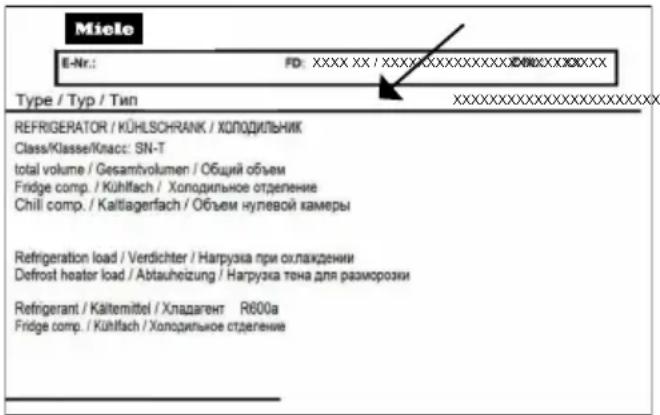
The data plate can be found in the interior cabinet of the refrigeration appliance.
Warranty
For information on the appliance warranty specific to your country please contact Miele. See back cover for address.
In the UK, your appliance warranty is valid for 2 years from the date of purchase. However, you must activate your cover by calling 0330 160 6640 or registering online at www.miele.co.uk.
EU Conformity declaration
Miele hereby declares that this fridge-freezer complies with Directive 2014/53/EU.
The complete text of the EU declaration of conformity is available from one of the following internet addresses:
- Products, Download from www.miele.ie
- For service, information, operating instructions etc: go to https://miele.co.uk/manuals and enter the name of the product or the serial number
Frequency range of the WiFi module 2.4000–2.4835 GHz
Maximum transmission power of the WiFi module < 100 mW
UK Conformity declaration
Miele hereby declares that this fridge-freezer complies with UK Radio Equipment Regulations 2017, as amended.
The complete text of the UK declaration of conformity is available from one of the following internet addresses:
- Products, Download from www.miele.co.uk
- For service, information, operating instructions etc: go to https://miele.co.uk/manuals and enter the name of the product or the serial number
Frequency band of the WiFi module 2.4000 GHz - 2.4835 GHz
Maximum transmitting power of the WiFi module < 100 mW
ThisStatement of Compliance confirms this Miele product fully complies with the Product Security and Telecommunications Infrastructure (Security Requirements for Relevant Connectable Products) Regulations 2023.
1) Household Appliance – Freezer-KI KSDF18EUM, KI KIWD24EUM, KI KSDF30EUM
Refrigerator-KI KSDR30EUM, KI KSDR36EUM
Fridge-freezer-KI KBM30EUM, KI KBM36EUM,
KI KBM36DEUM, KI BMS302W, KI BMS362W,
KI FBMS362W
Wine unit-KI KSDW24EUM
2) Manufactured by: Miele & Cie KG, Carl Miele Street 29, 33332 Gutersloh Germany
Imported by and contact point: Miele Company Ltd, Fairacres, Marcham Road,
Abingdon, Oxon, OX14 ITW Great Britain
3) The defined support period at the time of first supply is 10 years To report vulnerabilities and cybersecurity issues please contact: psirt@miele.com4
5) Signature

Name: Paul Wright
Company Position: Head of Technical Management
Date of signature: 19th March 2024
Place of signature: Abingdon, Oxfordshire
United Kingdom
Miele Co. Ltd., Fairacres, Marcham Road, Abingdon, Oxon, OX14 1TW
Tel: 0330 160 6600, Internet: www.miele.co.uk, E-mail: info@miele.co.uk
Australia
Miele Australia Pty. Ltd.
ACN 005 635 398
ABN 96 005 635 398
Level 4, 141 Camberwell Road
Hawthorn East, VIC 3123
Tel: 1300 464 353
E-mail: info@miele.com.au
Internet: www.miele.com.au
China Mainland
Miele Electrical Appliances Co. Ltd.
No. 82, Shimenyi Road, JingAn Distri
Shanghai, China, P.R.C
Post Code: 200040
Phone: +86 21 6157 3500
Fax: +86 21 6157 3511
E-mail: info@miele.cn
Kowloon Bay, Hong Kong
Tel: (852) 2610 1025
Fax: (852) 3579 1404
E-mail:
customerservices@miele.com.hk
Website: www.miele.hk
India
Miele India Pvt. Ltd.
1st Floor, Copia Corporate Suites,
Commercial Plot 9, Mathura Road,
Jasola, New Delhi - 110025
E-mail: customercare@miele.in
Website: www.miele.in
Ireland
Miele Ireland Ltd.
2024 Bianconi Avenue
Citywest Business Campus
Dublin 24
Tel: (01) 461 07 10
Fax: (01) 461 07 97
E-mail: info@miele.ie
Internet: www.miele.ie
Malaysia
Miele Sdn Bhd
Suite 12-2, Level 12
Menara Sapura Kencana
Petroleum
Solaris Dutamas No. 1
Jalan Dutamas 1
50480 Kuala Lumpur, Malaysia
Phone: +603-6209-0288
Fax: +603-6205-3768
New Zealand
Miele New Zealand Limited
IRD 98 463 631
8 College Hill
Freemans Bay, Auckland 1011
Tel: 0800 464 353
E-mail: customercare@miele.co.nz
Internet: www.miele.co.nz
Singapore
Miele Pte. Ltd.
29 Media Circle
11-04 ALICE@Mediapolis
Singapore 138565
Tel: +65 6735 1191
Fax: +65 6735 1161
E-mail: info@miele.com.sg
Internet: www.miele.sg
South Africa
Miele (Pty) Ltd.
63 Peter Place, Bryanston 2194
P.O. Box 69434, Bryanston 202
Tel: (011) 875 9000
Fax: (011) 875 9035
E-mail: info@miele.co.za
Internet: www.miele.co.za
Thailand
Miele Appliances Ltd.
BHIRAJ TOWER at EmQuartier
43rd Floor Unit 4301-4303
689 Sukhumvit Road
North Klongton Sub-District
Vadhana District
Bangkok 10110, Thailand
United Arab Emirates
Miele Appliances Ltd.
Showroom 1, Eiffel 1 Building
Sheikh Zayed Road, Umm Al She
P.O. Box 114782 - Dubai
Tel. +971 4 3044 999
Fax. +971 4 3418 852
800-MIELE (64353)
E-mail: info@miele.ae
Website: www.miele.ae
Manufacturer: Miele & Cie. KG, Carl-Miele-Straße 29, 33332 Gütersloh, Germany
Miele
KFMC 3844 R/L, KFMC 3844 FD
- OPERATING AND INSTALLATION INSTRUCTIONS FRIDGE-FREEZER
- WARNINGS AND SAFETY NOTES
- SUSTAINABILITY AND ENVIRONMENTAL PROTECTION
- INSTALLATION
- FAMILIARISATION
- COMMISSIONING
- OPERATION
- ADJUSTING SETTINGS
- CLEANING AND CARE
- TROUBLESHOOTING
- CUSTOMER SERVICE DEPARTMENT
- INFORMATION
- CORRECT APPLICATION
- SAFETY WITH CHILDREN
- TECHNICAL SAFETY
- PROPER INSTALLATION
- CORRECT USE
- ACCESSORIES AND SPARE PARTS
- TRANSPORT
- DISPOSAL OF YOUR OLD APPLIANCE
- SYMBOL ON THE COMPRESSOR (DEPENDING ON MODEL)
- SYMBOL ON THE BACK OF THE REFRIGERATION APPLIANCE (DEPENDING ON THE MODEL)
- DISPOSING OF THE PACKAGING MATERIAL
- DISPOSING OF YOUR OLD APPLIANCE
- HOW TO SAVE ENERGY
- ORDERING PRINTED INSTALLATION INSTRUCTIONS
- FASTENING THE REFRIGERATION APPLIANCE IN THE BUILDING-IN NICHE
- BUILDING-IN DIMENSIONS
- INSTALLATION SITE
- CLIMATE RANGE
- BEFORE INSTALLATION
- LOAD-BEARING CAPACITY OF THE NICHE FLOOR
- SIDE-BY-SIDE INSTALLATION
- VENTILATION
- DOOR HINGING CHANGE
- SAFETY NOTES FOR THE MAINS WATER CONNECTION
- THE WATER SUPPLY TO THE REFRIGERATION APPLIANCE
- WATER FILTER
- CHANGING THE ACTIVE CHARCOAL FILTER (OPTIONAL ACCESSORIES)
- PLEASE NOTE
- ELECTRICAL CONNECTION
- CONNECTING THE APPLIANCE
- MAIN MENU ON DISPLAY KFMC 3844 R/L, KFMC 3844 FD
- SYMBOLS IN THE DISPLAY
- NAVIGATING THE DISPLAY
- EXITING A MENU LEVEL
- ADJUSTING PARAMETERS
- CHANGING PARAMETERS ON A SCALE
- DISPLAYING THE CONTEXT MENU
- DISPLAYING THE PULL-DOWN MENU
- NETWORKING
- SMART EXTRAS VIA THE MIELE APP
- INTERIOR LIGHTING (SMARTLIGHT)
- SUPERCOOL & AIRCLEAN 🌿
- SUPERFREEZE
- QUICKICE
- HOLIDAY MODE
- ECO MODE
- SABBATH MODE
- CHARCOAL FILTER (AIRCLEAN SYSTEM)
- CAMERA (FOODVIEW)
- DOOR ASSISTANT PUSH2OPEN
- TEMPERATURE ALARM IN THE FREEZER ZONE
- DOOR ALARM
- ADJUSTING THE INTERIOR FITTINGS
- REMOVING OR MOVING THE DOOR SHELVES
- REMOVING OR MOVING THE SHELVES
- REMOVING THE MASTERFRESH PRO DRAWER
- REMOVING THE DAILYFRESH EXTRACOOL DRAWER
- REMOVING CONTAINERS FROM THE FREEZER DRAWER
- PLACING CONTAINERS IN THE FREEZER DRAWER
- REMOVING THE ICE CUBE CONTAINER
- ACCESSORIES SUPPLIED
- OPTIONAL ACCESSORIES
- BEFORE USING FOR THE FIRST TIME
- CONNECTING THE REFRIGERATION APPLIANCE
- INSERTING THE CHARCOAL FILTER (AIRCLEAN SYSTEM) INTO THE HOLDERS IN THE FRIDGE ZONE
- REQUIREMENTS FOR NETWORKING
- SWITCHING THE REFRIGERATION APPLIANCE ON
- PERFORMING INITIAL COMMISSIONING
- SWITCHING ON THE CAMERAS
- SWITCHING OFF CAMERAS
- SELECTING A WATER FILTER
- SWITCHING THE REFRIGERATION APPLIANCE OFF
- TO NOTE WHEN SWITCHING OFF FOR LONGER PERIODS OF TIME
- TEMPERATURE IN THE FRIDGE ZONE
- SWITCHING ON SUPERCOOL & AIRCLEAN 🌿
- SWITCHING OFF SUPERCOOL & AIRCLEAN 🌿
- TEMPERATURE IN THE FREEZER ZONE
- SWITCHING SUPERFREEZE ✿ ON
- SWITCHING SUPERFREEZE ✿ OFF
- TEMPERATURE DISPLAY
- SWITCHING ON THE HOLIDAY MODE FUNCTION
- SWITCHING OFF THE HOLIDAY MODE FUNCTION
- SWITCHING ON THE ECO MODE FUNCTION
- SWITCHING OFF THE ECO MODE FUNCTION
- SWITCHING ON THE SABBATH MODE FUNCTION
- SWITCHING OFF THE SABBATH MODE FUNCTION
- STORING FOOD IN THE FRIDGE ZONE
- DIFFERENT STORAGE ZONES
- WARMEST AREA
- COLDEST AREA
- SHOULD FOOD BE STORED LOOSE OR IN PACKAGING
- STORING FOOD IN THE MASTERFRESH PRO DRAWERS
- SELECTING THE RIGHT SETTING FOR THE MASTERFRESH PRO DRAWER
- CREATING A FAVOURITE FOR THE INDIVIDUAL SETTING IN THE MASTERFRESH PRO DRAWER
- DAILYFRESH EXTRACOOL DRAWER
- FREEZING AND STORING FRESH FOOD
- MAXIMUM FREEZING CAPACITY
- BEFORE PLACING FOOD IN THE FREEZER
- PLACING FOOD IN THE FREEZER
- AFTER FREEZING FRESH FOOD
- COOLING DRINKS QUICKLY
- ICE CUBE MAKER
- ICE CUBE MAKER ACTIVATION
- SWITCHING THE ICE CUBE MAKER OFF
- OPENING THE SETTINGS MENU
- SETTINGS: OVERVIEW
- LANGUAGE & REGION
- DATE & TIME
- DISPLAY BRIGHTNESS
- SOUNDS
- SECURITY
- FACTORY DEFAULT SETTINGS
- WIFI
- CONNECTION
- APPLIANCE FUNCTION
- CAMERAS
- INTERIOR LIGHTING
- FILTER MANAGEMENT
- DOOR ASSISTANT
- AUTOMATIC SUPERFREEZE
- GENERAL
- SENSOR LOCK
- DATA PLATE
- SOFTWARE
- LEGAL INFORMATION
- SERVICE
- CLEANING AGENTS
- PREPARING THE REFRIGERATION APPLIANCE FOR CLEANING
- CLEANING THE INTERIOR OF THE APPLIANCE
- CLEANING THE CAMERA
- REACTIVATING THE CHARCOAL FILTERS (AIRCLEAN SYSTEM) IN THE OVEN
- CLEANING THE WATER FILTER (MESH FILTER)
- CLEANING THE DOOR SEAL
- CLEANING THE VENTILATION OPENINGS
- AFTER CLEANING
- AUTOMATIC DEFROSTING
- FRIDGE ZONE AND MASTERFRESH PRO DRAWERS
- FREEZER ZONE
- CONTACT IN THE EVENT OF A FAULT
- EPREL DATABASE
- WARRANTY
- EU CONFORMITY DECLARATION
- UK CONFORMITY DECLARATION
- UNITED KINGDOM
- AUSTRALIA
- CHINA MAINLAND
- INDIA
- IRELAND
- MALAYSIA
- NEW ZEALAND
- SINGAPORE
- ALICE@MEDIAPOLIS
- SOUTH AFRICA
- THAILAND
- UNITED ARAB EMIRATES
- MIELE
Brand : MIELE
Model : KFMC 3844 FD
Category : Refrigerator