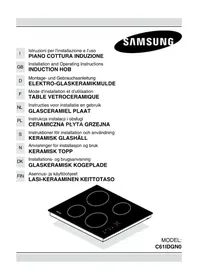
C61IDGNO - Cooker SAMSUNG - Free user manual and instructions
Find the device manual for free C61IDGNO SAMSUNG in PDF.


| Product Type | Freestanding Cooker |
| Brand | Samsung |
| Model Number | C61IDGNO |
| Fuel Type | Natural Gas (LPG convertible) |
| Number of Gas Burners | 4 |
| Burner Configuration | Triple-ring wok burner, semi-rapid burner, 2 auxiliary burners |
| Oven Operation | Gas oven with thermostatic control |
| Oven Capacity | 65 L |
| Oven Functions | Bake, Broil (grill) |
| Ignition | Automatic electronic ignition (220-240 V) |
| Dimensions (W x D x H) | 600 x 600 x 850 mm |
| Net Weight | 52 kg |
| Gas Connection | 1/2" BSP rear left, nominal pressure 20 mbar NG |
| Power Supply Voltage | 220-240 V ~ 50 Hz |
| Energy Efficiency Class | A (oven) |
| Controls | Front-mounted rotary knobs with flame symbols |
| Safety Features | Flame failure thermocouple, triple-glazed cool-touch oven door |
| Cleaning & Maintenance | Enamel interior, removable burner caps and pan supports, dishwasher-safe pan supports |
| Spare Parts Accessibility | Available through authorized service centers and online; common parts include igniter, thermocouple, knobs, hinges, and gas injectors |
| Repairability Index | 8.0/10 (easy to repair with modular components) |
Frequently Asked Questions - C61IDGNO SAMSUNG
User questions about C61IDGNO SAMSUNG
0 question about this device. Answer the ones you know or ask your own.
Ask a new question about this device
Download the instructions for your Cooker in PDF format for free! Find your manual C61IDGNO - SAMSUNG and take your electronic device back in hand. On this page are published all the documents necessary for the use of your device. C61IDGNO by SAMSUNG.
USER MANUAL C61IDGNO SAMSUNG
MODEL:
C61IDGN0
USING THIS MANUAL....18
SAFETY....19
Electrical safety....19
Child safety....19
Safety during use 19
Safety when cleaning....19
DISPOSAL INSTRUCTIONS....20
INSTALLING....21
Installing into the countertop....21
Installing over an kitchen furniture....22
Installing over an oven....22
Connecting to the mains power supply....23
BEFORE YOU BEGIN....24
HOB USE....24
The principle of induction....24
Advantages....24
Cookware....25
Switching the appliance on....26
Temperature control....26
Switching the appliance off....26
Using the child safety lock....26
Timer....26
Minute - Minder Function....27
Heat Up Function....27
Low Temp Function....27
CLEANING AND CARE....28
Hob....28
Light soiling....28
Stubborn soiling....28
TECHNICAL SPECIFICATIONS....29
Technical data....29
Please take the time to read this owner's manual, paying particular attention to the safety information contained in the following section, before using your appliance. Keep this manual for future reference. If transferring ownership of the appliance, please remember to pass the manual on to the new owner.
The following symbols are used in the text

This is the safety alert symbol.
Warning indicates information concerning your personal safety.
Important indicates information on avoiding damage to the appliance.

This symbol indicates useful information and practical tips.

This symbol refers to measures that can be taken to help protect the environment.
Electrical safety
- Before connecting the appliance to the electricity supply:
- Check that the voltage and power values listed on the data plate (positioned on the lower part of the appliance) are compatible with the electricity supply and socket. If you have any doubts, please consult a qualified electrician for assistance.
- The appliance should be serviced only by qualified service personnel. Repairs carried out by unqualified individuals may cause injury or serious malfunction. If your appliance is in need of repair, contact your local service centre. Failure to follow these instructions may result in damage and void the warranty.
- Flush - mounted appliances may be operated only after they have been installed in cabinets and workplaces that conform to the relevant standards. This ensures sufficient protection against contact for electrical units.
-
If your appliance malfunctions or if fractures, cracks or splits appear:
-
switch off all cooking zones
- disconnect the hob from the mains supply to avoid the possibility of electric shock.
- contact your local service centre
- Do not use your hob until the glass surface has been replaced.
- Do not use the hob to heat aluminium foil, products wrapped in aluminium foil or frozen foods packaged in aluminium cookware.

Child safety
- This apparatus is not suitable for use by children or persons who need supervision.
- Do not allow children to play with the apparatus.
- Before using the induction cooker top it is important to check that the apparatus is compatible with anyone who has a pacemaker and active surgical implants.
Safety during use
- This appliance is to be used only for normal cooking and frying in the home. It is not designed for commercial or industrial use.
- Never use the hob for heating the room.
- Take care when plugging electrical appliances into mains sockets near the hob. Mains leads must not come into contact with the cooktop.
- Metal objects such as knives, forks, spoons or lids must not be placed on the cooker surface as they can get hot.
- Overheated fat and oil can catch fire quickly. Never leave surface units unattended when preparing foods in fat or oil.
- Avoid liquid spilling, therefore to boil or heat liquids reduce the heat supply.
- Do not leave the heating elements switched on with empty vessels or without vessels.
- After use, switch the cooker off using the control device and do not rely on the pan detector.
- When you have finished cooking, switch off the relative resistance using the control indicated below.
- Always keep the control panels clean and dry.
- Never place combustible items on the hob, it may cause fire.
Safety when cleaning
- Always turn the appliance off before cleaning.
- For safety reasons do not clean the appliance with a steam jet or high - pressure cleaner.
- Clean the hob in accordance with the cleaning and care instructions contained in this manual.
Disposing

This appliance conforms to the European Directive EC/2002/96, Waste Electrical and Electronic Equipment(WEEE). By making sure that this appliance is disposed of in a suitable manner, the user is helping to prevent potential damage to the environment or to public health.
The symbol 📄 on the product or on the accompany indicates that the appliance should not be treated as domestic waste, but should be delivered to a suitable electric and electronic appliance recycling collection point. Follow local guidelines when disposing of waste. For more information on the treatment, reuse and recycling of this product, please contact your local authority, domestic waste collection service or the shop where the appliance was purchased.

Warning: Before disposing of your old appliance, make it inoperable so that it cannot be a source of danger.
- The appliance may not be disposed of in the household rubbish.
- Information about collection dates and public refuse disposal sites is available from your local refuse department or council.
These instructions address specialised installers and serve as a guide for installation, adjustment and maintenance in conformity with the laws and regulations in force.
Installing into the countertop.
The appliance is made for fixing into a worktop, as shown in the relevant figure. Apply the supplied sealant to the entire perimeter of the hob and insert it into the fitment hole (for sizing see fig. 3). Fix the appliance into the worktop with the 4 stays, rotating them according to the top's depth (fig. 4)

Fig. 3

Fig.4

Installing over an kitchen furniture
If the underside of the appliance will be accessible after installation, a separator panel G (fig. 5A) will need to be mounted maintaining the distances shown (fig. 5B)..
To allow fresh air circulation there must be openings in the kitchen furniture (fig. 5A) of the sizes indicated in fig.5B.

Installing over an oven
If the appliance is installed over an oven the panel is not necessary (fig. 6A - 6B)
To allow fresh air circulation there must be openings in the kitchen furniture (fig.6A) of the sizes indicated in fig.6B

IMPORTANT: if there is an oven under the induction hob it is advisable for it to have a cooling fan. Do not use the induction hob while PYROLITIC cleaning is in process.

WARNING: to allow the circulation of as much fresh air as necessary, there must be at least 40 mm between the induction hob module and any appliance installed under it (fig. 6B). In any event, adequate aeration must be provided.

220-240V\~ H05V2V2-F 3G 2.5mm 4

220-240V\~ H05V2V2-F 3G 2.5mm 4

380-415V2N\~ H05V2V2-F 4G 2.5mm 4
Fig. 7
Electrical connection (Fig.7)
Before making the electrical connections, check that:
-the ground cable is 2 cm longer than the other cables;
-the system ratings meet the ratings indicated on the identification plate fixed on the lower part of the worktop;
-the system is fitted with efficient earthing compliant to the laws and regulations in force.
Earthing is obligatory by law.
If the domestic appliance is fitted with a cable with plug, must be installed in order that the socket is easily accessible.
If the domestic appliance is fitted with a cable without plug, an omnipolar switch must be interposed with a minimum opening of 3 mm between the contacts and suited to the load indicated on the plate and conform to the regulations in force (the yellow/green ground conductor must not be interrupted by the switch). When the appliance has been installed, the omnipolar switch must be easily reachable.
If the appliance is not fitted with a cable, use type:"H05V2V2-F".
At no point must the cable reach a temperature 50° C higher than room temperature.
Initial cleaning
Wipe the ceramic glass surface with a damp cloth and ceramic cooktop glass cleaner.

Important: Do not use caustic or abrasive cleaners. The surface could be damaged.
Hob Use
The principle of induction
The system of cooking by induction is based on the physical phenomenon of magnetic induction. The fundamental feature of this system is direct transfer of heat energy from the generator to the pan without intermediate means (different from traditional cooker tops see fig.1).
Advantages
If you compare your electric cooker tops, with the induction cooker top, the result will be:
- Safer: low temperature on the glass surface.
- Quicker: brief heating times.
- More precise: the top reacts immediately to your commands.
- More efficient: 90% of the energy absorbed is transformed into heat.

Cookware (Fig.9)
Cooking by induction uses magnetism to generate heat. The vessels must therefore contain iron. Check if the vessel material is magnetic using a magnet..

Important:
To prevent permanent damage to the cooker surface, do not use:
- Pans with bases that are not perfectly flat..
- Metal pans with enamelled bases.
- Do not use pans made of cast iron or with rough bases or burrs, as they may scratch the hob's surface
- Pots with aluminium or copper bases can cause metallic discolouration on the ceramic glass surface. The discolouration is very difficult or impossible to remove.
- For best results use pans of the same diameter as the induction plate, so that they can be recognised by the magnetic sensor.
Fig.9

(□□□.8)
Fig.8
Possibility to activate the booster in 2 cooking zones:

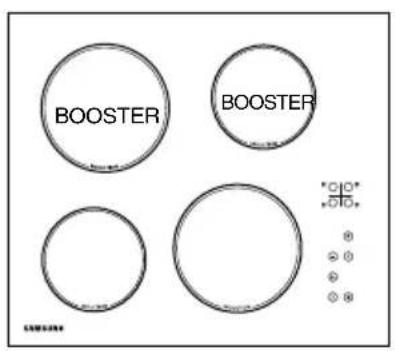


Fig.10
![graph TD B["○"] --> A["○"] A --> C["○"] C --> D["○"] D --> E["○"] E --> F["○"] F --> G["○"] G --> H["○"] H --> I["○"] I --> J["○"] J --> K["○"] K --> L["○"] L --> M["○"] M --> N["○"] N --> O["○"] O --> P["○"] P --> Q["○"] Q --> R["○"] R --> S["○"] S --> T["○"] T --> U["○"] U --> V["○"] V --> W["○"]…](/content/2026/08/1621040/images/cac314277fbf0e8e472a9f0e0365c453e0b61a92cae055635f9e61f69f85b9e4.jpg)
Fig.10
Switching the appliance on
Press key A to switch the cooker top on. Press one of the keys in section B corresponding to the cooking area you intend to use. Select cooking power using the + / - keys in section C (number 9 on the display corresponds to the maximum temperature and 1 to the minimum). Selecting - the power level is set at position 9, while selecting + the power level is set at position 5. You can disconnect the cooking area by pressing the symbols + and - at the same time.
Temperature control
Depending on the appliance model, it may be fitted with a Booster system which can be used to speed up cooking times through the application of a power level which is greater than the nominal value, with in a defined period of time. The cooking zones which can be used in conjunction with this function are indicated in fig. 8.
To activate the Booster, switch the interested cooking area on at any power level and press key P (fig. 8F). This allows to reach higher temperatures in a short time disbursing the maximum power possible. Once the function is activated, a P will appear on the display. The function will last for 10 minutes then the cooking zone will automatically come back to the power level 9. The Booster may be activated at its Maximum power level on 2 cooking zones, one on the right hand side of the hob and the other on the left hand side of the hob. If the Booster is activated at the same time in otherparts of the cooking area, the power will be slightly lessened until the end of functioning. (fig.8)
Switching the appliance off
Press key A to switch the cooker top off.
Using the child safety lock
To prevent use the cooker surface by children, it is possible to block all functions by pressing the D key. If the small hotplate is equipped with an extended hotplate ring then the second zone will activate when the corresponding knob P is touched and held for 3 seconds (fig. 8F). At this point the hotplate will be ignited and the temperature may be regulated using the - or + knobs. This function can be activated only if the hob is switched on.
Timer:
A Timer can be used simultaneously for each cooking zone.
Select the interested cooking zone at any power, pressing the E key (timer), one led will indicate the corresponding cooking zone. Then with the keys + and - select the cooking time desired.
Once the set cooking time has elapsed, the timer switches off and deselects the cooking zones.
A buzzer will sound for 2 minutes to indicate that the timer is no longer active. To deactivate it press any key.
To know the residual time for each zone, press the key B of the interested zone. To set at zero the timer select the zone and press the E key contemporaneously with the keys + and -.

Caution!
While the hob is in operation the timer display remains on, with its value set to "00".
IMPORTANT: To prevent damage being inflicted on the electronic circuits, the hob is fitted with an overheating safety system. In situations where the appliance is used at high power levels for a prolonged period of time, the hob may switch off one or more of the activated zones temporarily, until the temperatures return to the set levels. On the display corresponding to the cooking zone which has been temporarily switched off, the power level (e.g.8) will be shown in alternation with a H E 2. This will stop flashing once the cooking zone has been reactivated.
Minute - Minder Function:
- Unblock the cooking surface by keeping the "key button" pressed down for 3 seconds until the "indicator light button" is switched off.
- Press the "Timer" (E) button until the writing "00" (G) appears on the display.
- Press + or - to select the number of the minutes.
- Press the "Timer" button to confirm the selection. At the end of the set time, an acoustic signal will be activated.
Heat Up Function:
The function heat up allows to set the maximum temperature for a limited period of time on the cooking zone, then the temperature decreases down to the selected value.
- To activate the Heat up function, select the cooking zone, set at 9 the temperature level, press again the key "+" the letter A will appear on the display then with the "-" key select the desired final temperature level. Until the function is activated, on the display the A will alternate with the final set up level. Like the Booster, also this function can be activated max on 2 cooking zones one on the left and the another on the right side of the hob.
Low Temp Function:
With this function, the temperature of the cooking zone remains constant to 70° .
- To activate this function select the desired zone, set at 1 the temperature level, press again the key "-" , the symbol will appear on the display indicated in the picture 11. To deactivate it press + or -.

![graph TD E["Input"] --> Timer["Timer"] G["Input"] --> Timer Timer --> 0["0"] Timer --> 1["1"]](/content/2026/08/1621040/images/727d4fcf9761013926ce3397c5cda08de0e2c5f0f96f2594d8717ddda01348a1.jpg)

Fig.11
Hob

Important: Cleaning agents must not come into contact with a heated ceramic glass surface. All cleaning agents must be removed with adequate amounts of clean water after cleaning because they can have a caustic effect when the surface becomes hot. Do not use any aggressive cleaners such as grill or oven sprays, scouring pads or abrasive pan cleaners.
Clean the ceramic glass surface after each use when it is still warm to the touch. This will prevent spillage from becoming burnt onto the surface. Remove scales, watermarks, fat drippings and metallic discolouration with the use of a commercially available ceramic glass or stainless steel cleaner.
Light Soiling
Clean the heated area as thoroughly as possible using SIDOL, STAHLFIX or similar products and a cloth/paper, then rinse with water and dry with a clean cloth.
Stubborn Soiling
Using the special scraper (optional) immediately remove any fragments of aluminium and plastic material that have unintentionally melted on the heated cooking area or residues of sugar or food with a high sugar content(Fig.11). In this way, any damage to the cooktop surface is prevented.
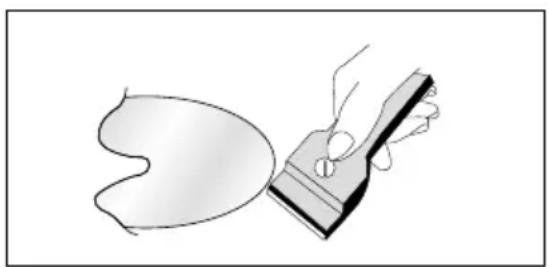
Fig.11
Technical specifications
Technical Data:
Connection voltage
220-240V \~ 380- 415V 2N 50/60 Hz
Maximum connected load power 7,4 kW
Weight Net 10,9 Kg
Weight Gross 13 Kg
Induction:
| POSITION | DIAMETER | POWER | BOOSTER |
| R1 | 145 mm | 1400W | 1800W |
| R2 | 180 mm | 1850W | 2500W |
| R3 | 145 mm | 1400W | 1800W |
| R4 | 180 mm | 1850W | 2500W |

Possible visualizations on display:

This led indicates that the cooking zone is still hot

Absent or inadequate pot

| NOMINAL DIAMETER OF COIL | LIMIT OF POT DETECTOR (switches on) |
| ∅ 145 mm | ∅ 90 mm |
| ∅ 180 mm | ∅ 120 mm |


Booster function activated
Overflow Safety Device activated

Temperature levels

Hi-Temperature Safety Device activated

Low voltage
THE MANUFACTURER DECLINES ALL RESPONSIBILITY FOR EVENTUAL DAMAGES CAUSED BY BREACHING THE ABOVE WARNINGS.
SAMSUNG
QUESTIONS OR COMMENTS
| COUNTRY CALL | OR VISIT US ONLINE AT | |
| BELGIUM | 0032 (0)2 201 24 18 | www.samsung.com/be |
| CZECH REPUBLIC | 844 000 844 | www.samsung.com/cz |
| DENMARK | 70 70 19 70 | www.samsung.com/dk |
| FINLAND | 030 - 6227 515 | www.samsung.com/fi |
| FRANCE | 3260 SAMSUNG (726-7864)08 25 08 65 65 (euro 0,15/Min) | www.samsung.com/fr |
| GERMANY | 01805 - 121213 (0,15 Min) | www.samsung.de |
| HUNGARY | 06 - 80 - SAMSUNG (726-7864) | www.samsung.com/hu |
| ITALIA | 800 - SAMSUNG (726-7864) | www.samsung.com/it |
| LUXEMBURG | 0035 (0)2 261 03 710 | www.samsung.com/be |
| NETHERLANDS | 0900 20 200 88 (0,10/Min) | www.samsung.com/nl |
| NORWAY | 815-56 480 | www.samsung.com/no |
| POLAND | 0 801 801 881 / 022-607-93-33 | www.samsung.com/pl |
| PORTUGAL | 80 8 200 128 | www.samsung.com/pt |
| SLOVAKIA | 0800-SAMSUNG (726-7864) | www.samsung.com/sk |
| SPAIN | 902 10 11 30 | www.samsung.com/es |
| SWEDEN | 0771 - 400 200 | www.samsung.com/se |
| U.K. | 0870-SAMSUNG (726-7864) | www.samsung.com/uk |
| Republic of Ireland | 0818 717 100 | www.samsung.com/ie |
| AUSTRIA | 0800- SAMSUNG (726-7864) | www.samsung.com/at |
| Switzerland | 0800 - SAMSUNG (726-7864) | www.samsung.com/ch |
Code No.: DE68-

- USING THIS MANUAL....18
- SAFETY....19
- DISPOSAL INSTRUCTIONS....20
- INSTALLING....21
- BEFORE YOU BEGIN....24
- HOB USE....24
- CLEANING AND CARE....28
- TECHNICAL SPECIFICATIONS....29
- ELECTRICAL SAFETY
- CHILD SAFETY
- SAFETY DURING USE
- SAFETY WHEN CLEANING
- DISPOSING
- INSTALLING INTO THE COUNTERTOP
- INSTALLING OVER AN KITCHEN FURNITURE
- INSTALLING OVER AN OVEN
- ELECTRICAL CONNECTION (FIG.7)
- INITIAL CLEANING
- HOB USE
- THE PRINCIPLE OF INDUCTION
- ADVANTAGES
- COOKWARE (FIG.9)
- IMPORTANT
- SWITCHING THE APPLIANCE ON
- TEMPERATURE CONTROL
- SWITCHING THE APPLIANCE OFF
- USING THE CHILD SAFETY LOCK
- TIMER
- CAUTION
- MINUTE - MINDER FUNCTION
- HEAT UP FUNCTION
- LOW TEMP FUNCTION
- HOB
- LIGHT SOILING
- STUBBORN SOILING
- TECHNICAL SPECIFICATIONS
- TECHNICAL DATA
- POSSIBLE VISUALIZATIONS ON DISPLAY
- SAMSUNG
Brand : SAMSUNG
Model : C61IDGNO
Category : Cooker