882 - Measuring equipment Testo - Free user manual and instructions
Find the device manual for free 882 Testo in PDF.


Pick your language and provide your email: we'll send you a specifically translated version.
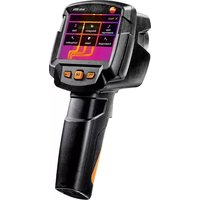
| Product Type | Thermal Imaging Camera |
| Brand | Testo |
| Model | 882 |
| Category | Measuring Equipment |
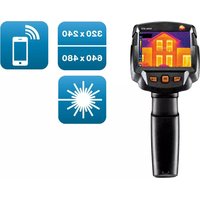
| IR Resolution | 320 x 240 pixels |
| Thermal Sensitivity | Less than 0.08 °C |
| Temperature Range | -30 °C to +650 °C |
| Accuracy | ±2 °C or ±2% of reading |
| Visual Camera | Integrated digital camera |
| Display | 3.5 inch LCD touchscreen |
| Image Storage | SD card and internal memory |
| Data Interface | USB and HDMI output |
| Battery Type | Rechargeable Li-ion battery |
| Battery Life | Approximately 4 hours of continuous use |
| Weight | 620 g (including battery) |
| Dimensions | 219 x 96 x 115 mm |
| Laser Marker | Class 2 laser for target indication |
| Software Compatibility | Testo IRSoft software for analysis |
| Maintenance | Clean lens with a dry soft cloth |
| Safety Features | Automatic shutdown and laser safety |
| Spare Parts and Repairability | Replaceable battery and SD card; service center repair |
Frequently Asked Questions - 882 Testo
What is the temperature measurement range of the Testo 882?
The Testo 882 measures temperatures from -30 °C to +650 °C, making it suitable for a wide variety of industrial and electrical applications.
How do I transfer thermal images from the Testo 882 to a computer?
Connect the device to your computer using the USB cable, or remove the SD card and use a card reader. You can then use the IRSoft software to import and analyze the images.
How can I extend the battery life of my Testo 882?
To extend battery life, reduce the screen brightness, avoid continuous laser usage, and consider using the auto-off feature. Also, keep the battery at moderate temperatures and fully recharge it before heavy use.
How do I perform a basic calibration check on the Testo 882?
Manual calibration is not required for routine use. However, you can verify accuracy by measuring a known reference temperature and comparing the reading. For full calibration, contact an accredited Testo service center.
What type of memory card is recommended for the Testo 882?
A standard SD card (up to 32 GB) is recommended. Use a high-speed card (Class 10 or higher) to ensure smooth image storage and data transfer.
Can I adjust the emissivity settings on the Testo 882?
Yes, the emissivity is adjustable in the device settings, typically within a range of 0.1 to 1.0. This allows for accurate measurements on different surfaces.
How should I clean the lens of the Testo 882?
Use a soft, dry microfiber cloth to gently wipe the lens. Do not use any solvents or abrasive materials, as they may damage the lens coating.
Does the Testo 882 have an automatic shutdown feature?
Yes, the device includes an auto-off function that can be configured in the menu to save battery power when the device is not in use for a set period.
How do I replace the battery in the Testo 882?
Turn off the device, remove the battery cover (usually on the back), and slide out the old battery. Insert the same model Li-ion battery and close the cover firmly. Ensure the battery is correctly oriented.
What accessories are included with the Testo 882?
The standard package typically includes the camera, Li-ion battery, USB cable, SD card, lens cap, and a carrying case. Check the manual for a complete list.
User questions about 882 Testo
0 question about this device. Answer the ones you know or ask your own.
Ask a new question about this device
No questions yet. Be the first to ask one.
Download the instructions for your Measuring equipment in PDF format for free! Find your manual 882 - Testo and take your electronic device back in hand. On this page are published all the documents necessary for the use of your device. 882 by Testo.
USER MANUAL 882 Testo

Manual assistant
Powered by Anthropic
Waiting for your message
Product information
Brand : Testo
Model : 882
Category : Measuring equipment