 ManualGo.com
 URC 7950 - Télécommande universelle ONEFORALL - Free user manual and instructions
Find the device manual for free URC 7950 ONEFORALL in PDF.


Download the instructions for your Télécommande universelle in PDF format for free! Find your manual URC 7950 - ONEFORALL and take your electronic device back in hand. On this page are published all the documents necessary for the use of your device. URC 7950 by ONEFORALL.
USER MANUAL URC 7950 ONEFORALL
SETTING UP THE ONE FOR ALL 5
Direct code set up Search Method
SET-UP CODES TV VCR SAT CBL VAC AMP RCV DVD CODE BLINK OUT
(To find out which code is currently programmed)
THE LEARNING FEATURE
(How to copy functions from your original working remote onto the ONE FOR ALL 5)
• Mode re-assignment (Changing a device mode) • Volume Punch-Through • Macros (Sequence of commands) • Key Magic (How to program missing functions)
Installing the Batteries
Your ONE FOR ALL 5 needs 2 new “AA/LR6” alkaline batteries. 1 2 3
Remove the battery cover from the back of your ONE FOR ALL 5.
Match the batteries to the + and - marks inside the battery case, then insert the batteries. Press the battery cover back into place.
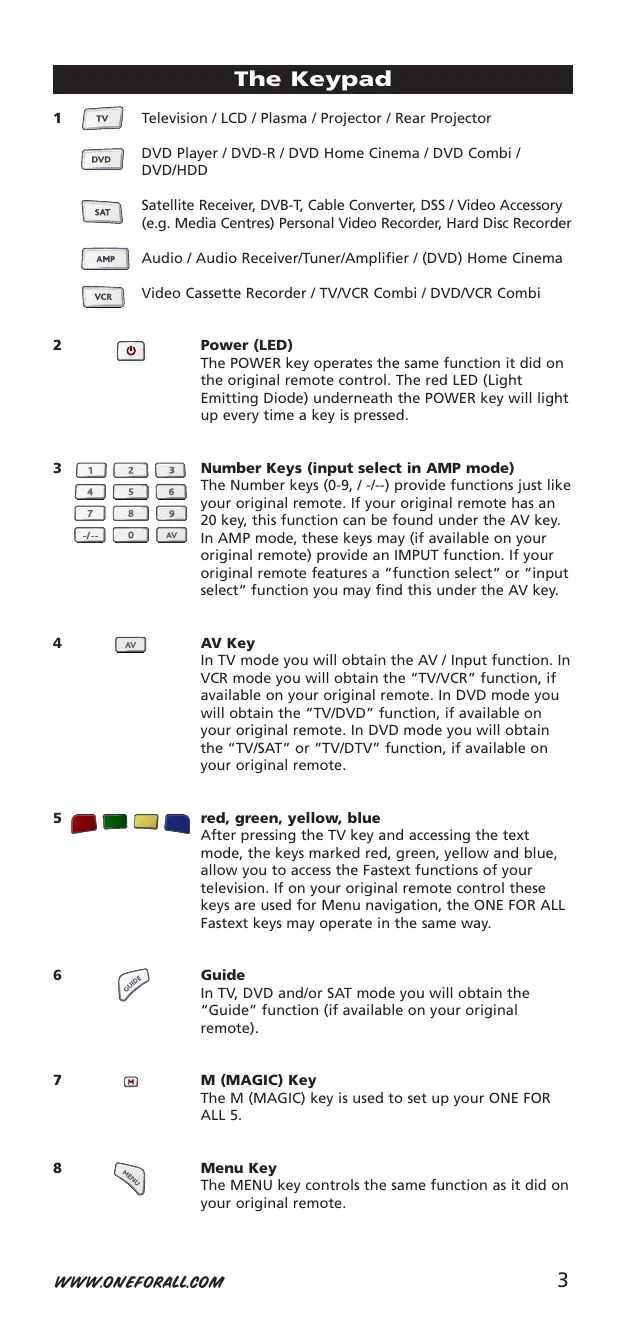
WWW.ONEFORALL.COM The Keypad
Television / LCD / Plasma / Projector / Rear Projector
DVD Player / DVD-R / DVD Home Cinema / DVD Combi / DVD/HDD Satellite Receiver, DVB-T, Cable Converter, DSS / Video Accessory (e.g. Media Centres) Personal Video Recorder, Hard Disc Recorder Audio / Audio Receiver/Tuner/Amplifier / (DVD) Home Cinema Video Cassette Recorder / TV/VCR Combi / DVD/VCR Combi
The POWER key operates the same function it did on the original remote control. The red LED (Light Emitting Diode) underneath the POWER key will light up every time a key is pressed.
Number Keys (input select in AMP mode)
The Number keys (0-9, / -/--) provide functions just like your original remote. If your original remote has an 20 key, this function can be found under the AV key. In AMP mode, these keys may (if available on your original remote) provide an IMPUT function. If your original remote features a “function select“ or “input select“ function you may find this under the AV key.
In TV mode you will obtain the AV / Input function. In VCR mode you will obtain the “TV/VCR” function, if available on your original remote. In DVD mode you will obtain the “TV/DVD” function, if available on your original remote. In DVD mode you will obtain the “TV/SAT” or “TV/DTV” function, if available on your original remote.
red, green, yellow, blue
After pressing the TV key and accessing the text mode, the keys marked red, green, yellow and blue, allow you to access the Fastext functions of your television. If on your original remote control these keys are used for Menu navigation, the ONE FOR ALL Fastext keys may operate in the same way.
In TV, DVD and/or SAT mode you will obtain the “Guide” function (if available on your original remote).
The M (MAGIC) key is used to set up your ONE FOR ALL 5.
The MENU key controls the same function as it did on your original remote.
If available on your original remote, these keys will allow you to navigate through the menu mode of your device.
OK The OK key will confirm your choice in menu operation.
These keys operate in the same way as the keys on your original remote. In TV mode you may obtain Colour + / - when you press and release the M (MAGIC) key and then press Volume + / - .
These keys operate in the same way as the keys on your original remote. In TV mode you may obtain Brightness + / - when you press and release the M (MAGIC) key and then press Channel + / -
Transport Keys (VCR / DVD)
These keys operate the transport functions (PLAY, FF, REW etc.) of your device. To prevent accidental recording, the RECORD key mustbe pressed twice to start recording.
After pressing the TV key, the transport keys (REW, PLAY, PAUSE, FF) are used to operate the main Teletext functions. The symbols below the keys are for Teletext. The text keys are used to access the Teletext functions of your television. Of course, your television must have Teletext capability. TEXT ON: Puts the television in the Teletext mode. EXPAND: Shows the top half of the Teletext page in larger letters. By pressing again, you can see the bottom half of the Teletext page enlarged. To return to regular Teletext viewing, press the EXPAND key again, or press the TEXT ON key, depending on your television. TEXT OFF: Switches the television back to regular viewing mode. On some televisions, this may be done by pressing the TEXT ON key several times. HOLD/STOP: Stops changing pages. MIX: Shows teletext and regular television simultaneously. You may also use this key for subtitling. On some televisions this function is accessed by pressing the text key twice. 16:9: This key provides you the (16:9) wide screen view function, if available on your original remote).
For a more detailed explanation of Teletext and Fastext, please refer to the manual of your television. Remember, different televisions control Teletext and Fastext features in different ways. Not all of the Teletext functions may be available for your particular model.
WWW.ONEFORALL.COM Setting up the ONE FOR ALL 5
Before you start, please read these instructions carefully
Example: To set up the ONE FOR ALL 5 for your television:
A FOR ONE Find the code for your device in the Code list (page 143 165). Codes are listed by device type and brand name.
The most popular code is listed first. Make sure your device is switched on (not on standby).
Press the TV key on the ONE FOR ALL 5 for the device you wish to Set-Up.
Press and hold down the M (MAGIC) key until the red LED underneath the POWER key blinks twice (the red LED will blink once then twice).
Enter your (four-digit device code) using the number keys. The red LED will blink twice.
Now, aim the ONE FOR ALL 5 at your device and press POWER If your device switches off, the ONE FOR ALL 5 is ready to operate your device.
Turn your device back on and try all the remote’s functions to ensure they are working properly. If the functions do not work properly, repeat steps 1-5 using another code listed under your brand.
If your device does not respond, follow steps 1 to 5 with each code listed for your brand. If none of the codes listed for your brand operate your device, or if your brand is not listed at all, try the search method described on page 6.
- Most TV’s do not switch on pressing the POWER key. Please try pressing a “number” key or the “TV-text off” key to switch your TV back on. - Some codes are quite similar. If your device does not respond or is not functioning properly with one of the codes, try another code listed under your brand. - If your device’s original remote control does not have a POWER key, press PLAY instead of POWER when setting up your device. - Remember to press the correct device key before operating your device. Only one device can be assigned to a device key. If your original remote operates more than one device, you need to set up each device separately.
If your device does not respond to the ONE FOR ALL 5 after you have tried all the codes listed for your brand, try searching for your code. The Search Method allows you to find the code for your device by scanning through all the codes contained in the memory of the ONE FOR ALL 5. The Search Method may also work if your brand is not listed at all. Example: To search for your TV code:
Switch your television on (not on standby) and aim your ONE FOR ALL at your TV.
Press the TV key on your ONE FOR ALL 5.
Press and hold down the M (MAGIC) key until the red LED underneath the POWER key blinks twice (the red LED will blink once then twice).
Press 9 9 1. The red LED will blink twice.
Aim the ONE FOR ALL 5 at your Television. Now press CH+ over and over, until your Television turns off (everytime you press the CH+ key the ONE FOR ALL 5 will send out a
POWER signal from the next code contained in the memory). You may have to press this key many times (up to 150 times) so please be patient. If you skip past a code, you can go to the previous code(s) by pressing the CHkey. Remember to keep pointing the ONE FOR ALL 5 at your Television while pressing this key.
As soon as your television turns off, press the M (MAGIC) key to store the code.
- Most TV’s do not switch on pressing the POWER key. Please try pressing a “number” key or the “TV-text off” key to switch your TV back on. - To search for the code for another device follow the instructions above only press the appropriate device key instead of TV during step 2. - If your Video’s original remote control does not have a POWER key, press PLAY instead of POWER during step 5.
WWW.ONEFORALL.COM Code Blink out
(To find out which code is currently programmed) Once you have Set-Up your ONE FOR ALL 5, you can blink back your SET-UP CODE for future reference. Example: To blink out your Television code: 1
Press and hold down the M (MAGIC) key until the red LED underneath the POWER key blinks twice (the red LED will blink once then twice).
Press 9 9 0. The red LED underneath the POWER key will blink twice.
For the first digit of your four-digit code, press 1 and count all the red blinks. If there are no blinks, the digit is
For the second digit, press 2 and count all the red blinks.
If there are no blinks, the digit is "0".
For the third digit, press 3 and count all the red blinks.
If there are no blinks, the digit is "0".
For the fourth digit, press 4 and count all the red blinks.
If there are no blinks, the digit is "0". Now you have your four-digit code.
The Learning Feature
(How to copy functions from your original working remote onto the ONE FOR ALL5) Before you start: - Make sure your original remote control is working correctly. - Make sure neither your ONE FOR ALL, nor your original remote control is pointing at your device. Example: To copy the “mono/stereo” function from your original TV remote onto the ”Red”key of your ONE FOR ALL 5.
1 Place both remote controls (the ONE FOR ALL 5 and your original) on a flat surface. Make sure the ends which you normally point at your device are facing each other. Keep the remotes at a distance of 2 to 5 cm.
Press and hold down the M (MAGIC) key until the red LED underneath the POWER key blinks twice (the red LED will blink once then twice).
Press 9 7 5 (the red LED will blink twice).
Press the device key (on the ONE FOR ALL remote) to select the mode to which you want to copy the learned function (Example: TV key).
Press the key (on the ONE FOR ALL remote) where you want to place the learned function
(Example: ”Red” key). The red LED will flash rapidly.
Press and hold the key (on your original remote) that you want to copy until the red LED blinks twice
(Example: “mono/stereo” key).
7 If you want to copy other functions within the same mode, simply repeat steps 5 and 6 pressing the next key you want to copy by learning.
To exit the learning mode, press and hold down the M (MAGIC) key until the red LED blinks twice.
9 Learning is mode specific. To access your learned function, press the appropriate device key first.
- The ONE FOR ALL 5 can learn approximately 25 – 40 functions. - You can replace a learned function by placing another learned function on top. - Upon changing the batteries, your learned functions will be retained.
WWW.ONEFORALL.COM Shifted Learning
You can also learn a function on a key of the ONE FOR ALL without sacrificing the original ONE FOR ALL function. A Shifted Learning function can also be put on any key EXCEPT for the following: Device keys, MAGIC key, Number keys. To install a Shifted Learning function, simply follow steps 1-8 on the previous page. During step 5, press M (MAGIC) once before you press the key where you are placing the learned function. To access the shifted function, press M (MAGIC) and then the key you have learned on.
To delete a learned function:
Press and hold down the M (MAGIC) key until the red LED underneath the POWER key blinks twice (the red LED will blink once then twice).
Press 9 7 6 (the red LED underneath the POWER key will blink twice).
Press the device key in which the function will be deleted.
Press twice on the learned key which will be deleted (the red LED underneath the POWER key will blink twice).*
If there is another key which you wish to delete, repeat steps 1-4.
The original functions of the ONE FOR ALL 5 will now be present.
To delete a Shifted Learned feature, press M (MAGIC) before you press
“the learned key to be deleted” (during step 4).
To delete all learned functions within a specific mode:
Press and hold down the M (MAGIC) key until the red LED underneath the POWER key blinks twice (the red LED will blink once then twice).
Press 9 7 6 (the red LED will blink twice).
Press the appropriate device (mode).
The Operational Reset will erase all learned functions across all modes and some other programmed functions like Key Magic and Macros. 1
Press and hold down the M (MAGIC) key until the red LED underneath the POWER key blinks twice (the red LED will blink once then twice).
Press 9 8 0 (the red LED will blink four times).
Mode re-assignment (Changing a device mode) It is possible to change the mode of any device key. This is useful if you want to set up two of the same devices on the ONE FOR ALL 5. The code can be set up using “Direct code set up” (pag. 5) or “Search method” (pag. 6). To change a device key, see the three examples below. Example 1)
if you want to program a second TV on the VCR key.
if you want to program a second TV on the DVD key.
To program a second Television on the VCR key (for example), you need to change the VCR key into a TV key, so press: (*)
The VCR key has now become a second TV key.
Now enter the Set-Up code for your second TV by pressing: (*)
To program a second Television on the DVD key (for example), you need to change the DVD key into a TV key, so press: (*)
The DVD key has now become a second TV key.
Now enter the Set-Up code for your second TV by pressing: (*)
Resetting a Device key
Example: To reset the VCR key to its original mode, press: (*)
Example: To reset the DVD key to its original mode, press:
Press and hold down the M (MAGIC) key until the red LED underneath the POWER key blinks twice.
The the red LED underneath the POWER key will blink once then twice.
WWW.ONEFORALL.COM Extra Features
Volume Punch Through You may be able to use some functions of your Television, Video recorder, DVD player, Amp./Tuner, Satellite receiver or Cable converter at the same time. For example: if you are watching a program on your video recorder, you can adjust the volume (a TV function) without pressing the TV mode key on your ONE FOR ALL 5. To punch through to TV volume while in the VCR, DVD, AMP or SAT mode: 1.
Press and hold down the M (MAGIC) key until the red LED underneath the POWER key blinks twice (the red LED will blink once then twice).
Then press the TV key and the red light will blink twice.
To cancel the “Volume Punch Through” per mode:
(Example: to cancel the “Volume Punch Through” for the VCR mode) 1.
Press and hold down the M (MAGIC) key until the red LED underneath the POWER key blinks twice (the red LED will blink once then twice).
Then press the Volume (-) key and the red light will blink four times.
Result: being in VCR mode, you will be able to control VOL+/- or MUTE functions of your VCR (provided it has volume control).
Press and hold down the M (MAGIC) key until the red LED underneath the POWER key blinks twice (the red LED will blink once then twice).
Press the Volume (+) key and the red light will blink four times.
(Sequence of commands)
You can program your ONE FOR ALL 5 to issue a sequence of commands at the press of one button. Any sequence of commands you regularly use can be reduced to one key stroke for your convenience. For example, you may want to turn off your TV, VCR and DVD Player at the same time. Example: To set up the Macro mentioned above on the key labeled ”Red” on your ONE FOR ALL 5: 1
Press and hold down the M (MAGIC) key until the red LED underneath the POWER key blinks twice (the red LED will blink once then twice).
Then press the Red key to which the Macro will be assigned.
Next press TV, POWER, VCR, POWER, DVD, POWER.
To store the Macro, Press and hold down the M (MAGIC) key until the red LED underneath the POWER key blinks twice (the red
LED will blink once then twice).
Whenever you press the ”Red” key, the ONE FOR ALL 5 will turn off your TV, VCR and DVD player.
• To erase the Macro from the Red key, press:
Here you must hold down THE M (MAGIC) KEY until the red LED underneath the POWER key blinks twice (the red LED will blink once then twice).
WWW.ONEFORALL.COM Extra Features
Shifted Macros You can install a Shifted Macro on any key, except for the device keys (TV, VCR, SAT and DVD), the M (MAGIC) key, and the NUMBER keys. If for example, you want to program a shifted Macro on the POWER key, simply press M (MAGIC) once then the POWER key during step 3. Now everytime you press M (MAGIC), then the POWER key, the ONE FOR ALL will turn off your TV, VCR and DVD Player. • To erase the Shifted Macro from the POWER key press: M*
* Here you must press and hold down the M (MAGIC) key until the red LED underneath the POWER key blinks twice (the red LED will blink once then twice).
- Each MACRO can consist of a maximum of 15 key strokes. - Make sure that you program a Macro on a spare key that you don’t use in any mode. - Once you program a Macro on a specific key, the sequence will work regardless of the mode (TV, VCR, SAT, DVD and AMP) you are using. - To avoid accidental recordings with the ONE FOR ALL 5, you must press the Record key twice to begin recording. Because of this, you cannot assign a Macro or Shifted Macro to the Record key. - If you had to hold down a key for a few seconds on the original remote control to get a function, this function may not work in a macro on your ONE FOR ALL remote. - If you program a Macro on a key, the original function will become shifted (excluding CH+/- and VOL+/- keys). Press M (MAGIC) key then the key to access it. If you place a Macro shifted on a digit key, access the original function by pressing the M (MAGIC) key twice and then the digit key. - If a Shifted Macro is placed on the Channel and Volume keys then the Colour and Brightness feature will be sacrificed.
Key Magic® how to program missing functions Key Magic is an exclusive ONE FOR ALL feature. The design of the ONE FOR ALL ensures that many functions of your original remote control can be operated - even those that do not have their own key on the ONE FOR ALL keypad. Frequently used functions can be assigned to a key of your choice using the Key Magic feature of your ONE FOR ALL. In order to program a certain function with Key Magic you need to know the corresponding function code. As these function codes vary with different types of devices, they cannot be found in the manual. You can request your function codes calling our consumer service or by sending us a fax or e-mail. Please mention: • The 4-digit set-up code your device is working with. • How the function was labelled on your original remote control. Once you obtain(ed) your function code(s) from customer service, programming the code is easy: 1
Press the device key (TV, VCR, SAT, DVD and AMP).
Press and hold down the M (MAGIC) key until the red LED underneath the POWER key blinks twice (the red LED will blink once then twice).
Press 9 9 4. The red LED underneath the POWER key will blink twice.
Press the M (MAGIC) key once.
Enter the 5-digit function code (provided by customer service).
Press the key to which the function will be assigned. The device key will blink twice.
EXTENDED FUNCTION REFERENCE
(first entry is an example):
DEVICE TV SET-UP CODE
- To access the function you have programmed, press the corresponding device key first.
- Key Magic can be assigned to any key EXCEPT the Device keys and the M (MAGIC) key. - Please note all the extended function codes you obtain from customer service for easy future reference.
WWW.ONEFORALL.COM Problem & Solution
Your brand is not listed in the code section?
Try the search method on page 6.
The ONE FOR ALL does not operate your device(s)?
A) Try all the codes listed for your brand. B) Try the search method on page 6.
The ONE FOR ALL is not performing commands properly?
You may be using the wrong code. Try repeating the Direct
Set-Up using another code listed under your brand or start the search method over again to locate the proper code.
Problems changing channels?
Enter the programme number exactly as you would on your original remote.
Video not recording?
As a safety feature on your ONE FOR ALL, you must press the
The ONE FOR ALL does not respond after pressing a key?
Make sure you are using new batteries and are aiming the one for all at your device.
The red LED does not blink when you press a key?
Replace batteries with 2 fresh, new “AA” alkaline batteries.
(***) Just send a blank message, you’ll get auto-reply.
EINSTELLCODES TV VCR SAT CBL VAC AMP RCV DVD CODES CONFIGURÉS TV VCR SAT CBL VAC AMP RCV DVD CBL VAC AMP RCV DVD Press VCR once.
Press and hold down the M (MAGIC) key until the red LED underneath the POWER key blinks twice (the red LED will blink once then twice).
Then press the Volume (-) key and the red light will blink four times.
Result: being in VCR mode, you will be able to control VOL+/- or MUTE functions of your VCR (provided it has volume control).
Press and hold down the M (MAGIC) key until the red LED underneath the POWER key blinks twice (the red LED will blink once then twice).
Press the Volume (+) key and the red light will blink four times.
Para cancelar o “Volume Punch Through”:
SAT CBL VAC AMP RCV DVD INSTELCODES TV VCR SAT CBL VAC AMP RCV DVD EXTENDED FUNCTION REFERENCE
(first entry is an example):
APPARAAT TV INSTELCODE
TV VCR SAT CBL VAC AMP RCV DVD CENTRUM OBSŁUGI KLIENTA
A.R. Systems Accent Acer Acoustic Research Acura Adcom Addison ADL Admiral
0352 0556 0374 0037 0556 1509
0556 0606 1163 0264 0217 0556 0433 0264 0412 0706
0361 0371 0745 0672 0163 0516 0480 0216 0606 0648
0208 1442 0191 0329 0412 0715 1074 0264 1037 1259
0556 1537 0035 0072 0729 0602 0217 0178 1908 1248
0218 0264 0556 0412 0009 0282 1982 0037 0714 0371 0247 0443
0370 0177 0362 0433 1982 0556
0037 0516 0371 0218 0556 1037 0009 0650
1149 0264 0264 0037 0556 0102
WWW.ONEFORALL.COM Clayton
CMS CMS hightec Cobolt Combitech Concorde Condor
0556 0668 0519 0486 0362 0556 0217
0660 0282 0371 0363 0208 1900 1248
Cinex Citizen City Clarivox
0264 0374 0374 0753 0009 0264
Conrac Conrad Conrowa Contec Continental Edison Cosmel Crosley Crown
0648 0060 0009 0037 0102 0037 0714 0217 0648 1037 0216 0217 0891 1908 0009 0320 0216 0247 0264 0754 0808 0037 0009 0753 0009 0264
Evesham Excel Expert Exquisit Fagor FairTec Family Life Feilang Feilu Feiyan Feiyue Fenner Ferguson
0861 1556 0820 0217 0343 0037 0259 0352 0394 1137 0631 1149
0706 0556 0435 0037 0411 0361
0556 0218 0610 0217 0630
0037 0556 0264 1037 0556 0216 0548 0556 0104 0361 0163 0037 0320 0556 0264 0216 0178 0556 0320 0370
0820 0217 0264 0037 0556 0370 0556
WWW.ONEFORALL.COM Firstar
Flint FNR Fonda Force Forgestone Formenti FormentiPhoenix Fortress Fraba Friac
0217 1248 0037 0259 0037 0037 1191 0037 0009 0009 0264 0009 0374 0037 0287 0193 0104 0443 1908 0163 0363 0412 0217 0208 0163 0343 0037 0072 0411 0715 0480 0606 0009 0009 0217 0321 0102 0361 1363 0104 0370 0163 0874 0037 0072 0102 1239 1149 0193 0037 0486
0093 0037 0009 0370 Frontech 0163 0217 Fujimaro 0865 Fujitsu 0683 0217 0037 Fujitsu General 0009 Fujitsu Siemens 1298 1163 Funai 0668 Furi 0264 Furichi 0860 Futronic 0264 Future 0037 G-Luxon 0844 Galaxi 0102 0163 Galaxis 0370 0556
0556 0247 0216 1259 0556 0163 0556 0247 0556 0556
0009 0073 0335 0556 0108 1037
0037 0556 0371 0193 0264 1908 0346 0363 0045 0105 0556 0516 0102 1556 0621
0072 0287 0070 0714 0217 0631 0473 0808
0374 0714 0411 1037 1163 0217 0555 0072
0247 0163 0072 1191 1371 0036 0045
0109 0335 0625 0163 0361 0072 0516 0556 0247 0363 0163 0287 0287 0037 0556 0218 0037 0556 0009 1298 1206 1217
0037 0556 0371 0516 0480 1908 0880
0072 0714 1909 0009 0560 0630 1308
0499 0343 0374 0487 0335 0661 0587
Hitsu HMV Höher Home Electronics Hongmei Hongyan Hornyphon Hoshai Hua Tun Huafa Huanghaimei Huanghe Huanglong Huangshan Huanyu Huaqiang Huari Hugoson Hygashi Hyper Hypersonic Hypson
Hyundai 0412 0216 0217 0060 0217 1908
0499 0282 0009 0808 0009 0102 0037 0865 0773 0009 0487 0037 0093 0009 0556 0264 0556 0217 1467 0109 0216 0264 0218 0779 0009 0556 0443 0282 1908 1363 0753 0780 0225 0036 0163 0194 0481 0556 0634 1170 0361 1576 0108 0009 0193 0714 0606 0009 0264 0037 0218 0009 0009 0009 0009 0009 0009 0216 0264 0264 0890 0217 0009 0361 0037 0714 1908 0037 0706 1244 1518 0037 0217 0009 0218
0519 0394 0217 0486 0516 1338 0556
0412 0037 0556 0556 0282 0412 0037 0217 0218 0418 0037 0009
0218 0487 0218 0714 0208 0821 0556 1225 0044 0343 0178 0499 0548 0744 0105 0512 1149 0225 0610
1170 1074 0009 0108 0217 0516 0037 0363 1037 0492 0480 0877
1208 0578 0473 0109 0072 0508 0719 1137 1481 1045
1224 1376 1217 0037 0370 0630 Imperial Crown 0001 0412 0037 Indiana 1164 InFocus 0163 Ingelen 0361 Ingersoll 0009 Inno Hit 0009 0556 0102 Innova 0037 Innovation 0519 Innowert 0865 inotech 0773 Interactive 0037 0163 0411 0009 Interbuy 0512 Interfunk 0037 0361 0109 Internal 0037 1909 International 0216 Intervision 0037 0455 0519 0487 0009 Irradio 0009 0247 IRT 0698 Isukai 0218 0455 ITC 0217 ITS 0037 0264 ITT 0163 0473 0208 ITT Nokia 0361 0480 0606 ITV 0264 0374 JDV 1982 Jean 0036 JEC 0035 Jialicai 0009 Jinfeng 0208 Jinque 0009 Jinta 0009 Jinxing 0009 JMB 0037 0556 JNC 1964 Jocel 0712 Jubilee 0556 Juhua 0264 JVC 0653 0508 0218 0650 Kaige 0009 Kaisui 0009 0037 Kambrook 0377 Kamp 0216 Kanghua 0896
0418 0264 0216 0217 0714 0370 0037 0163 0556 0337 0721 0009 0163 0556 0104 0587
0264 0001 0377 0714 0060 0109 1148 0247 0327 0327
0037 1265 0217 0163 0698 1191 0361 0556 0328
0370 0556 0216 0108 0715 1252
Local Calcutta TV Local
Chennai TV Local Delhi TV Lodos
Manesth Manhattan Marantz Mark Master's Masuda Matsui
0108 0178 0556 Mitsuri General 0163 Mivar 0216 0217 Monaco 0009 Morgan's 0037 Motorola 0093 MTC 0060 0216 MTlogic 0714 Mudan 0009 0412 Multibroadcast 0193 Multistandard 0102 Multitec 0037 1037 Multitech 0009 0486 0556 Murphy 0104 Musikland 0037 MyCom 1376 Myryad 0556 NAD 0166 Naiko 0037 Nakimura 0374 Nanbao 0009 Nansheng 0264 Naonis 0363 Narita 1982 NAT 0226 National 0226 NEC 0170 1270 0455 0556 0412 0653 Neckermann 0037 1505 0418 0320
0109 0105 0480 0556 0195
0343 0217 0492 0634 0661
0163 0287 0216 0361 0714
0195 0191 0587 0668 0556 0218
0487 0535 0195 0516 0108 0037 0556
0036 0193 0535 0208 1037 1393
Netsat Network Neufunk New Tech New World Newave Nfren Nicamagic Nikkai
Nikko Nippon Nishi Nobliko Nogamatic Nokia
Okano Olidata Omega Omni Onida Onwa Opera Optimus Optonica Orbit ORcom Orion
0320 0535 0361 0009 Pace 1908 Pacific 0037 1037 0216 Pael 0370 Palladium 0411 0191 0247 0217 Palsonic 0264 0779 0698 1183 Panama 0009 0037 Panashiba 0001 Panasonic 0650 0556 0367 0548 0853 Panavision 0037 Panda 0009 0412 Papouw 0037 Pathe Cinema 0163 Pathe Marconi 0109 Pausa 0009 Peng Sheng 0891 Penney 0060 Perdio 0320 0216 Perfekt 0037 Philco 0084 0037 0178 Philex 0193 Philharmonic 0217 Philips 0037 0193 0374 1756 Phocus 1289 Phoenix 0037 0163 Phonola 0037 Pilot 0556 Pioneer 0760 0109 0556 0343 Pionier 0370 Plantron 0037 Playsonic 0714 0715 Policom 0102 0070 Polytron 0282 Poppy 0009 Portland 0374 Powerpoint 0487 0894 Prandoni-Prince 0247 Precision 0217 Premier 0009 President 0860 Prima 0009 Princess 0698 Prinston 1037 Prinz 0072 Profex 0009 Profi 0009
0443 0037 0630 1505 0327 0363 0412 0217 0556 0778 0217 0556
0377 0001 1196 0264 0247
0163 0508 1310 0178 0411 0208 0508 0556 0216
0208 0896 0850 0060 0556 0226 0698
0072 0282 0556 0074 0556 0519 0163 0556 0343 0772 1506 1308 0556 0072 0556 0037 0011 0170 0287 0361 0486 0556 0037 1652 0109 0074
0865 1964 1373 0876 1376 1384
Normerel Novak Novatronic Novita NU-TEC
0163 1206 1371 1338 0247 0037 0337 0037 0218 0037 0217 0218 0009 0800 0216 0072 0556 0337 0714 0178 1239 0482 0102 0109 0361 0548 0339 0320 0217 0109 0343 0556 1248 0163 0037 0037 0037 1384 0455 0556 0163 0163 0548 0264 0370 0072 1376 0264 0780 1046 0653 0371 0102 0037 0650 0093 0037 1504 0037 0556 0655 0009 1916 0037 0668 0516 0072 0412 0556 0037 0218 0072 0556
0178 0009 0361 0714 0370 0216 0193 0712 0166 0163 1260 0486
0320 0216 0706 0037 0679 0370 0512
0217 0339 0361 0163 0084 0535
0037 0556 0698 0516 0361 0363 0264 0264 0412 1269
R-Line Radialva Radiola Radiomarelli RadioShack Radiotone
Revox Rex RFT Rhapsody Ricoh Rinex Roadstar
Sambers Sampo Samsung
0650 0037 0104 0535 0217 0328 0195 0346
1505 0361 0512 0247 0105 0200 0009
0218 0287 0556 0247 0556 0037 0412 1037
0163 0337 0217 0037 0178 0556 0648
0070 0412 0191 0327 0668 0264
0335 0618 0343 0753 0418 0556 0548 0556 0556 0876 1214 0634 0556 0259 0247 0072 0486
Save Saville SBR Schaub Lorenz Schneider
0036 0346 1037 0668 0877 1206 1298 1909 0370 0264 0363
Scotland Scott Sears Seaway Seelver SEG
0418 1037 0218 0264 0037 0556 0714 0282 1916 1189 0556 0877 0264 0698 0009 0712 0216 0587 0412 0037 0625 0335 0498
0163 0287 0343 0516 0548 0650
0009 0264 0037 0668 0163 0455 0163 0516 0480 0335 0102 0009 0650 0618 0037 0009 0482 0329 0519 1584 0216 0264 0037 0706 0861 0888 0009 0208 0036 0072 0555 0163 0486 0009 0037 1908 0037 0361 0486 0037 0556 0394 0217 0648 1982 0178 0163 1189 0178 0634 0556 0036 0264 0487 0102 1163 0102 0163 0102 0556 1217 0163 0411 0346 0009 0035 0610 0264 0009 0329 0093 0653 0200 0009 0009 0009
0363 0339 0208 0621 0516 0036 0721 0644 0178 0093 0217 0216 0163 1619 0217 0412 0655 0371 1236 0753
0060 0556 1630 0370 0072 0226 0766
1249 1235 0264 0208 0625 0821
0727 1412 0602 0455 1371
0045 0216 0412 0037 0170 0093 0556
0370 0104 0009 0108 0704
0548 0374 1137 0371 0352 0361 0714 1916
0714 1191 0218 0519 0259 1037 1909 0070
Shenyang Sherwood Shintoshi Shivaki
0264 0753 0556 0556 0443 0374
0163 0195 0535 0328 0556
Sunwood Superla Supersonic
SuperTech 0556 0216 0361
0163 0556 0037 0556 0435 0335
1505 0037 0556 0282 0880 0178 1504
0727 0753 0880 1374 1377
Tek Teknika Tele System Teleavia Telecor
0037 0321 0610 0865 0371 0264 0455 0037 0516 0208 0805 0009 0218 0178 0218 0009 0587 0805 0247 1504 0216 0036 0037 0216 0447 0178 0009 0009 0367 0362 0218 0163 1371 0036 0170 1556 0556 0217 1756 1191 0727 0714 0009 0264 1037 0712 0721 0714 0217 0337 0361 0037 1163 1189 0218 0320 1982 0650 0655 1267 0714 0037 1163 0556 0009 0218 0217 0037 0208 0009 0795 0060 0876 0109 0037 0217
0355 0455 0218 0037 0556 0487 0037 0556 0009
0217 0698 0264 0037 0556
0217 0060 0093 0178 0556
0374 0411 0109 0337 0361 0163 0072 0093 0217 0247 0721 0216 0009 0072 0011 1371
0163 0036 0516 0621 1259
0363 0037 0060 1908 1248
1289 0698 0282 0418 0668 1909 1149 0247 0259 0163 0556
0808 0037 1437 0556 0217 0178 1755 0009 0037
0343 0216 0108 0072 0343 0084 0556 0045 0108 0361 0035
0335 0037 0193 0073 0104 0499 0011 0374 0343 0335
0225 0361 0512 0335 0070 0109 0499
0178 0264 0412 0037 0556 0337 0163 0217 0374 1037 0035 0218 0412 0587 0668 0060 0036 0102 0412 0618 0821 0037 1935
Allstar Amstrad Anitech Ansonic Aristona
0000 0348 0352 0742 1137 0032
Westinghouse 0037 0337 0668 Windsor 0282 Windstar 0556 Windy Sam Wintel 0714 World-of-Vision 0880 1298 Worldview 0455 X-View 1191 Xenius 0634 Xiahua 0009 0773 Xianghai 0009 0264 Xiangyang 0264 Xihu 0412 Xinaghai 0009 Xingfu Xinghai 0264 Xingyu 0009 Xinsida 0329 Xlogic 0698 Xoro 1196 Xrypton 0037 Yamaha 0650 Yamishi 0282 0556 Yingge 0009 Yokan 0037 Yoko 0037 0218 0216 Yonggu 0009 Yorx 0218 Yousida 0009 Yuhang 0009 Zanussi 0363 Zenith 0178 Zenor 0339 Zhuhai 0009 Zonda 0698 ZX 1908
0045 0000 1137 0240 0000 0278 1754 0072 0240 0432 0081 0042 0166 0048 0037 0043 0226 0081 0104 0042
Fisher Flint France Telecom freebox Frontech Fujitsu Fujitsu General Funai Galaxi Galaxis GE GEC Gecco General Technic Genexxa Globo Goldhand GoldStar Goodmans
Imperial Ingersoll Inno Hit Interbuy Interfunk Internal International Intervision Inverto Irradio ITT ITT Nokia ITV JMB Joyce JVC Kaisui Kambrook Karcher Kathrein Kendo Kenwood KIC Kneissel Kolster Korpel Kyoto
Leyco LG Lifetec Loewe Logik Lumatron Lux May Luxor Magnavox Magnum Manesth Marantz Mark Mastec Master’s Matsui
0072 0240 0278 0081 0348 0637 0642 0240 0048 0226 0037 0195 0348 0034
0104 0642 2004 1735 1804 1794 0278 0352 0000 0480 0240 0278 0072 0072 0104 0637 0037 0278 0037 0348 0037 0081 1137 0104 0240 0037 0348 0206
Nordmende NU-TEC Oceanic Okano Onimax Opentel Orbis Orbit Orion Orson Osaki Osume Otto Versand Pace Pacific Palladium Palsonic Panasonic Pathe Cinema Perdio Philco Philips
0072 0037 1137 0348 0081 0240 0278 0072 0106 0048 0081 0642 0072 0081 0278 0642 0278 0348 0000 0081 0348 0000 0104 0072 0081 1562 0226 0348 0348 0000 0195 0043 0000 2009 0037 0000 0000 0081 0104 0642 1562 0038 0037 0081 0072 0037 0072 0104 0240 2031 1831 0320 0348 0000 0104 0315 0642 2009 2009 0072 0352 0000 0000 0072 0081 0352 0000 0072 0348 0072 1562 1941 0043 0000 0038 0081
0315 0642 0045 0081 0038 0000
0742 0352 2009 1851 0037 0038 0000 0037 0048
Handan Hanimex Hanseatic Harwood HCM Hinari Hirschmann Hisawa Hischito Hitachi
0045 0104 0348 1878 0219 0072 0000 0037 0000 0000 0278 0320 0081 2009 0348 0104 2009 0072 0037 0000 0037 0352 0037 0104 0104 0037 0072 0347 0320 0742 0348 0397 0352 0037 0072 0072 0072 2009 0352 0045 0042 0081 0278 0081 1711 1853 0072 0037 0000 0240 0240 0037 0081 0278 0278 0000 1788 0072 0106 0048 0278 0352 0000 0067 0072 0037 0278 1802 0106 0037 0038 0000 0352 0348 0072 0072
0226 0067 0040 0104 0278 1137 0000 0352
0106 0315 0278 0048 0042 0081 2029 2030 0494 0067 0048 0106 0081 0348 0072 0278
0315 0037 0240 0432 0000 0642 0226 0836 0227 1704
WWW.ONEFORALL.COM Strong
Sunkai Sunny Sunstar Suntronic Sunwood Supra Symphonic T+A Tandberg Tashiko
0348 1966 0000 0000 0072 0037 0000 1562 0278 0000 0037 0000 Tatung 0348 Tchibo 0348 TCM 0348 Teac 0072 0037 0397 TEC 0278 Tech Line 0072 Technics 0226 0348 TechniSat 0037 Tedelex 0642 Telefunken 0206 Telenet 1784 Telestar 0037 Teletech 0072 Telewest 0115 Tenosal 0072 Tensai 0000 Tevion 0348 Texet 0278 Thomson 0320 0206 Thorn 0104 Thorn-Ferguson 0320 Tokai 0072 Tokiwa 0072 Topfield 1959 Topline 0348 Toshiba 0045 0352 Towada 0072 Tradex 0081 Tredex 0278 Triad 0278 Uher 0037 Ultravox 0278 Unitech 0240 United 0348 United Quick Star 0278 Universum 0000 0106 Victor 0067 Video Technic 0000 Watson 0081 Weltblick 0037 Wharfedale 0642 World 0348 Yamishi 0072 Yokan 0072 Yoko 0037 Yoshita 0072 Zehnder 2009 Zenith 0637 ZX 0348
0072 0226 0048 0240 0081 0081 0048 0043 0352
1429 0879 1259 1173 Axil 1457 Axis 1111 B@ytronic 1412 Bauckhage 1331 Beko 0455 Bentley Walker 1017 Best 0369 Bestar 0243 Big Sat 1457 Black Diamond 1284 Blaupunkt 0173 Blue Sky 0713 Blue Star 1279 Boca 0132 1232 Boston 0132 Brainwave 1214 British Sky Broadcasting 0847 Broco 0713 BskyB 0847 BT 1296 Bubu Sat 0713 Bush 1471 1743 Canal Digital 1622 0167
0713 0132 1113 0713 1279 1083
0642 0879 1176 1659 1720 0369 0299
1175 1662 1656 1175 1662 1656
1811 1853 0853 1780 1046
Telephone Audioline Aurora Austar
0887 1418 1259 1367 1491
Mega Melectronic Metronic
Regal RFT Roadstar Rover Rownsonic S-ZWO SAB Sabre Sagem Samsung
1223 1023 0723 1723 0455 1311 0455
1412 1283 1611 0292 1412 1100 0114 0847 1356 0791 1423 1284
Skypex skyplus SkySat SL SM Electronic Smart Soniq Sony SR Star Sat Starland Stream Strong
1043 1367 0713 1418 0243 1418 1099 0292 1626 0114 0455 1334 1232 1681 1334 1622 0711 1815 0292 0820 0455 1672 0132 0200 1697 0455 1206 1783 1446 0820 0200 0114 1099 1862 1075 1429 0713 0132 0879 1547 0243 1251 0173 1161 0173 0369 0200 1795 1251 1161 1323 0125 1742 0114
1342 Hewlett Packard 1272 1272 1805 Microsoft Philips 1218 Pinnacle Systems 1447 Pioneer 1715
Cambridge Soundworks
Creative 1471 Curtis Mathes 0300 Denon 0272 Philips 1618 Pioneer 0300 Red Star 1381 Reoc 1381 Sansui 1330 Sony 0689 Synn 1381 Yamaha 0848
Amitech Amstrad Anam Arcam Arena ASCOMTEC Audiolab Audiosonic Audioworld Balanced Audio Technology Bang & Olufsen Basic Line Belson Blue Sky
1389 0121 1258 1512 1178 1390 1961 0744 0609 1089 1625 1389 1089 1389 1390
1357 1089 1189 1269 1289 0797 1772
All-Tel Amitech Amoi Amoisonic Amstrad AMW Ansonic Apex Digital Arena Aria Arianet Aristona ASCOMTEC Asono Astro ATACOM Audiola Audiosonic Audioworld Audix Autovox Auvio Auvion Avious AWA Axion
0788 1228 0699 1224 1366 0641 0790 0716 0705 0838 1005 0699 0898 0717 0695 1140 1617 1151 0790 0770 0852 0835 0713 1571 0872 0759 0672 0852 0893 0893 0539 1923 1224 1513 1224 1660 1923 0790 1104 0713 0843 1488 1165 0730 0730
0770 1152 0672 1321 0826 0695 0788 0884 1975
0790 1894 1923 0672 1345 0869 1115 0713 1695
1686 0533 0898 0852 1233
1868 1772 1089 0744 1390 1938 1554 1634
Victor Voxson Waitec Watson Welltech Wharfedale Yamaha Yukai Zenith
Meridian Metz Micromaxx Micromega Microstar Mustek Mx Onda Myryad NAD Naim NEC Neovia Nikkai Nikkei Okano Omni Onkyo Optimus Orient Power Palladium Panasonic
Basic Line Baze BBK Beep Bellagio Belson Best Buy Binatone Black Diamond Blaupunkt Blu:sens Blue Parade Blue Sky BNI Boghe Boman Bose Brainwave Brandt Bush
Coby Codex Compacks Conia Contel Continental Edison CrossWood Crown Crypto Cybercom CyberHome Cytron D-Vision Daenyx Daewoo
1107 1056 Denzel 0665 Diamond 0651 1156 Digihome 0713 DigiLogic 0713 0717 digiRED 0893 Digital i 1421 Digitech 1005 Digitor 0672 Digitrex DigiX 1829 Digix Media 0826 DiK 0831 Dinamic 0788 DiViDo 0705 DK digital 0831 DMTECH 0790 Dragon 0831 DSE 1730 0831 Dual 0730 0831 Durabrand 0768 DVX E-Boda 0723 E-Dem 1224 e:max 1233 EagleTec 0714 eBench 1152 Eclipse 0723 Electrohome 0770 Elfunk 0850 Elin 0770 Ellion 0850 Elta 0770 1151 Eltax 1321 Emerson 0591 Encore 1412 Energy Sistem 1513 Enzer 0665 EuroLine 0788 1884 Ferguson 0651 0884 Finlux 0741 0751 Fintec 0713 Firstline 0869 Funai 0695 GE 0717 Germatic 1051 Global Link 1224 Global Solutions 0768 Global Sphère 0768 Go Video 1099 GoldStar 0591 Goodmans 0713 0730 0879 1140 1617 GP Audio 1140 GPX 0741 Graetz 0665 Gran Prix 0831 Grandin 0716 Grundig 0695 0705 0686 1004 1483 Grunkel 0770 H&B 0818 1233
1316 1321 1923 0672 1686 0768 0751 0723 0790
1271 0833 1152 1829 0713 0665 0651 0790 2007 0713 1832
Magnex Magnum Majestic Manhattan Marantz Mark Marquant Mastec Master-G Matsui
0843 1920 1994 0665 0857 0713 1748 1923 0831 1004 1224
1224 0850 2021 1107 0788 0713 0741 1894 0695 1235 0702 0730 1367 0699 1183 0695 1271 0623 0539 1863 1051 1107 1233 0713 1347 0770 0534 0770 0770 0818 0841 0818 0651 0857 0705 1513 0699 0713 1513 1228 2014 2014 0699 0741 0869 0651 0716 1158 0713 0539 0768 0713 0705 1367 0705 1321 1832 0573 1004 1884
0503 0867 1860 1701 1597 1771
0699 0831 0672 0713 0898 0490
1523 0665 1230 1107 0716 0872 0651 0831
0768 0770 0818 1165 1505
0831 1347 0768 1456 1416 1738 0741 0884
Kansas Technologies Kendo
Palsonic Panasonic Panda Papouw peeKTON Philips
Phocus Phonotrend Pioneer Plu2 Pointer Portland Powerpoint Prima Prinz Prism Pro2 ProCaster Proline
Reoc Revoy Rex Richmond Rimax Roadstar
Sanyo Scan ScanMagic ScanSonic SCE Schaub Lorenz
0646 1340 0675 1812 1813 1158
0818 1107 0539 1051 0869
0898 0833 2014 1446 1227
1004 0516 0525 0723 1676 0551 0831 1367 0770 1446 0744 1932 1928 0490 1635 1748 0716 0768 0723 0751 1230 1228 1316 1832 1884
0713 1884 0262 Scientific Labs 0768 Scott 0651 1233 Seeltech 1224 0713 SEG 0872 1530 0672 Shanghai 0630 Sharp 2015 Sherwood 0717 Shinco 0717 Siemssen 1382 Sigmatek 0857 Silva 0788 Silva Schneider 0831 SilverCrest 1152 Singer 0716 1140 Sinudyne 0672 Sistemas 0730 Skymaster 0898 Skyworth Sliding 1115 Slim Art 0770 Slim Devices 0533 SM Electronic 0730 Smart 0705 Sonashi 0716 Soniko 0788 Sontech 1156 Sony 0533 1981 1536 Sound Color 1233 Soundmaster 0768 Soundmax 0768 Spectra 0872 Standard 0651 0898 Star Clusters 0768 StarLogic 1005 Starmedia 0818 Stevison 1367 Strong 0713 Sunfly 0857 Sunkai 0770 Sunstech 1513 Sunwood 0788 SuperDigital 1187 Supervision 0730 Supratech 1513 SVA 0672 Synn 0768 T.D.E. Systems 1156 Tandberg 0713 Tangent 1321 Targa 0741 0116 Tatung 0770 Tchibo 0741 TCM 0741 Teac 0717 0768 0790 1165 TEC 0898 Technica 1367 Technics 0490 Technika 0770 1489 Technosonic 1051 Techwood 0713 Tedelex 1228
0651 0869 0790 1367 0646 1505 1152 0672 1036 2014 1513 1451 0665 0768 0884 0763 1994 1975
0898 0831 1906 0768 0723 0751 0768 1316 0768
0672 0852 1056 1834 1908 1905 1579 1107
Thomson Tiny Tokai Tokiwa Tom-Tec Top Suxess Toshiba Trans Continens TRANScontinents Transonic Tredex Trio TruVision TSM Umax United
Universal Electronics BV Europe & International
P.O. Box 3332 7500 DH, Enschede The Netherlands