FOX3 SR 321 - Audio/video extension Extron - Free user manual and instructions
Find the device manual for free FOX3 SR 321 Extron in PDF.


Pick your language and provide your email: we'll send you a specifically translated version.
| Product Type | Audio/Video Extender (Fiber Optic) |
| Brand | Extron |
| Model | FOX3 SR 321 |
| Category | Audio/video extension |
| Signal Type | HDMI, DVI, DisplayPort (via adapters) |
| Fiber Optic Inputs | 3 |
| Output Connections | 1 HDMI output |
| Maximum Resolution | 4K @ 60 Hz with 4:4:4 color |
| Extension Distance | Up to 30 km over singlemode fiber |
| Control | RS-232, IR, Ethernet |
| Audio Support | Embedded multi-channel digital audio |
| Power Supply | External 12 V DC, 1 A |
| Power Consumption | 12 W (max) |
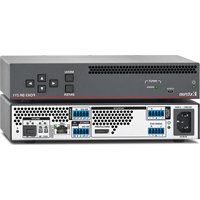
| Dimensions (H x W x D) | 4.4 cm x 22.0 cm x 15.2 cm |
| Weight | 0.6 kg |
| Enclosure | Metal chassis with ventilation slots |
| Mounting | Rack-mountable with optional kit |
| Operating Temperature | 0 to 50 °C |
| Storage Temperature | -20 to 70 °C |
| Compliance | CE, UL, RoHS |
| Warranty | Extron 3-year parts and labor |
Frequently Asked Questions - FOX3 SR 321 Extron
What is the maximum extension distance of the FOX3 SR 321?
The FOX3 SR 321 supports extension distances up to 30 km over singlemode fiber. The actual distance depends on the fiber type and link budget.
Can I connect DVI sources to the FOX3 SR 321?
Yes, the unit accepts DVI signals by using a DVI-to-HDMI adapter. The embedded TMDS signals are compatible with HDMI inputs.
Does the FOX3 SR 321 support Power over Fiber (PoC)?
Yes, the FOX3 SR 321 provides Power over Cable (PoC) to the transmitter, reducing the need for a separate power supply at the remote end.
How do I select the input source on the FOX3 SR 321?
Input selection can be done manually via the front panel buttons, or remotely through RS-232, Ethernet, or IP control. The last selected input is retained in memory.
Can I control the device via RS-232?
Yes, the FOX3 SR 321 features a bidirectional RS-232 control port. It allows integration with third-party control systems for switching and configuration.
What do the LED indicators on the front panel mean?
The front-panel LEDs indicate power status, signal presence, and link status for each input. A green LED confirms an active signal, while a blinking LED may indicate an error.
Is the unit wall-mountable?
Yes, the compact metal enclosure includes mounting holes for wall or furniture mounting. An optional rack-mount kit is also available for standard 19-inch racks.
What power supply is required for the FOX3 SR 321?
The unit requires an external 12 V DC power supply rated at 1 A (12 W). Extron recommends using the included power adapter to ensure proper operation.
How should I clean the FOX3 SR 321?
Use a soft, dry cloth to wipe the exterior. Do not use liquid cleaners, sprays, or abrasive materials to avoid damaging the finish or internal components.
What is the warranty period for this product?
Extron provides a 3-year limited warranty covering parts and labor. For full details, refer to the warranty statement in the user manual or contact Extron support.
User questions about FOX3 SR 321 Extron
0 question about this device. Answer the ones you know or ask your own.
Ask a new question about this device
No questions yet. Be the first to ask one.
Download the instructions for your Audio/video extension in PDF format for free! Find your manual FOX3 SR 321 - Extron and take your electronic device back in hand. On this page are published all the documents necessary for the use of your device. FOX3 SR 321 by Extron.
USER MANUAL FOX3 SR 321 Extron

Manual assistant
Powered by Anthropic
Waiting for your message
Product information
Brand : Extron
Model : FOX3 SR 321
Category : Audio/video extension