TE-2021 - Turntable TANLANIN - Free user manual and instructions
Find the device manual for free TE-2021 TANLANIN in PDF.


Pick your language and provide your email: we'll send you a specifically translated version.
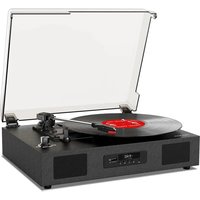
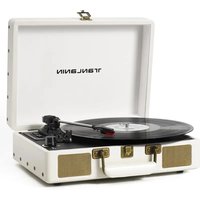
| Product Type | Turntable (Record Player) |
| Brand | TANLANIN |
| Model | TE-2021 |
| Drive System | Belt drive |
| Speeds | 33 1/3 and 45 RPM |
| Platter | Aluminum platter |
| Tonearm | Balanced tonearm with adjustable counterweight |
| Cartridge | Magnetic (MM) cartridge |
| Built-in Phono Preamp | Yes, selectable for line or phono output |
| Output | RCA line out, 3.5mm headphone jack |
| Bluetooth | Built-in Bluetooth 5.0 for wireless streaming |
| Power Supply | 12V DC adapter (included) |
| Dimensions (W x D x H) | Approx. 420 x 360 x 110 mm |
| Weight | Approx. 3.5 kg |
| Material | MDF and durable plastic |
| Additional Functions | Auto-stop, pitch control, dust cover included |
| Cleaning and Maintenance | Dust with a soft dry cloth; replace stylus when worn |
| Safety | Avoid moisture, unplug during storms or long periods of inactivity |
| Spare Parts | Replacement stylus and drive belt available |
| Repairability | Accessible bottom panel for easy maintenance |
Frequently Asked Questions - TE-2021 TANLANIN
How do I set up the TANLANIN TE-2021 turntable?
Place the turntable on a flat, stable surface. Remove the shipping screw (if present), connect the power adapter, and plug in the RCA cables to your receiver or active speakers. If your system lacks a phono input, set the preamp switch to 'LINE'.
Why does the turntable play at the wrong speed?
Check that the speed selector is set correctly (33 or 45 RPM) and that the belt is properly seated on the platter. A worn or loose belt can cause speed inconsistencies.
How do I connect the turntable to Bluetooth speakers?
Turn on the turntable and enable Bluetooth on your speaker. Press the Bluetooth button on the turntable to enter pairing mode, then select 'TANLANIN TE-2021' from your speaker's device list.
Can I replace the stylus on the TE-2021?
Yes, the stylus is user-replaceable. Gently pull the old stylus forward and out, then push the new stylus into place until it clicks. Use a compatible MM cartridge stylus for best sound.
Why is there no sound coming from my speakers?
Ensure the preamp switch is set to 'PHONO' only if your amplifier has a phono input; otherwise set it to 'LINE'. Check that the RCA cables are fully connected to the correct inputs and that the speakers are turned on.
How do I clean the turntable and records?
Use a soft, lint-free cloth to wipe the dust cover and platter. For records, use an anti-static brush in a circular motion. Avoid using alcohol or harsh chemicals on the turntable surfaces.
Does the TE-2021 have an automatic stop feature?
Yes, the auto-stop feature lifts the tonearm at the end of the record to prevent unnecessary wear. If you want continuous play, you can disable it using the switch on the side.
Can I play 78 RPM records on this turntable?
No, the TE-2021 supports only 33 1/3 and 45 RPM records. Playing a 78 RPM disc may harm the stylus and record.
How do I adjust the tonearm counterweight?
Slide the counterweight to the rear of the tonearm. Rotate it until the tonearm floats horizontally, then set the tracking force dial to the recommended weight for your cartridge (typically 2-3 grams).
What should I do if the platter doesn't turn?
Check the belt connection: remove the platter and ensure the belt is looped around both the motor pulley and the platter rim. Also verify that the power adapter is plugged in and the switch is on.
User questions about TE-2021 TANLANIN
0 question about this device. Answer the ones you know or ask your own.
Ask a new question about this device
No questions yet. Be the first to ask one.
Download the instructions for your Turntable in PDF format for free! Find your manual TE-2021 - TANLANIN and take your electronic device back in hand. On this page are published all the documents necessary for the use of your device. TE-2021 by TANLANIN.
USER MANUAL TE-2021 TANLANIN

Manual assistant
Powered by Anthropic
Waiting for your message
Product information
Brand : TANLANIN
Model : TE-2021
Category : Turntable