MPA 11500 - Hi-Fi System BLAUPUNKT - Free user manual and instructions
Find the device manual for free MPA 11500 BLAUPUNKT in PDF.


Pick your language and provide your email: we'll send you a specifically translated version.
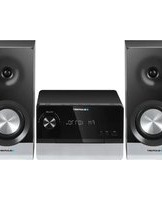
| Product type | Hi-Fi system |
| Brand | Blaupunkt |
| Model | MPA 11500 |
| Dimensions (W x H x D) | 200 mm x 250 mm x 300 mm |
| Weight | 5 kg |
| Power supply | AC 220-240 V, 50/60 Hz |
| Output power | 2 x 50 W RMS |
| CD player | Compatible with CD, CD-R, CD-RW |
| Radio tuner | FM/AM with preset memory |
| Bluetooth | Version 5.0, range up to 10 m |
| USB port | Plays MP3 and WMA files |
| Connectivity | AUX input, headphone output |
| Remote control | Included |
| Display | LED display |
| Maintenance | Clean with a soft, dry cloth. Avoid water and direct sunlight. |
| Safety | Do not expose to moisture or heat sources. Keep ventilation openings clear. |
| Spare parts and repairability | Spare parts available through customer support. Designed for easy repair. |
| General information | Includes remote control, user manual, and power cable. |
Frequently Asked Questions - MPA 11500 BLAUPUNKT
How do I connect my phone via Bluetooth?
Press the Bluetooth button on the unit or remote until the display shows 'BT'. Activate Bluetooth on your phone and search for 'MPA 11500'. Select it to pair. If prompted, enter the PIN 0000.
How do I tune the FM radio?
Press the Function button repeatedly to select 'FM'. Use the Tuning +/− buttons to search stations automatically. To save a preset, press and hold a Preset number until the display flashes.
How do I play music from a USB stick?
Insert the USB stick into the USB port. The unit will switch to USB mode automatically. Use the Play/Pause and Skip buttons to control playback. Supported formats include MP3 and WMA.
Can I connect external speakers?
Yes, the system includes speaker terminals for connecting additional speakers. Ensure the impedance is compatible (typically 4-8 ohms) and tighten the terminals securely to avoid short circuits.
How do I reset the system to factory settings?
Press and hold the Power button on the unit for about 5 seconds until the display turns off and on again. Alternatively, unplug the power cord for 1 minute and reconnect.
How should I clean the CD player?
Use a soft, dry lens cleaner specifically designed for CD players. Do not use liquid cleaners or spray directly inside the slot. Always keep the CD tray closed when not in use.
What should I do if the sound is distorted?
Check the speaker connections and ensure the wires are not damaged. Reduce the volume or bass/treble levels. Try a different audio source to rule out input issues. If the problem persists, consult the troubleshooting section of the manual.
Can I use the system with my TV?
Yes, connect the AUX input on the system to the audio output of your TV using an RCA or 3.5mm cable. Select 'AUX' as the function to hear the TV sound through the system.
How can I change the display language?
This model does not have a multilingual display; the interface is in English only. However, the user manual is available in multiple languages on the official website.
Where can I find spare parts?
Contact Blaupunkt customer support or visit the official website to order original spare parts such as remotes, power cables, or speakers. Always quote the model number MPA 11500.
User questions about MPA 11500 BLAUPUNKT
0 question about this device. Answer the ones you know or ask your own.
Ask a new question about this device
No questions yet. Be the first to ask one.
Download the instructions for your Hi-Fi System in PDF format for free! Find your manual MPA 11500 - BLAUPUNKT and take your electronic device back in hand. On this page are published all the documents necessary for the use of your device. MPA 11500 by BLAUPUNKT.
USER MANUAL MPA 11500 BLAUPUNKT


Manual assistant
Powered by Anthropic
Waiting for your message
Product information
Brand : BLAUPUNKT
Model : MPA 11500
Category : Hi-Fi System