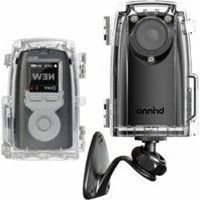
AFB1000 - Uncategorized Brinno - Free user manual and instructions
Find the device manual for free AFB1000 Brinno in PDF.


Pick your language and provide your email: we'll send you a specifically translated version.
| Product type | Compact camera |
| Brand | Brinno |
| Model | AFB1000 |
| Primary function | Birdhouse monitoring and wildlife observation |
| Image sensor | 1/4-inch CMOS sensor |
| Video resolution | 1280x720 pixels (HD) |
| Field of view | 90 degrees |
| Night vision | Automatic infrared LED illumination |
| Motion detection | PIR sensor for triggered recording |
| Time-lapse function | Adjustable intervals (1, 5, 10 seconds) |
| Storage media | SD/SDHC card (up to 32GB) |
| Power source | 4 AA batteries or USB 5V external power |
| Battery life | Up to 2 weeks with intermittent capture |
| Housing | Weatherproof and dust resistant |
| Mounting | Adjustable bracket included |
| Dimensions | 100 x 70 x 55 mm |
| Weight | 150 grams (without batteries) |
| Operating temperature | 0°C to 40°C |
| Accessories included | Bracket, USB cable, quick start guide |
Frequently Asked Questions - AFB1000 Brinno
What is the Brinno AFB1000 used for?
The Brinno AFB1000 is a compact birdhouse camera designed for wildlife monitoring. It captures birds and other animals with high-definition video and time-lapse modes.
How do I install the AFB1000 in a birdhouse?
Position the camera inside the birdhouse with the lens facing the nest. Use the mounting bracket to secure it in place. Ensure the camera is powered and contains a formatted SD card with sufficient free space.
What power source does the AFB1000 require?
The camera can be powered by 4 AA batteries (not included) or via an external 5V USB power supply for continuous operation. Battery power is suitable for remote locations.
How do I set up time-lapse recording?
Press the mode button to select the time-lapse mode. Then choose the capture interval (1, 5, or 10 seconds) using the control buttons. Once configured, the camera automatically records a sequence of photos.
How do I view the recorded footage?
Remove the SD card from the camera and insert it into a computer or card reader. You can also connect the camera to a computer using the USB cable to access files directly.
Is the AFB1000 weatherproof?
Yes, the AFB1000 features a weatherproof housing that protects it from rain and dust. It is suitable for outdoor installation in birdhouses and similar environments.
How do I clean the camera lens?
Gently wipe the lens with a soft, dry cloth. For the external housing, use a slightly damp cloth with mild soap. Never use harsh chemicals or submerge the camera in water.
How long does the battery last?
With normal time-lapse recording and AA alkaline batteries, the AFB1000 can last up to two weeks. Battery life depends on the interval set and the frequency of motion-triggered events.
Can I use the AFB1000 at night?
Absolutely. The camera has infrared LEDs that automatically activate in low-light conditions, enabling night vision without disturbing wildlife.
What should I do if the camera is not recording?
Check that an SD card is inserted and formatted, the batteries are charged, and the recording mode is correctly set. If issues persist, reset the camera to factory defaults and try again.
User questions about AFB1000 Brinno
0 question about this device. Answer the ones you know or ask your own.
Ask a new question about this device
No questions yet. Be the first to ask one.
Download the instructions for your Uncategorized in PDF format for free! Find your manual AFB1000 - Brinno and take your electronic device back in hand. On this page are published all the documents necessary for the use of your device. AFB1000 by Brinno.
USER MANUAL AFB1000 Brinno
Manual assistant
Powered by Anthropic
Waiting for your message
Product information
Brand : Brinno
Model : AFB1000
Category : Uncategorized