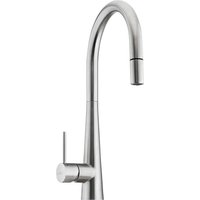
MT0039 - Faucet Oliveri - Free user manual and instructions
Find the device manual for free MT0039 Oliveri in PDF.


Pick your language and provide your email: we'll send you a specifically translated version.
| Brand | Oliveri |
| Model | MT0039 |
| Product Type | Faucet |
| Material | Brass |
| Finish | Chrome |
| Mounting Type | Deck Mount |
| Handle Type | Single Lever |
| Water Supply | Hot and Cold |
| Connection Size | 1/2 inch |
| Operating Pressure | 1–5 bar (0.1–0.5 MPa) |
| Spout Height | 150 mm |
| Spout Reach | 180 mm |
| Flow Rate | 6 L/min at 3 bar |
| Net Weight | 1.5 kg |
| Installation | DIY with basic tools |
| Cartridge | Ceramic 35 mm |
| Aerator | Removable aerator |
| Maintenance | Clean with a soft damp cloth |
| Safety | Lead-free materials |
| Spare Parts | Cartridge and aerator available |
| Warranty | 5 years |
| Package Contents | Faucet, mounting hardware, installation guide |
Frequently Asked Questions - MT0039 Oliveri
How do I install the Oliveri MT0039 faucet?
Ensure the water supply is turned off. Apply plumber's tape to the 1/2 inch threads, insert the faucet through the deck hole, and tighten the mounting nut from below. Connect the hot and cold water lines, then turn on the water and check for leaks.
What tools are required for installation?
You will need an adjustable wrench, basin wrench, screwdriver, plumber's tape, and a bucket to catch residual water.
How do I connect the water supply lines?
Connect the flexible supply hoses to the threaded stubs of the faucet. Use a 1/2 inch connection and tighten carefully with a wrench. Ensure hot water is connected to the left and cold to the right.
Why does my faucet leak from the spout?
A leak from the spout usually indicates a worn or damaged cartridge. Remove the handle, unscrew the packing nut, and replace the ceramic cartridge with a new 35 mm cartridge.
How do I replace the cartridge?
Turn off the water supply, remove the handle and cover cap, unscrew the brass nut, extract the cartridge, and install a new one. Check for proper alignment and reassemble.
How do I clean the faucet properly?
Wipe the exterior with a soft damp cloth and mild soap. Avoid abrasive cleaners that may scratch the chrome finish. Rinse with clear water and dry with a soft towel.
Is the faucet compatible with low-pressure systems?
Yes, the faucet operates at a minimum pressure of 1 bar (0.1 MPa). It should work with most gravity-fed and mains-pressure systems.
What is the recommended water pressure?
The recommended operating pressure is between 1 and 5 bar (0.1–0.5 MPa). Pressures above 5 bar require a pressure-reducing valve.
How do I remove the aerator for cleaning?
Unscrew the aerator at the spout tip using a wrench or by hand. Soak it in vinegar to remove mineral deposits, then rinse and reinstall it.
Does the faucet come with a warranty?
Yes, the Oliveri MT0039 includes a 5-year warranty covering manufacturing defects. Keep your purchase receipt for claims.
User questions about MT0039 Oliveri
0 question about this device. Answer the ones you know or ask your own.
Ask a new question about this device
No questions yet. Be the first to ask one.
Download the instructions for your Faucet in PDF format for free! Find your manual MT0039 - Oliveri and take your electronic device back in hand. On this page are published all the documents necessary for the use of your device. MT0039 by Oliveri.
USER MANUAL MT0039 Oliveri
Manual assistant
Powered by Anthropic
Waiting for your message
Product information
Brand : Oliveri
Model : MT0039
Category : Faucet