VT800B - Gps CLARION - Free user manual and instructions
Find the device manual for free VT800B CLARION in PDF.


Pick your language and provide your email: we'll send you a specifically translated version.
| Product Type | Portable GPS Navigation System |
| Brand | Clarion |
| Model | VT800B |
| Category | Car GPS / Satellite Navigation |
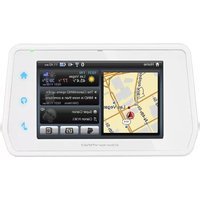
| Display Size | 7 inches TFT LCD touchscreen |
| Display Resolution | 800 × 480 pixels |
| GPS Chipset | High-sensitivity SiRF Star III receiver |
| Preloaded Maps | North America (US and Canada) with 2-year updates |
| Voice Guidance | Turn-by-turn spoken directions |
| Points of Interest (POI) | Built-in database with over 2 million locations |
| Battery | Rechargeable lithium-ion, up to 3 hours continuous use |
| Power Supply | 12V DC cigarette lighter adapter included |
| Connectivity | MicroSD card slot (supports up to 32GB), USB 2.0 port |
| Mount | Windshield suction cup mount included |
| Dimensions (W × H × D) | 176 × 112 × 20 mm |
| Weight | Approximately 250 g |
| Operating Temperature | 0°C to 45°C (32°F to 113°F) |
| Maintenance and Cleaning | Wipe the screen and body with a soft, dry cloth; avoid using liquid cleaners |
| Safety | Designed for safe mount on windshield; use only in lower corner to avoid obstructing view |
| Spare Parts and Repairability | Non-user-serviceable; authorized Clarion service centers for repairs |
Frequently Asked Questions - VT800B CLARION
How do I update the maps on my Clarion VT800B?
You can update the maps by downloading the latest map packs from the Clarion support website to a MicroSD card, then inserting the card into the device and following the on-screen instructions.
The GPS signal is not being found. How can I fix it?
Make sure you are in an open area, away from tall buildings or tunnels. Try resetting the GPS by pressing the reset button for a few seconds, or check if the GPS antenna is properly connected.
How do I charge the VT800B battery?
Connect the included 12V car adapter to the power port and plug it into the cigarette lighter. The battery will charge automatically while the device is powered on or off.
Can I use the device as a regular touchscreen without navigation?
Yes, the VT800B can be used to view photos, play media, or manage files via the USB and MicroSD slots. Its main menu includes options beyond navigation.
How do I set a home address?
Go to the Main Menu, select My Home, then press and hold the Save button. Choose 'Set as Home' and enter the desired address.
Why is the device not turning on?
Check that the battery is charged or that the car adapter is properly connected. Try pressing and holding the Power button for 10 seconds to force a restart.
How do I reset the device to factory defaults?
Open the Settings menu, select System Restore and choose 'Factory Defaults'. Confirm the action to erase all personal data and reset the device.
Can I plan a route with multiple stops?
Yes, you can add waypoints to your route. In the navigation screen, select 'Route Options' and 'Add Stop', then search for the additional destinations.
How do I adjust the volume of voice guidance?
During navigation, press the speaker icon on the map screen to open the volume slider. You can also adjust it in the Settings > 'Volume' menu.
Is the windshield mount secure for long drives?
The suction cup mount should be attached to a clean, dry windshield and the locking lever pressed firmly. Check the mount periodically and reposition if necessary.
User questions about VT800B CLARION
0 question about this device. Answer the ones you know or ask your own.
Ask a new question about this device
No questions yet. Be the first to ask one.
Download the instructions for your Gps in PDF format for free! Find your manual VT800B - CLARION and take your electronic device back in hand. On this page are published all the documents necessary for the use of your device. VT800B by CLARION.
USER MANUAL VT800B CLARION


Manual assistant
Powered by Anthropic
Waiting for your message
Product information
Brand : CLARION
Model : VT800B
Category : Gps