Digi-Loop PLA DL210NET - Receiver Williams Sound - Free user manual and instructions
Find the device manual for free Digi-Loop PLA DL210NET Williams Sound in PDF.


Pick your language and provide your email: we'll send you a specifically translated version.
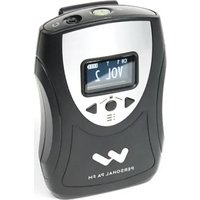
| Type of product | Induction loop receiver |
| Brand | Williams Sound |
| Model | Digi-Loop PLA DL210NET |
| Category | Receiver |
| Frequency response | 100 Hz to 15 kHz |
| Signal-to-noise ratio | 75 dB |
| Battery type | AAA Alkaline (3 x 1.5V) |
| Battery life | Up to 25 hours continuous use |
| Power consumption | Standby: 10 mA, Active: 30 mA |
| Connector type | 3.5 mm mono headphone jack |
| Weight | 0.12 kg (4.2 oz) |
| Dimensions (W x H x D) | 60 x 70 x 25 mm (2.4 x 2.8 x 1.0 in) |
| Compatibility | Works with Digi-Loop systems and other induction loop transmitters |
| Controls | Power/volume dial, channel selector (A/B) |
| LED indicators | Power on, low battery warning |
| Operating temperature range | 0°C to 40°C (32°F to 104°F) |
| Storage temperature range | -20°C to 55°C (-4°F to 131°F) |
| Warranty | 2-year limited warranty |
| Maintenance and cleaning | Clean with a soft dry cloth; avoid moisture and solvents |
| Safety | Complies with FCC Part 15 and CE standards |
| Spare parts and repairability | Replaceable battery and headphone cable; serviceable by certified technicians |
| General information | Designed for clear audio in assistive listening applications |
Frequently Asked Questions - Digi-Loop PLA DL210NET Williams Sound
How do I turn on the Digi-Loop PLA DL210NET receiver?
Twist the volume dial clockwise until you hear a click. The LED indicator will light up green to show the device is on. Adjust the volume to your preferred level.
What type of battery does the DL210NET use and how long does it last?
The receiver uses three AAA alkaline batteries. They provide up to 25 hours of continuous use, depending on volume level and transmitter conditions.
How can I change the batteries in the DL210NET?
Slide the battery cover off the back of the receiver. Remove the old AAA batteries and insert new ones, matching the + and - symbols. Slide the cover back until it clicks into place.
What does the LED indicator mean when it blinks red?
A blinking red LED indicates low battery. You should replace the batteries soon to avoid interruption. The device may continue to operate for a short time, but performance may degrade.
Can I use the DL210NET with any induction loop system?
The DL210NET is compatible with Williams Sound Digi-Loop systems and other standard induction loop transmitters operating in the same frequency range. Always check the transmitter's compatibility.
How do I select a different channel on the receiver?
Use the channel selector switch located on the side of the device. Switch between A and B to receive different audio sources if the transmitter supports multiple channels.
What is the best way to clean and maintain the receiver?
Wipe the exterior with a soft, dry cloth. Do not use liquids or chemical cleaners. Keep the devices dry and store it in a protective case when not in use.
Is the DL210NET compatible with hearing aids?
Yes, the receiver converts audio into a magnetic signal that can be picked up by hearing aids set to the T (telecoil) position. You can also use the included earphone for direct listening.
What should I do if the receiver produces no sound?
Check that the receiver is powered on, the volume is not turned down, and the earphone/headset is firmly connected. Also verify that the transmitter is on and set to the same channel. If the problem persists, try new batteries.
Can I use a different earphone or headset with this receiver?
Yes, the device uses a standard 3.5 mm mono jack. You can use any compatible mono or stereo earphone; stereo earphones will still work, but the audio will be transmitted as a mono signal.
User questions about Digi-Loop PLA DL210NET Williams Sound
0 question about this device. Answer the ones you know or ask your own.
Ask a new question about this device
No questions yet. Be the first to ask one.
Download the instructions for your Receiver in PDF format for free! Find your manual Digi-Loop PLA DL210NET - Williams Sound and take your electronic device back in hand. On this page are published all the documents necessary for the use of your device. Digi-Loop PLA DL210NET by Williams Sound.
USER MANUAL Digi-Loop PLA DL210NET Williams Sound

Manual assistant
Powered by Anthropic
Waiting for your message
Product information
Brand : Williams Sound
Model : Digi-Loop PLA DL210NET
Category : Receiver