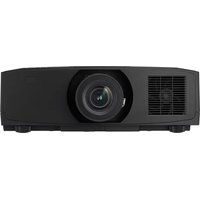
PG-F255W - Projector SHARP - Free user manual and instructions
Find the device manual for free PG-F255W SHARP in PDF.


Pick your language and provide your email: we'll send you a specifically translated version.
| Type of product | Projector |
| Brand | Sharp |
| Model | PG-F255W |
| Display technology | DLP |
| Native resolution | 1280 x 800 (WXGA) |
| Brightness | 2500 ANSI lumens |
| Contrast ratio | 2000:1 |
| Lamp life | Up to 3000 hours (normal mode), 4000 hours (eco mode) |
| Lens type | Manual zoom and focus |
| Projection size | 40 to 300 inches |
| Throw ratio | 1.5 - 1.8:1 |
| Keystone correction | ±40° vertical |
| Connectivity | HDMI, VGA, S-Video, composite, audio in/out |
| Built-in speaker | 1 x 5 watts |
| Remote control | Included with batteries |
| Power consumption | 260 watts maximum |
| Power supply | AC 100-240V, 50/60Hz |
| Dimensions (W x D x H) | 315 x 274 x 89 mm |
| Weight | 2.9 kg |
| Safety features | Overheat protection, auto power off |
| Maintenance | Clean air filter every 500 operating hours |
| Included accessories | Power cable, VGA cable, remote control, batteries, user manual |
Frequently Asked Questions - PG-F255W SHARP
How do I connect my laptop to the Sharp PG-F255W projector?
Use a VGA cable to connect the laptop's external monitor port to the projector's COMPUTER/COMPONENT input. Alternatively, you can use an HDMI cable for digital video and audio. Press the SOURCE button on the remote or control panel to select the correct input.
How do I adjust the keystone correction on the PG-F255W?
Press the KEYSTONE button on the remote control to display the adjustment screen. Use the ▲/▼ arrow keys to correct vertical distortion by up to ±40°. This helps square the image when the projector is placed at an angle.
What is the recommended lamp replacement interval?
The lamp should be replaced after 3000 hours of use in normal mode, or 4000 hours in eco mode. The projector will display a warning message when the lamp is approaching the end of its life.
Where is the best place to install the projector?
Place the projector at a distance from the screen that gives the desired image size, typically between 1.5 and 1.8 times the screen width. Ensure the projector is on a stable, flat surface and that the lens is at the same height as the top or bottom of the screen, using keystone correction if needed.
How do I clean the air filter on the PG-F255W?
Turn off the projector and unplug it. Locate the air filter on the side or bottom of the unit, remove it gently, and brush off dust with a soft brush or vacuum it. If the filter is very dirty, wash it with water and let it dry completely before reinserting. Clean it every 500 hours.
Can I use this projector for home theater?
Yes, the PG-F255W is suitable for home theater use. It offers 1280x800 native resolution and 2500 ANSI lumens, providing a bright and sharp image. Connect a Blu-ray player or streaming device via HDMI for the best picture quality.
How do I replace the lamp in the Sharp PG-F255W?
Turn off the projector and disconnect the power cable. Remove the lamp compartment cover using a screwdriver, then loosen the screws on the lamp module. Pull out the old lamp and insert a new Sharp approved lamp, then retighten the screws and close the cover. Reset the lamp timer in the menu after replacement.
Why is my projected image blurry?
First, adjust the focus ring on the lens. If the image remains blurry, check the projection distance – move the projector closer or farther away until the image is sharp. Also ensure the projector is not tilted too much or use keystone correction to improve the geometry.
Can I play audio through the projector's built-in speaker?
Yes, the projector has a 5-watt built-in speaker. Connect an audio source from your device using the AUDIO IN port, or use HDMI which carries audio. The sound will be output through the projector's speaker.
How do I perform a factory reset on the PG-F255W?
Use the MENU button to open the on-screen menu, go to SYSTEM SETUP, and select RESET. Choose ALL RESET to restore all settings to their factory defaults. Confirm when prompted.
User questions about PG-F255W SHARP
0 question about this device. Answer the ones you know or ask your own.
Ask a new question about this device
No questions yet. Be the first to ask one.
Download the instructions for your Projector in PDF format for free! Find your manual PG-F255W - SHARP and take your electronic device back in hand. On this page are published all the documents necessary for the use of your device. PG-F255W by SHARP.
USER MANUAL PG-F255W SHARP



Manual assistant
Powered by Anthropic
Waiting for your message
Product information
Brand : SHARP
Model : PG-F255W
Category : Projector