
CORVIC13 - Uncategorized CORONA - Free user manual and instructions
Find the device manual for free CORVIC13 CORONA in PDF.


| Brand | Corona |
| Model | CORVIC13 |
| Product Type | Portable Convection Heater |
| Power Consumption | 1300 W |
| Voltage | 220-240 V ~ 50/60 Hz |
| Heating Element | Aluminum finned heating element |
| Heat Settings | 2 settings (1, 2) |
| Thermostat | Adjustable temperature control |
| Safety Overheat Protection | Yes, automatic cut-off |
| Tip-Over Switch | Yes, automatic shutdown |
| Housing Material | Durable ABS plastic |
| Dimensions (H x W x D) | Approx. 45 x 25 x 10 cm |
| Weight | 2.2 kg |
| Cord Length | 1.5 meters |
| Indicator Light | Power and thermostat indicators |
| Control Type | Rotary dials |
| Noise Level | Low (under 40 dB) |
| Recommended Room Area | Up to 15 m² |
| Cleaning Method | Wipe with a soft, damp cloth; filter washable |
| Mounting | Freestanding legs with anti-slip base |
Frequently Asked Questions - CORVIC13 CORONA
User questions about CORVIC13 CORONA
0 question about this device. Answer the ones you know or ask your own.
Ask a new question about this device
Download the instructions for your Uncategorized in PDF format for free! Find your manual CORVIC13 - CORONA and take your electronic device back in hand. On this page are published all the documents necessary for the use of your device. CORVIC13 by CORONA.
USER MANUAL CORVIC13 CORONA
CareInstructionsandTips
-
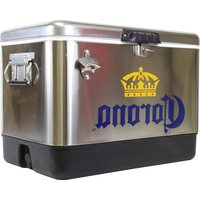
WATER AND A CLOTH. Routine cleaning can be accomplished by using warm water and a cloth. Dry the cooler with a towel or cloth to prevent water spots. This is very important, since minerals in water can leave marks. Microfiber cleaning cloths are in for cleaning, because they do a great job of absorbing all of the water without scraping the surface.
-
MILD DETERGENT, (DISH WASHING LIQUID) AND CLOTH. For cleaning that needs more power, mild detergent and warm water can do a great job without damaging stainless steel cooler exterior. A drop of mild dish detergent and warm water can help you get tougher dirt off of your stainless steel cooler exterior. Start with a small si warm water with a few drops of dish soap, or put a small drop of dish soap on a Add warm water to the cloth and rub the dish soap to create suds on your cleaning cloth. Wipe down the dirty area. After you've finished washing away the dirt, make you rinse the surface thoroughly to prevent staining and spotting. It is important to towel dry to prevent water spots, which can be caused by minerals in water.
-
GLASS CLEANER FOR FINGERPRINTS. Can be taken care of by using glass cleane household ammonia. No matter what you decide to use, spray the cleaner on a microfiber cloth rather than spraying directly onto the cooler exterior. With a cloth, wipe the stainless steel area gently in a circular motion to remove the finger prints Repeat as needed. Rinse thoroughly and towel dry.
Warranty
This product is warranted to the retail customer for 90 days from date of retail purchases against defects in material and workmanship.
WHAT IS COVERED
- Replacement parts and labor.
- Transportation charges to customer for the repaired product.
WHAT IS NOT COVERED
- Damage caused by abuse, accident, misuse, or neglect.
- Transportation of the unit or component from the customer to the Master Service Cen
IMPLIED WARRANTIES
Any implied warranties, including the implied warranty of merchantability are also limited to the duration of 90 days from the date of retail purchase.
WARRANTY REGISTRATION
Register on-line at www.koolatron.com AND keep the original, dated, sales receipt with this manual.
WARRANTY AND SERVICE PROCEDURE
If you have a problem with your unit, or require replacement parts, please direct all service related calls to Koolatron at the following number for assistance:
North America 1-800-265-8456
Master Service Centers are at these locations:
U.S.A.
4330 Commerce Dr.
Batavia, NY 14020-4102
Canada
139 Copernicus Blvd.
Brantford, ON N3P 1N4
A Master Service Center must perform all warranty work


Brand : CORONA
Model : CORVIC13
Category : Uncategorized