Mirage Gold 650W - Computer Adapter AeroCool - Free user manual and instructions
Find the device manual for free Mirage Gold 650W AeroCool in PDF.


Pick your language and provide your email: we'll send you a specifically translated version.
| Product Type | ATX Computer Power Supply |
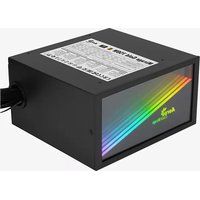
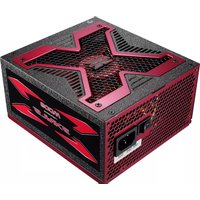
| Model | Mirage Gold 650W |
| Brand | AeroCool |
| Power Rating | 650W |
| Efficiency Rating | 80 PLUS Gold (up to 90%) |
| Form Factor | ATX |
| Dimensions (W x H x L) | 150 mm x 86 mm x 140 mm |
| Weight | 2.2 kg |
| Input Voltage Range | 100 - 240 V AC |
| Input Frequency Range | 50 - 60 Hz |
| Cooling Fan | 120 mm temperature-controlled fan |
| Modular Cabling | Fully modular |
| Connectors | 1x ATX 24-pin, 2x CPU 4+4 pin, 2x PCIe 6+2 pin, 6x SATA, 3x Molex |
| Protections | OVP, UVP, OCP, OPP, SCP, OTP |
| Certifications | CE, FCC, RoHS |
| Operating Temperature | 0°C - 40°C |
| Warranty | 5 years (estimated) |
| Package Contents | Power supply, power cord, mounting screws, cable ties, user manual |
| Compatibility | ATX cases and motherboards |
| Noise Level | Ultra-quiet under typical loads |
| Maintenance | Periodic dust removal with compressed air |
| Repairability | Replaceable fan and modular cables |
Frequently Asked Questions - Mirage Gold 650W AeroCool
What is the wattage rating of the AeroCool Mirage Gold 650W?
The AeroCool Mirage Gold 650W provides a total continuous power output of 650 watts, sufficient for most mid-range gaming and workstation builds.
Is this power supply fully modular?
Yes, the Mirage Gold 650W features a fully modular cabling system, allowing you to connect only the cables you need for a cleaner and better organized build.
What safety protections does the Mirage Gold 650W include?
It includes comprehensive protections: OVP (Over Voltage Protection), UVP (Under Voltage Protection), OCP (Over Current Protection), OPP (Over Power Protection), SCP (Short Circuit Protection), and OTP (Over Temperature Protection).
How do I install the power supply in my computer?
Ensure your PC is off and unplugged. Remove the side panel, disconnect the old PSU cables, unscrew and remove the old unit. Place the new Mirage Gold 650W in the PSU bay, screw it in, and connect the necessary 24-pin motherboard, CPU, and peripheral cables.
Does it come with all required cables?
Yes, the package includes ATX 24-pin, CPU, PCIe, SATA, and Molex cables, so you can power a wide range of components.
Can this PSU handle a high-end graphics card?
Yes, it features two 6+2 pin PCIe connectors, supporting most modern high-end GPUs up to around 300W power draw.
What is the efficiency rating of the Mirage Gold 650W?
It is 80 PLUS Gold certified, meaning it achieves up to 90% energy efficiency under typical loads, reducing heat and electricity costs.
How should I clean and maintain the power supply?
Always unplug the PSU from the wall outlet before cleaning. Use compressed air to remove dust from the fan and vents. Avoid liquid cleaners and never open the PSU casing.
Is the power supply quiet during operation?
Yes, it is equipped with a 120mm temperature-controlled fan that spins only as needed, keeping noise levels very low under typical workloads.
What should I do if my computer shuts down unexpectedly?
Check all cable connections and ensure the power switch is ON. Verify that your total component load does not exceed 650W. Test with another wall socket and try the paperclip test to confirm the PSU works alone.
User questions about Mirage Gold 650W AeroCool
0 question about this device. Answer the ones you know or ask your own.
Ask a new question about this device
No questions yet. Be the first to ask one.
Download the instructions for your Computer Adapter in PDF format for free! Find your manual Mirage Gold 650W - AeroCool and take your electronic device back in hand. On this page are published all the documents necessary for the use of your device. Mirage Gold 650W by AeroCool.
USER MANUAL Mirage Gold 650W AeroCool


Manual assistant
Powered by Anthropic
Waiting for your message
Product information
Brand : AeroCool
Model : Mirage Gold 650W
Category : Computer Adapter