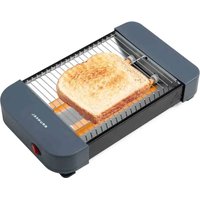
TS-40EASYTOAST - Toaster Grunkel - Free user manual and instructions
Find the device manual for free TS-40EASYTOAST Grunkel in PDF.


Pick your language and provide your email: we'll send you a specifically translated version.
| Product Type | Toaster |
| Brand | Grunkel |
| Model | TS-40EASYTOAST |
| Number of Slots | 2 |
| Power Consumption | 850 W |
| Power Supply | 220-240 V ~ 50/60 Hz |
| Dimensions (L x W x H) | 25 x 18 x 20 cm |
| Weight | 1.2 kg |
| Control Type | Lever with electronic functions |
| Browning Control | 6 levels |
| Defrost Function | Yes |
| Reheat Function | Yes |
| Cancel Function | Yes |
| Auto Pop-up | Yes |
| Removable Crumb Tray | Yes |
| Housing Material | Stainless steel |
| Safety Features | Overheat protection, non-slip base |
| Cleaning | Removable crumb tray, wipe exterior |
| Spare Parts Availability | Crumb tray, heating elements |
| Repairability | Accessible internal parts, repair manual available |
| Warranty | 2 years |
Frequently Asked Questions - TS-40EASYTOAST Grunkel
How do I clean my Grunkel TS-40EASYTOAST toaster?
Always unplug the toaster and let it cool. Remove the crumb tray and empty it. Wipe the exterior with a damp cloth. Do not immerse in water.
How does the defrost function work?
The defrost function lowers the toasting time for frozen bread. Press the defrost button after setting your desired browning level.
How do I adjust the browning level?
Use the browning control dial to select from 1 to 6. Setting 1 is light toast, 6 is dark toast.
What is the reheat function for?
The reheat function warms already toasted bread without additional browning. Press the reheat button to activate.
Why does my toaster make a clicking sound?
A clicking sound is normal as the pop-up mechanism engages. Persistent clicking may indicate crumbs in the mechanism; empty the crumb tray.
Can I toast bagels in this toaster?
Yes, the wide slots accommodate bagels. Use a lower browning setting and monitor during toasting.
How do I replace the crumb tray?
Slide the removable crumb tray out from the bottom, empty it, and push it back in. Replacement trays are available.
Is it safe to leave the toaster plugged in?
Unplugging is recommended when not in use. The toaster has auto shut-off and overheat protection for safety.
What should I do if bread gets stuck?
Unplug the toaster and let it cool. Gently remove the bread with a wooden or plastic utensil. Avoid metal objects.
Does the toaster have a warranty?
Yes, it comes with a 2-year warranty covering manufacturing defects. Keep your receipt.
User questions about TS-40EASYTOAST Grunkel
0 question about this device. Answer the ones you know or ask your own.
Ask a new question about this device
No questions yet. Be the first to ask one.
Download the instructions for your Toaster in PDF format for free! Find your manual TS-40EASYTOAST - Grunkel and take your electronic device back in hand. On this page are published all the documents necessary for the use of your device. TS-40EASYTOAST by Grunkel.
USER MANUAL TS-40EASYTOAST Grunkel
Manual assistant
Powered by Anthropic
Waiting for your message
Product information
Brand : Grunkel
Model : TS-40EASYTOAST
Category : Toaster