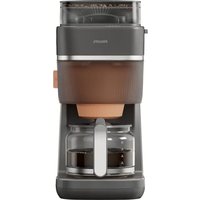
Walita RI7460 - Coffee maker PHILIPS - Free user manual and instructions
Find the device manual for free Walita RI7460 PHILIPS in PDF.


Pick your language and provide your email: we'll send you a specifically translated version.
| Product Type | Coffee Maker |
| Brand | Philips Walita |
| Model | RI7460 |
| Dimensions (W x D x H) | 23 x 24 x 32 cm |
| Weight | 1.4 kg |
| Power Consumption | 850 W |
| Voltage | 220-240 V |
| Capacity | 1.25 L (10 cups) |
| Brewing System | Drip filter |
| Keep Warm Function | Yes, automatic |
| Auto Shut-off | Yes, after 2 hours |
| Drip-stop Function | Yes |
| Water Level Indicator | Yes, transparent window |
| Filter Type | Permanent or paper filter (size 4) |
| Removable Filter Basket | Yes |
| Carafe Material | Glass |
| Carafe Capacity | 1.25 L |
| Anti-drip Design | Yes |
| Cleaning | Removable parts dishwasher safe; descaling recommended regularly |
| Safety Features | Auto shut-off, overheating protection |
| Spare Parts Available | Carafe, filter basket, lid, water tank |
| Repairability | User-replaceable parts; professional repair for electronics |
| Certifications | CE, EMF |
Frequently Asked Questions - Walita RI7460 PHILIPS
How do I descale my Philips Walita RI7460 coffee maker?
Mix 1 part white vinegar with 2 parts water and fill the water tank. Run a brewing cycle without coffee grounds. Repeat with fresh water to rinse. For best results, descale every 2-3 months.
What type of filter should I use?
You can use a permanent filter (included) or standard size 4 paper filters. Paper filters provide cleaner coffee; permanent is more economical.
Why is my coffee maker not brewing?
Check that the water tank is filled, the filter basket is properly placed, and the carafe is securely on the hotplate. Ensure the power cord is plugged in and the outlet is working.
How do I clean the carafe?
Wash the glass carafe with warm soapy water and a soft sponge. It is also dishwasher safe. For stubborn stains, use a mixture of baking soda and water.
Can I use the coffee maker without a filter?
No, you must use a filter (permanent or paper) to prevent coffee grounds from entering the carafe. Using without a filter may cause clogging.
How do I prevent the coffee from tasting bitter?
Use medium-coarse grind coffee, avoid over-extraction by not brewing too long, and clean the machine regularly. Scale buildup can also cause bitterness.
What is the capacity of the water tank?
The water tank holds up to 1.25 liters, which brews approximately 10 cups of coffee (125 ml each).
Does the coffee maker have an auto shut-off feature?
Yes, the Philips Walita RI7460 automatically shuts off after 2 hours of inactivity for safety and energy saving.
Can I use the coffee maker to make tea?
It is designed for coffee only. Using it for tea may leave flavors and residues. However, you can run a cleaning cycle after making tea.
Where can I buy spare parts like a new carafe?
You can purchase genuine Philips spare parts from authorized dealers or online retailers. Look for the RI7460 model.
User questions about Walita RI7460 PHILIPS
0 question about this device. Answer the ones you know or ask your own.
Ask a new question about this device
No questions yet. Be the first to ask one.
Download the instructions for your Coffee maker in PDF format for free! Find your manual Walita RI7460 - PHILIPS and take your electronic device back in hand. On this page are published all the documents necessary for the use of your device. Walita RI7460 by PHILIPS.
USER MANUAL Walita RI7460 PHILIPS
Manual assistant
Powered by Anthropic
Waiting for your message
Product information
Brand : PHILIPS
Model : Walita RI7460
Category : Coffee maker