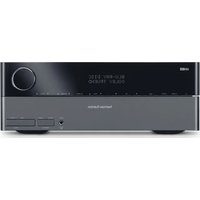
TC400Q - Receiver HARMAN KARDON - Free user manual and instructions
Find the device manual for free TC400Q HARMAN KARDON in PDF.


Pick your language and provide your email: we'll send you a specifically translated version.
| Product Type | FM/AM Stereo Receiver |
| Brand | Harman Kardon |
| Model | TC400Q |
| Dimensions (W x H x D) | 440 x 130 x 360 mm |
| Weight | 9.5 kg |
| Power Output (RMS) | 80 watts per channel into 8 ohms (20 Hz - 20 kHz, both channels driven) |
| Total Harmonic Distortion | 0.08% |
| Frequency Response | 10 Hz - 40 kHz (±0.5 dB) |
| Signal-to-Noise Ratio | 95 dB (IHF-A) |
| Input Sensitivity/Impedance | 150 mV / 47 kΩ (line) |
| FM Sensitivity | 14.8 dBf (mono) |
| Audio Inputs | 4 line inputs (including CD, Tuner, Aux, Tape), 1 phono input (MM) |
| Audio Outputs | 2 tape outputs, pre-amp output, subwoofer output |
| Speaker Impedance Range | 4 - 16 ohms |
| Tuner Presets | 30 AM / 30 FM presets |
| Remote Control | Infrared remote included (6-key basic control) |
| Power Consumption | 350 W (maximum), 30 W standby |
| Power Supply | AC 120 V / 60 Hz (US model) |
| Finish | Black anodized aluminum faceplate |
| Maintenance & Cleaning | Clean with soft, dry cloth; avoid solvents. Keep ventilation slots free of dust. |
| Safety | Do not expose to moisture; ensure adequate ventilation; use with grounded outlet. |
| Spare Parts & Repairability | Contact Harman Kardon service centers; some parts available online. Repair by qualified technicians only. |
Frequently Asked Questions - TC400Q HARMAN KARDON
How do I connect my speakers to the Harman Kardon TC400Q?
Use speaker cables with bare wire or banana plugs. Connect to the Speaker A or B terminals on the back panel, matching polarity (+ to +, - to -). Ensure speaker impedance is between 4 and 16 ohms.
Can I use the receiver with a turntable?
Yes, the TC400Q has a dedicated Phono input compatible with moving magnet (MM) cartridges. Connect your turntable's ground wire to the GND terminal to minimize hum.
Why is there no sound from the speakers?
Check if the receiver is in Speaker ON mode (button on front panel). Ensure the input source is selected correctly and volume is turned up. Also verify speaker connections and that the speakers are not damaged.
How do I set the FM radio presets?
Tune to the desired station manually or via scan. Press and hold the Memory button on the front panel until the preset number flashes. Use the tuning knob to select a preset number (1-30) and press Memory again to save.
What type of remote control does the TC400Q use?
The receiver comes with a basic infrared remote that controls power, volume, input selection, and mute. It requires two AAA batteries (not included).
How can I improve FM reception?
Use the FM dipole antenna included with the receiver. For best results, extend it fully and place it in a window or high location. Avoid metallic obstacles. You can also connect an outdoor FM antenna to the 75 ohm terminal.
What is the power consumption in standby mode?
The TC400Q consumes approximately 30 watts in standby mode. For energy saving, it is recommended to turn off the unit completely when not in use for extended periods.
Can I connect a subwoofer to this receiver?
Yes, there is a subwoofer output (RCA) on the back panel. Connect an active subwoofer using a shielded RCA cable. The output signal is full-range; use the subwoofer's low-pass filter.
How do I clean the receiver's faceplate?
Turn off and unplug the receiver. Gently wipe the faceplate with a soft, lint-free cloth slightly dampened with water. Do not use alcohol, ammonia, or abrasive cleaners. Dry immediately.
Is there a protection mode? What triggers it?
Yes, the receiver has overload protection. It may shut off if a short circuit occurs at the speaker terminals, if the receiver overheats, or if the power supply is unstable. Solutions include checking speaker wires, ensuring ventilation, or plugging into a different outlet.
User questions about TC400Q HARMAN KARDON
0 question about this device. Answer the ones you know or ask your own.
Ask a new question about this device
No questions yet. Be the first to ask one.
Download the instructions for your Receiver in PDF format for free! Find your manual TC400Q - HARMAN KARDON and take your electronic device back in hand. On this page are published all the documents necessary for the use of your device. TC400Q by HARMAN KARDON.
USER MANUAL TC400Q HARMAN KARDON

Manual assistant
Powered by Anthropic
Waiting for your message
Product information
Brand : HARMAN KARDON
Model : TC400Q
Category : Receiver