MBC - Uncategorized Rupert Neve Designs - Free user manual and instructions
Find the device manual for free MBC Rupert Neve Designs in PDF.


Pick your language and provide your email: we'll send you a specifically translated version.
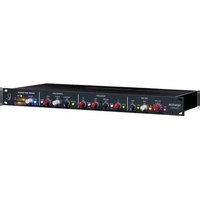
| Product Type | Master Bus Compressor |
| Brand | Rupert Neve Designs |
| Model | MBC |
| Channels | 2 (Stereo) |
| Circuit Design | Class-A discrete transformer-coupled |
| Compression Type | VCA-based with custom control |
| Frequency Response | 20 Hz – 20 kHz ±0.5 dB |
| Maximum Input Level | +26 dBu |
| Dimensions (W x H x D) | 19 x 1.75 x 10 inches (rack unit) |
| Weight | 3.6 kg (8 lbs) |
| Power Requirement | 100-240 VAC, 50/60 Hz, 30 W |
| Main Features | Threshold, Ratio, Attack, Release, Makeup Gain, Sidechain HPF, Blend (Wet/Dry), Output Level |
| Controls | Rotary knobs and switches on front panel |
| I/O Connectors | XLR balanced input and output |
| Sidechain | External sidechain input (TRS) |
| Metering | LED ladder for gain reduction and output level |
| Bypass | True bypass relay |
| Chassis Material | Steel with black anodized aluminum front panel |
| Operating Temperature | 0°C to 40°C (32°F to 104°F) |
| Maintenance | Keep clean with dry cloth; avoid liquids |
| Safety | Class I product – ground connection required |
| Spare Parts / Repair | Contact authorized service center |
| Warranty | 5 years limited (parts and labor) |
| Manual Languages | English (PDF downloadable) |
| Included Accessories | Power cable, user manual |
Frequently Asked Questions - MBC Rupert Neve Designs
What does MBC stand for in Rupert Neve Designs MBC?
MBC stands for Master Bus Compressor, a high-end stereo compressor designed for final mix bus processing.
How do I connect the MBC to my audio interface?
Use balanced XLR cables to connect the output of your interface or mixer to the MBC inputs, and the MBC outputs to your monitoring system or recorder.
What is the recommended threshold setting for mastering?
Start with the threshold fully clockwise (no compression), then slowly turn counterclockwise until you see 2-4 dB of gain reduction on peaks. Adjust ratio (typically 1.5:1 to 2:1).
Can I use the blend control for parallel compression?
Yes, the Blend knob mixes dry and compressed signals in parallel, allowing you to preserve transients while adding density.
How do I engage the sidechain high-pass filter?
Press the Sidechain HPF switch to activate a high-pass filter at 120 Hz, preventing low frequencies from triggering compression.
What does the 'Link' switch do?
The Link switch couples the left and right channels so that compression is applied equally to both sides, maintaining stereo balance.
How do I clean the MBC?
Use a soft, dry cloth to wipe the front panel and chassis. Do not use any liquids or cleaning agents.
Is the MBC suitable for tracking or only for mixing?
While designed for mix bus use, the MBC can be used on individual tracks or subgroups for its smooth, musical compression.
What is the power consumption of the MBC?
The MBC consumes approximately 30 watts and operates on 100-240 VAC, 50/60 Hz.
Where can I find the latest user manual or firmware updates?
Visit the official Rupert Neve Designs website and navigate to the MBC product page for downloads. Manuals are also available on notice-facile.com.
User questions about MBC Rupert Neve Designs
0 question about this device. Answer the ones you know or ask your own.
Ask a new question about this device
No questions yet. Be the first to ask one.
Download the instructions for your Uncategorized in PDF format for free! Find your manual MBC - Rupert Neve Designs and take your electronic device back in hand. On this page are published all the documents necessary for the use of your device. MBC by Rupert Neve Designs.
USER MANUAL MBC Rupert Neve Designs

Manual assistant
Powered by Anthropic
Waiting for your message
Product information
Brand : Rupert Neve Designs
Model : MBC
Category : Uncategorized