VCM3 Pro - Microphone CKMOVA - Free user manual and instructions
Find the device manual for free VCM3 Pro CKMOVA in PDF.


Pick your language and provide your email: we'll send you a specifically translated version.
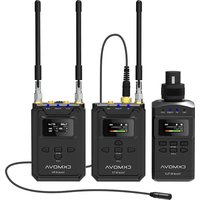
| Product Type | Wireless Lavalier Microphone System |
| Model | VCM3 Pro |
| Brand | CKMOVA |
| Transmitter Dimensions | Approx. 65 x 25 x 15 mm |
| Receiver Dimensions | Approx. 80 x 30 x 20 mm |
| Weight (Transmitter) | Approx. 30 g |
| Weight (Receiver) | Approx. 40 g |
| Power Supply | Built-in rechargeable lithium-ion battery |
| Battery Life | Up to 8 hours continuous use |
| Charging Interface | USB-C |
| Frequency Range | 2.4 GHz ISM band |
| Operating Range | Up to 100 meters (line of sight) |
| Microphone Type | Omnidirectional condenser lavalier |
| Audio Output | 3.5mm TRS |
| Latency | Less than 20 ms |
| Main Functions | Wireless audio transmission, mute, volume control, noise reduction |
| Cleaning and Maintenance | Wipe with a dry cloth; avoid moisture and extreme temperatures |
| Safety | Keep away from water; use specified charger only |
| Spare Parts and Repairability | Replacement windscreens and lavalier clips available; battery not user-replaceable |
| General Information | Designed for content creators, vloggers, and filmmakers |
Frequently Asked Questions - VCM3 Pro CKMOVA
How do I pair the transmitter with the receiver?
Turn on both units. They should automatically pair within a few seconds. If not, press the pairing button on both devices simultaneously.
What is the battery life of the VCM3 Pro?
The built-in battery lasts up to 8 hours on a full charge. Charging via USB-C takes about 2 hours.
Can I use the microphone with a smartphone?
Yes, the receiver has a 3.5mm output that can be connected to smartphones using a TRRS adapter (not included).
How far can the transmitter be from the receiver?
The operating range is up to 100 meters in open line of sight. Obstacles may reduce range.
Is the microphone compatible with DSLR cameras?
Yes, it connects via 3.5mm jack. Ensure your camera has a mic input.
How do I mute the microphone?
Press the mute button on the transmitter. The indicator will blink red when muted.
Can I use multiple transmitters with one receiver?
The VCM3 Pro supports single transmitter per receiver. For dual-person recording, use two VCM3 Pro sets.
What do I do if there is interference or noise?
Change the channel by pressing the channel button on the receiver. Ensure no other 2.4GHz devices are too close.
How to clean and maintain the microphone?
Wipe with a soft dry cloth. Store in a cool, dry place. Do not expose to liquids.
Where can I find replacement windscreens or clips?
Contact CKMOVA customer support or check authorized retailers for spare parts.
User questions about VCM3 Pro CKMOVA
0 question about this device. Answer the ones you know or ask your own.
Ask a new question about this device
No questions yet. Be the first to ask one.
Download the instructions for your Microphone in PDF format for free! Find your manual VCM3 Pro - CKMOVA and take your electronic device back in hand. On this page are published all the documents necessary for the use of your device. VCM3 Pro by CKMOVA.
USER MANUAL VCM3 Pro CKMOVA

Manual assistant
Powered by Anthropic
Waiting for your message
Product information
Brand : CKMOVA
Model : VCM3 Pro
Category : Microphone