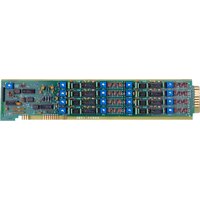
10A41-2C - Analog Input Card Daytronic - Free user manual and instructions
Find the device manual for free 10A41-2C Daytronic in PDF.


Pick your language and provide your email: we'll send you a specifically translated version.
| Product Type | Analog Input Card |
| Brand | Daytronic |
| Model | 10A41-2C |
| Number of Input Channels | 4 differential inputs |
| Input Voltage Range | ±10 V, ±5 V, ±1 V, ±100 mV (software selectable) |
| Resolution | 16 bits |
| Sampling Rate | Up to 100 kS/s (aggregate) |
| Input Impedance | 10 MΩ |
| Isolation | 500 V channel-to-system |
| Interface | PCI bus |
| Dimensions | 100 mm x 160 mm x 20 mm |
| Weight | 150 g |
| Power Supply | +5 V DC, 500 mA |
| Operating Temperature | 0 °C to +50 °C |
| Storage Temperature | -20 °C to +70 °C |
| Functions | High-speed analog data acquisition with programmable gain and offset calibration |
| Maintenance and Cleaning | Use a dry, anti-static cloth; avoid solvents and liquids. |
| Safety | ESD sensitive – handle with proper grounding; install in a powered-off computer. |
| Spare Parts and Repairability | Contact Daytronic support for spare parts; board-level repair not user-serviceable. |
| General Information | Part of the Daytronic 10A series; compatible with Windows/Linux data acquisition software. |
Frequently Asked Questions - 10A41-2C Daytronic
What is the Daytronic 10A41-2C?
The Daytronic 10A41-2C is a high-performance analog input card for PCI bus systems, offering 4 differential channels with 16-bit resolution and programmable input ranges.
What are the supported input voltage ranges?
The card supports software-selectable ranges: ±10 V, ±5 V, ±1 V, and ±100 mV, allowing flexibility for various sensor outputs.
How do I install the Daytronic 10A41-2C?
Installation involves powering off your computer, inserting the card into a free PCI slot, securing it, and installing the provided drivers. Ensure you follow ESD safety precautions.
Is the 10A41-2C compatible with 64-bit operating systems?
Yes, Daytronic provides drivers for both 32-bit and 64-bit versions of Windows and Linux. Check the manual for the latest driver downloads.
What software can be used with this card?
The card works with Daytronic's proprietary DASLab software as well as third-party applications like LabVIEW, MATLAB, and custom programs via the provided DLL/API.
How do I calibrate the analog inputs?
Calibration is software-assisted. Use the calibration utility provided with the driver to apply an accurate reference voltage to each channel and adjust the offset and gain coefficients.
What is the maximum sampling rate?
The aggregate sampling rate is up to 100 kS/s (kilo-samples per second), which can be distributed across channels.
Does the card provide isolated inputs?
Yes, the 10A41-2C features 500 V channel-to-system isolation to protect your computer from ground loops and transients.
Can I use this card for thermocouple measurements?
Yes, with appropriate external signal conditioning (e.g., thermocouple amplifiers) and the smallest input range (±100 mV), the card can accurately measure low-level signals.
Where can I find the user manual and support?
The user manual is available for free download on the Daytronic support website or via manual databases like notice-facile.com. For technical support, contact Daytronic directly.
User questions about 10A41-2C Daytronic
0 question about this device. Answer the ones you know or ask your own.
Ask a new question about this device
No questions yet. Be the first to ask one.
Download the instructions for your Analog Input Card in PDF format for free! Find your manual 10A41-2C - Daytronic and take your electronic device back in hand. On this page are published all the documents necessary for the use of your device. 10A41-2C by Daytronic.
USER MANUAL 10A41-2C Daytronic
Manual assistant
Powered by Anthropic
Waiting for your message
Product information
Brand : Daytronic
Model : 10A41-2C
Category : Analog Input Card