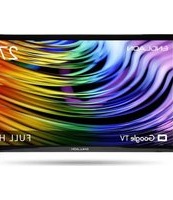
LED27M80 - Television Englaon - Free user manual and instructions
Find the device manual for free LED27M80 Englaon in PDF.


Pick your language and provide your email: we'll send you a specifically translated version.
| Product Type | LED Television |
| Model | LED27M80 |
| Brand | Englaon |
| Screen Size | 27 inches (68.6 cm) |
| Resolution | 1366 x 768 (HD Ready) |
| Refresh Rate | 60 Hz |
| Dimensions (without stand) | 620 x 370 x 80 mm |
| Weight (without stand) | 4.5 kg |
| Power Supply | AC 100-240V, 50/60Hz |
| Power Consumption (typical) | 35 W |
| Standby Power | < 0.5 W |
| Connectivity | HDMI, USB, VGA, AV, RF |
| Built-in Speakers | 2 x 3W |
| Wall Mount Compatible | VESA 100 x 100 mm |
| Remote Control | Included |
| Cleaning Instructions | Wipe with a soft dry cloth; do not use liquid cleaners |
| Energy Efficiency Class | A+ (EU) |
Frequently Asked Questions - LED27M80 Englaon
How do I connect external devices to my Englaon LED27M80 TV?
Use the HDMI port for high-definition devices like gaming consoles or streaming sticks. For older devices, use the AV input with a composite cable. The TV also has a USB port for media playback and a VGA port for computers.
Can I mount this TV on a wall?
Yes, the Englaon LED27M80 supports VESA 100x100 mm wall mounts. Use a compatible bracket and follow the wall mounting instructions in the manual.
How do I perform a factory reset?
Go to Settings > System > Reset or press Menu on the remote, navigate to Setup, and select Factory Reset. Enter the password (default 0000) if prompted.
What is the best picture setting for this TV?
For standard viewing, choose Standard mode. For movies, switch to Cinema or Movie mode. Adjust Brightness, Contrast, and Color to your preference.
Why is there no sound from my TV?
Check if the TV is muted or volume is low. Ensure external speakers are properly connected. Go to Sound Settings and verify the audio output is set to TV Speaker.
How do I update the firmware?
Insert a USB drive with the firmware file (downloaded from the support website) into the USB port. Go to Settings > System > Software Update and select USB Update.
What is the warranty period for this TV?
The Englaon LED27M80 typically comes with a 1-year limited warranty covering manufacturing defects. Check your purchase receipt or contact customer support for details.
Can I record TV programs?
This TV does not have a built-in PVR function. You can use an external USB recording device if supported, but it is not standard.
How do I clean the screen?
Turn off the TV and unplug it. Use a soft microfiber cloth slightly dampened with water. Gently wipe the screen in circular motions. Avoid using alcohol or abrasive cleaners.
What should I do if the TV won't turn on?
First, check the power cord connection and try a different outlet. If the standby light is off, the power supply may be faulty. If the light is on but the screen remains black, try a factory reset or contact Englaon support.
User questions about LED27M80 Englaon
0 question about this device. Answer the ones you know or ask your own.
Ask a new question about this device
No questions yet. Be the first to ask one.
Download the instructions for your Television in PDF format for free! Find your manual LED27M80 - Englaon and take your electronic device back in hand. On this page are published all the documents necessary for the use of your device. LED27M80 by Englaon.
USER MANUAL LED27M80 Englaon
Manual assistant
Powered by Anthropic
Waiting for your message
Product information
Brand : Englaon
Model : LED27M80
Category : Television