Clover - Heating Argoclima - Free user manual and instructions
Find the device manual for free Clover Argoclima in PDF.


Pick your language and provide your email: we'll send you a specifically translated version.
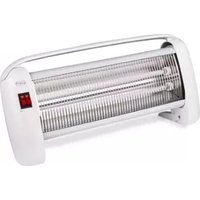
| Product Type | Fan Heater |
| Brand | Argoclima |
| Model | Clover |
| Dimensions (W x H x D) | 25 cm x 20 cm x 15 cm |
| Weight | 1.5 kg |
| Power Supply | AC 220-240 V, 50/60 Hz |
| Rated Power | 2000 W |
| Heating Modes | Fan only, Low heat (1000 W), High heat (2000 W) |
| Thermostat Control | Adjustable thermostat |
| Overheat Protection | Yes, automatic shut-off |
| Tip-over Protection | Yes, automatic shut-off |
| Housing Material | ABS plastic |
| Cooling Fan | Yes, for summer use |
| Noise Level | Approx. 45 dB |
| Cleaning | Unplug and wipe with a soft damp cloth; do not immerse |
| Filter | Washable rear filter |
| Safety Certifications | CE, RoHS |
| Repairability | Replaceable power cord and thermostat; spare parts available via service centers |
| Warranty | 2 years |
Frequently Asked Questions - Clover Argoclima
How do I clean the Argoclima Clover heater?
Always unplug the heater before cleaning. Use a soft, damp cloth to wipe the exterior. The rear filter can be removed and washed with mild soap and water. Allow it to dry completely before reinstalling. Do not use abrasive cleaners or immerse the heater in water.
Can I use the Clover heater in a bathroom?
This heater is not designed for bathroom use unless it is specifically rated for splash-proof environments. Always check the manual for IP rating. For safety, keep it away from water and moisture.
Why does the heater turn off by itself?
The heater has automatic safety features. It may turn off due to overheating, tip-over, or if the set temperature is reached. If it shuts off frequently, check for obstructions around the air intake and ensure it is on a stable surface.
What is the power consumption of the Clover heater?
The heater has two power settings: 1000 W (low) and 2000 W (high). At maximum setting, it consumes 2 kWh per hour of use. This information helps estimate running costs.
Does the Clover heater have a remote control?
The basic model does not include a remote control; all functions are controlled via buttons on the unit. Some advanced versions may include a remote; refer to your specific model's manual.
How do I adjust the thermostat?
Turn the thermostat dial clockwise to increase the desired room temperature. The heater will automatically cycle on and off to maintain the set temperature. The fan continues running when the heating element is off.
Can I leave the heater on overnight?
While the heater has safety features like overheat protection, it is not recommended to leave it unattended for long periods. If used overnight, ensure it is placed on a non-flammable surface away from curtains and bedding.
What should I do if the heater stops working?
First, check if it is plugged in properly and the power outlet is working. Ensure the filter is clean and not blocked. If the tip-over switch is activated, place it upright. If the problem persists, contact Argoclima customer support.
Is the Clover heater suitable for large rooms?
With 2000 W output, it is suitable for rooms up to approximately 20-25 m². For larger spaces, it may be used as a supplementary heater. Consider insulation and ceiling height for better efficiency.
How to store the heater when not in use?
Allow the heater to cool down completely. Clean the filter and exterior. Store in a cool, dry place away from direct sunlight and moisture. Keep the power cord loosely coiled to avoid damage.
User questions about Clover Argoclima
0 question about this device. Answer the ones you know or ask your own.
Ask a new question about this device
No questions yet. Be the first to ask one.
Download the instructions for your Heating in PDF format for free! Find your manual Clover - Argoclima and take your electronic device back in hand. On this page are published all the documents necessary for the use of your device. Clover by Argoclima.
USER MANUAL Clover Argoclima
Manual assistant
Powered by Anthropic
Waiting for your message
Product information
Brand : Argoclima
Model : Clover
Category : Heating