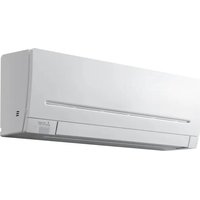
MSY-GW60VFD-A1 - Air Conditioning MITSUBISHI - Free user manual and instructions
Find the device manual for free MSY-GW60VFD-A1 MITSUBISHI in PDF.


Pick your language and provide your email: we'll send you a specifically translated version.
| Product Type | Split System Air Conditioner (Indoor Unit) |
| Brand | Mitsubishi |
| Model | MSY-GW60VFD-A1 |
| Cooling Capacity | 6.0 kW (20,500 BTU/h) |
| Heating Capacity | 6.8 kW (23,200 BTU/h) |
| Power Supply | 230 V ~ 50 Hz |
| Dimensions (Indoor Unit) | 880 x 309 x 234 mm (W x H x D) |
| Weight (Indoor Unit) | 14 kg |
| Refrigerant Type | R410A |
| Airflow Speeds | 4 speeds (Auto, Low, Medium, High) |
| Fan Motor Type | DC Inverter |
| Air Filter | Washable Mesh Filter |
| Noise Level (Indoor) | 25 - 45 dB(A) |
| Energy Efficiency Ratio (EER) | 3.2 (Cooling) |
| Operating Temperature Range (Cooling) | -10°C to 43°C |
| Operating Temperature Range (Heating) | -15°C to 24°C |
| Installation Type | Wall-mounted |
| Remote Control | Included (wired or wireless) |
| Warranty | 5 years (compressor), 2 years (parts) |
Frequently Asked Questions - MSY-GW60VFD-A1 MITSUBISHI
How often should I clean the air filter?
Clean the air filter every 2 weeks under normal usage. A dirty filter reduces efficiency and airflow. Remove the front panel, take out the filter, and wash it with water. Let it dry completely before reinserting.
What does the flashing 'POWER' light mean?
A flashing POWER light indicates a system error. Common causes include refrigerant leaks, sensor faults, or electrical issues. Turn off the unit and contact a qualified technician. Refer to the manual's error code table for details.
Can I use the air conditioner without the remote control?
Yes, the indoor unit has a manual Emergency Operation button. Press it to turn on/off or switch modes. However, full functionality requires the remote. You can also use a universal remote compatible with Mitsubishi systems.
Why is my air conditioner not cooling/heating effectively?
Check for dirty filters, blocked airflow, incorrect thermostat settings, or oversize/undersize unit relative to room. Also ensure the outdoor unit is not obstructed. If problem persists, refrigerant level may be low.
How do I set the timer to turn on/off?
Press the TIMER button on the remote. Use the +/- buttons to set desired time. Press SET to confirm. The unit will automatically start/stop at the scheduled time. Check the manual for advanced timer combinations.
What is the 'WIDE SWING' mode?
WIDE SWING oscillates the horizontal and vertical louvres simultaneously to distribute air evenly across the room. Press the SWING button until the display shows 'WIDE'. This mode is ideal for quick cooling or heating.
Is it normal for the outdoor unit to produce water?
Yes, during cooling mode the outdoor unit drains condensation. Ensure the drain hose is properly connected and not blocked. In heating mode, the outdoor unit may defrost and produce water or steam, which is normal.
How do I enable the SLEEP mode?
Press the SLEEP button on the remote. The temperature will gradually adjust to prevent overcooling/heating during the night. The fan speed reduces for quiet operation. To disable, press SLEEP again.
What does the 'CLEAN' indicator mean?
The CLEAN indicator flashes after a set number of operating hours to remind you to clean the air filter. After cleaning, press the CLEAN button on the remote or unit for 3 seconds to reset the indicator.
Can I install the unit myself?
Installation should be performed by a qualified professional. Improper installation can cause refrigerant leaks, electrical hazards, or reduced performance. The manual includes installation diagrams but requires specialized tools and expertise.
User questions about MSY-GW60VFD-A1 MITSUBISHI
0 question about this device. Answer the ones you know or ask your own.
Ask a new question about this device
No questions yet. Be the first to ask one.
Download the instructions for your Air Conditioning in PDF format for free! Find your manual MSY-GW60VFD-A1 - MITSUBISHI and take your electronic device back in hand. On this page are published all the documents necessary for the use of your device. MSY-GW60VFD-A1 by MITSUBISHI.
USER MANUAL MSY-GW60VFD-A1 MITSUBISHI
Manual assistant
Powered by Anthropic
Waiting for your message
Product information
Brand : MITSUBISHI
Model : MSY-GW60VFD-A1
Category : Air Conditioning