WM-70RT-01 - Wall mount Gembird - Free user manual and instructions
Find the device manual for free WM-70RT-01 Gembird in PDF.


Pick your language and provide your email: we'll send you a specifically translated version.
| Product Type | Wall Mount for Flat Screen TVs |
| Brand | Gembird |
| Model | WM-70RT-01 |
| Color | Black |
| Material | Steel |
| Max VESA Size | 400 x 400 mm |
| Weight Capacity | 50 kg (110 lbs) |
| Tilt Angle | +15° / -15° |
| Swivel Angle | ±30° |
| Profile Distance to Wall | 38 - 50 mm (1.5 - 2.0 in) |
| Overall Dimensions (W x H x D) | 560 x 240 x 55 mm |
| Net Weight | 2.5 kg |
| Package Content | Wall plate, TV brackets, hardware kit, spacers, level bubble, instructions |
| Compatible TV Sizes | 32" - 70" |
| Installation Type | Single stud or concrete wall |
| Safety Features | Anti-tip locks, cable management |
| Warranty | 2 years |
| Cleaning Instructions | Wipe with a damp cloth; do not use abrasive cleaners |
| Repairability | No user-serviceable parts; contact support |
Frequently Asked Questions - WM-70RT-01 Gembird
Is the Gembird WM-70RT-01 compatible with my TV?
Check your TV's VESA pattern (hole spacing) and weight. This mount supports VESA up to 400x400 mm and a maximum weight of 50 kg. It fits most 32" to 70" televisions.
What tools are needed for installation?
You will need a stud finder, drill, wrench or socket set, and a level. The included hardware kit contains screws, washers, and spacers.
Can I mount this on drywall?
Yes, but you must attach the wall plate to wood studs (preferably 16" or 24" on center). Do not mount directly to drywall alone; use appropriate anchors for brick or concrete walls.
Does the mount tilt and swivel?
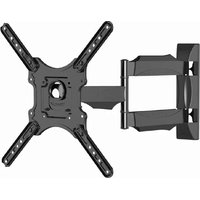
Yes, it offers ±15° tilt (to reduce glare) and ±30° swivel for flexible viewing angles. The mount also allows the TV to sit close to the wall.
How far will the TV sit from the wall?
The profile distance is approximately 38-50 mm (1.5-2.0 inches) when fully pushed back. You can adjust it slightly during installation.
Are cables included for management?
The mount features built-in cable management channels or clips to hide and route cables. No additional cable ties are needed.
What if my TV's VESA pattern is larger than 400x400?
This mount cannot accommodate VESA patterns larger than 400x400 mm. You will need a larger universal mount or one specifically designed for your TV size.
How do I clean the mount?
Wipe the mount with a soft damp cloth and mild soap if needed. Avoid abrasive cleaners or solvents that could damage the finish.
Is the mount safe for a heavy 70" TV?
Yes, as long as the TV weight does not exceed 50 kg and the wall is properly reinforced. Always ensure the mount is securely fastened to studs or concrete.
What is the warranty for the WM-70RT-01?
Gembird provides a 2-year warranty against manufacturing defects. Register your product on their website for extended support.
User questions about WM-70RT-01 Gembird
0 question about this device. Answer the ones you know or ask your own.
Ask a new question about this device
No questions yet. Be the first to ask one.
Download the instructions for your Wall mount in PDF format for free! Find your manual WM-70RT-01 - Gembird and take your electronic device back in hand. On this page are published all the documents necessary for the use of your device. WM-70RT-01 by Gembird.
USER MANUAL WM-70RT-01 Gembird

Manual assistant
Powered by Anthropic
Waiting for your message
Product information
Brand : Gembird
Model : WM-70RT-01
Category : Wall mount