PLCE09GFFWTG - Washing machine Philco - Free user manual and instructions
Find the device manual for free PLCE09GFFWTG Philco in PDF.


Pick your language and provide your email: we'll send you a specifically translated version.
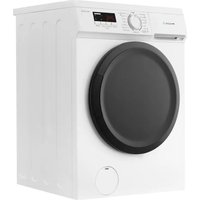
| Product Type | Washing Machine |
| Brand | Philco |
| Model | PLCE09GFFWTG |
| Capacity | 9 kg |
| Dimensions (H x W x D) | 850 x 600 x 600 mm |
| Weight | 70 kg |
| Power Supply | 220-240 V, 50 Hz |
| Energy Class | A+++ |
| Spin Speed | 1400 rpm |
| Noise Level (Wash/Spin) | 55 dB / 75 dB |
| Water Consumption per Cycle | 50 L |
| Number of Programs | 15 |
| Programs | Cotton, Synthetic, Delicates, Wool, Quick 15', Eco, etc. |
| Functions | Delay Start, Child Lock, Pre-wash, Extra Rinse |
| Drum Material | Stainless Steel |
| Display | LED Digital Display |
| Safety Features | Child Lock, Overflow Protection, Anti-flood System |
| Maintenance | Clean filter regularly, check drain pump, descale monthly |
| Spare Parts Availability | Replacement parts available from authorized service centers |
Frequently Asked Questions - PLCE09GFFWTG Philco
How do I start a wash cycle on the Philco PLCE09GFFWTG?
Ensure the door is closed, select the desired program using the program knob, adjust any settings (temperature, spin speed) as needed, then press the Start/Pause button.
What should I do if the machine doesn't drain water?
Check the drain hose for kinks or blockages. Clean the filter located at the bottom front of the machine. Ensure the drain pump is not obstructed. If problem persists, contact service.
Can I wash delicate fabrics like silk or wool in this machine?
Yes, use the dedicated Delicates or Wool program with cold water and low spin speed. Place delicate items in a laundry bag for extra protection.
How often should I clean the filter?
Clean the filter every 2-3 months or when you notice drainage issues. Regular cleaning prevents blockages and maintains performance.
What is the maximum load capacity for a cotton cycle?
The maximum load for cotton is 9 kg. Overloading can reduce cleaning efficiency and cause excessive vibration.
How do I activate the child lock?
Press and hold the Child Lock button for 3 seconds (usually indicated by a padlock icon). The lock will prevent accidental button presses during the cycle.
The machine is vibrating excessively. What could be wrong?
Ensure the machine is level and all four feet are in contact with the floor. Remove any transport bolts if not already done. Check that the load is balanced and not too heavy.
How do I run a self-clean cycle?
Use the Drum Clean program (if available) or run a hot cycle (90°C) with a descaling agent. This removes detergent residue and bacteria.
Can I pause and add laundry after the cycle has started?
Yes, if the door unlock condition is met (water level low and temperature safe). Press Start/Pause to pause, wait for door to unlock, add items, then press Start/Pause again.
What spare parts are available for the PLCE09GFFWTG?
Common spare parts include door seal, drain pump, filter, control board, and belt. Contact Philco service centers or authorized dealers for genuine parts.
User questions about PLCE09GFFWTG Philco
0 question about this device. Answer the ones you know or ask your own.
Ask a new question about this device
No questions yet. Be the first to ask one.
Download the instructions for your Washing machine in PDF format for free! Find your manual PLCE09GFFWTG - Philco and take your electronic device back in hand. On this page are published all the documents necessary for the use of your device. PLCE09GFFWTG by Philco.
USER MANUAL PLCE09GFFWTG Philco
Manual assistant
Powered by Anthropic
Waiting for your message
Product information
Brand : Philco
Model : PLCE09GFFWTG
Category : Washing machine