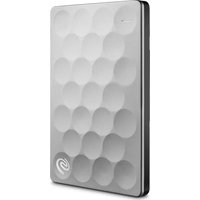
NAS OS 4 - External hard drive SEAGATE - Free user manual and instructions
Find the device manual for free NAS OS 4 SEAGATE in PDF.


Pick your language and provide your email: we'll send you a specifically translated version.
| Product Type | Network Attached Storage (NAS) External Hard Drive |
| Brand | Seagate |
| Model | NAS OS 4 |
| Dimensions (H x W x D) | 196 x 92 x 160 mm |
| Weight | 1.2 kg |
| Power Supply | 12V DC, 3A |
| Main Functions | File sharing, media streaming, automated backup, remote access, RAID support (JBOD/0/1) |
| Maintenance | Keep in cool, dry place; clean with soft, dry cloth; avoid dust accumulation |
| Safety | Do not expose to liquids; use only provided power adapter; unplug before cleaning |
| Spare Parts & Repairability | Power adapter and Ethernet cable available from Seagate; hard drive user-replaceable |
| General Information | Warranty: 2 years; firmware updates via Seagate Dashboard; supports Windows, macOS, Linux |
Frequently Asked Questions - NAS OS 4 SEAGATE
How do I set up my Seagate NAS OS 4 device?
Connect the device to your router via Ethernet, power it on, then install Seagate Dashboard on your computer to complete the setup.
What file systems does NAS OS 4 support?
It supports ext4 for internal volumes and NTFS, HFS+, FAT32 for external USB drives.
Can I access my files remotely?
Yes, enable Cloud Access in the settings and use the Seagate Mobile app or personal cloud URL.
How do I perform a backup to NAS OS 4?
Use Seagate Dashboard to schedule automatic backups from your PC or Mac, or use built-in rsync/SMB.
What is the default admin username and password?
The default username is admin and the password is admin (change immediately after first login).
How do I update the firmware?
Open Settings > System > Firmware Update and check for updates, or download from Seagate's support site.
Can I replace the hard drive in my NAS?
Yes, the drives are user-replaceable. Power off, remove the caddy, swap drives, and rebuild RAID via the dashboard.
Does NAS OS 4 support RAID?
Yes, it supports JBOD, RAID 0, and RAID 1 for two-bay models.
How do I reset the device to factory defaults?
Press and hold the reset button on the back for 10 seconds until the status light blinks orange. This erases all settings.
Is my NAS OS 4 compatible with Windows and Mac?
Yes, it works with Windows 7+, macOS 10.10+, and Linux via SMB, AFP, NFS, and FTP.
User questions about NAS OS 4 SEAGATE
0 question about this device. Answer the ones you know or ask your own.
Ask a new question about this device
No questions yet. Be the first to ask one.
Download the instructions for your External hard drive in PDF format for free! Find your manual NAS OS 4 - SEAGATE and take your electronic device back in hand. On this page are published all the documents necessary for the use of your device. NAS OS 4 by SEAGATE.
USER MANUAL NAS OS 4 SEAGATE


Manual assistant
Powered by Anthropic
Waiting for your message
Product information
Brand : SEAGATE
Model : NAS OS 4
Category : External hard drive