PRO-1410HD - Television PIONEER - Free user manual and instructions
Find the device manual for free PRO-1410HD PIONEER in PDF.


Pick your language and provide your email: we'll send you a specifically translated version.
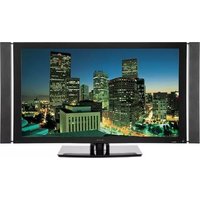
| Product Type | Television |
| Brand | Pioneer |
| Model | PRO-1410HD |
| Screen Size | 14 inches (diagonal) |
| Display Technology | Plasma |
| Resolution | 1366 x 768 (HD Ready) |
| Aspect Ratio | 16:9 |
| Inputs | 1 x HDMI, 1 x Component Video, 1 x Composite Video, 1 x VGA |
| Audio Output | Built-in stereo speakers (2 x 5W) |
| Power Consumption | 120 W (max) |
| Power Supply | AC 100-240 V, 50/60 Hz |
| Dimensions (with stand) | 13.2 x 10.5 x 7.0 inches (W x H x D) |
| Weight (with stand) | 12.1 lbs |
| Stand Included | Yes |
| Remote Control | Yes (included) |
| Cleaning Instructions | Use a soft, dry cloth. Do not use liquid cleaners. |
| Safety Precautions | Do not expose to moisture or heat sources. Disconnect power before cleaning. |
| Repair Information | Refer servicing to qualified personnel only. |
| Spare Parts Availability | Contact Pioneer authorized service centers for genuine parts. |
Frequently Asked Questions - PRO-1410HD PIONEER
How do I connect external devices to my Pioneer PRO-1410HD?
Use the HDMI port for HD devices, component video for analog HD, and composite video for standard definition. Refer to the input labels on the back panel.
How do I clean the screen of my Pioneer PRO-1410HD?
Use a soft, dry cloth to gently wipe the screen. Do not use water, ammonia, or abrasive cleaners, as they may damage the anti-glare coating.
Does the Pioneer PRO-1410HD have a built-in TV tuner?
This model likely includes an analog tuner (NTSC) and possibly a digital tuner (ATSC). Check the manual to confirm compatibility with your broadcast standard.
What is the maximum resolution supported by the PRO-1410HD?
The native resolution is 1366 x 768 pixels, supporting HD signals up to 720p. It can also accept 1080i signals but will downscale them.
How do I reset the Pioneer PRO-1410HD to factory settings?
Press the Menu button on the remote, navigate to Setup, select Reset, and confirm. This will erase all custom settings.
Can I wall-mount my Pioneer PRO-1410HD?
Yes, the PRO-1410HD is VESA mount compatible (likely 100 x 100 mm). Use a suitable wall mount kit and ensure the wall can support the weight.
What should I do if there is no power to the television?
Check that the power cord is securely plugged into both the TV and a working outlet. Also ensure the power switch on the TV (if present) is turned on.
How do I adjust the picture settings?
Press the Menu button, select Picture or Display, and adjust Brightness, Contrast, Color, and Sharpness to your preference.
Is there a headphone jack on the PRO-1410HD?
This model typically includes a 3.5 mm headphone output on the side or back panel for private listening.
Where can I find the serial number of my Pioneer PRO-1410HD?
The serial number is printed on a label on the back panel of the television. It is required for service and registration.
User questions about PRO-1410HD PIONEER
0 question about this device. Answer the ones you know or ask your own.
Ask a new question about this device
No questions yet. Be the first to ask one.
Download the instructions for your Television in PDF format for free! Find your manual PRO-1410HD - PIONEER and take your electronic device back in hand. On this page are published all the documents necessary for the use of your device. PRO-1410HD by PIONEER.
USER MANUAL PRO-1410HD PIONEER




Manual assistant
Powered by Anthropic
Waiting for your message
Product information
Brand : PIONEER
Model : PRO-1410HD
Category : Television