
CFD-50 - Hi-Fi System SONY - Free user manual and instructions
Find the device manual for free CFD-50 SONY in PDF.


| Type | Portable Stereo System |
| Brand | Sony |
| Model | CFD-50 |
| Dimensions (W x H x D) | 500 x 250 x 300 mm |
| Weight | 5.2 kg |
| Power Supply | AC 120-240V, 50/60 Hz or 8 D-size batteries (DC 12V) |
| Power Consumption | 25 W |
| Supported Media | CD, Cassette tape, AM/FM radio |
| CD Player | Yes, plays audio CDs |
| Cassette Deck | Yes, record and playback |
| Radio Bands | AM (530-1710 kHz), FM (87.5-108 MHz) |
| Speaker System | 2 full-range speakers, 5W each |
| Headphone Jack | Yes, 3.5mm stereo |
| Auxiliary Input | Yes, 3.5mm stereo |
| Antenna | Built-in ferrite bar (AM), telescopic rod (FM) |
| Display | Digital LED clock/tuner display |
| Remote Control | Not included |
| Maintenance | Clean with soft dry cloth; use isopropyl alcohol for cassette heads |
| Safety | Keep away from moisture; do not open the cabinet; unplug during storms |
| Repair & Spare Parts | Contact Sony authorized service center; some parts available online |
Frequently Asked Questions - CFD-50 SONY
User questions about CFD-50 SONY
0 question about this device. Answer the ones you know or ask your own.
Ask a new question about this device
Download the instructions for your Hi-Fi System in PDF format for free! Find your manual CFD-50 - SONY and take your electronic device back in hand. On this page are published all the documents necessary for the use of your device. CFD-50 by SONY.
USER MANUAL CFD-50 SONY
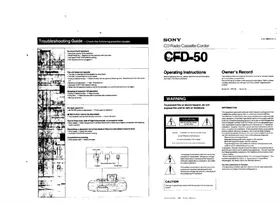
Troubleshooting Guide — Check the following possible causes.

No sound from speakers - Improper polarity of the batteries - Weak batteries → Replace all the batteries with new ones. - Improper FUNCTION selector setting. - The headphones are plugged in.
The unit does not operate - The disc is inserted with the labeled surface down. - The disc compartment lid is not closed. - Dusty or defective disc. — Clean the disc with an optional cleaning cloth. Wipe the disc from the center out. - Moisture condensation. → See "Precautions". - Improper FUNCTION selector setting. - When the CD operation buttons cannot be activated, turn off the unit and turn it on again.
Skipping of sound in CD operation - Dusty or defective disc. → Clean the disc. - Dirty lens. → Clean the lens with a commercially available blower. - Strong vibrations.
No tape operation • II PAUSE button is depressed. → Press again to release it
- REC button cannot be depressed. - The cassette inserted has the tabs removed. → Cover the slots.
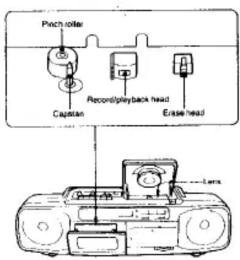
Sound drop-outs, loss of high frequencies, or excessive noise • Dirty heads → Clean the portions illustrated below with a cleaning tip slightly moistened with cleaning fluid or alcohol
Recording or playback cannot be made or there is a decrease in sound level. - Dirty heads → Clean the heads. - Improper FUNCTION selector setting Unsatisfactory erasing - Dirty erase head → Clean the head.
SONY CD Radio Cassette-Corder

Operating Instructions Before operating the unit, please read this manual thoroughly and retain it for future reference.
3-751-268-21(1) 19
Owner's Record
The model number is located at the bottom and serial number is located in the battery compartment. Record the serial number in the space provided below. Refer to these numbers whenever you call upon your Sony dealer regarding this product.
Model No. CFD-50 Serial No.
WARNING
To prevent fire or shock hazard, do not expose the unit to rain or moisture.
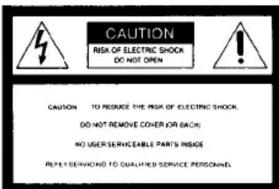

This symbol is intended to alert the user to the presence of uninsulated "dangerous voltage" within the product's enclosure that may be of sufficient magnitude to constitute a risk of electric shock to persons.
This symbol is intended to alert the user to the presence of important operating and maintenance (servicing) instructions in the literature accompanying the appliance.
CAUTION
The use of optical instruments with this product will increase eye hazard.
INFORMATION
This equipment generates and uses radio frequency energy and if not installed and used properly, that is, in strict accordance with the manufacturer's instructions, may cause interference to radio and television reception. It has been type tested and found to comply with the limits for a Class B computing device in accordance with the specifications in Subpart I of Part 15 of FCC Rules, which are designed to provide reasonable protection against such interference in a residential installation. However, there is no guarantee that interference will not occur in a particular installation. If this equipment does cause interference to radio or television reception, which can be determined by turning the equipment off and on, the user is encouraged to try to complete the equipment.
Reorient the receiving antenna. Relocate the equipment with respect to the receiver Move the equipment away from the receiver Plug the equipment into a different outlet so that equipment and receiver are on different branch circuits If necessary, the user should consult the dealer or an experienced radio/television technician for additional suggestions. The user may find the following booklet prepared by the Federal Communications Commission helpful: "How to identify and Resolve Radio TV Interference Problems". This booklet is available from the U.S. Government Printing Office, Washington, DC 20402, Stock No. 004-000-00345-4.
For the customers in Canada This apparatus complies with the Class B limits for radio noise emissions set out in Radio Interference Regulations.
Sony Corporations 1990 President in Malaysia

Information Display

Note
- Even if REMAIN/ENTER button is pressed, remaining time of the disc being played cannot be displayed when it has more than 100 selections and remains time in more than 100 minutes.
When it has more than 100 selections or 15 remaining time is more than 100 minutes.
* During shuttle or program play, remaining time of the disc is not displayed even if REMAIN/ENTER is pressed
Particular Portion

* AMS is the abbreviation of Automatic Music Sensor
Notes on the AMS function
- The player pauses at the beginning of the located selection when you press |◀ or ▶ in the pause mode
- If you guess it repeatedly, the player locates the previous selections.
If you guess it repeatedly, the players locate the next additions and step at the last selection.
Notes on compact discs

Selecting Various Playing Modes
Each time PLAY MODE is pressed, play mode changes as follows. To stop the disc press
Operate while listening to the disc. However, select INTRO scan play when disc is not being played.
| Play mode | Button to be pressed | Front display window |
| Press PLAY MODE once when disc is not being played. | ||
| PLAY MODE | ||
| Press > Scanning starts from the first selection. | ||
| PLAY | ||
| Press PLAY MODE once more while listening to the desired selection. | ||
| PLAY MODE | ||
| Press I and I for another selection. | ||
| Press PLAY MODE once more. When play reaches the end of the disc, it restarts from the first selection. | ||
| PLAY MODE | ||
| Press PLAY MODE once more. | ||
| PLAY MODE |
| 1 Press PLAY MODE once more. PLAY MODE | |
| 2 Choose the desired selection with ▶ or ▶ | |
| 3 Press REMAIN/ENTER REMAIN/ The selection is stored | |
| 4 Repeat steps ▶ and ▶ (Up to 16 selections) | |
| 5 Press PLAY disappears and play starts. | |
| 6 Press PLAY MODE once more. PLAY MODE | |
| 7 Repeat step ▶ to ▶ above. |
To return to normal play press PLAY MODE once more.
During REPEAT SHUFFLE play
To locate the beginning of the current
selection
Press
To locate the next selection
Pyrss
You cannot locate a previous selection even if you
keep prellning
When you open the disc holder or you press ■
All programmed selections are cleared
If another selection is stored after 15 selec-
tions have been stored
The first selection will be cleared and the new one will
The first design will be cleared and the new old are be stored in its place. The program will be cleared
when you press ■
Microphone mixing
Use a monaural microphone equipped with a miniplug (optional).

1

Turn on the power if it has a switch.
2
Choose the desired sound source with the FUNCTION selector.
| Sound source | FUNCTION selector |
| CD sound | CD |
| Radio program | AM or FM |
| Tape sound | TAPE (CD/RADIO QFF) |
3
Play the sound source and speak or sing into the microphone.
4

To record the mixed sound
Insert a cassette and only press ●. You can record the sound of the
microphone mixed with a CD or radio program.
Specifications
AUDIO POWER SPECIFICATIONS
POWER OUTPUT AND TOTAL HARMONIC DISTORTION
With 3.2-ohm loads, both channels driven from 150-15,000 Hz: rated 2.3 W per channel minimum
RMS power, with no more than 10% total harmonic distortion in AC operation.
OTHER SPECIFICATIONS
CD player section
System
Compact disc digital audio system
Material CaAlAs
Wavelength 780 nm Emission duration
Emission deviation: Contributions Laser output: less than 44.6 °W
* This output is the value measured at a distance of
about 200 mm from the objective lens surface on
the optical pick-up bit 20 - 20,000 Hz + 2 dB
20—20,000 Hz · GB Below measurable limit
1.2.3.
Radio section
Frequency range
Antesnas
FM: 87.6—108 MHz
AM: 530—1.710 kHz
FM: Telescope antenna AH: Built in service bar antenna
Tape recorder section and general
Recording system 4-track 2-channel stereo
Frequency response
(with TYPE (NORMAL) cassette)
Full-range speakers 10 cm dia. cone type
Power output
For Canada model
Full-range speakers: 2.3 W + 2.3 W (at 3.2 ohms) (10% harmonic distortion).
Using magnophore input is
Sensitivity 2.5 mV
For low up
Outputs
Headphones jack (stereo minijack
For 16 -68 ohms impedance headphones
Power requirements
120 V AC, 60 Hz
DC 9 V, 6 size D (R20) batteries
Power consumption
(hours)
| FM recording | Playback | |
| Sony SUM-1 (NS) | approx. 11 | approx. 8 |
| Sony Alkaline AM! (N) | approx. 17 | approx. 12 |
Dimensions
incl. projecting parts and controls
Apprual: 4.6 kg. incl. battery (Anonym: 10 lb.2 oz)
AC power cord (1)
Design and specifications subject to change without notice
OPTIONAL ACCESSORIES
Sony "MDR" headphone series
Sony "Dynamic microphone" series
Head demagnetizer HE-5C CD-cleaner: XR-CD1, XR-CD3, XR-CD4
CD/EBB- AF/EBT, AF/EBT, AF/EBT
Precautions
Notes on power sources
- For battery operation, use six size D (R20) batteries.
For AC operation (120 V AC only), use the supplied AC power cord.
do not use any other type.
- When the internal batteries will not be used, remove them to avoid
damage caused by battery leakage and corrosion.
- Unplug the unit from the wall outlet when it is not to be used for an extended period of time.
Notes on handling the unit
• As the laser beam used in the CD player section is harmful to the eyes, do not attempt to disassemble the casing. Refer servicing to qualified personnel only.
- If the unit is brought directly from a cold to a warm location, or is
placed in a very damp room, moisture may condense or the lenses inside the CD player section. Should this occur, the player will not operate properly. In this case, remove the disc and waitabout an
hour for the moisture to evaporate.
- Avoid exposure to temperature extremes, direct sunlight, dust,
mechanical shock
- If the unit is left in a car parked in the sun, be sure to choose a location in the car where the unit will not be subject to the direct rays of the sun.
- Should any solid object or liquid fall into the unit, unplug the unit, remove the batteries, and have the unit checked by qualified personnel before operating it any further.
- Be careful not to lift the handle while the telescopic antenna is in a
raised position.
• After long storage, set the unit in playback mode and warm it up for a
few minutes before inserting a cassette.
- Do not place anything within 10 mm of the side of the cabinet. The
ventilation holes must be unobstructed for the proper operation of
the unit and to prolong the life of its components.
- Since a strong magnet is used for the speakers, keep personal
credit cards using magnetic coding or spring-wound watches away
from the unit to prevent possible damage from the magnet
Note on cassettes longer than 90 minutes
The use of those cassettes is not recommended except for long continuous recording or playback.
If you have any question or problem concerning your unit please consult your nearest Sony dealer.
Power Sources
— The OPR/BATT indicator lights up during operation
House Current


The unit cannot be operated on the internal batteries when the AC power cord is connected to the unit.

For critical recording or disc playing
Operating the unit on AC power is recommended
When to replace the batteries
If the batteries become weak while the unit is in operation, the OPR/BATT indicator will glow faintly. In this case, replace all the batteries with new ones.
Playing Back a Tape

1

2
Insert a cassette.

→

3

4

To stop playback

To pause: Preis III
To please pause, press III again.
To wind the tape: Press
To rewind the tape: Press
To locate a desired position
Keep pressing ◀◀ or ▶▶ during play
At the desired point found by listening to the high-speed sound, release the pressed button to restart playing back.
Listening to the Radio

1
Select the desired band.

2

3

To turn off the radio

For improved reception

AM

When an FMstereo program is tuned in
FM STEREO indicator lights up
If the received FM stereo is too weak
The reception becomes monaural, and the FM STEREO indicator will go off.
Recording — Use only a TYPE I (normal) cassette for recording

1
Insert a cassette.

2

2

3

3

4

is depressed automatically
When you record from a disc, press ● REC after the number of the selections in the disc and the total playing time are displayed.
Disc playing will automatically start from the first selection after approx. 8 seconds.
To stop recording
Press ■ of the CD player and ■ ▲ of the cassette deck.
Set FUNCTION to TAPE (CD/RADIO OFF).
On recording level
Recording level is automatically set. Volume and tone adjustments will not affect recording level.
To record in PGM (program) mode
1 Set FUNCTION to CD.
2 Select PGM play (See "Selecting Various Playing Modes")
3 Press the ● REC button.
Disc playing and recording will automatically start after approx. 8 seconds.
To prevent accidental erasure
Break off the tab corresponding to the side which has been recorded on. Recording on that side will be protected.


- TROUBLESHOOTING GUIDE — CHECK THE FOLLOWING POSSIBLE CAUSES
- OWNER'S RECORD
- WARNING
- CAUTION
- INFORMATION
- SELECTING VARIOUS PLAYING MODES
- MICROPHONE MIXING
- SPECIFICATIONS
- AUDIO POWER SPECIFICATIONS
- OTHER SPECIFICATIONS
- OPTIONAL ACCESSORIES
- PRECAUTIONS
- NOTES ON POWER SOURCES
- NOTES ON HANDLING THE UNIT
- NOTE ON CASSETTES LONGER THAN 90 MINUTES
- POWER SOURCES
Brand : SONY
Model : CFD-50
Category : Hi-Fi System