
CDX-U500 - Car radio SONY - Free user manual and instructions
Find the device manual for free CDX-U500 SONY in PDF.
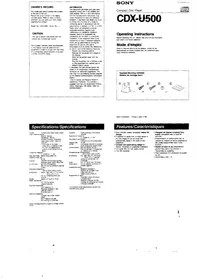


| Product Type | Car Radio / CD Receiver |
| Brand | Sony |
| Model | CDX-U500 |
| Dimensions (W x H x D) | 178 x 50 x 162 mm (Standard DIN) |
| Weight | 1.2 kg |
| Power Supply | 12 V DC (negative ground) |
| Maximum Power Output | 4 x 45 W |
| Playback Media | CD, CD-R, CD-RW |
| Tuner Bands | FM, AM |
| FM Tuner Frequency Range | 87.5 – 108.0 MHz |
| AM Tuner Frequency Range | 531 – 1602 kHz |
| Number of Preset Stations | 30 (FM18 + AM12) |
| Audio Features | CD Text, RDS, EQ presets, Bass/Treble control |
| Remote Control | Yes (included) |
| Display | LCD with backlight |
| Inputs | AUX input (3.5 mm) |
| Outputs | Preamp outputs (2 pairs), Antenna |
| Mounting | DIN sleeve or custom bracket |
| Maintenance | Clean with dry cloth; avoid liquids |
| Safety | Do not disassemble; keep away from moisture |
| Spare Parts & Repairability | Contact Sony service center for parts |
| General Information | Designed for 12V vehicle electrical systems |
Frequently Asked Questions - CDX-U500 SONY
User questions about CDX-U500 SONY
0 question about this device. Answer the ones you know or ask your own.
Ask a new question about this device
Download the instructions for your Car radio in PDF format for free! Find your manual CDX-U500 - SONY and take your electronic device back in hand. On this page are published all the documents necessary for the use of your device. CDX-U500 by SONY.
USER MANUAL CDX-U500 SONY
The model and serial numbers are located at the rear of the unit. Record the serial number in the space provided below. Refer to these numbers whenever you call upon your Sony dealer regarding this product.
Model No. CDX-U500 Serial No._
CAUTION
The use of optical instruments with this product will increase eye hazard.
The shielded interface cable recommended in this manual must be used with this equipment in order to comply with the limits for a computing device pursuant to Support J of Part 15 of FCC Rules.
INFORMATION
This equipment generates and uses radio frequency energy and if not installed and used properly that is, in fact accordance with the manufacturer's instructions, may cause interference to radio and television reception. It has been type tested and found to comply with the limits for a Class B computing device in accordance with the specifications in Subpart J of Part 15 of FCC Rules, which are designed to provide reasonable protection against such interference in a residential installation. However, there is no guarantee that interference will not occur in a particular installation. If the equipment does cause interference to radio or television reception, which can be determined by turning the equipment off and on, the user is encouraged to try to correct the interference by one or more of the following measures:
Reorient the receiving antenna Relocate the equipment with respect to the receiver Move the equipment away from the receiver Plug the equipment into a different route so that equipment and receiver are on different branch circuits.
If necessary, the user should consult the dealer or an experienced radio/television technician for additional suggestions. The user may find the following booklet prepared by the Federal Communications Commission helpful:
"How to identify and Resolve Radio-TV Interference Problems". This booklet is available from the U.S. Government Printing Office, Washington, DC 20402. Stock No. 004-000-00345-4.
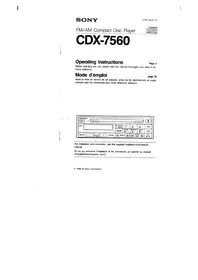
SONY
Compact Disc Player
[Unreadable]

CDX-U500
Operating Instructions
Before operating the unit, please read this manual thoroughly and retain it for future reference.
Mode d'emploi
Sony Corporation Printed in Japan € 1991
Specifications/Spécifications
System Compact disc digital audio system Laser diode properties
Material: QoAAs Wavelength: 780 nm Emission duration: Continuous Laser output power: Less than 44.6 μW* * This output is the value measured at a distance of 200 mm from the objective lens surface on the Optical Pick-up Block.
Frequency response
5 - 20,000 Hz ±1 dB Wow andutter Below measurable limit Signal-to-noise ratio
96 dB Outputs UNILINK control output (8 PIN) Analogue audio output (RCA PIN) Current drain 800 mA (CD playback) 800 mA (during loading or ejecting a disc)
Operating temperature - 10°C to 55°C (14°F to 131°F) Dimensions Approx. 305 x 88 x 177 mm (wind) (12½ x 3½ x 7 in.) not incl projecting parts and controls
Weight Approx 2.7 kg (5 lb 15 oz)
Power requirement 12 V DC car battery (negative ground)
Supplied accessories Disc magazine (1) Mounting hardware (1 SE) UNILINK cable (1) RCA PIN cord (1)
Optional accessories Compact disc single adaptor CSA-8 Disc magazine XA-10B CD cleaning kit COM-2BK
Design and specifications subject to change without notice.
Precautions/Précautions
- Avoid installing the unit in a place:
— subject to temperatures exceeding 55°C (131°F) (such as in a car parked in direct sunlight)
— subject to direct sunlight
— near heat sources (such as heaters)
-- exposed to rain or moisture
— imposed to excessive dust or dirt
— subject to excessive vibration - As the laser beam in this compact disc player is harmful to the eyes, do not attempt to disassemble the cabinet. Refer servicing to qualified personnel only.
On moisture condensation
On a rainy day or in a very damp area, moisture may condense on the lenses inside the unit. Should this occur, the unit will not operate properly. In this case, remove the disc and wait for about an hour until the moisture evaporates.
A dirty or defective disc causes sound drop-outs in playing. To enjoy optimum sound, handle the disc as follows.
Handle the disc by its edge, and to keep the disc clean, do not touch the surface without label.

Do not stick paper or tape on the labeled surface.
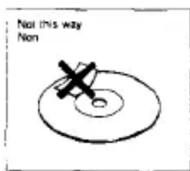
Do not expose the disc to direct sunlight or heat sources such as hot air ducts, or leave it in a car parked in the direct sunlight where there can be a considerable rise in the temperature.

Before playing, clean the disc with an optional cleaning cloth. Wipe the disc in the direction of the arrows.
Do not use solvents such as benzene, thinner, commercially available cleaners or antistatic spray intended for analog discs.

Notes on Disc Magazine
- Do not leave the magazine in locations with high-temperature and high-rumidity, such as on a car dashboard or at the rear window where the magazine will be subjected to direct sunlight.
- Do not insert more than one disc into one slot, otherwise the player and the discs will be damaged.
- Do not drop the magazine or subject it to a violent shock.
Use the unit with the door closed
Otherwise, foreign matter may enter the unit, and contaminate the lens in the player.
Notes
• To play a 3-inch CD, use the Sony CSA-8 adaptor (not supplied). Playing a 3-inch CD without the adaptor may damage the unit.
- When a disc magazine is inserted to the CDX-U500 or the reset button of the connected head unit is pressed, the unit will be automatically activated and read the information of the CDs. When the information of all the CDs in the disc magazine has been read, the unit will automatically stop the operation.
sution
/ore making connections, disconnected the und wire terminal of the car battery to avoid of electricals.
ote
- sure to use the supplied extension cord.
ring a cord other than supplied one may
use noise.
. details refer to the installation/connection
gual of each product
Attention
- Choose the mounting location carefully, observing the followings:
— The fuel tank should not be damaged by the tapping screws.
— There should be no wire harnesses nor pipelines under the place where you are going to install the unit.
— The spare tire, tools or other equipment in or under the trunk should not be unterreded with nor damaged by the screws or the unit itself. - Be sure to use only the supplied mounting hardware for a sale and secure installation
Before Installation
Remove the transit locks (screws) and put the supplied stickers (E) over the holes.
Priculations
How to Install the Unit

Horizontal installation
Vertical installation
Installation, vertical

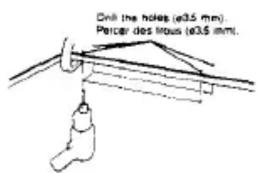
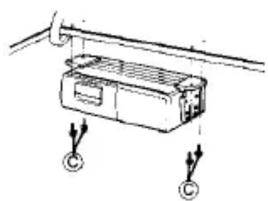
Suspended installation
When the unit is to be installed under the rear tray etc. in the trunk room, make sure that the following provisions are made.
- Choose the mounting location carefully so that the unit can be installed horizontally.
• Make sure that the unit does not hinder the movement of torsion bar spring etc. of the trunk lid.
Installation suspendue
2
3
- CAUTION
- INFORMATION
- SONY
- CDX-U
- OPERATING INSTRUCTIONS
- MODE D'EMPLOI
- SPECIFICATIONS/SPÉCIFICATIONS
- PRECAUTIONS/PRÉCAUTIONS
- ON MOISTURE CONDENSATION
- NOTES ON DISC MAGAZINE
- USE THE UNIT WITH THE DOOR CLOSED
- NOTES
- SUTION
- OTE
- ATTENTION
- BEFORE INSTALLATION
- PRICULATIONS
- HOW TO INSTALL THE UNIT
- SUSPENDED INSTALLATION
- INSTALLATION SUSPENDUE
Brand : SONY
Model : CDX-U500
Category : Car radio