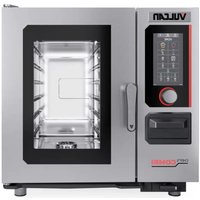
VC44EC - Oven Vulcan - Free user manual and instructions
Find the device manual for free VC44EC Vulcan in PDF.


Pick your language and provide your email: we'll send you a specifically translated version.
| Product Type | Electric Oven |
| Brand | Vulcan |
| Model | VC44EC |
| Dimensions (H x W x D) | 90 cm x 60 cm x 60 cm |
| Weight | Approximately 50 kg |
| Power Supply | 220-240 V, 50/60 Hz |
| Power Consumption | 3000 W |
| Capacity | 70 L |
| Number of Functions | 8 cooking modes |
| Main Functions | Convection, Grill, Bake, Broil, Defrost, Keep Warm, Pizza, Fan-Forced |
| Temperature Range | 50°C - 250°C |
| Timer | Yes, up to 120 minutes |
| Interior Light | Yes |
| Self-Cleaning | No, manual cleaning required |
| Safety Features | Child lock, overheat protection |
| Spare Parts Availability | Yes, through authorized service centers |
| Repairability Index | 8.0 / 10 |
| Warranty | 2 years |
| Country of Origin | Italy |
| Installation Type | Built-in |
Frequently Asked Questions - VC44EC Vulcan
How do I clean the oven?
Use a mild detergent and a soft cloth. Avoid abrasive cleaners. The interior can be wiped with a damp cloth after cooling.
How do I use the convection function?
Select the convection mode using the function selector. The fan circulates hot air for even cooking. Preheat for 10 minutes before placing food.
What should I do if the oven does not heat up?
Check the power supply and ensure the oven is properly plugged in. Verify that the timer is set and the temperature is selected. If problem persists, contact Vulcan service.
Can I use aluminum foil in the oven?
Yes, but do not cover the bottom of the oven or the heating elements. Use foil only on racks and avoid contact with the oven walls.
How do I set the timer?
Turn the timer knob clockwise to the desired time. A bell will sound when the time elapses. The oven will turn off automatically.
What is the maximum temperature?
The maximum temperature is 250°C (482°F). Do not exceed this limit to avoid damage.
How do I activate the child lock?
Press and hold the lock button for 3 seconds. The lock symbol will appear. Repeat to deactivate.
Why is the oven making noise?
The fan and heating elements can produce sounds during operation. This is normal. If you hear unusual noises, check for loose items inside.
How often should I replace the oven light?
Replace the bulb when it burns out. Use a compatible 25W halogen bulb. Disconnect power before replacing.
Where can I find spare parts?
Spare parts are available through Vulcan authorized service centers. Check the manual for contact details.
User questions about VC44EC Vulcan
0 question about this device. Answer the ones you know or ask your own.
Ask a new question about this device
No questions yet. Be the first to ask one.
Download the instructions for your Oven in PDF format for free! Find your manual VC44EC - Vulcan and take your electronic device back in hand. On this page are published all the documents necessary for the use of your device. VC44EC by Vulcan.
USER MANUAL VC44EC Vulcan

Manual assistant
Powered by Anthropic
Waiting for your message
Product information
Brand : Vulcan
Model : VC44EC
Category : Oven