BACKUPCAM-3 - Rear Camera Metra - Free user manual and instructions
Find the device manual for free BACKUPCAM-3 Metra in PDF.


Pick your language and provide your email: we'll send you a specifically translated version.
| Product Type | Rear View Backup Camera |
| Brand | Metra |
| Model | BACKUPCAM-3 |
| Image Sensor | CMOS Color |
| Resolution | 480p (NTSC/PAL) |
| Viewing Angle | 120° Diagonal |
| Night Vision | Yes (6 IR LEDs) |
| Waterproof Rating | IP68 |
| Power Supply | 12V DC |
| Power Consumption | 0.5W |
| Video Output | RCA Composite (CVBS) |
| Cable Length | 5 meters |
| Mounting Type | License Plate Frame |
| Dimensions (L x W x H) | 2.5 x 1.5 x 1.0 inches |
| Weight | 200 grams |
| Operating Temperature | -20°C to 60°C |
| Reverse Trigger | Yes (automatic activation) |
| Warranty | 1 Year Limited |
| Maintenance | Wipe with dry cloth. Avoid moisture inside. |
| Safety | For reversing aid only. Check surroundings manually. |
| Spare Parts | Not available individually; unit is sealed. |
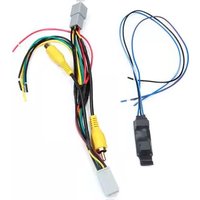
| General Info | Easy installation with included wiring harness. |
Frequently Asked Questions - BACKUPCAM-3 Metra
How do I install the Metra BACKUPCAM-3 rear camera?
Connect the camera's power wire to the reverse light circuit (12V) and ground the black wire. Route the video cable to the monitor/receiver's rear camera input. Mount the camera using the included license plate bracket.
What is the camera's resolution?
The camera has a resolution of 480p (NTSC or PAL, auto-switching).
Does this camera work at night?
Yes, it has 6 built-in IR LEDs for night vision, providing clear images in low light.
Is the camera weatherproof?
Yes, it has an IP68 rating, meaning it is dust-tight and can be submerged in water up to 1.5m for 30 minutes.
What type of video output does it have?
It uses standard RCA composite (CVBS) video output, compatible with most aftermarket monitors and head units.
How long is the cable?
The included cable is 5 meters (16.4 feet) long, sufficient for most vehicles.
Can I use this camera with a factory radio?
It works with aftermarket monitors or adapters that have composite video input. Some factory radios may require an interface module.
Why is the image showing a blue screen?
A blue screen usually means the camera is not receiving power or the video connection is faulty. Check the 12V supply and RCA connection.
Does the camera support a parking guide grid?
The camera does not generate a grid. Some aftermarket monitors can overlay grid lines if supported.
What is the field of view?
The camera has a 120° diagonal viewing angle, providing a wide view behind the vehicle.
User questions about BACKUPCAM-3 Metra
0 question about this device. Answer the ones you know or ask your own.
Ask a new question about this device
No questions yet. Be the first to ask one.
Download the instructions for your Rear Camera in PDF format for free! Find your manual BACKUPCAM-3 - Metra and take your electronic device back in hand. On this page are published all the documents necessary for the use of your device. BACKUPCAM-3 by Metra.
USER MANUAL BACKUPCAM-3 Metra
Manual assistant
Powered by Anthropic
Waiting for your message
Product information
Brand : Metra
Model : BACKUPCAM-3
Category : Rear Camera