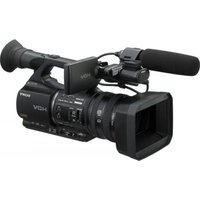
HXR-NX30U - Video camera SONY - Free user manual and instructions
Find the device manual for free HXR-NX30U SONY in PDF.


Pick your language and provide your email: we'll send you a specifically translated version.
| Product Type | Professional Handheld Camcorder |
| Model | HXR-NX30U |
| Brand | Sony |
| Dimensions (Approx.) | 192.5 x 132.0 x 233.5 mm (body only) |
| Weight (Approx.) | 2.4 kg (body only) |
| Power Supply | DC 7.2 V (battery pack) or DC 8.4 V (AC adapter) |
| Battery Type | Rechargeable lithium-ion battery pack (NP-F770 or NP-F970) |
| Image Sensor | 1/2.88-inch Exmor CMOS sensor |
| Effective Pixels | Approx. 6.63 megapixels (16:9) |
| Optical Zoom | 20x |
| Recording Format | AVCHD 2.0, MP4, DV |
| Built-in LED Light | Yes |
| Memory Card Slots | 2x SD/SDHC/SDXC, Memory Stick PRO Duo |
| LCD Monitor | 3.5-inch Xtra Fine LCD (approx. 921K dots) |
| Viewfinder | 0.45-inch OLED (approx. 1.23M dots) |
| Audio Input | XLR x 2 (3-pin female) |
| Video Output | HDMI (Type A), AV, Component |
| Main Functions | Full HD recording, slow & quick motion, interval recording, face detection, zebra pattern, peaking |
| Maintenance | Clean exterior with dry cloth; keep lens and viewfinder free of dust; use cleaning kit for optical surfaces |
| Safety Precautions | Do not expose to rain or moisture; avoid direct sunlight; do not disassemble; use only recommended accessories |
| Spare Parts | Battery packs, AC adapter, remote control, tripod adapter, microphone |
| Repairability | Service by authorized Sony technicians only; genuine parts recommended |
| General Information | Professional camcorder for high-quality video production; supports various frame rates; compatible with Sony's professional accessories |
Frequently Asked Questions - HXR-NX30U SONY
How do I connect an external microphone to the HXR-NX30U?
Use the two XLR input connectors located on the top handle. You can select line or mic level and enable +48V phantom power from the menu.
What is the maximum recording time on a single battery?
With a fully charged NP-F770 battery, you can record approximately 3 hours in AVCHD 1920x1080/50i mode. The larger NP-F970 extends to about 6 hours.
How do I transfer footage to a computer?
Connect using the USB cable (Micro USB) to your PC, then set USB connect mode to Mass Storage in the menu. Alternatively, with a card reader, you can copy files directly from the memory card.
Can I use standard SD cards?
Yes, but for best performance, use Class 10 or UHS-I SDHC/SDXC cards. The camcorder supports SD, SDHC, SDXC, and Memory Stick PRO Duo media.
How do I adjust the focus manually?
Set the focus switch to MANUAL. Rotate the focus ring on the lens. You can enable peaking (focus assist) and magnification for precise adjustment.
What video formats are supported?
The HXR-NX30U supports AVCHD (1920x1080, 1440x1080, 1280x720), MP4 (1920x1080, 1280x720), and DV (720x480) formats, with various bit rates.
How do I reset the camcorder to factory settings?
Go to Menu > Setup and select Initialize to reset all settings. For a reset of the lens or other components, refer to the manual.
Can I record directly to an external recorder?
Yes, use the HDMI output to connect to an external recorder with clean 4:2:2 output. Ensure the recorder supports the selected video format.
How do I clean the lens?
Use a blower brush to remove dust, then a microfiber cloth with a small amount of lens cleaning solution. Wipe in a circular motion from center to edge.
What does the 'Zebra' pattern indicate?
The zebra pattern shows areas of the image that are overexposed (clipping). You can set the zebra level (e.g., 70% or 100%) in the menu to assist with exposure control.
User questions about HXR-NX30U SONY
0 question about this device. Answer the ones you know or ask your own.
Ask a new question about this device
No questions yet. Be the first to ask one.
Download the instructions for your Video camera in PDF format for free! Find your manual HXR-NX30U - SONY and take your electronic device back in hand. On this page are published all the documents necessary for the use of your device. HXR-NX30U by SONY.
USER MANUAL HXR-NX30U SONY
Manual assistant
Powered by Anthropic
Waiting for your message
Product information
Brand : SONY
Model : HXR-NX30U
Category : Video camera