SSG3065JS - Cooker SHARP - Free user manual and instructions
Find the device manual for free SSG3065JS SHARP in PDF.


Pick your language and provide your email: we'll send you a specifically translated version.
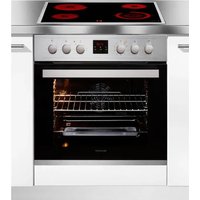
| Product Type | Freestanding Electric Cooker |
| Brand | Sharp |
| Model | SSG3065JS |
| Width | 30 inches (76.2 cm) |
| Height | 36 inches (91.4 cm) |
| Depth | 25 inches (63.5 cm) |
| Weight | Approximately 150 lbs (68 kg) |
| Power Supply | 240 V, 60 Hz, 40 A |
| Oven Capacity | 5.3 cu ft (150 L) |
| Cooktop Type | 4 Radiant Elements |
| Oven Cooking Modes | Bake, Broil, Convection, Self-Clean |
| Self-Cleaning | Yes, with steam clean option |
| Control Type | Electronic touch with digital display |
| Oven Light | Yes, interior oven light |
| Storage Drawer | Yes, bottom drawer for pots and pans |
| Child Safety Lock | Yes, control panel lock |
| Cooling Fan | Yes, automatic cooling fan |
| Cleaning | Wipe cooktop with damp cloth; self-clean oven cycle |
| Spare Parts | Available from Sharp authorized service centers |
| Warranty | 1 year limited parts and labor |
Frequently Asked Questions - SSG3065JS SHARP
How do I install the SSG3065JS cooker?
Installation should be performed by a qualified electrician. The cooker requires a 240V, 40A dedicated circuit. Ensure proper ventilation and leveling. Refer to the installation manual for detailed steps.
How do I self-clean the oven?
Remove all cookware and racks. Select the self-clean mode, set the duration (usually 2-4 hours), and lock the door. The oven will heat to high temperatures to burn off soil. After cooling, wipe residue with a damp cloth.
What do the error codes mean?
Error codes like E1, E2, F1 indicate sensor or control board faults. If an error appears, try resetting the cooker by turning off the circuit breaker for 1 minute. If persistent, contact Sharp service.
How do I use the convection mode?
Select convection bake on the control panel. The fan circulates hot air for even cooking. Reduce recipe temperature by 25°F (15°C) and check doneness earlier than usual.
Can I use metal pans on the radiant cooktop?
Yes, but avoid sliding pans to prevent scratches. Use flat-bottomed pans for efficient heating. Do not use aluminum foil directly on the glass surface.
How do I replace the oven light bulb?
Disconnect power. Remove the glass cover by turning it counterclockwise. Use a replacement bulb rated for high temperature (e.g., 40W appliance bulb). Reinstall the cover and restore power.
Why is the oven not heating?
Check if the timer is set (delay start). Verify the circuit breaker. If the oven still won't heat, the bake element or control board may be faulty. Contact a technician.
How do I lock the control panel?
Press and hold the Lock button for 3 seconds until the indicator light turns on. This prevents accidental changes. Repeat to unlock.
What is the recommended cleaning for the cooktop?
Use a ceramic cooktop cleaner and a soft cloth. Remove spills immediately. For burnt-on residue, use a scraper designed for glass cooktops. Avoid abrasive sponges.
Where can I get spare parts?
Contact Sharp customer service or visit an authorized service center. Have your model number SSG3065JS ready. Parts like elements, knobs, and oven racks are typically in stock.
User questions about SSG3065JS SHARP
0 question about this device. Answer the ones you know or ask your own.
Ask a new question about this device
No questions yet. Be the first to ask one.
Download the instructions for your Cooker in PDF format for free! Find your manual SSG3065JS - SHARP and take your electronic device back in hand. On this page are published all the documents necessary for the use of your device. SSG3065JS by SHARP.
USER MANUAL SSG3065JS SHARP


Manual assistant
Powered by Anthropic
Waiting for your message
Product information
Brand : SHARP
Model : SSG3065JS
Category : Cooker