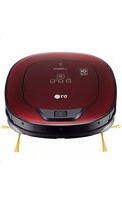
VR66900TWA - Robot vacuum LG - Free user manual and instructions
Find the device manual for free VR66900TWA LG in PDF.


Pick your language and provide your email: we'll send you a specifically translated version.
| Product Type | Robot Vacuum |
| Brand | LG |
| Model | VR66900TWA |
| Dimensions (Dia. x H) | 340 mm x 90 mm |
| Weight | 3.2 kg |
| Power Supply | Rechargeable Li-ion 14.4 V, 2600 mAh |
| Charging Time | Approximately 3 hours |
| Runtime | Up to 100 minutes (normal mode) |
| Suction Power | 20 W |
| Dustbin Capacity | 0.6 L |
| Navigation System | Dual Eye 2.0 with remote control and app |
| Cleaning Modes | Auto, Spot, Zigzag, Edge, and Turbo |
| Scheduling | Weekly programmable schedule |
| Smart Features | Wi-Fi connectivity, LG SmartThinQ app, voice control (Google Assistant, Alexa) |
| Sensors | Cliff sensors, obstacle detection, bumper sensors |
| Noise Level | 60 dB (typical) |
| Maintenance | Clean dustbin after each use, replace filter every 3 months, replace main brush every 6 months |
| Safety Features | Auto-detects stairs and drops, anti-tangle brush, thermal protection |
| Repairability | Replaceable battery, filter, side brushes, main brush, and wheels |
| Included Accessories | Charging station, remote control (batteries included), main brush, side brushes (2), replacement filter |
Frequently Asked Questions - VR66900TWA LG
How do I set the cleaning schedule on my LG VR66900TWA?
Use the LG SmartThinQ app or the remote control. In the app, go to Schedule, tap Add, set the day and time, then select cleaning mode. Confirm to save.
What should I do if my robot vacuum doesn't start?
Check if the power switch is on (unit bottom). Ensure the battery is charged by placing on the dock. If still not working, restart the unit by pressing the power button for 5 seconds.
How can I improve the cleaning performance?
Empty the dustbin after each use. Clean the filter regularly and replace every 3 months. Remove tangled hair from the main brush weekly. Use Turbo mode for carpets.
How do I reset the Wi-Fi connection?
Press and hold the Home and Start/Stop buttons on the robot simultaneously for 10 seconds until you hear a beep. Then reconnect via the LG SmartThinQ app.
What does the error code 'E01' mean?
E01 indicates a bumper sensor issue. Clean the sensors with a soft cloth. If persists, check for obstructions in the wheels. Restart the robot.
How do I replace the battery?
Turn over the robot, remove the screw of the battery cover, lift the cover, disconnect the old battery, connect the new one, and reassemble. Use only LG-approved batteries.
Can the robot vacuum map multiple floors?
Yes, the VR66900TWA can store maps for up to 3 floors. To save a new map, start a cleaning on the new floor; the robot will automatically detect and save.
How often should I replace the filter and brushes?
Replace the filter every 3 months and the main brush every 6 months. Side brushes should be replaced every 3-4 months or when visibly worn.
What is the best way to clean the sensors?
Use a dry, soft cloth to gently wipe the cliff sensors (bottom) and the bumper sensors (front). Do not use liquid cleaners. Clean weekly for optimal navigation.
My robot makes a strange noise while cleaning. What should I check?
Check the main brush and side brushes for tangled hair or debris. Remove any blockages. Also inspect the wheels for trapped objects. If noise persists, contact LG support.
User questions about VR66900TWA LG
0 question about this device. Answer the ones you know or ask your own.
Ask a new question about this device
No questions yet. Be the first to ask one.
Download the instructions for your Robot vacuum in PDF format for free! Find your manual VR66900TWA - LG and take your electronic device back in hand. On this page are published all the documents necessary for the use of your device. VR66900TWA by LG.
USER MANUAL VR66900TWA LG



Manual assistant
Powered by Anthropic
Waiting for your message
Product information
Brand : LG
Model : VR66900TWA
Category : Robot vacuum