
AX1AH9000WK - Air purifier SAMSUNG - Free user manual and instructions
Find the device manual for free AX1AH9000WK SAMSUNG in PDF.
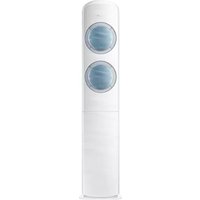


| Type of product | Air purifier |
| Brand | Samsung |
| Model | AX1AH9000WK |
| Dimensions (H x W x D) | Approximately 700 x 400 x 400 mm |
| Weight | Approximately 12 kg |
| Power supply | 220-240 V, 50/60 Hz |
| Power consumption (max) | 65 W |
| Airflow rate (CADR) | Up to 350 m³/h |
| Coverage area | Up to 50 m² |
| Number of fan speeds | 4 (Auto, Low, Medium, High) |
| Filter system | Pre-filter, HEPA H13, Activated carbon |
| Filter replacement indicator | Yes |
| Smart sensor | PM2.5, PM10, gas sensor |
| Auto mode | Yes, adjusts fan speed based on air quality |
| Sleep mode | Yes, ultra-quiet operation |
| Timer function | Yes (1-8 hours) |
| Child lock | Yes |
| Noise level (max) | 52 dB(A) |
| Maintenance and cleaning | Clean pre-filter every 2 weeks; replace HEPA and carbon filters every 12 months |
| Safety features | Overheat protection, automatic shut-off when front cover is opened |
| Spare parts and repairability | Replacement filters available; repairable by authorized service centers |
Frequently Asked Questions - AX1AH9000WK SAMSUNG
User questions about AX1AH9000WK SAMSUNG
0 question about this device. Answer the ones you know or ask your own.
Ask a new question about this device
Download the instructions for your Air purifier in PDF format for free! Find your manual AX1AH9000WK - SAMSUNG and take your electronic device back in hand. On this page are published all the documents necessary for the use of your device. AX1AH9000WK by SAMSUNG.
USER MANUAL AX1AH9000WK SAMSUNG
QUESTIONS OR COMMENTS?
| COUNTRY CALL OR VISIT US ONLINE AT | ||
| SOUTH AFRICA 0860 SAMSUNG (726 7864) | www.samsung.com/support | |
| BOTSWANA 8007260000 | ||
| NAMIBIA 08 197 267 864 | ||
| ZAMBIA 0211 350370 | ||
| MAURITIUS 800 2550 | ||
| REUNION 0262 50 88 80 | ||
| MOZAMBIQUE 847267864 / 827267864 | ||
| NIGERIA 0800-726-7864 | www.samsung.com/africa_en/support | |
| GHANA | 0800-100770302-200077 | |
| COTE D'IVOIRE 8000 0077 | www.samsung.com/africa_fr/supportSENEGAL 800-00-0077 | |
| CAMEROON 7095-0077 | ||
| KENYA 0800 545 545 | www.samsung.com/support | |
| UGANDA 0800 300 300 | ||
| TANZANIA | 0800 755 755 / 0685 889 900 | |
| RWANDA | 9999 | |
| BURUNDI | 200 | |
| DRC | 499999 | |
| SUDAN | 1969 | |

AX1AH9000WK
Air Purifier user manual
imagine the possibilities
Thank you for purchasing this Samsung product.
EN DB68-04901A-02
SAMSUNG
Product features
TOTAL AIR CARE!! Running both purifying and sterilizing functions at the same time!!
- Air purification with 3-step filtering and ion sterilizing dual clean system: The combination of 3-step filtering system, Dust filter (for big dust) → Deodorization filter (for harmful gas/odor) → HEPA filter (for fine dust) and Virus doctor sterilization that generates ion, will enhance quality of indoor air.
- Extraordinary air purifying technology of Virus doctor: The Virus doctor independently developed by Samsung is the technology that the Hydroperoxy radical (HOO - ) generated by the combination of active hydrogen (H) and oxygen ion(O 2- ) captures harmful materials floating in the air and destroys the hydrogen bond of protein structure for sterilization function.
High efficient purifying system
• Efficient dust collection:
The HEPA filter inside the air purifier can filter even invisible fine dust.
• Outstanding deodorizing function:
The high efficient activated carbon filter in the air purifier can quickly get rid of odors such as food, cigarette, etc.
- Virus doctor:
It generates active hydrogen and ion to eliminate floating germs, viruses, allergen, etc. in the indoor air.
• High sensitive sensor:
When dust sensor and Gas(Odor) sensor in the air purifier detect dust and Gas(Odor), the air purifier automatically runs suitable operation for the environment while displaying pollution level of indoor air.
Fast and clean air purification
- Fast air purification:
The large capacity of air purifier can swiftly purify large space by using the 2 HEPA filters (green). - Fine dust elimination
The high efficient HEPA filter (blue) which shows better performance than existing HEPA filter (green) can eliminate even micro-fine dust.
Contents
PREPARATION
Safety precautions 4
Checking before using the product.... 11
BASIC OPERATION
Name of each part 14
Using the remote controller 18
Basic operation 20
TIMER
Setting the On/Off timer 22
OPTIONS
Using the Virus doctor operation 24
Using the Turbo operation....25
SETTINGS
Using the lighting function.... 26
Using volume function....26
Using the filter reset function.... 27
OTHERS
Cleaning and maintaining the product 28
Trouble shooting....33

Correct Disposal of This Product (Waste Electrical & Electronic Equipment)
(Applicable in countries with separate collection systems)
This marking on the product, accessories or literature indicates that the product and its electronic accessories (e.g. charger, headset, USB cable) should not be disposed of with other household waste at the end of their working life. To prevent possible harm to the environment or human health from uncontrolled waste disposal, please separate these items from other types of waste and recycle them responsibly to promote the sustainable reuse of material resources. Household users should contact either the retailer where they purchased this product, or their local government office, for details of where and how they can take these items for environmentally safe recycling. Business users should contact their supplier and check the terms and conditions of the purchase contract. This product and its electronic accessories should not be mixed with other commercial wastes for disposal.
Safety precautions
These safety precautions are for owner's safety and prevention of property damage. Therefore, please read this manual thoroughly before using your air purifier.
| WARNING | Hazards or unsafe practices that may result in severe personal injury or death. | |||
| CAUTION | Hazards or unsafe practices that may result in minor personal injury or property damage. | |||
| Follow directions. Unimg | the appliance. | |||
| Do NOT attempt. Do NOT | disassemble. | |||
| Make sure the machine is grounded to prevent electric shock. | ||||
| FOR INSTALLATION | WARNING | |||
Plug the power cord into a wall socket with the power specifications of the product or higher and use the socket for this appliance only. Also, do not extend the power cord on your own.
Sharing a wall socket with other appliances using a multi outlet power strip or extending the power cord may result in electric shock or fire.
▶ Do not use an electric transformer. It may result in electric shock or fire.
▶ If the voltage/frequency/rated current condition is different, it may cause electric shock or fire.
Do not install this appliance near a heater or a material vulnerable to heat. Do not install this appliance in a humid, oily or dusty location, in a location exposed to direct sunlight and water (rain drops). Do not install this appliance in a location where gas may leak.
▶ Otherwise, electric shock or fire may occur.
The appliance should be installed in a place where the power cord of the product can be easily pulled out.
▶ Failure to do so may result in electric shock or fire due to electric leakage.
Install your appliance on a level and hard floor that can support its weight.
▶ Failure to do so may result in abnormal vibrations, noise, or product malfunction.
When installing the appliance, allow enough space around the appliance.
▶ Space between the rear side of the appliance and the wall: At least 25 cm or more
▶ Space between both sides of the appliance and the wall: At least 60 cm or more
▶ If enough space for air intake is not provided, purifying capacity may deteriorate.
▶ If the appliance is too close to the wall, the wall paper may get damaged.
▶ Make sure obstacles such as a curtain do not block air inlet or outlet of the appliance.
When installing the product, make sure that no heavy objects are on the power cord (or cable).
▶ Failure to do so may result in electric shock or fire.
Confirm that the fixing device has been installed with an installation engineer.
▶ If the fixing device is not installed, the appliance may vibrate and fall and this may result in injury.
Safety precautions
FOR POWER SUPPLY
WARNING

Unplug the product, and then remove foreign substances (dust, moisture, etc.) from the power plug terminal or power plug connection part with a dry cloth on a regular basis.
▶ Otherwise, electric shock or fire may occur.
When plugging in the appliance, the power plug should be downward.
▶ If the plug is positioned upward, the electric wires within the cable may be damaged and this may result in electric shock or fire.
When the power line is damaged, replace the damaged one with a new one by a qualified technician.

Plug the power plug into the wall socket firmly. Do not use a damaged power plug, damaged power cord or loose wall socket.
▶ Otherwise, electric shock or fire may occur.
When unplugging the product, do not pull the power cord. Grip the power plug, and then pull the power plug.
▶ Otherwise, electric shock or fire may occur.
Do not pull or excessively bend the power cord. Do not twist or tie the power cord. Do not hook the power cord over a metal object, place a heavy object on the power cord, insert the power line between objects, or push the power cord into the space behind the appliance.
▶ Otherwise, electric shock or fire may occur.

When the air purifier will not be used for a long period of time or during a thunder or lightning storm, disconnect the power supply.
▶ Failure to do so may result in electric shock or fire.
It is dangerous when the power cable gets damaged, therefore contact a service center or qualified experts for the repair.
Before cleaning or repairing the appliance, unplug the appliance.
FOR OPERATION
WARNING

If the appliance is flooded, turn off the appliance and contact a service center.
If the appliance generates a strange noise, a burning smell or smoke, disconnect the power supply immediately and contact a service center.
▶ Failure to do so may result in electric shock or fire.
When gases (city gas, profane gas, etc.) leak, do not touch the product or power cord. Immediately ventilate the area and contact a service center or a qualified technician.
▶ Do not use a ventilating fan.
▶ If there is a spark, explosion or fire may occur.
Do not unplug the appliance during operation.
▶ When plugging the appliance in again, flame may occur and it may result in electric shock or fire.
When a repair is needed, contact the service center.
▶ Failure to do so may result in a product malfunction, water leakage, electric shock or fire.
When installing the appliance, contact a service center.
▶ A delivery service for the appliance is not provided. If you reinstall the appliance in another location, additional installation fee will be charged.
Safety precautions
FOR OPERATION
WARNING

Do not touch the power plug or auxiliary power switch with wet hands.
▶ Otherwise, electric shock may occur.
Do not apply a force to or pull the product using excessive force.
▶ Otherwise, fire, injury or product malfunction may occur.
After unpacking the air purifier, keep all packaging materials out of the reach of children.
▶ If a child places a bag over its head, it may suffocate.
Do not insert your fingers or a foreign substances into the air outlet while product is operating.
▶ Take special care that children do not injure themselves by inserting their fingers into the product.
Do no place an object near the outdoor unit that makes it possible for children to climb onto the machine.
The child could fall and injure themselves or the product may fall over and injure the child.
Do not put other foreign materials such as metal into the product.
▶ Otherwise, electric shock or injury may occur.
If water has entered the power supply module, unplug the power cable and dry the product completely before use.
▶ Failure to do so may result in electric shock or fire.
Do not place heavy objects on the product.
▶ Otherwise, product malfunction or noise may occur.

Do not attempt to repair, disassemble, or modify the product yourself.
▶ Do not use a fuse (such as copper, steel wire, etc.) other than a standard fuse.
▶ Otherwise, electric shock, fire, product malfunction or injury may occur.

If a foreign substance such as water has entered the electric part of the product, disconnect the power supply and contact the service center.
▶ Failure to do so may result in electric shock or fire.
FOR OPERATION

CAUTION

Keep a distance of about 2 m from other electric appliances such as a TV, video or audio device etc.
▶ Failure to do so may result in reduced video quality or noise.
Allow enough space between the appliance and a wall.
▶ Space between the rear side of the appliance and the wall: At least 25 cm or more
▶ Space between the both sides of the appliance and the wall: At least 60 cm or more
This appliance has a flow path which intakes and purifies air at the rear side of the appliance, so it is recommended to install the appliance in the middle of the room. However, if it is installed near the wall, make sure obstacles such as curtains do not block the air inlet or outlet of the appliance.

Do not spray volatile material such as insecticide onto the product.
As well as being harmful to humans, this may also result in electric shock, fire or a product malfunction.
Do not tilt or turn the product upside down while the product is connected to the wall outlet.
▶ Otherwise, product malfunction or fire may occur.
Do not put the product into water.
▶ Otherwise, product malfunction may occur.
Do not place the product on the edge of a desk or table.
Do not stand on top of the product or place objects (such as laundry, lighted candles, lighted cigarettes, dishes, chemicals, metal objects, etc.) on the product.
▶ Otherwise, electric shock, fire, product malfunction or injury may occur.
Do not operate the product with wet hands.
▶ Otherwise, electric shock may occur.
Safety precautions
FOR OPERATION
CAUTION

This appliance is not intended for use by persons (including children) with reduced physical, sensory or mental capabilities, or lack of experience and knowledge, unless they have been given supervision or instruction concerning use of the appliance by a person responsible for their safety. Children should be supervised to ensure that they do not play with the appliance.
For use in Europe: This appliance can be used by children aged from 8 years and above and persons with reduced physical, sensory or mental capabilities or lack of experience and knowledge if they have been given supervision or instruction concerning use of the appliance in a safe way and understand the hazards involved. Children shall not play with the appliance. Cleaning and user maintenance shall not be made by children without supervision.
FOR CLEANING
WARNING

Do not clean the product by spraying water directly onto it. Do not use benzene, thinner, acetone or alcohol to clean the product.
▶ Otherwise, discoloration, deformation, damage, electric shock or fire may occur.
Disconnect the power supply and stop the fan operation before cleaning the product.
▶ Otherwise, electric shock or fire may occur.
Checking before using the product
Checking before installing the product
Check that the location for installation meets the following conditions.
The floor should be level without a slope.
There should be no obstacles around the air inlet or outlet of the air purifier.
The place should not be humid and there should be no inflammable materials.
The space between the rear side of the product and a wall should be at least 25 cm or more.
The space between the both sides of the product and a wall should be at least 60 cm or more.
The rear side of the product should not come into contact with a curtain.
Before first using the product or replacing the deodorization/HEPA filter (integrated type), remove the vinyl packing of the filter.
Fix the air purifier.
In any conditions and locations of installation, the product could be shaken or fall by external force or children. Therefore, fix the upper and rear side of the air purifier firmly by using the fixing device.

※ Supply cords of parts of appliances for outdoor use shall not be lighter than polychloroprene sheathed flexible cord. (Code designation IEC: 60245 IEC 57 / CENELEC:H05RN-F)
Accessories
| Remote controller | Remote controller batteries | Fixing device M4 x 16 screw M4 x 25 screw | |
 |  |  |  |
| Integrated type filter User manual Holder lock | Cleaning cloth (superfine fiber) | ||
 |  |  |  |
Power plug and wall socket
▶ Use the 230 V wall socket for the power plug.
(When plugging in the product, the product will become operation standby status.)
When the product is not used for some time, unplug the product.
Checking before using the product
Information on the product
The product should not be used without the filter. When the filter smells bad, replace the filter with a new one.
The deodorization filter in the product is highly effective to remove not only domestic odor but also the formaldehyde, VOCs, etc. which are the cause of sick house syndrome. Since the deodorizing function of the air purifier becomes effective as the air is circulated by the filter, ventilate the room at first and then operate the deodorizing function if there is strong odor. If you use the product in the suggested way, the performance of the air purifier can be highly efficient.
▶ If the air purifier is used without a filter, air purifying function will not be carried out.
If the filter is dirty, purifying function works less effectively. If the exterior of the filter is dirty, the filter smells bad, or the fan speed of the product observably decreases, the filter should be replaced.
When cooking food with a strong smell such as grilled fish, turn off the air purifier.
If the air purifier is used in a place where food with strong smell is made, the product life of the deodorization filter can dramatically decrease. In the worst case, the smell from food pervades the deodorization filter and the filter generates the food smell even after ventilation. Therefore, use the air purifier to remove the remaining smell after carrying out ventilation.
If the odor around the air purifier pervades the HEPA or deodorization filter and generates the odor with the air purifier operation, the filters should be replaced.
When operating the air purifier, close windows or doors.
▶ If the air purifier operates with the window or door opened, purifying function will work less effectively.
▶ Carbon monoxide (CO) normally comes from outdoor area and it cannot be eliminated.
▶ Main harmful gas that cannot be eliminated: Carbon monoxide (CO)
If the air purifier is used in a closed area for long hours, concentration of carbon dioxide may increase. Therefore, carry out ventilation regularly. If mild smell pervades the filter but it is used after ventilation several times, the smell of the filter may decrease.
Using a filter
▶ Before first using the air purifier, remove the vinyl packing of deodorization/HEPA filter (Integrated type).
- If an alarm rings or filter reset indicator blinks in the first operation of the product, check the vinyl of the filter has been removed.
▶ If the air purifier is used without a filter, air purifying function will not be carried out.
When the filter reset indicator ( ☐) is turned on, replace the old deodorization/HEPA filter (Integrated type) with new ones. (The HEPA filter and deodorization filter eliminate particles of invisible fine dust and gas. Filter replacement period can vary depending on the surrounding environment.)
If bad smell is generated, fan speed decreases, or replacement period passes, the deodorization/HEPA filter (Integrated type) should be replaced.
If the dust filter is cleaned frequently, the efficiency of the air purifier increases.
For filter replacement procedure, refer to the 'Replacing the deodorization/HEPA filter' in the 'Cleaning and maintaining the product' section.
▶ Before replacing the filter, turn off the air purifier.
Checking for filter replacement period
Check the filter monitor hole or filter reset indicator to replace the filter.
Filter replacement period can be checked with the filter reset indicator.
When the filter reset indicator (☐) is turned on with alarm, replace the old deodorization/HEPA filter (Integrated type) with new ones.
When you carry out the filter reset function after the filter is replaced, the alarm and the indicator will be turned off.
- When the filter reset indicator displayed, the alarm rings every time you turn on the air purifier until you clear the filter reset indicator. (Refer to the 'Using the filter reset function' p.27.)
The filter reset indicator is displayed according to the maximum operation hours of the filter which is set regardless of surrounding environment. Therefore, the replacement period can vary depending on the surrounding environment.
If a bad smell is generated or fan speed decreases, the filter should be replaced. - Minor smell can be generated at the first use of the air purifier, but the smell will disappear after the filter is used more than one day.
The pollution level of the filter can be checked.
▶ You can check the pollution level of the HEPA filter (green) through the filter monitor hole only when the lighting function is in operation.
▶ Check the pollution level of the deodorization/HEPA filter (integrated type) through the filter monitor hole on the side of the product.
- The pollution level of the filter can vary depending on the surrounding environment.
- If the back of the filter monitor hole connected to the inside of the filter is covered with dust, take out the filter and wipe the hole with a superfine fiber cloth.
※ The HEPA filter (blue) at the lower part of the product cannot be checked through the filter monitor hole. To check the pollution level, take out the lower filter from the product.
▶ Compare the pollution level of the filter with the colored label to decide filter replacement.
- The colored labels are attached inside the filter frame. (Upper part / 2 EA: green label, Lower part: blue label)
- As the filter is polluted, the color of the filter changes from green or blue to gray.


Product specification
| Model name AX1AH9000WK | |
| Product size (WxHxD) 360 mm x 1890 mm x 327 mm | |
| Bottom space for the product(CA certified) | 151.2 m2 |
※ Design and product specification may change for quality improvement without advance notice.
Name of each part
Air purifier
Front side
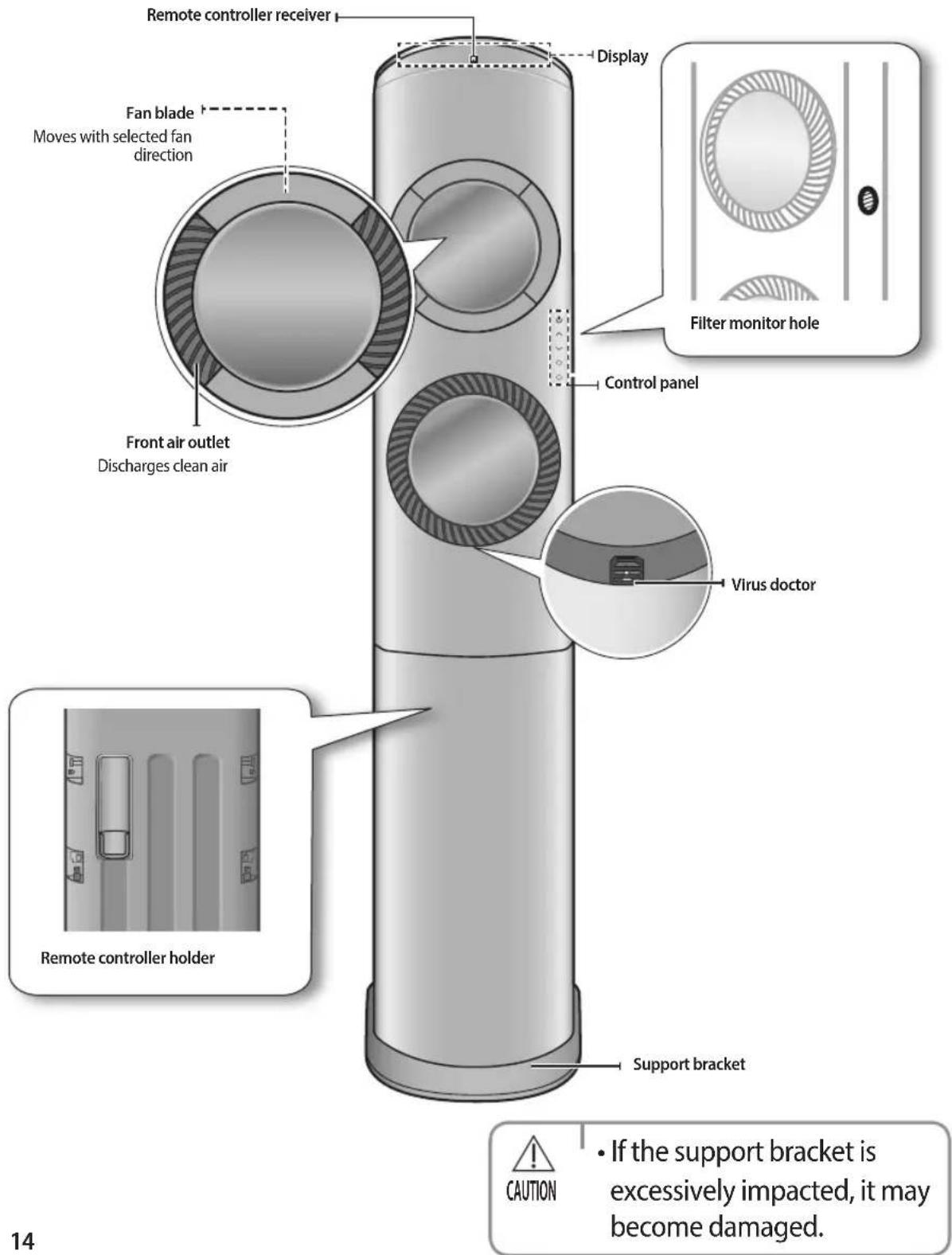
Rear side


NOTE
- The deodorization filter (black) and HEPA filter (green/blue) are integrated.
- Insert the integrated type deodorization/HEPA filter (green) into the 2 filter frames on the upper part of the air purifier.
- Insert the integrated type deodorization/HEPA filter (blue) into the filter frame on the lower part of the air purifier.

CAUTION
- Make sure the right filter is inserted into the filter frame by checking the color of the filter to operate best air purifying function.
- The integrated type deodorization/HEPA filter (blue) should be inserted into the filter frame on the lower part of the air purifier.
Name of each part
Display


NOTE
• Gas(Odor) and dust sensor operate to display purity level.
- Purity level display
Red → Orange → Yellow → Green → Blue
(Polluted) Clean
- The purity level may change frequently or may not change for long hours depending on the surrounding environment. Therefore, do not worry about product malfunction with this.
Buttons on the control panel
![graph TD A["Power"] --> B["Power"] C["Fan speed control button\nSelects the fan speed"] --> D["Fan speed control button"] D --> E["✓"] F["Individual control button\nControls the front air outlet individually"] --> G["○"] G --> H["○"]](/content/2026/07/1505253/images/83461081d32ed6f7157eef1dff544a821b2dde95a35454d9de67498f2b0ab9c7.jpg)
Operation with control panel
- Press the Power button to operate the air purifier.
▶ All the air outlets open with melody sound and the air purifier operates with the mode last selected before it is turned off.
- At the first operation, the air purifier starts with Low fan speed.
Stop Press the Power button again.
- Press the [, ] button to select the fan speed.
▶ Press the [∧] button to change the fan speed in order of: L → M → H → Auto → Sleep → L
▶ Press the [V] button to change the fan speed in order of:
L → Sleep → Auto → H → M → L
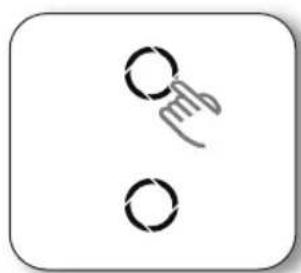
- Adjust fan height with the two individual control buttons.
The fan height can be adjusted by controlling the two front air outlets individually.
Cancel ▶ Press the Individual control button one more time.

NOTE
- The two side air outlets cannot be adjusted individually.
- When the two front air outlets are closed with the Individual control button, the front air outlets stop operation and only the side air outlets on the lower part of the product operate.
- Press the Individual control button again to open the front air outlet.
- The fan speed of each air outlet differs for pleasant air flow control.
- Press the Power button to turn off the side air outlet.
- If the individual control is carried out by a remote controller, it is not displayed on the remote controller.


Using the remote controller
▶ Point the remote controller towards the remote controller receiver of the air purifier.
When you properly press the button on the remote controller, you will hear a melody from the air purifier and a transmit indicator ( f ) appears on the remote controller display.
Buttons on the remote controller


NOTE
- In case you wish to cancel the options or settings that you have just set, select the set options and settings and press the Options or Settings button on the remote controller again, then press the SET button.
- Default setting for fan speed is Low. Press the Fan button to select the fan speed.
Remote controller display

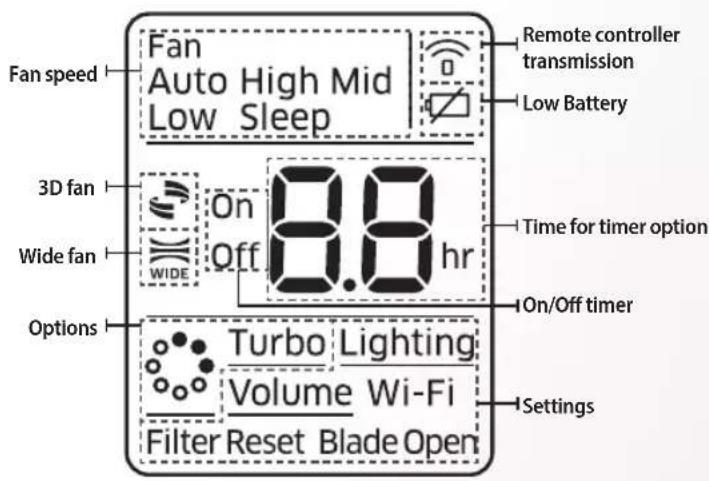
※ This model does not support the Wifi function.
※ When the remote controller is turned off and turned on again, the last Timer, Options or Settings function which was set before turning off the product is cancelled. However, the fan speed and Virus doctor operation remain.
Battery changing time
When the battery is exhausted, (☑) indicator will be displayed on the remote controller display. When the icon appears, change the batteries. The remote controller requires two 1.5 V AAA type batteries.
Storing the remote controller
When you do not use the remote controller for a long time, remove the batteries from the remote controller and store it in the remote controller holder.

Inserting the batteries
- Open the battery cover of the remote controller.
- Press the ⏻) part gently and lift it up in the arrow direction.
- Insert the batteries.
- Check and match the (+) and (-) signs accordingly.
- Close the battery cover.
- Match the cover and bottom part of the remote controller and press it until you hear click sound.


CAUTION
• Make sure that water is not allowed to enter the remote controller.

NOTE
- Use the remote controller that is only for operation of the air purifier. When using the air conditioner remote controller, the air purifier may not operate properly or the display on the remote controller is not the same as actual operation of the air purifier.
- There is a possibility that the air purifier will not operate by the remote controller near strong light such as a fluorescent lamp or neon sign. In this case, use the remote controller in front of the remote controller receiver of the air purifier.
- If other electrical products operate by the remote controller, call your nearest service center.
Basic operation
Turning on the air purifier
Press the button to operate the air purifier.
Adjusting fan speed
![graph LR A["Press the button to select the fan speed."] --> B["Fan Auto"] B --> C["Fan High"] C --> D["Fan Mid"] D --> E["Fan Low"] E --> F["Fan Sleep"]](/content/2026/07/1505253/images/2866864f64ceb1f2559d4b39dd21bd2ebc2ff7e593996813ec6ac079393b93dc.jpg)
Auto
The air purifier starts operation as Mid fan speed for 2 minutes and then the fan speed is adjusted automatically depending on the indoor purity level.
▶ If you change the fan speed, the Auto mode is cancelled and then the air purifier operates as the selected fan speed.
High/Mid/Low
The air purifier operates as the selected fan speed.
Sleep
The air purifier operates the most Sleep fan speed. The two front fan blades are closed and only the two side air outlets discharge the fan.
▶ If you change the fan speed, the Sleep mode is cancelled and then the air purifier operates as the selected fan speed.
※ In Sleep mode, the purity level is not displayed and the lighting function does not work.
Adjusting fan direction
Press the WBE button to select the fan direction.
 | The fan is discharged from the front and side air outlets. It is used to purify the whole space efficiently. |
 | The wide fan function is used to purify large space. |
The fan blade operates differently depending on the fan direction.
| Classification | Fan direction | ||
| 3D Wide | |||
| Fan blade operation | Air outlet (Upper) | Up/down/left/right fan blades are opened | Up/down fan blades are fixed |
| Air outlet (Lower) Up | up/down fan blades are fixed | ||
| Fan blade shape | Air outlet (Upper) |  |  |
| Air outlet (Lower) | 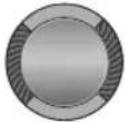 |  | |
Cancel

Press the 01D button.

NOTE
- In turbo operation or Sleep mode(fan speed), the fan direction (Wide, 3D) cannot be selected.
- If you press the 📋 or button after selecting the individual control, the air outlet selected by the individual control operates only.
- If you select the fan direction after canceling the individual control, the two front air outlets operate.
Individual control
Press the button to select the fan height.
The fan height is not displayed on the remote controller and only the fan blade of the air purifier is adjusted.
Setting the On/Off timer
Set this function to turn on or off the air purifier automatically at desired time.
Setting the On timer
When the air purifier is turned off
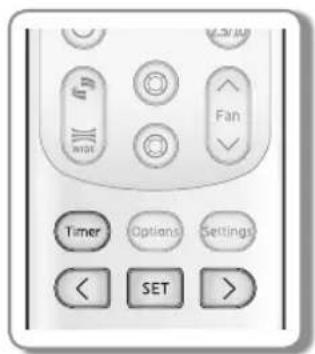

Remote controller display
- Press the Timer button and select (On).
- Press the [<] or [>] button to set the time.
| Set time | Unit(—) |
| 30 minutes~3 hours 30 minutes (0.5) | |
| 3 hours ~24 hours 1 hour (1.0) | |
- Press the SET button to complete the On timer setting.
- As (On) indicator and the set time of the timer are displayed on the remote controller display, the and the set time are displayed on the air purifier display, and then the On timer setting is completed.
- On timer setting is cancelled if you don't press the SET button within 10 seconds after setting the time. Therefore, check the (On) indicator on the remote controller and the 📋 indicator on the air purifier display.
▶ Press Timer button → select (On) → press the [<] or [>] button → set the time to 0.0 → press the SET button. ▶ Press the Power button.
| Additional options available in On timer | |
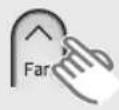 | Low → Mid → High → Auto → Sleep → Low |
 | Low → Sleep → Auto → High → Mid → Low |

NOTE
- Set time for the On timer and the Off timer should be different from each other.
- After 3 seconds from the completion of the On timer setting, only (On) indicator remains on the remote controller display.
- If you press the Power button on the air purifier control panel after completing the On timer setting with a remote controller, timer indicator on the air purifier display is turned off and the timer function is cancelled. Although the (On) indicator remains on the remote controller display, the timer function does not work.
- The times remaining and ⚙ indicator are displayed until the set time.
Setting the Off timer
When the air purifier is turned on
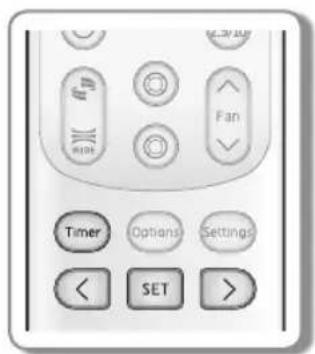

Remote controller display
- Press the Timer button and select (Off).
- Press the [<] or [>] button to set the time.
| Set time | Unit(−) |
| 30 minutes~3 hours 30 minutes (0.5) | |
| 3 hours ~24 hours 1 hour (1.0) | |
-
Press the SET button to complete the Off timer setting.
-
As (Off) indicator and the set time of the timer are displayed on the remote controller display, the 📋 Indicator and the set time are displayed on the air purifier display, and then the Off timer setting is completed.
- Off timer setting is cancelled if you don't press the SET button within 10 seconds after setting the time. Therefore, check the (Off) indicator on the remote controller and the 📋 indicator on the air purifier display.
▶ Press Timer button → select (Off) → press the [<] or [>] Cancel button → set the time to 00 → press the SET button. ▶ Press the Power button.
Combining On timer and Off timer
| When the air purifier is turned off When the air purifier is turned on | |
| When set time on On timer is shorter than Off timere.g.: e.g. On timer: 3 hours, Off timer: 5 hours- The air purifier is turned on after 3 hours from themoment you have set the timer and the air purifierremains on for 2 hours and then is turned offautomatically. | When set time on On timer is longer than Off timere.g.: e.g. On timer: 3 hours, Off timer: 1 hours- The air purifier is turned off after 1 hour from themoment you have set the timer and is turned on after 2hours from the moment it was turned off. |

NOTE
- Set time for the On timer and the Off timer should be different from each other.
• After 3 seconds from the completion of the Off timer setting, only (Off) indicator remains on the remote controller display. - When the On timer and Off timer are set at the same time, the time that was set later is applied.
- If you press the Power button while the on timer or off timer is set, current settings are cancelled.
- If you select the Sleep mode after completing the Off timer setting, 📋 indicator is displayed on the air purifier display but the set time is not displayed.
Using the Virus doctor operation
Virus doctor operation produces ion that captures harmful materials floating in the air and destroys the hydrogen bond of protein structure for sterilization.
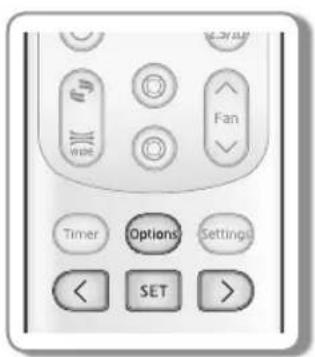
- Press the Options button.
- Press the [<], [>] or Options button until (💡) indicator starts to blink.
- Press the SET button to set the Virus doctor operation.
- (●) blinks first, then remains on the remote controller display as () and the Virus doctor operation starts.
Cancel
▶ Press the Options button → [<], [>] or Options button to make the ( indicator blink and press the SET button.

Remote controller display

NOTE

Air purifier display
- Unless you unplug the air purifier, the Virus doctor operation set before turning off the product remains after restarting the air purifier.
- If you unplug the product and then plug in it again, Virus doctor operation set before turning off the air purifier does not remain.
- Virus doctor operation should be set again with the Options button.
- Virus doctor operation does not work when the fan of lower air outlet on the front side is stopped.
- In Sleep mode, the Virus doctor operation does not work.
Using the Turbo operation
You can set the Turbo operation to provide fast and powerful purifying function.

- Press the Options button.
- Press the [<], [>] or Options button until (Turbo) indicator starts to blink.
- Press the SET button to set the turbo operation.
- (Turbo) blinks first, then remains on the remote controller display as (Turbo) and the turbo operation works for 30 minutes.
Cancel
▶ Press the Options button → [<], [>] or Options button to make the (Turbo) indicator blink and press the SET button.


Remote controller display
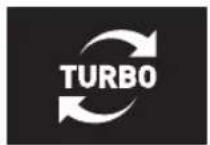
Air purifier display
• Fan direction cannot be adjusted.
- Purity level is not displayed with the turbo operation in Sleep mode.
- If you press the Fan button, the turbo operation is cancelled.
- If you press the Individual control button during turbo operation, the turbo operation is cancelled but the (Turbo) indicator remains on the remote controller display.
- When turbo operation is finished, the last fan speed set before the turbo operation operates.
Using the lighting function
You can turn on soft light to provide fresh indoor atmosphere with the lighting function.

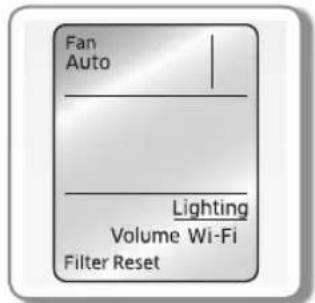
Remote controller display (Step setting is available)
- Press the Settings button.
- Press the [<], [>] or Settings button until (Lighting) indicator starts to blink.
- Press the SET button to set the lighting function.
- (Lighting) is displayed on the remote controller display.
- Press the [<], [>] button to set the lighting step.
- Set the lighting step while the (Lighting) is displayed.
- The first step is medium brightness. The last setting remains every time you adjust the step.
- Set the lighting step while the (Lighting) is displayed.
- The first step is medium brightness. The last setting remains every time you adjust the step.
| Lighting step Brightness | |
| Off Off | |
| Step 1 Soft | |
| Step 2 Medium (Default) | |
| Step 3 Strong | |

NOTE
• After 5 seconds from the lighting step setting, the indicator of Settings on the remote controller display disappears.
- If the fan speed is Sleep mode, the lighting function does not work.
- The lighting step is not displayed on the air purifier display.
- After 5 seconds from the lighting step setting, the indicator of Settings on the remote controller display disappears. - If the fan speed is Sleep mode, the lighting function does not work. - The lighting step is not displayed on the air purifier display.
Using volume function
By setting the volume of the alarm which notifies users of function operation, you can use the air purifier more conveniently.


Remote controller display (Step setting is available)
- Press the Settings button.
- Press the [<], [>] or Settings button until (Volume) indicator starts to blink.
- Press the SET button to set the volume function.
- (Volume) is displayed on the remote controller display.
- Press the [<] or [>] button to set the volume step.
- The volume is displayed on the air purifier display as Step 00, Step 1, Step 02, and Step 03.
| Volume step Status | |
| Step 00 | Off |
| Step 01 | Minimum sound |
| Step 02 | Default |
| Step 03 | Maximum sound |

NOTE
• After 5 seconds from the volume step setting, the indicator of Settings on the remote controller display disappears.
Using the filter reset function
When the filter needs to be replaced, the filter reset indicator is turned on with alarm for filter replacement. (For the filter replacement, refer to the 'Replacing the deodorization/HEPA filter' p. 31\~32.)
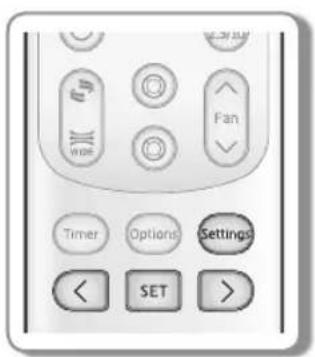
- Press the Settings button.
- Press the [<], [>] or Settings button until (Filter Reset) indicator starts to blink.
- Press the SET button to set the filter reset function.
- The filter reset indicator and alarm on the air purifier display disappears.

• After 3 seconds from the filter reset function setting, the indicator of Settings on the remote controller display disappears.
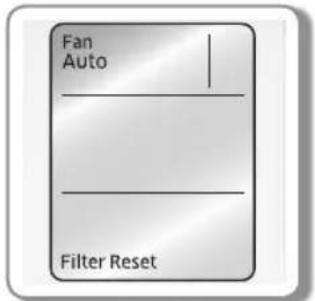
Remote controller display

Air purifier display
Cleaning and maintaining the product

CAUTION
• Before cleaning the product, you must unplug the product.
Cleaning the air purifier
▶ Slightly dampen a cleaning cloth (superfine fiber) with water and wipe the air purifier.
▶ Use the soft brush to remove dust in the chinks of the air purifier.

NOTE
- The superfine fiber cloth should be used to clean the product as the panel of the product can be easily scratched. Before using the cloth, slightly dampen the cloth with water and remove the foreign materials on the cloth as they might scratch the product.
- The cleaning cloth is included with the user manual and it can be purchased if you lose it.
While the air purifier and the remote controller are turned off after plugging in the air purifier
- Press the Settings button.
- Press the [<] or [>] button until (Fan Open) indicator starts to blink. Press the SET button to open the fan blade, and then clean the blade.
- When the fan blade is completely opened, wipe the inside of the air outlet by using a cleaning cloth (superfine fiber).
▶ While the remote controller is turned off, press the Settings button → press the [<], [>] or Settings button → (Fan Open) blinks → press the SET button to close the fan blade.

NOTE
• After 3 seconds from the fan blade open setting, the indicator of Settings on the remote controller display disappears.
- Before using the fan open function, make sure the product is plugged in.

CAUTION
- Do not wipe the air purifier with alkaline detergent.
- Do not wipe the surface of the product with sulfuric acid, hydrochloric acid, or organic solvent (thinner, kerosene, acetone, etc.) or do not attach a sticker onto the surface of the product. Otherwise, the exterior of the air purifier may be scratched.

Cleaning the sensor
- While the air purifier is turned off, open the sensor cover located at the rear side of the product.


- Wipe the dust sensor lens or Gas(Odor) sensor carefully with a cotton swab.


- Close the sensor cover.


- Only use water, do not wipe the sensors with volatile materials such as alcohol, acetone, etc.
- When the dust sensor lens or Gas(Odor) sensor is covered with foreign materials (dust), the purity level indicator may not change from the polluted status. In that case, clean the sensor again.
- Clean the sensors once in every 6 months. However, depending on the surrounding environment or hours of usage, cleaning period may be different. If the air purifier is installed in a dusty area, clean it more frequently.
- If the odor or dust in the indoor room is so serious and the air purifier cannot handle them, the purity level indicator on the air purifier may not change from the polluted status. (Open the window for ventilation.)
- Do not use a spray near the air purifier.
- Before cleaning the sensor, turn off the product. If the sensor is cleaned while the air purifier is turned on, the sensor may not detect purity level correctly and displays incorrect indicator.
Cleaning and maintaining the product
Cleaning the dust filter
Dust filter filters big dust in the air.
- Grip the filter handle and pull the dust filter.
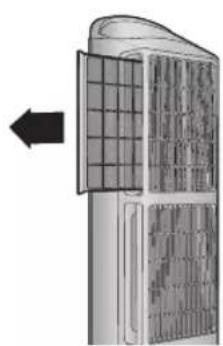

- Clean the dust filter with running water.
▶ When the dust is serious, clean the filter gently with warm water which contains a neutral detergent.
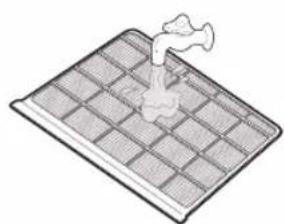
- Push the dust filter firmly so that it can be inserted completely.


- Dry it completely in the shade.
▶ When drying the dust filter, make sure the filter is not exposed to direct sunlight.
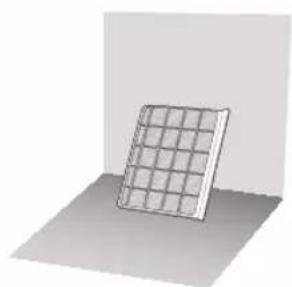

NOTE
- Clean the dust filter at least once in two weeks. However, depending on the surrounding environment or hours of usage, cleaning period may be different. If the air purifier is installed in a dusty area, clean it more frequently.
- If the filter is covered with dust seriously, remove the big dust by using a vacuum cleaner, and then clean the filter with water.
Replacing the deodorization/HEPA filter (integrated type)
When the filter monitor hole is covered with dust or filter reset indicator is turned on, replace the old deodorization/HEPA filter (Integrated type) with new ones.
▶ HEPA filter is a high efficient filter that eliminates fine dust or particle of cigarette smoke in the air.
▶ HEPA filter is highly efficient in removing allergen materials as the filter has anti allergen feature.
▶ Deodorization filter is a high efficient filter that eliminates domestic odor such as toilet, food etc.
- While the air purifier is turned off, grip the filter handle and pull the deodorization/HEPA filter (integrated type).
▶ Pull the dust filter first, and then pull the deodorization/HEPA filter (integrated type).
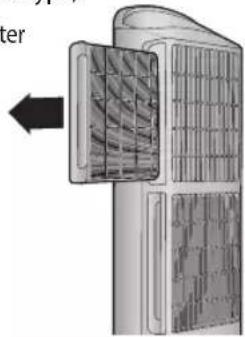
- Disassemble the deodorization/HEPA filter (integrated type) from the filter frame.

- Push the dust filter back into the filter part.
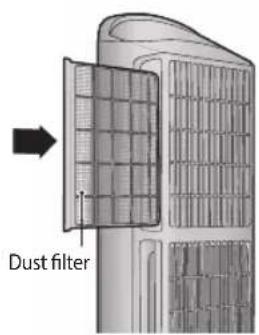
- Insert deodorization/HEPA filter (integrated type) into the filter frame first (①), and then push the filter frame into the filter part of the air purifier (②).
▶ When replacing the deodorization/HEPA filter (integrated type), the deodorization filter (black) should face the back of the air purifier.


- After turning on the air purifier, press the Settings button to clear the filter reset indicator. (Refer to the 'Using the filter reset function' p.27.)
Cleaning and maintaining the product

- When replacing the deodorization/HEPA filter (integrated type), the deodorization filter (black) should face the back of the air purifier.
- When odor is generated from the deodorization/HEPA filter (integrated type), fan speed of the product observably decreases, or filter becomes black with dust, replace the deodorization/HEPA filter (integrated type) with a new one.
- The deodorization/HEPA filter of the upper part of the air purifier (2 EA) is green and the deodorization/HEPA filter of the lower part of the air purifier (1 EA) is blue.
- Make sure the filters are inserted into the right position.
- Replaceable filters can be purchased in a Samsung Electronics service center or a digital plaza.
- Before replacing the deodorization/HEPA filter (integrated type), remove the vinyl packing.
- Since the amount of air circulated by the filter is different depending on the operation mode, filter replacement period may be different.
- Replacement interval of the Integrated filter is between minimum 6 months to maximum 1 year based on 24 hours of operation per day. (You can use the filter longer if the daily operation hours are shorter.) Replacement interval varies due to level of air pollution. If there's heavy dust in the area it will result heavier accumulation in the filter which will shorten the interval. Filter replacement indicator will be turned on and notified you when it's time to replace the filter. However, if the filter is too dirty, or if it smells, or if you feel the fan speed has gotten gradually weaker, you can replace it even though the filter replacement indicator has not turned on.

- Do not clean the deodorization/HEPA filter (integrated type) with water and make sure the filters do not come into contact with water all the time.
- Do not use the air purifier for long hours in a place where cooking is carried out. The product life of the filter may decrease dramatically. (Use the air purifier to remove the remaining smell after ventilating the cooking area.)
- Filter replacement period may vary depending on the surrounding environment.
Trouble shooting
Before you report the problem of the product, please check the table below.
| Problem Check Solution | ||
| The air purifier is not working | ·Check whether the power is supplied. | ·After checking the power supply status, operate the product again. |
| ·Check whether the product is plugged in. | ·Plug in the product and operate the product again. | |
| ·Check whether the wall socket has a problem. | ·Use another wall socket. | |
| Filter reset indicator does not appear | ·Check whether you cleared the filter reset alarm after filter replacement. | ·Clear the filter reset alarm with the Options button after filter cleaning or replacement. |
| Strange message is displayed | ·Check whether the message such as E154,155,176,162,163,103 is displayed. | ·Contact a service center. |
| Strange smell is generated | ·Check whether the dust filter is dirty | ·Clean the dust filter. |
| ·Check whether the deodorization/HEPA filter (integrated type) smells bad. | ·Replace the deodorization/HEPA filter (integrated type) with a new one. | |
Trouble shooting
| Problem Check Solution | ||
| Strange noise is generated. | ·Check whether crackling sound is generated. | ·The crackling sound may be heard during ion production. Do not worry about this. |
| The purity level indicator remains red | ·Check whether uncovered dust or a material that may cause odor is in the indoor room.·Check whether you have cleaned the product on a regular basis. | ·Clean the dust and Gas(Odor) sensor.·If there is a material that may cause odor in the indoor room, the purity level indicator may remain red.·If the purity level indicator still remains red regardless of the solution suggested above, sensor or wire can be the reason of the problem. Contact a service center. |
| The purity level indicator remains red or orange but the fan speed does not change | ·Check whether the fan speed is not set to Auto. | ·Set the fan speed as Auto mode.·If the fan speed is set to High, Mid, Low or Sleep, it does not change. |
MEMO

- AIR PURIFIER USER MANUAL
- PRODUCT FEATURES
- TOTAL AIR CARE!! RUNNING BOTH PURIFYING AND STERILIZING FUNCTIONS AT THE SAME TIME
- HIGH EFFICIENT PURIFYING SYSTEM
- FAST AND CLEAN AIR PURIFICATION
- CONTENTS
- PREPARATION
- BASIC OPERATION
- TIMER
- OPTIONS
- SETTINGS
- OTHERS
- (APPLICABLE IN COUNTRIES WITH SEPARATE COLLECTION SYSTEMS)
- SAFETY PRECAUTIONS
- CHECKING BEFORE USING THE PRODUCT
- CHECKING BEFORE INSTALLING THE PRODUCT
- POWER PLUG AND WALL SOCKET
- INFORMATION ON THE PRODUCT
- USING A FILTER
- CHECKING FOR FILTER REPLACEMENT PERIOD
- THE POLLUTION LEVEL OF THE FILTER CAN BE CHECKED
- NAME OF EACH PART
- OPERATION WITH CONTROL PANEL
- USING THE REMOTE CONTROLLER
- REMOTE CONTROLLER DISPLAY
- BATTERY CHANGING TIME
- STORING THE REMOTE CONTROLLER
- INSERTING THE BATTERIES
- CAUTION
- NOTE
- AUTO
- HIGH/MID/LOW
- SLEEP
- ADJUSTING FAN DIRECTION
- INDIVIDUAL CONTROL
- SETTING THE ON/OFF TIMER
- SETTING THE ON TIMER
- WHEN THE AIR PURIFIER IS TURNED OFF
- SETTING THE OFF TIMER
- WHEN THE AIR PURIFIER IS TURNED ON
- USING THE VIRUS DOCTOR OPERATION
- USING THE TURBO OPERATION
- CANCEL
- USING THE LIGHTING FUNCTION
- USING VOLUME FUNCTION
- USING THE FILTER RESET FUNCTION
- CLEANING AND MAINTAINING THE PRODUCT
- CLEANING THE AIR PURIFIER
- WHILE THE AIR PURIFIER AND THE REMOTE CONTROLLER ARE TURNED OFF AFTER PLUGGING IN THE AIR PURIFIER
- CLEANING THE SENSOR
- CLEANING THE DUST FILTER
- REPLACING THE DEODORIZATION/HEPA FILTER (INTEGRATED TYPE)
- TROUBLE SHOOTING
- MEMO
Brand : SAMSUNG
Model : AX1AH9000WK
Category : Air purifier