NUE-3702-F04 - Surveillance Camera BOSCH - Free user manual and instructions
Find the device manual for free NUE-3702-F04 BOSCH in PDF.


Pick your language and provide your email: we'll send you a specifically translated version.
| Product Type | Surveillance Camera (IP) |
| Brand | Bosch |
| Model | NUE-3702-F04 |
| Dimensions | 67 x 60 x 145 mm |
| Weight | 0.5 kg |
| Power Supply | PoE (Power over Ethernet) or 12V DC |
| Resolution | 1920x1080 (Full HD) |
| Field of View | Horizontal: 90° |
| Day/Night Function | Yes, with infrared LEDs for night vision |
| Video Compression | H.264, H.265, MJPEG |
| Network Interface | 10/100 Base-T Ethernet |
| Audio | Built-in microphone and speaker (two-way audio) |
| Storage | Supports microSD card up to 128GB, NAS, or cloud |
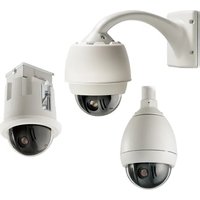
| Mounting | Wall or ceiling mount included |
| Operating Temperature | -30°C to 50°C |
| Protection Rating | IP66 (weatherproof) |
| Maintenance | Clean lens with a soft, dry cloth; avoid harsh chemicals |
| Safety | Complies with CE, FCC; use with rated PoE switch |
| Spare Parts | Mounting kit, power adapter (optional) available through Bosch |
| Repairability | Designed for non-user service; contact Bosch support |
Frequently Asked Questions - NUE-3702-F04 BOSCH
How do I reset the camera to factory defaults?
Locate the reset button on the camera (usually near the network port). Press and hold it for 10 seconds with a paperclip until the LED blinks. The camera will reboot with default settings.
What is the default IP address for the Bosch NUE-3702-F04?
The default IP is 192.168.1.168. You can also use DHCP to obtain an IP automatically. Refer to the Configuration Manager tool for discovery.
Can I use this camera outdoors?
Yes, the camera has an IP66 rating, making it weatherproof for outdoor use. Ensure the cables are properly sealed.
How do I view the camera remotely?
Install the Bosch Remote Portal app or access via web browser. Set up port forwarding on your router or use the Bosch cloud service for easier access.
What type of storage does this camera support?
It supports microSD cards up to 128GB local storage, as well as NAS (Network Attached Storage) and cloud recording options.
How can I update the firmware?
Download the latest firmware from the Bosch security website. Open the camera's web interface, go to Maintenance > Firmware Update, and upload the file.
Does the camera support two-way audio?
Yes, it has a built-in microphone and speaker. You can talk through the camera using the Bosch app or VMS software.
What video compression formats are supported?
The camera supports H.264, H.265, and MJPEG. H.265 is recommended for bandwidth efficiency.
Is the camera compatible with third-party software?
Yes, it supports ONVIF Profile G/S/T, allowing integration with many VMS systems. Ensure the third-party software is ONVIF compliant.
How do I clean the camera lens?
Use a soft, dry microfiber cloth. Avoid abrasive cleaners or liquids. For stubborn dirt, slightly dampen the cloth with water (do not spray directly).
User questions about NUE-3702-F04 BOSCH
0 question about this device. Answer the ones you know or ask your own.
Ask a new question about this device
No questions yet. Be the first to ask one.
Download the instructions for your Surveillance Camera in PDF format for free! Find your manual NUE-3702-F04 - BOSCH and take your electronic device back in hand. On this page are published all the documents necessary for the use of your device. NUE-3702-F04 by BOSCH.
USER MANUAL NUE-3702-F04 BOSCH


Manual assistant
Powered by Anthropic
Waiting for your message
Product information
Brand : BOSCH
Model : NUE-3702-F04
Category : Surveillance Camera