MDC-4237 - Battery charger Watson - Free user manual and instructions
Find the device manual for free MDC-4237 Watson in PDF.


Pick your language and provide your email: we'll send you a specifically translated version.
| Product Type | Battery Charger |
| Brand | Watson |
| Model | MDC-4237 |
| Input Voltage | 100-240V AC, 50/60Hz |
| Output Voltage | 1.2V - 4.2V (depending on battery type) |
| Number of Charging Slots | 4 |
| Compatible Battery Types | AA, AAA, NiMH, NiCd, Li-ion |
| Charging Current | 500mA per slot (max) |
| Dimensions (L x W x H) | 100 x 70 x 30 mm |
| Weight | 150 g |
| Power Source | AC adapter (included) |
| LED Indicators | Yes, per slot for charging status |
| Overcharge Protection | Yes, automatic cutoff |
| Short Circuit Protection | Yes |
| Reverse Polarity Protection | Yes |
| Operating Temperature | 0°C to 40°C |
| Storage Temperature | -20°C to 60°C |
| Cleaning Instructions | Wipe with dry cloth; do not use liquids |
| Safety Certifications | CE, RoHS |
Frequently Asked Questions - MDC-4237 Watson
What types of batteries can I charge with the Watson MDC-4237?
The charger supports AA, AAA, NiMH, NiCd, and Li-ion batteries. Always check battery compatibility before use.
How long does it take to fully charge a battery?
Charging time depends on battery capacity. For a typical 2000mAh AA NiMH battery, it takes about 4 hours at 500mA.
Can I charge different battery types at the same time?
It is recommended to charge batteries of the same type and capacity together to ensure optimal charging performance.
Does the charger have overcharge protection?
Yes, the MDC-4237 features automatic overcharge protection that stops charging when batteries are full.
What do the LED indicators mean?
A red LED indicates charging is in progress. A green or blue LED indicates the battery is fully charged. Refer to manual for exact colors.
Can I use the charger with a car adapter?
The charger is designed for household AC power. Using a car adapter is not recommended unless specified otherwise.
Is the charger safe for overnight charging?
Yes, due to overcharge protection, it is safe to leave batteries charging overnight. However, it is best to remove them once fully charged.
How do I clean the charger?
Unplug the charger and wipe it with a dry, soft cloth. Do not use water or cleaning liquids.
What should I do if the charger stops working?
Check the power outlet and connections. If the issue persists, contact Watson customer support for assistance.
Can I charge non-rechargeable batteries?
No, this charger is only for rechargeable batteries. Attempting to charge non-rechargeable batteries may cause leakage or fire.
User questions about MDC-4237 Watson
0 question about this device. Answer the ones you know or ask your own.
Ask a new question about this device
No questions yet. Be the first to ask one.
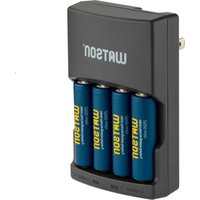
Download the instructions for your Battery charger in PDF format for free! Find your manual MDC-4237 - Watson and take your electronic device back in hand. On this page are published all the documents necessary for the use of your device. MDC-4237 by Watson.
USER MANUAL MDC-4237 Watson



Manual assistant
Powered by Anthropic
Waiting for your message
Product information
Brand : Watson
Model : MDC-4237
Category : Battery charger