
CDX-GT06 - Car radio SONY - Free user manual and instructions
Find the device manual for free CDX-GT06 SONY in PDF.
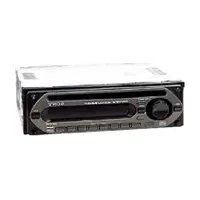


| Product Type | Car Radio |
| Brand | Sony |
| Model | CDX-GT06 |
| Dimensions (approx) | 178 x 50 x 185 mm |
| Weight (approx) | 1.2 kg |
| Power Supply | 12V DC, negative ground |
| Tuner Bands | FM/AM |
| CD Playback | CD, CD-R, CD-RW |
| MP3/WMA Playback | Yes (via CD) |
| Maximum Power Output | 50W x 4 |
| Audio Enhancement | Mega Bass, EQ Presets |
| Connectivity | Front AUX input |
| Remote Control | Included |
| Display | LCD with multi-color illumination |
| Detachable Faceplate | Yes, for theft prevention |
| Clock | Yes, with display |
| RDS (Radio Data System) | Yes |
| Preamp Outputs | 1 pair (front/rear) |
| Additional Features | Preset equalizer, random/repeat play |
| Cleaning | Use soft cloth; avoid solvents |
Frequently Asked Questions - CDX-GT06 SONY
User questions about CDX-GT06 SONY
0 question about this device. Answer the ones you know or ask your own.
Ask a new question about this device
Download the instructions for your Car radio in PDF format for free! Find your manual CDX-GT06 - SONY and take your electronic device back in hand. On this page are published all the documents necessary for the use of your device. CDX-GT06 by SONY.
USER MANUAL CDX-GT06 SONY
FM/AM Compact Disc Player
Operating Instructions Manual de instruccione
Owner's Record The model and serial numbers are located on the bottom of the unit. Record the serial number in the space provided below. Refer to these numbers whenever you call upon your Sony dealer regarding this product.
© 2006 Sony Corporation. Printed in China
Location of controls and basic operations
Main unit

① OFF button
To power off; stop the source.
② Volume control dial/select button
To adjust volume (rotate): select setup i
To adjust V (press and
- 50% (swallion) button
3 EQ3 (equalizer) button To select an available type (XPILOD
To select an equilizer type (AFLOD, VOCAL CLUB JAZZ NEW AGE
VOCAL, CLUB, JAZZ, NE ROCK, CUSTOM or OFF
□ Piss. ala
4 Disc slot
To inse
starts.
5 Display window
6 ▲ (eject) button
To eject the disc.
- DSPL (display)VDIM (dimmer) button
To change display items (press): change the
To change display items (press), change the display brightness (press and hold).
display originalness (press
8 (front panel relay
9 SEEK -/+ buttons
CD:
To skip tracks (press); skip tracks continuously (press, then press again with about 1 second and hold); reverse/fast-forward a track (press and hold).
Radio:
To tune in stations automatically (press); fi nd a station manually (press and hold).
10 SOURCE button
To power on: change the source (Radio/CD)
10 power of AUX).
11 RTM button
(1) BTM button To start the BTM function (news and hold)
To start the BYM
12 MODE button
To select the radio band (FM/AM).
13 RESET button (located behind the front
panel)
14 Number buttons
CD-
③: REP
To play the current track repeatedly
④: SHUF
To pla
Radio:
To receive a
stations (press and hold).
15 SENS button
To improve weak reception: LOCAL/
TO IMPROVE MONO.
15 AUX input lock
16 AUX input jack To support a portable audio device
To connect a portable audio device
Welcome!
Thank you for purchasing this Sony Compact
Disc Player. You can enjoy your drive with the
following functions
CD playback
You can play CD-DA and CD-R/CD-RW for
audio use.

DISC
Recordable
Radio reception
- You can store up to 6 stations per bond (FM1
For all beds up to 5 gallons per unit (FM1, FM2, FM3, AM1 and AM2).
- BTM (Best Tuning Memory): the unit selects
strong signal stations and stores them.
Sound adjustment
EQ3: You
music types. Auxiliaries equipment connection
An AUY input jack on the front of the
All AC/A input jack on the front of the allows connection of a portable audio
allows connection of a portable audio
For installation and connections, see th
For installation and connections, see the supplied installation/connections manu
supplied in
广力云智慧零售收银系统
Warning
Warning
This equipment has been tested and found to
comply with the limits for a Class B digital
device, pursuant to Part 15 of the FCC Rules.
These limits are designed to provide reasonable
protection against harmful interference in a residential installation. This equipment
a residential installation. This equipment generates uses and con radiote radio frequency
generates, uses, and can fanmate radio frequency energy and, if not installed and used in
accordance with the instructions, may cause
harmful interference to radio communications.
However, there is no guarantee that interference
will not occur in a particular installation. If
this equipment does cause harmful interference
to radio or television reception, which can be determined by turning the environment off and
determined by turning the equipment of and on, the year is encouraged to try to correct the
on, the user is encouraged to try to correct the interference by one or more of the following
POSTS:
– Reorient or relocate the receiving antenna.
– Increase the separation between the equipment
and receiver.
- Connect the equipment into an outlet on a
circuit different from that to which the receive is connected
Consult the dealer or an experienced radio/TV
- Conduit the dealer technician for help
technical for help
You are cautioned that any changes or
modifi cations not expressly approved in this
manual could void your authority to operate this
equipment.
广力云智慧零售收银系统
CAUTION
The use of op
will increase
(No text)
Warning if your car's ignition has no
ACC posi
After turning the ignition off, be sure to pres-
and hold OFF on the unit until the display
disappears.
Otherwise, the display does not turn off and
this causes battery drain.
Getting Started
Resetting the unit
The following table
Before operating the unit for the first time, or
after replacing the car battery or changing the
connections, you must reset the unit.
Detach the front panel and press the RESET
button with a pointed object, such as a ball-po
pen.
[Non-Text]
[Non-Text]
RESET
button
[Non-Text]
Note
Pressing the setting and
selling and
-
Setting the clock
Theorem 1.2. (A) Let U be a finite set of -values of .
The clock uses a 12-hour digital indication
1 Press and hold the select button.
The setup display appears
2 Press the select button repeatedly
until "CLOCK-ADJ" appears.
3 Press (DSPL).
The hour indication flash
- Rotate the volume contr
the hour and minute.
To move the digital indication, press
DSPL
5 Press the select button.
The setup is complete and the clock starts.
(1) (2)
To display the clock, press (DSPL). Press
(DSPL) again to return to the previous display
Detaching the front panel
M. and the fact that
You can detach the front panel of this unit to
prevent them
Caution alarm
If you turn the ignition switch
if you harm the ignition switch to the OFF position without detaching the front panel, the
caution alarm will sound for a few seconds.
The alarm will only sound if the built-in
amplifi er is used.
1 Press OFF
The unit is turn
- Press, then pull it off towards you.

(47)
[Non-Text]
1
[NO TEXT]
16
[NO TEXT]
Notes
- Do not drop or put excessive pressure on the front
panel and display window. • Do not subject the front panel to heat/high
- DO NOT SUBJECT: the front panel to building temperature or moisture. Avoid leaving it in a parke
car or on a dashboard/rear tray.
[Non-Text]
Attaching the front panel
Attaching the front panel
Engage part (A) of the front panel with part (B) of
the unit, as illustrated, and push the left side into


Note
Do not put anything on the inner surface of the front
panel.
Radio
Storing and receiving stations
2015 and 2016
广力云
Caution
When tuning in stations while driving, use Best
Tuning Memory (BTM) to prevent an accident.
The Ground Truth image displays a single, solid horizontal line. According to Rule 2 (UNDERSCORE & LINE RULES), if the GT contains lines used for stylistic emphasis or as background elements (like ruled paper), the OCR result must ignore them. The OCR content provided is "____", which represents four underscores. This is incorrect because underscores are not equivalent to a solid line and are not permitted under the “Stylistic/Background Lines (Ignore)” rule. The OCR has hallucinated text (underscores) where none should exist, violating the rule to ignore stylistic lines. Therefore, the OCR result is inconsistent with the Ground Truth.
Storing automatically — BTM
Ewing automatically, 2.1m
1 Press SOURCE repeatedly until
UNER" appears.
change the band, press (MODE)
eatedly. You can select from FM1, FM2
FMS, AM1 or AM2.
2 Press at flakes
It ashes. The result was obtained in sales of forward
The unit stores stations in order of frequency on the number buttons.
A been sounds when the setting is stored
A. 2017
Storing manually
2.00%
1 While receiving the station that
you want to store, press and hold
a number button (① to ⑥) until
"MEM" appears.
The number button indication appears in the display.
display:
Note
f you try to store another station on the same numbe
button, the previous stored station will be replaced.
The Ground Truth image displays a single, solid horizontal line. According to Rule 2 (UNDERSCORE & LINE RULES), if the GT contains lines used for stylistic emphasis or as background elements (like ruled paper), the OCR result must ignore them. The OCR content provided is "____", which consists of four underscores. This is incorrect because underscores are not equivalent to a solid line and are not permitted under the “Stylistic/Background Lines (Ignore)” rule. The OCR has hallucinated underscores where none should exist in the GT, violating the “Stylistic/Background Lines (Ignore)” rule. Therefore, the OCR result is inconsistent with the Ground Truth.
Receiving the stored stations
.
1 Select the band, then press a number
button (① to ⑥).
∴ m = 3/11
Tuning automatically
-
- 3.
1 Select the band, then press (STIK) → to search for the station.
to search for the station.
Scanning stops when the unit receives a station. Repeat this procedure until the
station. Repeat this procedure desired station is received.
2016年第一季度在10月31日
Tlp
If you know the frequency of the station you want
to listen to, press and hold (SEE) =4 to locate the approximate frequency, then press (SEE) =4
he approximated frequency, then press (mainly) is repeatedly to fine adjust to the desired frequency
(manual tuning).
广力云智慧零售收银系统
Other functions
Changing the sound settings
Changing the sound settings
2.13.10.11
Adjusting the sound
characteristics — BAL/FAD/SUB
You can adjust the balance, fader, and subroof
volume.
- Pass the select button reportedly
Press the select button repeatedly until "BAL." "FAD" or "SUB" appears
until BAE, TAB of SDB appears. The item changes as follows:
The item changes as follows:
LOW 01 → MID 01 → HI 01 —BAL (left right) → FAD (5v
DAL (left-right) → PAD (front-back) → SUB (subwoofer volume) 2 → ALY 3
USB (Subwoofer volume) → AUX
*1 When EQ3 is activated. *2 When the audio output
- When the absolute step is set to "ODS: "ATT" is displayed at the lowest setting, are
can be adjusted up to 20 ste
*3 When AUX source is activat
2 Rotate the volume control dial to
adjust the selected item.
After 3 seconds, the setting is complete an
the display returns to normal play/reception
mode.
[EMPTY]
Custom
— EQ3
"CUSTOM" of EO3 allows you to make your
CUSTOM OF EQS-IN own equalizer settings
1.2.1
1 Select a source, then press EQS
repeatedly to select CUSTOM.
2 Press the select button repeatedly until LOW "MID" or "W" appears
until LOW, "Mid" or "Hi" appears.
3 Rotate the volume contr
adjust the selected item.
The volume level is adjustable in 1 dB steps, from -10 dB to +10 dB.
from =10 dB to +10 dB.
- 2017年 , 5月17日
(LOW + 688 燃
Pmax = 2 × 1.2 × Vmax × Vmin
Repeat
curve. To restore the factory set pololites using
To restore the factory-set equalizer curve, press and hold the select button before the
setting is complete.
After 3 seconds, the setting is complete and
the display returns to normal play/reception
mode.
in
Other equalizer types are also adjustable.
Adjusting setup items — SET
The Ground Truth image displays a single, solid horizontal line. According to Rule 2 (UNDERSCORE & LINE RULES), this is a stylistic or background line, not a placeholder underscore. Therefore, the OCR result must ignore it and output nothing or only meaningful text. The provided OCR content is "____", which consists of four underscores. This is an incorrect interpretation of the line as a placeholder, violating the rule that stylistic lines must be ignored. The OCR has hallucinated underscores where none should exist based on the GT's visual context. Hence, the OCR result is inconsistent with the Ground Truth.
1 Press and hold the select button.
The setup display appears.
2 Press the select button repeatedly
until the desired item a
3 Rotate the volume control dial to
select the setting (example "ON" of
"OFF").
4 Press and hold the select button.
The setup is complete and the display returns
Bienvenido
DIGITAL AUDIO Recoverable DIGITAL AUDIO [Recoverable]
The following table
Recepción de radio Divido almacarobrato 6 (amízano d
The Ground Truth image displays a single, solid horizontal line, which is a stylistic or background element (like a ruled paper line). According to Rule 2, such lines must be ignored by the OCR result. The provided OCR content is "____", which consists of underscores. Underscores are not equivalent to a solid line and are not permitted under the “Stylistic/Background Lines (Ignore)” rule. Outputting underscores for a stylistic line is incorrect because it misinterprets the line as a fill-in-the-blank placeholder. Therefore, the OCR result is inconsistent with the Ground Truth.
[EMPTY]
Adv
(AFLOD, VOCAL, CLUB, JAZZ, NEW AGE ROCK CUSTOM = OFF)
AGE, ROCK, CUSTOMS OFF
Rahura del
Inserte el disc
(presondari), in pantalla (man
The Ground Truth image displays a single, solid horizontal line. According to Rule 2 (UNDERSCORE & LINE RULES), if the GT contains lines used for stylistic emphasis or as background elements (like ruled paper), the OCR result must ignore them. The provided OCR content is "____", which consists of four underscores. This is incorrect because underscores are not equivalent to a solid line and are not permitted under the “Stylistic/Background Lines (Ignore)” rule. Outputting underscores for a stylistic line violates the rule and constitutes an error. Therefore, the OCR result is inconsistent with the Ground Truth.
es básicas
∴ m = 3/11
[Non-Text]
[Non-Text]
[Non-Text]
F 6 7
5 6 7
|
1
1
1
BNN
(1)
BM
4 5 6 SWS
(2)
CDX-GT06
4 15 16
The Ground Truth image displays a single, solid horizontal line. According to Rule 2 (UNDERSCORE & LINE RULES), this is a stylistic or background line, not a placeholder underscore. Therefore, the OCR result must ignore it and output nothing or only meaningful text. The provided OCR content is "____", which consists of four underscores. This is an incorrect interpretation of the line as a placeholder, violating the rule that stylistic lines must be ignored. The OCR has hallucinated placeholder underscores where none should exist in the GT. Hence, the OCR result is inconsistent with the Ground Truth.
[Non-Text]
Botón SOURCE
2.1. Questions in unified anti-accruals
FAD (frontal-posterior) →
- FM/AM COMPACT DISC PLAYER
- LOCATION OF CONTROLS AND BASIC OPERATIONS
- ① OFF BUTTON
- WELCOME
- WARNING
- GETTING STARTED
- RESETTING THE UNIT
- SETTING THE CLOCK
- DETACHING THE FRONT PANEL
- RADIO
- STORING AND RECEIVING STATIONS
- STORING MANUALLY
- ∴ M
- OTHER FUNCTIONS
- CHANGING THE SOUND SETTINGS
- ADJUSTING SETUP ITEMS — SET
- BIENVENIDO
Brand : SONY
Model : CDX-GT06
Category : Car radio