Power Radio - Earphones ENERGY SISTEM - Free user manual and instructions
Find the device manual for free Power Radio ENERGY SISTEM in PDF.


| Product Type | Bluetooth In-Ear Earphones |
| Model | Power Radio |
| Brand | Energy Sistem |
| Dimensions (Earbud) | Approx. 2 x 2 x 2 cm each |
| Dimensions (Charging Case) | Approx. 6 x 4 x 3 cm |
| Weight (Earbuds) | Approx. 5 g each |
| Weight (Charging Case) | Approx. 35 g |
| Battery Capacity (Earbud) | 100 mAh (typical) |
| Battery Capacity (Case) | 500 mAh (typical) |
| Charging Time | Approx. 1.5 hours |
| Playback Time | Up to 6 hours (earbuds), additional charges from case |
| Connectivity | Bluetooth 5.0 |
| Supported Audio Codecs | SBC, AAC |
| Radio Features | FM radio with scan and preset memory |
| Controls | Touch or physical buttons (model dependent) |
| Water Resistance | IPX4 (splash proof) |
| Noise Cancellation | Passive noise isolation |
| Frequency Response | 20 Hz - 20 kHz |
| Driver Size | 8 mm |
| Microphone | Built-in for calls |
| Cleaning | Wipe with a soft, dry cloth; do not use liquids |
| Safety | Avoid prolonged high volume; keep away from children |
| Spare Parts | Ear tips and charging cable available from manufacturer |
| General Information | Includes charging case, USB cable, silicone ear tips (S/M/L) |
Frequently Asked Questions - Power Radio ENERGY SISTEM
User questions about Power Radio ENERGY SISTEM
0 question about this device. Answer the ones you know or ask your own.
Ask a new question about this device
Download the instructions for your Earphones in PDF format for free! Find your manual Power Radio - ENERGY SISTEM and take your electronic device back in hand. On this page are published all the documents necessary for the use of your device. Power Radio by ENERGY SISTEM.
USER MANUAL Power Radio ENERGY SISTEM
Care and maintenance 3
Technical specifications 4
Audio 4
Connectivity 4
Hands-free microphone 4
FM radio 4
Micro SD player 4
Cable 4
Battery 4
Product content 5
General overview 5
Switching on and off the device 6
Auto power off 6
Charging the battery 6
Bluetooth® wireless connection 6
FM radio 6
Micro SD player 7
Call control (hands-free function) 7
Voice Assistant 7
3.5 mm jack audio input 7
Resetting the device 8
Warranty 8
ENERGY♥SISTEM

power radio/ studio plus
Thank you for trusting our company and buying the new Studio Plus/Power Radio Headphones. We hope you enjoy the product.
We recommend reading this manual to make the most of your device.
Care and maintenance
- Do not expose your headphones to impacts, dust, humidity or high temperatures.
- Do not use neither corrosive nor abrasive cleaning products.
- Keep the headphones clean and free of dust using a soft, dry cloth.
- Do not disassemble your headphones. All repair works should be carried out exclusively by qualified staff of Energy Sistem Technology, S.A.
- Do not leave the battery completely discharged for a long period of time.
Technical specifications
Audio
• Frequency response: 20 Hz \~ 20 kHz
- Driver diameter: 40 mm
• Over-ear design
- Type: dynamic
Connectivity
- Bluetooth® 5.1 (class 2) wireless technology.
• Frequency band: 2.4 GHz
• Maximum output power: < 20.00 dBm - Compatible Bluetooth profiles: HSP / HFP / A2DP / AVRCP
- Compatible with SBC codec
- Up to 20 m distance range
- Hands-free function
• Voice assistant compatible with Google/Siri
Hands-free microphone
• Type: built-in microphone
• Sensitivity: -38 dB ± 3 dB (@1 kHz)
• Frequency response: 100 Hz \~ 10 kHz
FM radio
• Frequency range: 87.5 \~ 108 MHz
• Auto search function
Micro SD player
- Micro SD decoder: reads MP3 / WAV files from external units (up to 128 GB capacity) with exFAT / FAT / FAT32 file system.
Cable
- Length: 120 cm
- Plug: 3.5 mm jack
- Volume control
- Playback control
Battery
• Capacity: 1200 mAh / 3.7 V
• Type: lithium-polymer battery
- Battery life at medium volume (Bluetooth ON): 45 hours*
- Battery life at medium volume (FM radio ON): 20 hours*
- Battery life at medium volume (with Micro SD mode enabled): 35 hours*
- Charging time: 4 hours
• Charging method: USB Type-C
*This value is approximate. The battery life depends on the selected volume and the type of music.
Product content
• Power Radio / Studio Plus headphones
- USB Type-C cable
• 3.5 mm mini jack cable
- Quick guide
General overview
Volume + / Next1. Multifunction button2. Volume - / Back3. Change function4. Audio input5. LED indicator6. USB Type-C charging port7. Hands-free microphone8. Micro SD slot9.
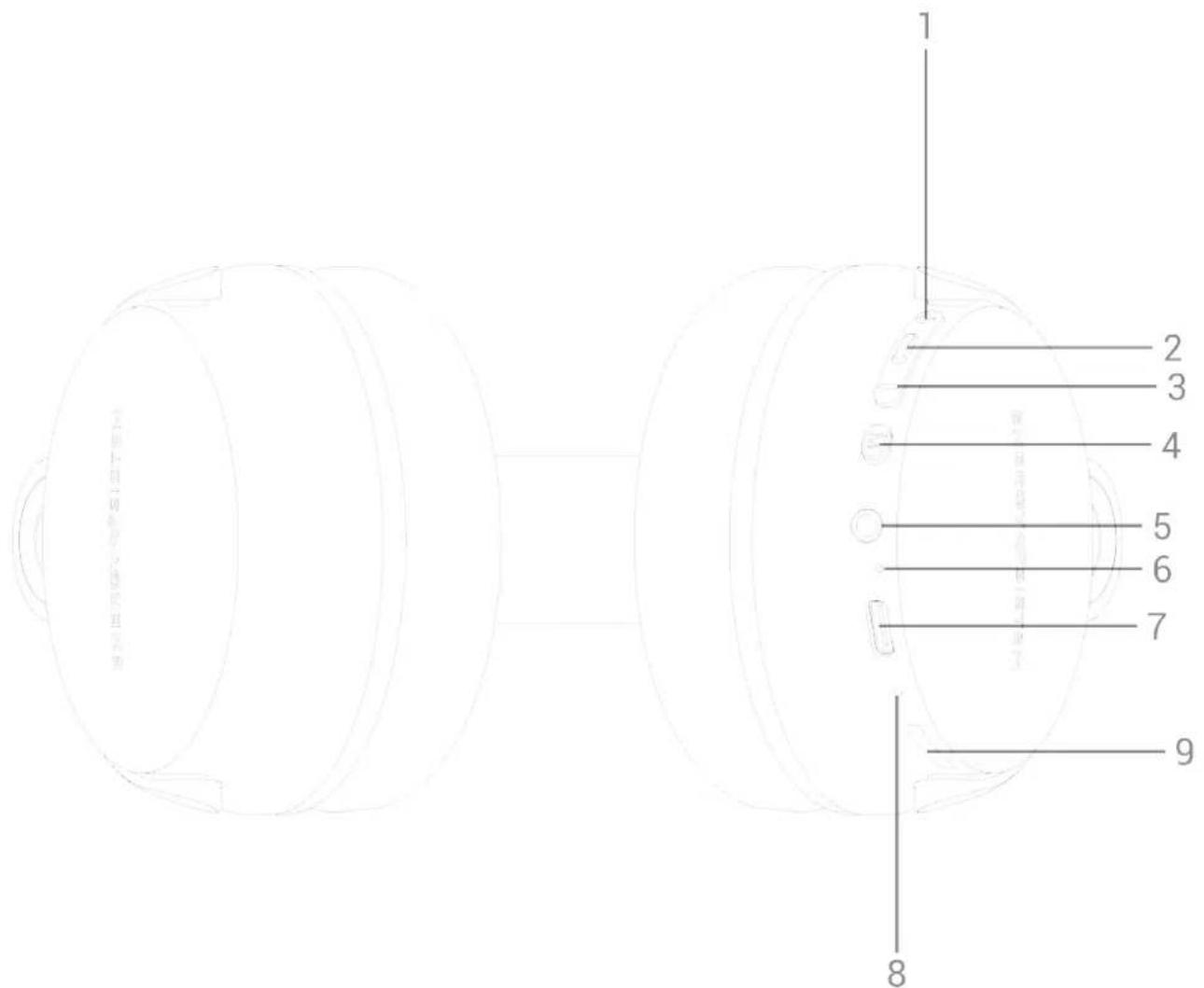
Switching on and off the device
To switch on your Studio Plus/Power Radio Headphones, press and hold the Multifunction button (2) for 2 seconds. You will hear a confirmation sound and the LED indicator (6) will light up white. The LED indicator (6) keeps flashing white while the headphones are on. Press and hold the Multifunction button (2) for 2 seconds to switch off the headphones. You will hear a sound when you switch them off.
Auto power off
To optimise battery life, your headphones turn off automatically after 5 minutes in Bluetooth® search mode, if not synchronised with any other device.
Charging the battery
When the battery level is below 10%, the LED indicator (6) starts flashing red. When the battery level is below 2%, you will hear a sound to remind you to charge it.
The LED indicator (6) lights up red while charging the device and turns off once the charging process is complete. To charge the battery, plug the USB Type-C end of the provided USB cable to your headphones' USB Type-C charging port (7) and the other USB end to any device with a USB charging port (PC, USB wall charger, car charger, etc.). The charging time is approximately 2 hours.
Note:
- To optimise battery life, do not store or leave the device completely discharged for a long time.
Caution: Do not charge your headphones with fast charging adapters or dedicated laptop charging adapters, Because their output voltage exceeds 5V and the device may become unusable.
Bluetooth® wireless connection
Press and hold the Multifunction button (2) for 2 seconds, until the LED indicator (6) starts flashing white. Your headphones are now ready to be paired with your Bluetooth device. Once Studio Plus/Power Radio Headphones appears on your source device screen, press "connect". You will hear a confirmation sound when both devices are paired.
Once your devices are synchronised, you can control basic playback functions such as turning up/down the volume and skipping to the next or previous track directly from your headphones.
Press Volume + / Next (1) to turn up the volume or Volume - / Back (3) to turn it down. You will hear a sound when reaching the maximum volume level.
Press and hold Volume + / Next (1) to skip to the next song. You can also press and hold Volume - / Back (3) to skip to the previous track.
Press the Multifunction button (2) once to pause or resume playback.
Note: If you're using the audio cable instead of the Bluetooth wireless connection, you will have to control music playback from your music player and not from the headphones.
FM radio
Press Change function (4) and select radio mode. Press and hold Change function (4) once again to start searching for FM radio stations. The process may take a few minutes. Once the search has been completed, press and hold Volume + / Next (1) or Volume - / Back (3) to select the radio station you want to hear from all saved radio stations.
Your Studio Plus/Power Radio Headphones save the last selected radio station when you turn them off. This way you will
hear it when switching on the headphones once again.
Micro SD player
Play .mp3 and .wav files from Micro SD cards (up to 128 GB). The contents play automatically a few seconds after inserting the storage unit.
The track you're listening to will be saved to the internal memory when turning off the headphones or removing the storage card. If you connect the same removable storage unit once again, playback will resume from the last track you listened to.
Press and hold Volume + / Next (1) or Volume - / Back (3) to switch to the next or previous track.
The folders and files stored on your removable storage units will be read in chronological order.
Press and hold Change function (4) to move to the next memory card folder.
Press Change function (4) twice to enable shuffle mode. You will hear a "beep" indicating shuffle mode has been enabled. Press the very same button twice to disable this mode. You will hear two "beeps" indicating that this mode has been disabled successfully.
Call control (hands-free function)
Once your headphones are paired with your smartphone via Bluetooth connection, simply wear the headphones and answer calls with the built-in Hands-free microphone (8).
Press the Multifunction button (2) to answer an incoming call. When receiving a call, the song you are listening to stops and the ringing tone sounds instead. You can also press and hold the very same button for 2 seconds to reject a call.
Press the Multifunction button (2) once again to hang up. Playback will resume from where it stopped.
The built-in microphone is designed to answer conventional phone calls from the smartphone. If you intend to connect these headphones to your Windows PC or MAC and use them for home office purposes such as video calls (Teams, Skype, Zoom, etc.), we recommend purchasing this add-on specifically designed for optimal performance: https://www.energysistem.com/headphones-microphone-1-45265-en
Voice Assistant
To activate your smartphone?s voice assistant, press the Multifunction button (2) on your Studio Plus/Power Radio Headphones twice.
This will activate your smartphone's digital assistant, allowing you to use voice commands to perform tasks naturally and easily.
Please take into account that the Multifunction button (2) activates your smartphone's voice assistant and depends on it to perform actions. For more information you can take a look at Google Assistant and Siri user guides, available on their manufacturers' websites.
3.5 mm jack audio input
You can also connect your Studio Plus/Power Radio Headphones to your music player using the audio cable provided. You don't need to switch on your headphones if you want to use the audio cable.
To enable this mode, simply plug one cable end into the Audio input (5) and the other end into your music player.
Note: If you're using the audio cable instead of the Bluetooth wireless connection, you will have to control music playback from your music player and not from the headphones.
Resetting the device
To force your Studio Plus/Power Radio Headphones to shut down, press and hold Volume + / Next (1) and Volume - / Back (3) simultaneously. The headphones will disconnect from the last paired device.
Warranty
Find the full warranty terms and conditions at: https://www.energysistem.com/terms-warranty
- ENERGY♥SISTEM
- POWER RADIO/ STUDIO PLUS
- CARE AND MAINTENANCE
- TECHNICAL SPECIFICATIONS
- AUDIO
- CONNECTIVITY
- HANDS-FREE MICROPHONE
- FM RADIO
- MICRO SD PLAYER
- CABLE
- BATTERY
- PRODUCT CONTENT
- GENERAL OVERVIEW
- SWITCHING ON AND OFF THE DEVICE
- AUTO POWER OFF
- CHARGING THE BATTERY
- NOTE
- BLUETOOTH® WIRELESS CONNECTION
- CALL CONTROL (HANDS-FREE FUNCTION)
- VOICE ASSISTANT
- 3.5 MM JACK AUDIO INPUT
- RESETTING THE DEVICE
- WARRANTY
Brand : ENERGY SISTEM
Model : Power Radio
Category : Earphones