101 4G - Telephone HMD - Free user manual and instructions
Find the device manual for free 101 4G HMD in PDF.


| Product Type | Feature Phone |
| Brand | HMD |
| Model | 101 4G |
| Dimensions | 121.5 x 50.0 x 14.4 mm |
| Weight | 90 g (with battery) |
| Display | 1.77 inch QQVGA (128x160) |
| Network | 4G VoLTE, 2G fallback |
| SIM | Dual SIM (nano, dual standby) |
| Battery | Removable Li-Ion 1000 mAh |
| Charging Port | Micro USB |
| Audio Jack | 3.5 mm |
| Storage | MicroSD up to 32 GB |
| Camera | Rear VGA with flash |
| Key Features | FM radio, torch, MP3 player, USB mass storage |
| Cleaning Method | Wipe with dry soft cloth; avoid liquids |
| Safety Notes | Use only original charger; avoid water and fire |
| Spare Parts | Battery, back cover, charger available via HMD service |
| General Info | Designed for basic calls, SMS, and 4G connectivity |
Frequently Asked Questions - 101 4G HMD
User questions about 101 4G HMD
0 question about this device. Answer the ones you know or ask your own.
Ask a new question about this device
Download the instructions for your Telephone in PDF format for free! Find your manual 101 4G - HMD and take your electronic device back in hand. On this page are published all the documents necessary for the use of your device. 101 4G by HMD.
USER MANUAL 101 4G HMD
1 About this user guide 4
2 Get started 5
Keys and parts
Set up and switch on your phone . . . . . . . . . . . . . . . . . . .
Charge your device . . . . . . . . . . . . . . . . . . . . . . . . . . .
Keypad
3 Calls, contacts, and messages 12
Calls 12
Contacts 12
Send messages 13
4 Personalize your phone 14
Change tones 14
Change the look of your home screen 14
Profiles 14
Add shortcuts 14
HMD 101 4G User Guide
7 Music 19
Music player
8 Empty your phone 20
Restore factory settings . . . . . . . . . . . . . . . . . . . . . . . . .
9 Product and safety information 21
For your safety . . . . . . . . . . . . . . . . . . . . . . . . . . . . . . .
Emergency calls
Take care of your device . . . . . . . . . . . . . . . . . . . . . . . .
Recycle 25
Crossed-out wheelie bin symbol 25
Battery and charger information 25
Small children 27
Nickel 27
Medical devices 27
Implanted medical devices 27
Hearing 28
Protect your device from harmful content 28
HMD 101 4G User Guide
1 About this user guide
Important: For important information on the safe use of your device and battery, "Product and safety information" before you take the device into use. To find out started with your new device, read the user guide.
HMD 101 4G User Guide
2 Get started
KEYS AND PARTS
Your phone

HMD 101 4G User Guide
Note: You can set the phone to ask for a security code to protect your privacy data. Select Menu > Settings > Security > Keyguard > Security code and enter a Note, however, that you need to remember the code, as HMD Global is not able bypass it.
Parts and connectors, magnetism
Do not connect to products that create an output signal, as this may damage not connect any voltage source to the audio connector. If you connect an exte or headset, other than those approved for use with this device, to the audio of special attention to volume levels.
Parts of the device are magnetic. Metallic materials may be attracted to the device, place credit cards or other magnetic stripe cards near the device for extended time, since the cards may be damaged.
SET UP AND SWITCH ON YOUR PHONE
Nano-SIM

HMD 101 4G User Guide
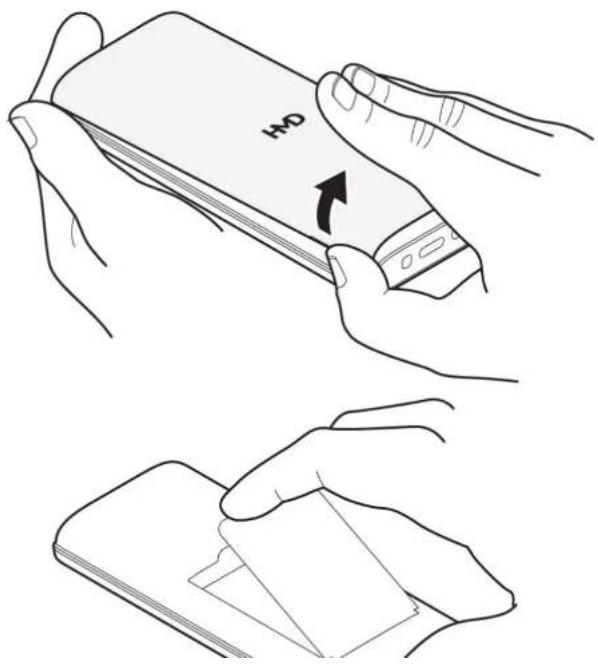
Open the back cover
HMD 101 4G User Guide
Insert the SIM cards
![graph TD A["Device 1"] --> B["Component 1"] C["Device 2"] --> D["Component 2"] B --> E["Output"] D --> E style A fill:#f9f,stroke:#333 style C fill:#f9f,stroke:#333 style B fill:#ccf,stroke:#333 style D fill:#ccf,stroke:#333 style E fill:#dfd,stroke:#333](/content/2026/07/1491066/images/b2950beb900c6dde8f0d04e29c64569675edb32dabe7abaae43a65e79d579231.jpg)
- Slide the SIM card in the SIM card slot.
- If you have a dual-SIM phone, slide the second SIM in the SIM2 slot.
HMD 101 4G User Guide
Insert the memory card

- Slide the memory card in the memory card slot.
- Put back the battery.
- Put back the back cover.
Use only compatible memory cards approved for use with this device. Incompatible damage the card and the device and corrupt data stored on the card.
HMD 101 4G User Guide
Charge the battery
- Plug the charger into a wall outlet.
- Connect the charger to the device.
Do not overcharge the battery: once charging of your device is complete, first µ charger from the device and then from the electrical outlet.
Do not overuse the battery: avoid letting the battery charge drop below 20% or runs out of power and shuts down.
If the battery is completely discharged, it may take several minutes before the indicator is displayed.

Tip: You can use USB charging when a wall outlet is not available. The efficiency charging power varies significantly, and it may take a long time for charging to s device to start functioning.
Charger model
For EU countries: Use your device only with an original BL-L5K rechargeable battery, your device with the HAC-18 charger. Charger plug type may vary. HMD Global r additional battery or charger models available for this device.
For environmental reasons this package does not include a charger. This device is powered with most USB power adapters and a cable with USB Type-C plug. Use and cables that are compliant with applicable country regulations, and international regional safety standards to avoid any risk of property loss or personal injury. The delivered by the charger must be between min 2 Watts required by the radio
HMD 101 4G User Guide
KEYPAD
Use the phone keys
• To see the apps and features of your phone, on the home screen, select
- To go to an app or feature, press the scroll key up, down, left, or right. feature, press the scroll key.
- If you have selected the zoomed menu view, press the scroll key up or do or feature. To open the app or feature, press the scroll key.
Lock the keypad
To avoid accidentally pressing the keys, lock the keypad: select ⇔ > Lock keypad, the keypad, press ⓞ, and select Unlock > ⏻.
Write with the keypad
Press a key repeatedly until the letter is shown.
To type in a space press 0.
To type in a special character or punctuation mark, select ≡ > Insert options Insert symbol.
To switch between character cases, press # repeatedly.
HMD 101 4G User Guide
3 Calls, contacts, and messages
CALLS
Make a call
Learn how to make a call with your new phone.
- Type in the phone number. To type in the + character, used for international twice.
- Press the call key. If asked, select which SIM to use.
- To end the call, press the end key.
Answer a call
Press ∩.
CONTACTS
Add a contact
- Select Menu > Contacts > ≡ > New Select First name, write the name, and select
HMD 101 4G User Guide
Call a contact
You can call a contact directly from the contacts list.
Select Menu > Contacts, scroll to the contact you want to call, and press th
SEND MESSAGES
Write and send messages
- Select Menu > Messages > 4. Select ≡ > Send . If asked, select w Create message . SIM to use.
- Write your message.
- Type in a phone number, or select Se
- To insert numbers or symbols to the and a recipient from your contacts list, message, select ≡ > Insert options 6> Select OK. Insert number or Insert symbol.
You can send text messages that are longer than the character limit for a single longer messages are sent as two or more messages. Your service provider may accordingly. Characters with accents, other marks, or some language options, take space, and limit the number of characters that can be sent in a single message
HMD 101 4G User Guide
4 Personalize your phone
CHANGE TONES
Set new tones
- Select Menu > Settings > Tone settings > Ring settings .
- Select which tone you want to change.
- Select Fixed ringtones to select from pre-defined tones, or More ringtones to tone from your phone or memory card.
- Scroll to the tone that you want and select Select .
CHANGE THE LOOK OF YOUR HOME SCREEN
Choose a new wallpaper
- Select Menu > Settings > Display > Wallpaper settings .
- Select Static wallpaper to select from pre-defined wallpapers, or More pictures a picture from your phone or memory card.
- Scroll to the wallpaper you want, and select Select .
PROFILES
HMD 101 4G User Guide
Edit Go to settings
On the bottom left of your home screen is ↗, which contains shortcuts to var settings. Select the shortcuts that are the handiest for you.
- Select Menu > Settings > Phone settings > Go to settings .
- Select Select options .
- Scroll to each shortcut you want to have on the list and select Mark .
- Select ← > Yes to save the changes.
You can also reorganize your list.
- Select Organise
- Scroll to the item you want to move, select Move and where you want to
- Select ← > Yes to save the changes.
ACCESSIBILITY
Change the menu view
You can select to see several apps in the apps menu at the same time, or
- Select Menu > Settings > Display > Menu display .
HMD 101 4G User Guide
BATTERY LIFE
Save power
If applicable, use network connections selectively for power saving: Switch Bluetooth when needed. Use a Wi-Fi connection to connect to the internet, rather than a connection. If you don't want to make or receive calls, switch the airplane mode mode closes connections to the mobile network and switches your device's wireless off.
HMD 101 4G User Guide
5 Clock, calendar, and calculator
SET THE TIME AND DATE MANUALLY
Change the time and date
- Select Menu > Settings > Phone settings > Time & date .
- Select Update time settings and switch Auto update time off.
ALARM CLOCK
Set an alarm
- Select Menu > Alarm
- Select ≡ > Add and enter the alarm time and other details.
- Select
CALENDAR
Add a calendar event
- Select Menu > Extras > Calendar
HMD 101 4G User Guide
6 Bluetooth
BLUETOOTH® CONNECTIONS
Switch on Bluetooth
- Select Menu > Settings > Connections > Bluetooth
- Switch Bluetooth on.
- Select Devices found > Add new device .
- Scroll to the found device and select Pair. If asked, confirm the passcode.
HMD 101 4G User Guide
7 Music
MUSIC PLAYER
You can listen to your MP3 music files with the music player. To play music, the music files on a memory card.
Listen to music
- Select Menu > Music .
- To start playing music, press the scroll key.
To adjust the volume, scroll up or down.
Note: MP3 player may be available in select countries only.
HMD 101 4G User Guide
8 Empty your phone
RESTORE FACTORY SETTINGS
Reset your phone
You can restore the original factory settings, but be careful, since this reset rer you have saved in the phone memory and all your personalization.
If you are disposing your phone, note that you are responsible of removing all
To reset your phone to its original settings and to remove all your data, on t type in *#7370#. If asked, enter your security code.
HMD 101 4G User Guide
9 Product and safety information
FOR YOUR SAFETY
Read these simple guidelines. Not following them may be dangerous or against lo regulations. For further info, read the complete user guide.
SWITCH OFF IN RESTRICTED AREAS

Switch the device off when mobile device use is not allowed or when it may or danger, for example, in aircraft, in hospitals or near medical equipment, fuel, blasting areas. Obey all instructions in restricted areas.
ROAD SAFETY COMES FIRST

HMD 101 4G User Guide
AUTHORIZED SERVICE

Only authorized personnel may install or repair this product unless self-repair supp available. See more info at www.hmd.com/self-repair.
BATTERIES, CHARGERS, AND OTHER ACCESSORIES

Use only batteries, chargers, and other accessories approved by HMD Global Oy this device. Do not connect incompatible products.
HMD 101 4G User Guide
GLASS PARTS

The device and/or its screen is made of glass. This glass can break if the device on a hard surface or receives a substantial impact. Stop using the device until replaced.
PROTECT YOUR HEARING

To prevent possible hearing damage, do not listen at high volume levels for long Exercise caution when holding your device near your ear while the loudspeaker is
HMD 101 4G User Guide
-
Press the call key.
-
Give the necessary info as accurately as possible. Do not end the call until permission to do so.
You may also need to do the following:
- Put a SIM card in the phone.
- If your phone asks for a PIN code, type in the official emergency number f location, and press the call key.
- Switch the call restrictions off in your phone, such as call barring, fixed dial user group.
Handle your device, battery, charger and accessories with care. The following suggestion help you keep your device operational.
- Keep the device dry. Precipitation, humidity, and all types of liquids or moisture can contain minerals that corrode electronic circuits.
- Unauthorized modifications may damage the device and violate regulations governing radio devices.
- Do not use or store the device in dirty battery. Rough handling can break in dirty areas.
- Do not store the device in high the surface of the device.
HMD 101 4G User Guide
RECYCLE

Always return your used electronic products, batteries, and packaging materials to collection points. This way you help prevent uncontrolled waste disposal and prom recycling of materials. Electrical and electronic products contain a lot of valuable including metals (such as copper, aluminum, steel, and magnesium) and precious (such as gold, silver, and palladium). All materials of the device can be recovered and energy.
CROSSED-OUT WHEELIE BIN SYMBOL
Crossed-out wheelie bin symbol

HMD 101 4G User Guide
Devices with a removable battery Use your device only with an original recharg The battery can be charged and discharged hundreds of times, but it will event When the talk and standby times are noticeably shorter than normal, replace the
Devices with a non-removable battery Do not attempt to remove the battery, a damage the device. The battery can be charged and discharged hundreds of time eventually wear out. When the talk and standby times are noticeably shorter than replace the battery, take the device to the nearest authorized service facility.
Devices with a user-replaceable battery To replace the battery, follow HMD's sell instructions or take the device to the nearest authorized service facility. For more about self-repair, visit www.hmd.com/self-repair.
Charge your device with a compatible charger. Charger plug type may vary. Char vary depending on device capability.
Battery and charger safety info
Once charging of your device is complete, unplug the charger from the device a outlet. Please note that continuous charging should not exceed 12 hours. If left fully charged battery will lose its charge over time.
Extreme temperatures reduce the capacity and lifetime of the battery. Always kee battery between 15°C and 25°C (59°F and 77°F) for optimal performance. A device hot or cold battery may not work temporarily. Note that the battery may drain temperatures and lose enough power to switch off the device within minutes. With outdoors in cold temperatures, keep your device warm.
Obey local regulations. Recycle when possible. Do not dispose as household waste
HMD 101 4G User Guide
• Always switch the device off and unplug the charger before removing any co-battery.
- Accidental short-circuiting can happen when a metallic object touches the metal battery. This may damage the battery or the other object.
SMALL CHILDREN
Your device and its accessories are not toys. They may contain small parts. Keep the reach of small children.
NICKEL
The surface of this device is nickel-free.
MEDICAL DEVICES
Operation of radio transmitting equipment, including wireless phones, may interfere inadequately shielded medical devices' function. Consult a physician or the medical manufacturer to determine if it is adequately shielded from external radio energy.
IMPLANTED MEDICAL DEVICES
HMD 101 4G User Guide
HEARING
Warning: When you use the headset, your ability to hear outside sounds may be. Do not use the headset where it can endanger your safety.
Some wireless devices may interfere with some hearing aids.
PROTECT YOUR DEVICE FROM HARMFUL CONTENT
Your device may be exposed to viruses and other harmful content. Take the fol precautions:
- Be cautious when opening messages. They may contain malicious software or be harmful to your device or computer.
- Be cautious when accepting connectivity requests or browsing the internet. Do Bluetooth® connections from sources you do not trust.
• Install antivirus and other security software on any connected computer. - If you access preinstalled bookmarks and links to third party internet sites, to appropriate precautions. HMD Global does not endorse or assume liability for su
VEHICLES
Radio signals may affect improperly installed or inadequately shielded electronic sys in vehicles. For more info check with the manufacturer of your vehicle or its e
CERTIFICATION INFORMATION
This mobile device meets guidelines for exposure to radio waves.
Your mobile device is a radio transmitter and receiver. It is designed not to ex limits for exposure to radio waves (radio frequency electromagnetic fields), recommend by international guidelines from the independent scientific organization ICNIRP. These guidelines incorporate substantial safety margins that are intended to assure the of all persons regardless of age and health. The exposure guidelines are based Specific Absorption Rate (SAR), which is an expression of the amount of radio 1 power deposited in the head or body when the device is transmitting. The ICNIF mobile devices is 2.0 W/kg averaged over 10 grams of tissue.
SAR tests are carried out with the device in standard operating positions, transm highest certified power level, in all its frequency bands.
This device meets RF exposure guidelines when used against the head or when at least 5/8 inch (1.5 centimetres) away from the body. When a carry case, be form of device holder is used for body-worn operation, it should not contain me provide at least the above stated separation distance from the body.
To send data or messages, a good connection to the network is needed. Sendi delayed until such a connection is available. Follow the separation distance instruct the sending is finished.
During general use, the SAR values are usually well below the values stated above because, for purposes of system efficiency and to minimize interference on the operating power of your mobile device is automatically decreased when full needed for the call. The lower the power output, the lower the SAR value.
Device models may have different versions and more than one value. Component changes may occur over time and some changes could affect SAP values.
COPYRIGHTS AND OTHER NOTICES
Copyrights
The availability of products, features, apps and services may vary by region. For info, contact your dealer or your service provider. This device may contain comm technology or software subject to export laws and regulations from the US and countries. Diversion contrary to law is prohibited.
The contents of this document are provided "as is". Except as required by appli warranties of any kind, either express or implied, including, but not limited to, the warranties of merchantability and fitness for a particular purpose, are made in re accuracy, reliability or contents of this document. HMD Global reserves the right document or withdraw it at any time without prior notice.
To the maximum extent permitted by applicable law, under no circumstances shall or any of its licensors be responsible for any loss of data or income or any consequential or indirect damages howsoever caused.
Reproduction, transfer or distribution of part or all of the contents in this document without the prior written permission of HMD Global is prohibited. HMD Global a policy of continuous development. HMD Global reserves the right to make char improvements to any of the products described in this document without prior
HMD Global does not make any representations, provide a warranty, or take any for the functionality, content, or end-user support of third-party apps provided with device. By using an app, you acknowledge that the app is provided as is.
Downloading of maps, games, music and videos and uploading of images and vid involve transferring large amounts of data. Your service provider may charge for transmission. The availability of particular products, services and features may vary


- 7 MUSIC 19
- 8 EMPTY YOUR PHONE 20
- 9 PRODUCT AND SAFETY INFORMATION 21
- 1 ABOUT THIS USER GUIDE
- 2 GET STARTED
- PARTS AND CONNECTORS, MAGNETISM
- SET UP AND SWITCH ON YOUR PHONE
- CHARGE THE BATTERY
- CHARGER MODEL
- KEYPAD
- USE THE PHONE KEYS
- LOCK THE KEYPAD
- WRITE WITH THE KEYPAD
- 3 CALLS, CONTACTS, AND MESSAGES
- CALLS
- CONTACTS
- SEND MESSAGES
- 4 PERSONALIZE YOUR PHONE
- CHANGE TONES
- SET NEW TONES
- CHANGE THE LOOK OF YOUR HOME SCREEN
- CHOOSE A NEW WALLPAPER
- PROFILES
- EDIT GO TO SETTINGS
- ACCESSIBILITY
- CHANGE THE MENU VIEW
- BATTERY LIFE
- SAVE POWER
- 5 CLOCK, CALENDAR, AND CALCULATOR
- SET THE TIME AND DATE MANUALLY
- ALARM CLOCK
- CALENDAR
- 6 BLUETOOTH
- BLUETOOTH® CONNECTIONS
- SWITCH ON BLUETOOTH
- 7 MUSIC
- MUSIC PLAYER
- LISTEN TO MUSIC
- 8 EMPTY YOUR PHONE
- RESTORE FACTORY SETTINGS
- 9 PRODUCT AND SAFETY INFORMATION
- FOR YOUR SAFETY
- RECYCLE
- CROSSED-OUT WHEELIE BIN SYMBOL
- BATTERY AND CHARGER SAFETY INFO
- SMALL CHILDREN
- NICKEL
- MEDICAL DEVICES
- IMPLANTED MEDICAL DEVICES
- HEARING
- PROTECT YOUR DEVICE FROM HARMFUL CONTENT
- VEHICLES
- CERTIFICATION INFORMATION
- COPYRIGHTS AND OTHER NOTICES
- COPYRIGHTS
Brand : HMD
Model : 101 4G
Category : Telephone