INT-12-BW - Thermometer Inkbird - Free user manual and instructions
Find the device manual for free INT-12-BW Inkbird in PDF.


Pick your language and provide your email: we'll send you a specifically translated version.
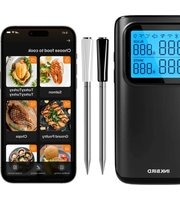
| Product Type | Wireless Digital Thermometer |
| Brand | Inkbird |
| Model | INT-12-BW |
| Category | Thermometer |
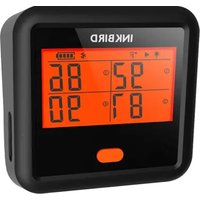
| Display Type | LCD with Backlight |
| Number of Probes | 2 |
| Probe Type | Stainless Steel, Food Grade |
| Temperature Range | -20°C to 300°C (-4°F to 572°F) |
| Accuracy | ±1°C (±2°F) |
| Connectivity | Bluetooth 4.0, Range up to 150m (490ft) |
| Power Source | 2 AAA Batteries (not included) |
| Battery Life | Up to 100 hours continuous use |
| Alarm Function | High/Low Temperature Alarms |
| Timer | Countdown Timer |
| Backlight | Yes, Manual On/Off |
| Dimensions (Main Unit) | 7.5 x 4.5 x 2 cm (2.95 x 1.77 x 0.79 in) |
| Weight (Main Unit) | 50 g (1.76 oz) |
| Material | ABS Plastic, Silicone Buttons |
| Waterproof Rating | IPX4 (Splash Resistant) |
| Included Accessories | 2 Probes, User Manual |
| Cleaning Instructions | Wipe with damp cloth; probes hand wash only |
| Safety Warnings | Do not immerse in water; not for medical use |
| Replacement Parts | Replacement probes available |
| Warranty | 1 Year Limited Warranty |
Frequently Asked Questions - INT-12-BW Inkbird
How do I pair the INT-12-BW with my phone?
Download the Inkbird Pro app from your app store. Enable Bluetooth on your phone. Open the app and follow the pairing instructions. Ensure the thermometer is within range (up to 150m).
How do I clean the probes?
Wipe the probes with a damp cloth after each use. For thorough cleaning, use mild soap and water. Do not immerse the probe connector or the main unit in water.
What should I do if the thermometer is not connecting?
First, check that the batteries are inserted correctly and have enough charge. Ensure Bluetooth is enabled on your device. Restart the app and the thermometer. If the issue persists, try resetting the thermometer by removing and reinserting the batteries.
How do I change the batteries?
Slide the battery cover on the back of the main unit. Remove the old batteries and insert two new AAA batteries, observing the correct polarity. Replace the cover securely.
Is the INT-12-BW waterproof?
The main unit has an IPX4 rating, meaning it is splash-resistant but not waterproof. Do not submerge it in water. The probes are water-resistant but should not be left submerged for long periods.
Can I use this thermometer for deep frying?
Yes, the probes can withstand temperatures up to 300°C (572°F), making them suitable for deep frying. However, ensure the probe is clipped securely to the side of the pot to avoid damage.
How do I set a temperature alarm?
In the app or on the device, navigate to the alarm settings. Set your desired high and low temperature thresholds. When the temperature crosses these limits, an audible alarm will sound.
How accurate is the thermometer?
The INT-12-BW has an accuracy of ±1°C (±2°F) under normal conditions. For best results, avoid extreme temperature fluctuations and ensure the probe is inserted correctly.
What is the maximum Bluetooth range?
The effective range is up to 150 meters (490 feet) in open space. Walls and obstacles can reduce the range significantly. Keep the thermometer and phone in line of sight for optimal connectivity.
Can I replace the probes?
Yes, replacement probes are available from Inkbird. Ensure you use genuine replacement probes to maintain accuracy and safety. Disconnect the old probe and plug in the new one.
User questions about INT-12-BW Inkbird
0 question about this device. Answer the ones you know or ask your own.
Ask a new question about this device
No questions yet. Be the first to ask one.
Download the instructions for your Thermometer in PDF format for free! Find your manual INT-12-BW - Inkbird and take your electronic device back in hand. On this page are published all the documents necessary for the use of your device. INT-12-BW by Inkbird.
USER MANUAL INT-12-BW Inkbird

Manual assistant
Powered by Anthropic
Waiting for your message
Product information
Brand : Inkbird
Model : INT-12-BW
Category : Thermometer