MHOTR24SS - Microwave Oven Summit - Free user manual and instructions
Find the device manual for free MHOTR24SS Summit in PDF.


Pick your language and provide your email: we'll send you a specifically translated version.
| Product Type | Microwave Oven |
| Brand | Summit |
| Model | MHOTR24SS |
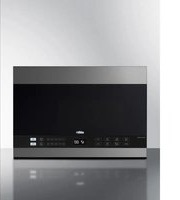
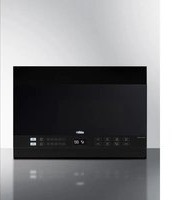
| Installation Type | Over-the-Range |
| Width | 24 inches |
| Capacity | 1.1 cu. ft. |
| Power Output | 1000 watts |
| Power Consumption | 1500 watts |
| Voltage | 120 V / 60 Hz |
| Weight | 51 lbs |
| Display Type | Digital LED |
| Control Type | Touchpad |
| Defrost Function | Yes, by weight or time |
| Auto Cook Programs | 10 preset menus |
| Turntable | Yes, removable glass |
| Interior Light | Yes, LED |
| Child Lock | Yes |
| Ventilation | Built-in exhaust fan (2-speed) |
| Cleaning | Wipe with damp cloth, mild detergent |
| Warranty | 1 year limited |
| User Manual | Included (20 pages) |
Frequently Asked Questions - MHOTR24SS Summit
How do I set the cooking time on the Summit MHOTR24SS?
Press the Time Cook button, then enter the desired cooking time using the number pad. Press Start to begin.
How to defrost food using this microwave?
Use the Defrost function. You can defrost by weight: press Defrost, enter weight, and press Start. Or use Defrost by time for manual defrosting.
What is the maximum capacity of the MHOTR24SS?
The oven has a 1.1 cubic foot capacity, suitable for most standard dishes.
How to clean the microwave interior?
Wipe the interior with a damp cloth and mild soap. Avoid abrasive cleaners. For odors, place a bowl of water with lemon slices and run for 2 minutes.
Why is my microwave not heating?
Check if the door is properly closed, the child lock is disabled, and the power cord is plugged in. If the issue persists, contact Summit support.
Can I use metal utensils in this microwave?
No, do not use metal or aluminum foil as they can cause arcing and damage the oven. Use microwave-safe containers only.
How to turn on the exhaust fan?
Press the Vent Fan button to cycle through fan speeds (High, Low, Off). The fan helps remove smoke and odors.
How to set the clock on the MHOTR24SS?
Press Clock, then enter the time using the number pad. Press Clock again to confirm or Start to save.
What does the 'Child Lock' feature do?
It prevents accidental operation by locking the control panel. To activate, press and hold Stop/Clear for 3 seconds. Repeat to unlock.
Where can I download the full user manual?
You can download the PDF manual for free from notice-facile.com or the Summit website. The manual includes detailed instructions and troubleshooting.
User questions about MHOTR24SS Summit
0 question about this device. Answer the ones you know or ask your own.
Ask a new question about this device
No questions yet. Be the first to ask one.
Download the instructions for your Microwave Oven in PDF format for free! Find your manual MHOTR24SS - Summit and take your electronic device back in hand. On this page are published all the documents necessary for the use of your device. MHOTR24SS by Summit.
USER MANUAL MHOTR24SS Summit

Manual assistant
Powered by Anthropic
Waiting for your message
Product information
Brand : Summit
Model : MHOTR24SS
Category : Microwave Oven