
AX034HPXAWQ - Air purifier SAMSUNG - Free user manual and instructions
Find the device manual for free AX034HPXAWQ SAMSUNG in PDF.


| Product Type | Air Purifier |
| Brand | Samsung |
| Model | AX034HPXAWQ |
| Dimensions (W x H x D) | 400 mm x 600 mm x 200 mm |
| Weight | 8 kg |
| Power Supply | 220-240 V, 50 Hz |
| Power Consumption | 50 W |
| Coverage Area | Up to 40 m² |
| Airflow (CADR) | 300 m³/h |
| Filter Type | Pre-filter, HEPA, Activated Carbon |
| Noise Level | 25 – 50 dB |
| Control Type | Touch panel, Remote control |
| Modes | Auto, Sleep, Speed (Low/Medium/High) |
| Timer | 1-8 hours |
| Filter Replacement Indicator | Yes |
| Air Quality Sensor | Yes (PM2.5, PM10) |
| Color | White |
| Warranty | 2 years |
Frequently Asked Questions - AX034HPXAWQ SAMSUNG
User questions about AX034HPXAWQ SAMSUNG
0 question about this device. Answer the ones you know or ask your own.
Ask a new question about this device
Download the instructions for your Air purifier in PDF format for free! Find your manual AX034HPXAWQ - SAMSUNG and take your electronic device back in hand. On this page are published all the documents necessary for the use of your device. AX034HPXAWQ by SAMSUNG.
USER MANUAL AX034HPXAWQ SAMSUNG
QUESTIONS OR COMMENTS?
COUNTRY CALL OR VISIT US ONLINE AT
SINGAPORE 1800-SAMSUNG (726 7864) www.samsung.com/sg/support

DB68-04615A-01
AX034HPXAWQSeries
Air Purifier with humidification function user manual

100% Recycled Paper
This manual is made with 100% recycled paper.


imagine the possibilities
Thank you for purchasing this Samsung product.

Features of your air purifier with humidification function
TOTAL AIR CARE!! Purification, humidification, sterilization functions can operate with one appliance!!
▶ Future multipurpose electric appliance :
As the functions of purification, humidification and sterilization are combined, this Samsung air purifier with humidification function enables you to use your living space efficiently.
Air purification function by 3 step filtering and ion sterilization of dual clean system.
The combination of the 3 step filter purification system pre filter (for large dust) → HEPA filter (for fine dust) → deodorization filter (for harmful gas and odor) and the sterilization function of S-Plasma ion will improve indoor air quality.
▶ Moisturizing effect by natural humidification :
The fine water particles produced by natural humidification are easily absorbed into skin and spread far away to humidify the indoor room evenly. In addition, the appliance maintains a healthy humidity of 40%\~60% to provide you with healthy living environment.
▶ Active sterilization and control by S-Plasma ion :
S-Plasma ion captures the harmful materials floating in the air through H O at is produced by combining active hydrogen (H) with oxygen ion( ) and destroys the hydrogen bond of protein structure to perform sterilization which removes germ, virus, and mold in the air.
▶ Clean humidification :
Samsung air purifier with humidification function uses a water purification filter to prevent white powder caused after moisture vaporizes from forming.
High-class design
The high-class design of the air purifier with humidification function gives the feel of gentle breeze. The design is user-centric as it is easy to use and in harmony with any indoor interior.
Contents
Preparation
Safety precautions 3
Check before use 10
Check the name of the components 14
Basic function
Operation mode 16
Sleep mode 17
S-Plasma ion 17
Others
Cleaning and maintenance 18
Troubleshooting 27
ENGLISH-2
Safety precautions
These safety precautions are for owner's safety and preventions of property damage. Therefore, please read this manual thoroughly before using your air purifier.
| WARNING | Hazards or unsafe practices that may result in severe personal injury or death. |
| CAUTION | Hazards or unsafe practices that may result in minor personal injury or property damage. |
| Follow directions. | |
| Do NOT attempt. | |
| Make sure the machine is grounded to prevent electric shock. | |
| Unplug the appliance. | |
| Do NOT disassemble. |
FOR INSTALLATION WARNING
Plug the power cord into a wall socket with the power specifications of the product or higher and use the socket for this appliance only. In addition, do not use an extension cord.
Sharing a wall socket with other appliances using a multi outlet power strip or extending the power cord may result in electric shock or fire.
▶ Do not use an electric transformer. It may result in electric shock or fire.
▶ If the voltage/frequency/rated current condition is different, it may cause electric shock or fire.
ENGLISH-3
Safety precautions
FOR INSTALLATION WARNING
Do not install this appliance near a heater, inflammable material. Do not install this appliance in a humid, oily or dusty location, in a location exposed to direct sunlight and water (rain drops). Do not install this appliance in a location where gas may leak.
▶ Failure to do so may result in electric shock or fire.
FOR INSTALLATION CAUTION
The appliance should be installed in a place where the power cord of the product can be easily pulled out.
▶ Failure to do so may result in electric shock or fire due to electric leakage.
Install your appliance on a level and hard floor that can support its weight.
▶ Failure to do so may result in abnormal vibrations, noise, or problems with the product.
There should be over 15cm space around the appliance.
▶ If space for air intake is not enough, humidification capacity may decrease.
▶ If the appliance is too near wall side, the wall paper may get damaged.
When installing the appliance, be careful not to press the power cord.
ENGLISH-4
FOR POWER SUPPLY WARNING
Unplug the product, and then remove foreign substances (dust, moisture, etc.) of the power plug terminal or power plug connection part with a dry cloth on a regular basis.
▶ Otherwise, electric shock or fire may occur.
When the appliance or power plug or power cord is damaged, contact your nearest service center.
Plug the power plug into the wall socket firmly. Do not use a damaged power plug, damaged power cord or loose wall socket.
This may result in electric shock or fire.
When unplugging the product, do not pull the power cord. Grip the power plug, and then pull the power plug.
▶ Otherwise, electric shock or fire may occur.
Do not pull or excessively bend the power cord. Do not twist or tie the power cord.
Do not hook the power line over a metal object, place a heavy object on the power cord, insert the power line between objects, or push the power cord into the space behind the appliance.
This may result in electric shock or fire.
FOR POWER SUPPLY CAUTION
When not using the air purifier for a long period of time or during a thunder or lightning storm, disconnect the power supply.
▶ Failure to do so may result in electric shock or fire.
ENGLISH-5
Safety precautions
If the appliance is flooded, turn off the appliance and contact a service center.
If the appliance generates a strange noise, a burning smell or smoke, disconnect the power supply immediately and contact a service center.
▶ Failure to do so may result in electric shock or fire.
When gases (city gas, profane gas, etc.) leak, do not touch the power cord. Immediately ventilate the area and contact a service center or a qualified technician.
▶ Do not use a ventilating fan.
▶ If there is a spark, explosion or fire may occur.
Do not unplug the appliance during operation.
▶ When plugging the appliance in again, flame may occur and it may result in electric shock or fire.
When repairing is needed, contact a service center.
▶ Failure to do so may result in product malfunction, water leakage, electric shock and fire.
Do not touch the power plug with wet hands.
▶ Failure to do so may result in electric shock.
Do not strike or pull the appliance with excessive force.
▶ Failure to do so may result in fire, injury, or problems with the product.
After unpacking the air purifier, keep all packaging materials out of the reach of children.
▶ If a child places a bag over its head, it may result in suffocation.
Do not insert your fingers or foreign substances into the air inlet or air outlet.
▶ Take special care that children do not injure themselves by inserting their fingers into the appliance.
ENGLISH-6
Do not place an object near the outdoor unit that allows children to climb onto the machine.
Children or the appliance may fall and be seriously injured.
Do not open the water bottle door during operation and do not put your hands into the outlet.
▶ Failure to do so may result in electric shock or injury.
Do not put other foreign materials such as metal into the appliance.
▶ Failure to do so may result in electric shock or injury.
If water has entered power supply part, unplug the appliance and dry it completely before use.
▶ Failure to do so may result in electric shock or fire.
Do not shake or move the appliance while the appliance(water bottle and tray) contains water.
▶ Failure to do so may result in electric shock or water leakage and fire.
Do not use humidification detergent.
Do not place heavy things onto the appliance.
▶ Failure to do so may result in product malfunction and noise.

Do not attempt to repair, disassemble, or modify the appliance yourself.
▶ Do not use any fuse (such as copper, steel wire, etc.) other than the standard fuse.
▶ Failure to do so may result in electric shock, fire, product malfunction or injury.

If any foreign substance such as water has entered the appliance, disconnect the power supply and contact a service center.
▶ Failure to do so may result in electric shock or fire.
ENGLISH-7
Safety precautions
Keep about 2m distance from other electric appliances such as TV, video, audio etc.
▶ Failure to do so may result in reduced video quality or noise.
Leave more than 15cm space between the product and the wall.
This appliance intakes air from rear side to purify the air, so installing the appliance in the middle of the place might be efficient. However, when installing the appliance at wall side, allow more than 15cm between the appliance and the wall.
Do not spray volatile material such as insecticide onto the appliance.
▶ As well as being harmful to humans, it may also result in electric shock, fire or product malfunctions.
Do not tilt or turn the appliance upside down, while the appliance is plugged in.
▶ Failure to do so may result in electric shock.
Do not use a damaged water bottle.
▶ Failure to do so may result in electric shock or water leakage.
Do not put hot (over 40 °C) or polluted water (salinity, detergent, chemical etc) into the water bottle.
▶ Failure to do so may result in product malfunction.
Do not install or operate the appliance at a place where the water in the appliance may be frozen.
▶ The water lower than 6° C is the reason for the product malfunction.
The proper water temperature for the air purifier with humidification function is 16 °C\~30 °C.
Do not put the appliance into the water.
▶ Failure to do so may result in product malfunction.
ENGLISH-8
After removing the upper cover, do not press the switches on the upper left side of the product with hands and chopsticks.
▶ Failure to do so may result in product malfunction.
Do not drink the water from the tray of the appliance.
Do not place the appliance on the edge of a desk and table.
Do not stand on top of the appliance or place objects (such as laundry, lighted candles, lighted cigarettes, dishes, chemicals, metal objects, etc.) on the appliance.
▶ Failure to do so may result in electric shock, fire, product malfunction and injury.
Do not operate the appliance with wet hands.
▶ Failure to do so may result in electric shock.
Do not eat grains in the water purification filter.
▶ Failure to do so may result in injury.
This appliance is not intended for use by persons (including children) with reduced physical, sensory or mental capabilities, or lack of experience and knowledge, unless they have been given supervision or instruction concerning use of the appliance by a person responsible for their safety.
Children should besupervised to ensure that they do not play with the appliance.
FOR CLEANING WARNING

Do not clean the appliance by spraying water directly onto it. Do not use benzene, thinner, acetone or alcohol to clean the appliance.
▶ Failure to do so may result in discoloration, deformation, damage, electric shock or fire.
Disconnect the power supply and stop the fan operation before cleaning the appliance.
▶ Failure to do so may result in electric shock or fire.
ENGLISH-9
Check before use
Checking installation
Check the required installation condition below.
The installation area should be level, not sloping.
The area near the air intake and air outlet should Be free from obstruction.
The area should not be humid, nor have inflammable material nearby.
The area should allow 15cm away from the wall.
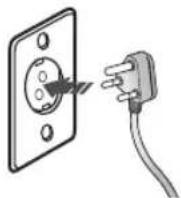
Check the power plug and socket
▶ Use the power plug to 220 - 240 V socket only.
(When the appliance is plugged in, it will be changed to operation waiting status.)
▶ Unplug the appliance when in use.
Product information
▶ A vapor particle of air purifier with humidification function is so small that it is invisible.
When the water in the tray smells bad or the color of the water changes, remove the water and then clean the tray.
The temperature of air flow from the appliance is lower than ambient temperature.
▶ Humidification filter may generate odor but this is not a malfunction.
Clean the humidification filter and the tray and then operate the appliance again.
When using the appliance for the first few times, white floating particles of dust might be found in the tray. This is not foreign matter but fiber materials of the humidification filter. If the floating particles of dust are generated a lot, clean the tray and then operate the appliance again.
Temperature range for operation of air purifier with humidification function
Indoor temperature: approximately 6 °C\~40 °C
▶ If the appliance operates out of its proper temperature range, it will not operate correctly.
Design information
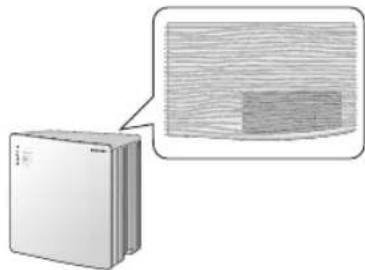
The wave pattern of upper cover is the patten of air flow, so it is not a faulty product.
The appliance may look bent depending on viewing angle as its design of left or right side is asymmetrical.
ENGLISH-10
Displaying current humidity
The air purifier with humidification function automatically detects and displays current humidity by 5 % units.
The displayed humidity figure might be different from the humidity of distant area.
▶ Users can adjust the fan speed while operating the humidification function of the appliance.
The set humidity may be different from the displayed humidity depending on usage environment and condition.
Using a filter
▶ Remove the vinyl packaging of the deodorization filter before first use.
▶ If you operate the appliance without a filter, the air purification function will not work.
When filter exchange light on, change the HEPA filter and the deodorization filter.
(The HEPA filter and deodorization filter removes invisible fine dust and gas or odor particle. Therefore, even though the filter looks fine, you should change those filters on a regular basis. As the filter exchange period is set based on maximum hours of usage by considering its operation hour, the exchange period might be different by indoor environment.)
▶ When odor is generated, fan speed is reduced or proper operation period is over, the filters (Pre filter/Deodorization filter) should be changed.
If the pre filter is cleaned frequently, the capacity of air purifier with humidification function is improved and you can maintain better indoor environment.
For filter change, refer to the 'Changing the HEPA and deodorization filter' in the cleaning and maintenance section.
Product specification
| Model AX034HPXAWQ Series | |
| Product size(WxHxD) 450 mm X 478 mm X 274 mm | |
| Water bottle capacity 3.4 ℓ | |
* Design or product specification might be changed without notice for product improvement.
Check before use
Water supply
Use tap water for the safe and long term use of your air purifier with humidification function.
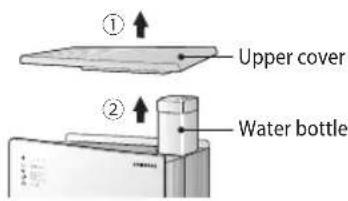
- While the air purifier with humidification function is switched off, detach the upper cover (①) and lift off (②) the water bottle.
- Open the water bottle cap.
- Turn the bottle cap in an anticlockwise direction. Before opening the water bottle, press the port in the middle of the bottle cap, which will release the vacuum and make the bottle cap easier to open.

- Filling water for the water bottle.
- Use tap water (which shouldn't be hotter than 40 °C). - When filling the bottle, you should grip the water bottle tightly.
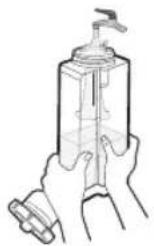
- Close the water bottle cap.
- Turn the bottle cap in clockwise direction.

- After putting the water bottle into the water bottle box(①), attach the upper cover(②).

ENGLISH-12

NOTE
- When the appliance runs out of water during operation (water supply) light will flash.
- To start the humidification mode, allow about 1-5 minutes after filling the water bottle when the appliance is supplied with enough water (water supply) light will go out and then return to the previous mode.
- Tap water reduces the bacterial growth of the water bottle and tray as the tap water contains chlorine. If the hardness of tap water is high, white powder (impurities) may be formed on a filter or tray. In this case, clean the appliance more frequently.
- When the water from reverse osmotic pressure water purifier is used, less white powder will be generated than using tap water. However, as the water of reverse osmotic pressure water purifier does not have chlorine there could be faster bacterial growth. Clean the water bottle or tray more frequently with a neutral detergent and using tap water is recommended. (Reverse osmotic pressure method : Pressure larger than osmotic pressure is applied to the denser solution so that water can move to the light part for purification.)
- Hardness indicates the amount of calcium ion and magnesium ion in water. Limestone and shoreline area show high hardness.

CAUTION
- If you assemble the water bottle incorrectly after supplying the water, this may result in water leakage.
Check the name of the components
Air purifier with humidification function
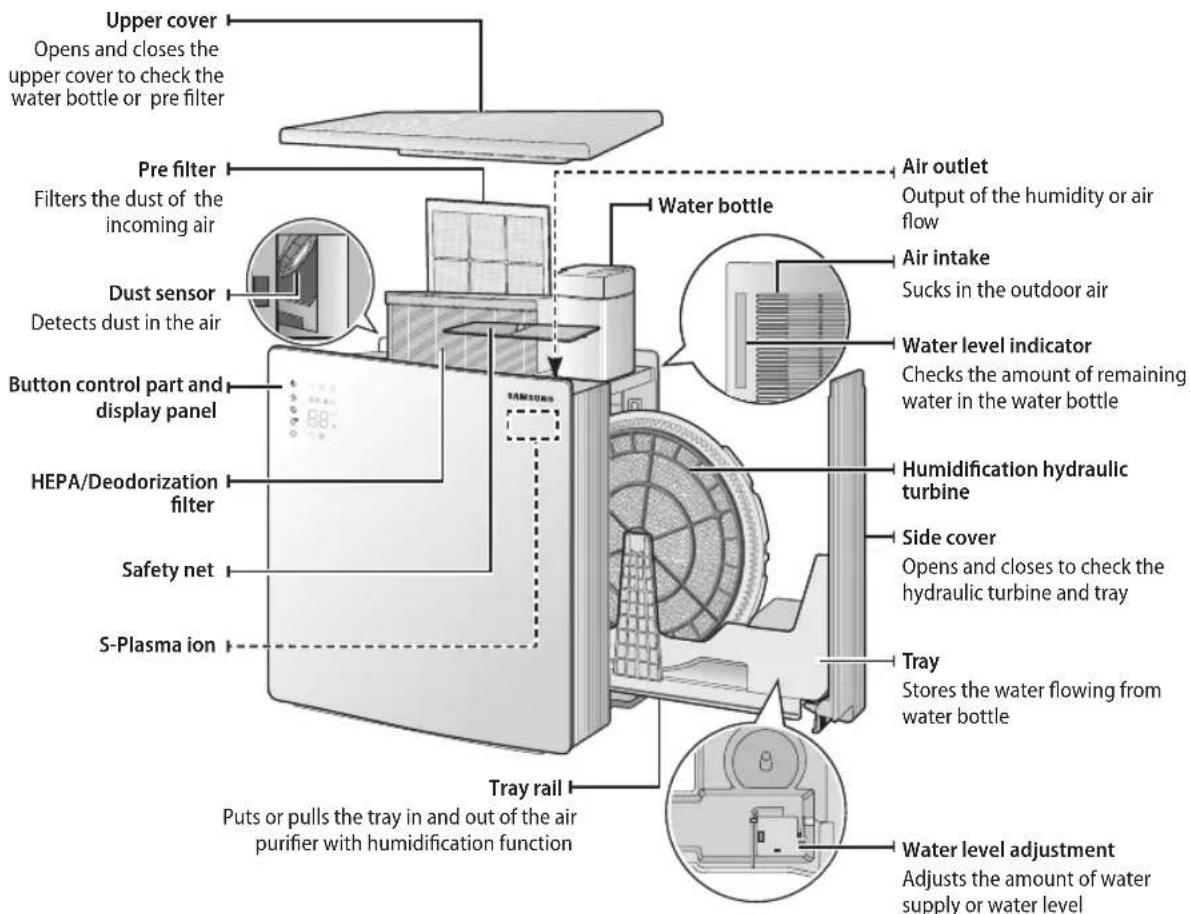
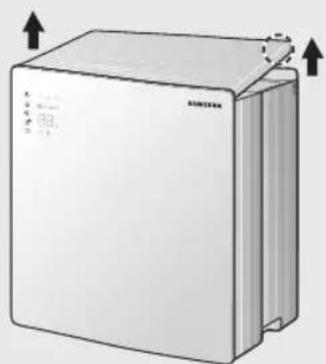
Opening the upper cover
Grip each side grooves on the back of the appliance and lift up the upper cover.
Opening the side cover
After pulling out the upper cover and the water bottle(①), detach the side cover from the appliance by pulling the handle part at the right bottom of the appliance in the arrow direction(②).

ENGLISH-14
Buttons on the control panel
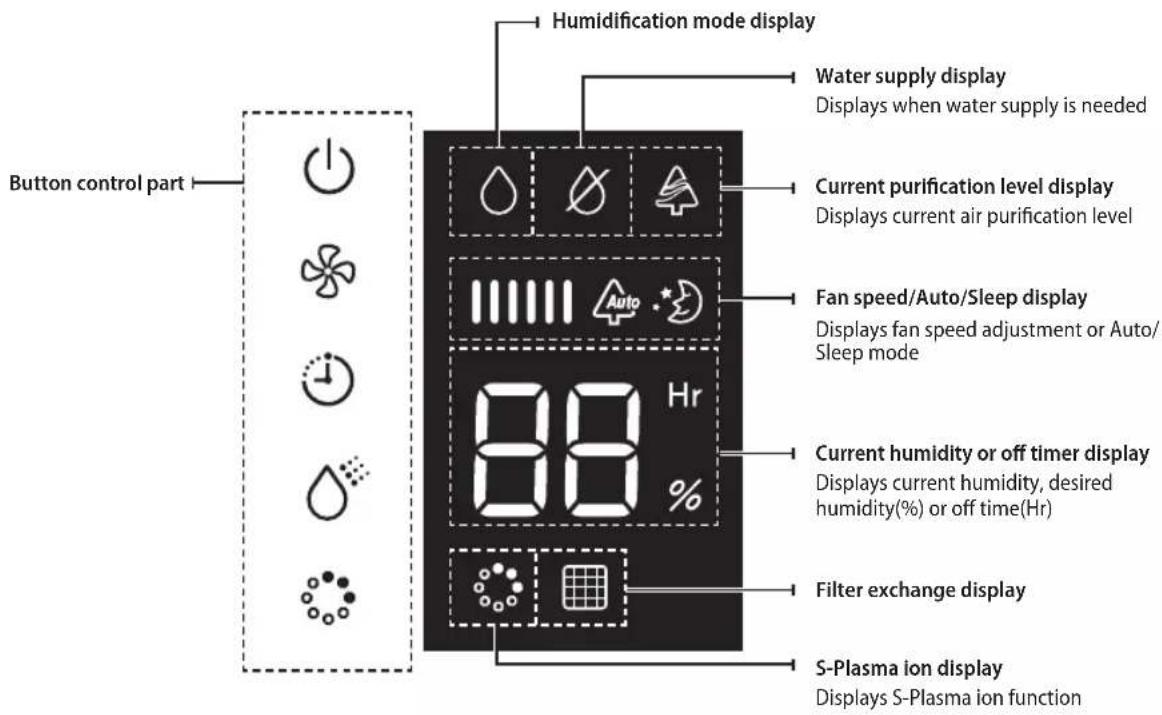
Buttons on the control panel
 | Power button | Turns the air purifier with humidification function on or off. |
 | Fan speed/Auto/Sleep button Adjusts fan speed or selects Auto or sleep mode. | |
 | Off timer button | Set the off time for the air purifier with humidification function. |
 | Humidification mode or desired humidity adjustment button | Adjusts humidification mode or desired humidity. |
 | S-Plasma ion button Turn the S-Plasma ion(sterilization) function on or off. | |
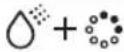 | Filter exchange icon off button | Resets the filter exchange display function after filter exchange. |

NOTE
- When pressing the [button] button on the control panel, the appliance starts and set mode and function will be displayed.
- When pressing a button and then the selected function is displayed with sound, it indicates that the function has been set.
Purification display
- Displays the purification level by odor or dust sensor.
• Purification display description - Red : Low(Polluted) / Orange : Medium(Normal) / Blue : High(Purity)
ENGLISH-15
Operation mode
You can select humidification and purification mode or purification mode only.
Humidification and purification mode
▶ Operates the humidification mode that adjusts indoor humidity and purification mode, providing clean air at the same time.
▶ Light will be on on the control panel and the desired humidity can be adjusted.
Purification mode
▶ You can operate purification mode only in the summer or high humidity condition.
][light on the control panel will go out and desired humidity cannot be adjusted.

NOTE
- When the humidification function is not in use, detaching the hydraulic turbine before using the appliance is recommended. (Refer to p.10)
- When you only use the purification mode without using the humidification function, get rid of all the water within the tray and the water bottle, wash the humidification filter, and make sure to dry them all before using the product.
-
Unpleasant smell may occur if the humidification hydraulic turbine is not being used while it is wet. Keep the humidification hydraulic turbine after cleaning it thoroughly. (Refer to page 20.)
-
Press [ ⏻] button to start the humidification and purification mode.
-
The air purifier with humidification function will be turned on with sound.
- When plugging the appliance in and turning it on, it will start as humidification and purification mode(Fan speed:[1] (Low)).
- When turning the appliance on again, the mode you set before turning the appliance off will remain.
- When the fan speed is auto, desired humidity cannot be adjusted.

[NO TEXT]


- Press [ ] button to adjust the desired humidity in humidification and purification mode.
- When pressing the button once time, current humidity will be displayed and each time you press the button, the desired humidity will be increased by 5%. You can set the humidity range from 30 to 70%.
- You can select either humidification and purification mode or purification mode only by adjusting humidity level. When the desired humidity is 70%, press[] button one more time to turn off the light and to stop the humidification mode and to start the purification mode.
- When the fan speed is Auto, the proper humidification and purification status will be maintained depending on the ambient temperature, humidity, dust, and odor.
- When the ⬇] light is not lit up, the humidification function does not operate.
- If the ⚙] icon blinks during humidification and purification mode, the mode will be stopped.

[NO TEXT]


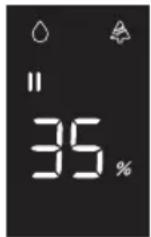
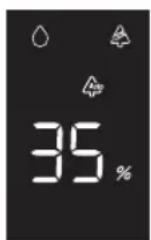
- Press [ ] button to adjust fan speed.
- (Low) → (Medium) → (Strong) → Auto → (Sleep) will be selected in rotation.
- When the fan speed is Auto, the proper humidification and purification status will be maintained depending on the ambient temperature, humidity, dust, and odor.
- When selecting sleep mode, only the ⚡ ] display on the control panel will be dimmed.
- Fan speed will be changed to (Sleep) during humidification and purification mode.

[NO TEXT]


ENGLISH-16
Sleep mode
When you are sleeping, the air purifier with humidification function will be turned off automatically. While the appliance is switched on, press [icon] button and set the sleep mode.
▶ Each time you press button, the time for sleep mode will be selected by 1 hour unit from continuation to 8Hr(8hours).
The off time will be set 1 minute after you set the off time and you can check the remaining time and set humidity by pressing [1] button and [2] button.
When pressing the button in timer mode, the timer function will be canceled.


- When the set time is over, the air purifier with humidification function will be turned off automatically.
- After setting the timer function, if you turn the appliance off or select the continuation status for timer, the timer function will be canceled.
- When setting the timer function, the remaining time will be displayed by 1 hour unit as time goes on.
- When selecting timer function, the appliance will be changed to sleep mode.
- If you select sleep mode while operating S-plasma ion, S-plasma ion will operate even though it is not displayed.
- The mode before setting the sleep mode will operate.
- Off timer function operates only in sleep mode.
S-Plasma ion
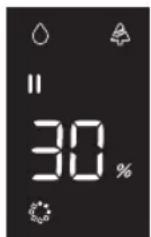
S-Plasma ion captures the harmful materials floating in the air through HdO at is produced by combining active hydrogen (H) with oxygen ion(6) and destroys the hydrogen bond of protein structure to perform sterilization which removes germ, virus, and mold in the air.
▶ Press button to operate S-Plasma ion.
▶ To cancel the S-Plasma ion function prebutton. The S-Plasma ion display will go out.
▶ S-Plasma ion function can be used without water. (Current humidity will be displayed.)



- When you don't use the humidification function, empty the water in the water bottle.
Cleaning and maintenance

- Before you clean the appliance, you turn off and unplug the appliance.
Cleaning the exterior
▶ Wet a towel with warm water, wring the towel tightly, and use to wipe the appliance clean.
- Use a cleaning brush to remove the dust in the grooves of the exterior panel. - Use a cotton bud to clean the grooves of the exterior.
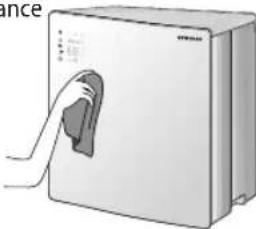

- Do not clean the display and button control part with alkaline detergent.
- Do not clean the surface of the appliance with sulfuric acid, hydrochloric acid or organic solvent such as thinner, kerosene, and acetone. Do not attach a sticker to the appliance as it will damage the surface of the appliance.
Maintaining the appliance
▶ Discard all the water in the water bottle and the interior of the appliance and then clean the appliance completely.
▶ After removing water on the tray, water bottle and purification filter, and cleaning the humidification filter, wipe them with a dry cloth and then leave them to dry in the shade.
When the appliance is not used for a long period of time, put it in a package box and store it in the shade where the humidity level is low.

- If water remains in the appliance for a long time, the foreign materials in the water will combine with air, which corrodes interior of the appliance and blocks the humidity discharge as well as bacterial propagation. (When not using the appliance for a long time, remove all the water in the water bottle and from the interior of the appliance.)
Moving the appliance
When moving the appliance without a water bottle, detach the tray as well. (If you lift up the tray without the water bottle, the appliance may fall as the tray is pulled out.)

- When moving the appliance, the water bottle should be attached.(Remove all the water in the water bottle and the tray.)
ENGLISH-18
Cleaning dust sensor
- Grip the grooves of the dust sensor cover and pull the cover toward the right.

- Clean the dust sensor lens carefully with a cotton bud.
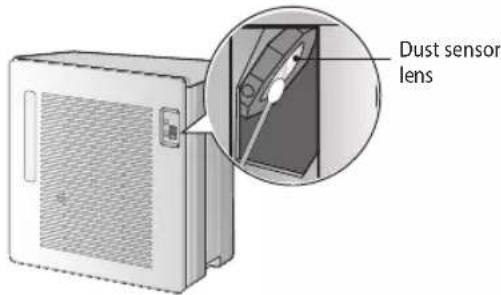
- Put the two hinge parts of the dust sensor cover into the right grooves of the dust sensor part(①) and press the cover in the arrow direction(②) to attach.
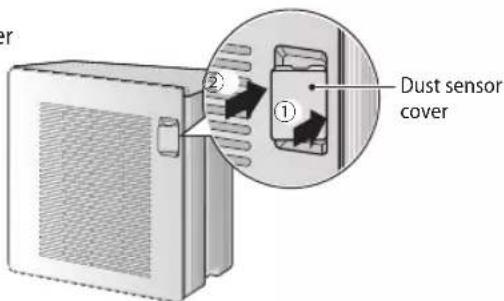

- Do not clean the sensor part with volatile materials such as alcohol and acetone, use only water.
- When foreign material(dust) remains around the dust sensor lens, the contamination level status might not be changed from contamination status. In that case, clean the sensor again.
- Clean the sensor part every six months. However, the cleaning period can vary according to the surrounding environment and hours of usage, so this period should be shorter in a dusty environment.
ENGLISH-19
Cleaning and maintenance
Cleaning the water bottle
- While the appliance is switched off, detach the upper cover(①) and lift off the water bottle from water bottle box(②).
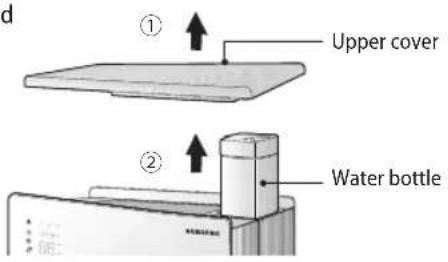
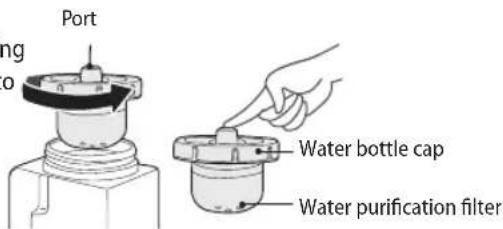
- Open the water bottle cap.
- Turn the bottle cap in an anti clockwise direction. Before opening the water bottle, press the port in the middle of the bottle cap to release the vacuum so the bottle cap can be opened easily.
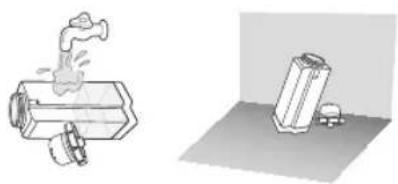
- After cleaning the water bottle with running water, leave it dry completely in the shade.
- Clean the water bottle frequently.
- Close the water bottle cap.
- Turn the bottle cap in a clockwise direction.
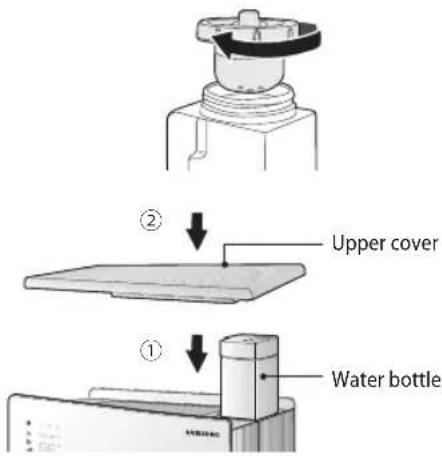
- After putting the water bottle into the water bottle box (①), fit the upper cover(②).

NOTE
- When using the appliance for the first few times, the operating time might be delayed while the supply of water flows through. (Maximum 5minutes)
• Each time you supply water, check the condition of the water bottle and clean it when it is dirty.

CAUTION
- If the upper cover is not closed correctly after cleaning, the appliance will not operate correctly.
- Be careful of damage since the water bottle could be weakened by shock. When the water bottle gets damaged, do not use it as there is the danger of water leakage and you should contact a service center.
ENGLISH-20
Cleaning the water purification filter
-
After detaching the water purification filter from water bottle cap, put the filter into a bowl of tap water and clean it by shaking slowly.
-
Fit the water purification filter back into the water bottle cap.
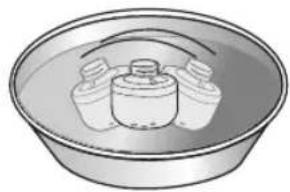
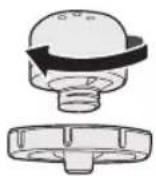

• Water purification filter needs to be cleaned only when the surface of the filter is polluted.
- Initial use: When you wash the filter for the first few times, sometimes the water color can be dark red but it will not cause any harm to the human body.
• Water supply: When operating the appliance for the first time, the initial operation time can be delayed since it needs time for the water supply (Maximum 5 minutes).
- Replacement time: The replacement time for the water purification filter can vary according to the elements of water and service life. When white powder forms in the tray or in the hydraulic turbin, purchase a new filter. (Expected lifespan of the filter is 3\~6 months.)
- Maintenance: If you are not going to use the filter for long period of time, remove it from the water bottle, dry the moisture on the surface and store it in a vinyl package.

- Be careful of damage since the water purification filter could be weakened by shock. When the water bottle gets damaged, do not use it as there is the danger of water leakage and contact a service center.
- Do not detach the water purification filter, do not apply impact to the filter and do not make a hole in the filter net. Otherwise, a positive ion exchange resin will get out.
- Do not drink the water purified and reserved in the appliance.
ENGLISH-21
Cleaning and maintenance
Cleaning the humidification filter
When the appliance is not cleaned for a long time, sediment powder will form on the humidification hydraulic turbin, so clean the filter frequently.
- While the appliance is switched off, detach the upper cover(①) and lift off the water bottle from water bottle box(②).

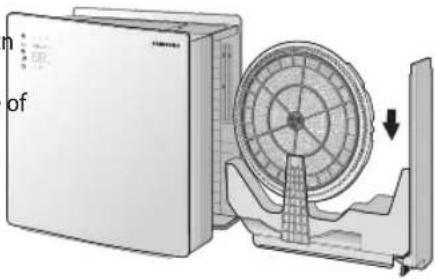
- Detach the side cover from the appliance by pulling the tray handle on the bottom right of the appliance and lift up the humidification hydrau turbin.
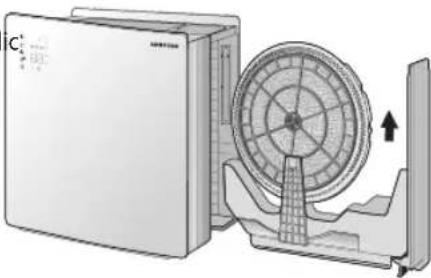
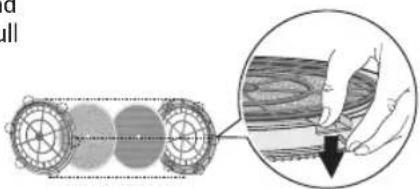
- Grip the part marked 'Back' on the humidification hydraulic turbin and press the fastener(6 places) in the arrow direction to detach and then pull out the humidification filter.
- When reassembling the humidification hydraulic turbin, repeat the assembling procedure in reverse order.
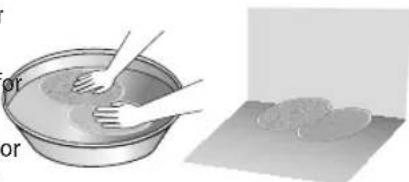
- Clean the humidification filter by soaking it in water. Then press the filter gently with hands and leave it to dry in the shade.
- Dissolve detergent in lukewarm water and put the filter in the water for 20\~30 minutes. Then press the filter gently with hands to clean.
- Rinse the filter with clean water to thoroughly remove the detergent or pollutant in the filter. (If the filter is not washed clean, it may produce an odor.)
- After cleaning the filter, leave the filter to dry in the shade.
ENGLISH-22
- After fitting the rubber packing into the groove of the humidification hydraulic filter, the humidification filter with humidification hydraulic turbin. When putting the humidification hydraulic turbin into the appliance, the 'Back' writing on the turbin should look at the rear side of the appliance.
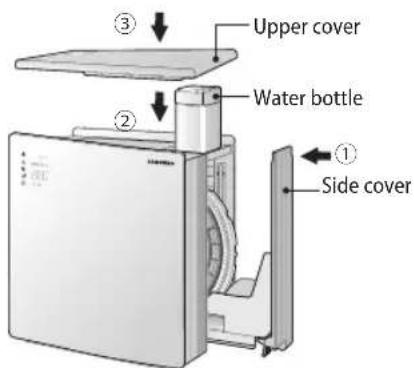
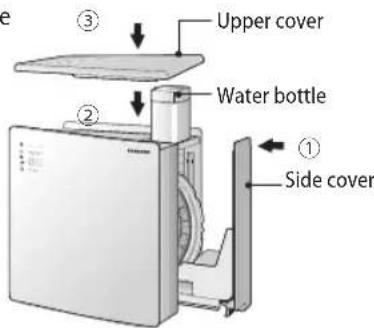
- After closing the side cover(①), put the water bottle into the water bottle box(②) and close the upper cover.(③)

- Humidification filter must be cleaned at least 2 times per week and tray and humidification hydraulic turbine must be cleaned at least 1 time per week.
- There is no front or rear side for the humidification filter.
- If the humidification filter is too dirty or there's bad smell, dissolve detergent in lukewarm water and put the filter in the water for about and hour. Then clean the filter by rubbing or pressing it gently with hands and rinse them thoroughly before drying it completely in the shade.
- If you are not going to use the humidification function for long period of time, empty the water in the tray and the water bottle, clean and dry the humidification and store the filter in the place where it is free from other odors.

- When the upper cover is not closed correctly after cleaning, the appliance will not operate correctly.
- When many impurities are attained, cleaning the humidification hydraulic turbin and the tray will be difficult and noise or product malfunctions may happen.
- Rinse the humidification filter more than 3 times so that detergent does not remain on the filter.
ENGLISH-23
Cleaning and maintenance
Cleaning the tray and the interior of the appliance
If the appliance is not cleaned for a long time, sediment (powder) can form so clean the appliance frequently.
- While the appliance is switched off, detach the upper cover(①) and lift off the water bottle from water bottle box(②).
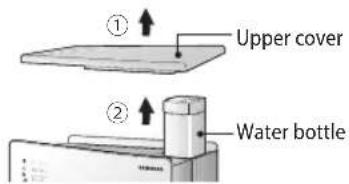
- Detacth the side cover from the appliance by gripping and pulling out the tray handle on bottom right of the appliance and then lift up the humidification hydraulic turbin in the arrow direction. Be careful not to drop water from the humidification hydraulic turbin.

-
If white powder has formed on the surface of the humidification hydraulic turbine or around the groove of the gear part, noise may be generated. Therefore, clean those parts with a soft brush.
-
After removing the water in the tray, dry the tray, side cover and interior of the appliance with dry towel.
-
When the tray is too dirty, clean the tray by using water with a neutral detergent and rinse it and dry it completely in the shade.
-
Do not clean the surface of the tray with anything sharp.
-
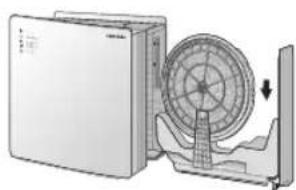
Put the humidification hydraulic turbin into the tray. When putting the turbin into the tray, the side that 'Back' is written should look at the rear side of the product.
- When putting the humidification hydraulic turbin into the tray, fit the rear side of the turbin into the hook first and then pull the front hook to fit the turbin.
- After closing the side cover(①), put the water bottle into the water bottle box(②) and close the upper cover.(③)



NOTE
- When the upper cover is not closed correctly after cleaning, the appliance will not operate correctly.
- Clean the tray and interior of the appliance more than once a week. However, if those parts have a bad odor or become dirty, clean them more frequently.
ENGLISH-24
Cleaning the pre filter
- While the appliance is switched off, detach the upper cover(①) and detach the pre filter from pre filter frame.

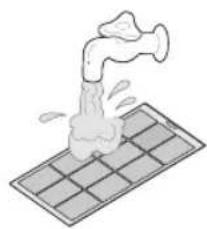
- Clean the pre filter with running water.
- When the dust is too thick, rinse the filter with warm water using neutral detergent.
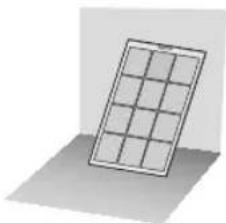
- Dry the filter completely in the shade.
- When drying the filter, it shouldn't be exposed to direct sunlight.
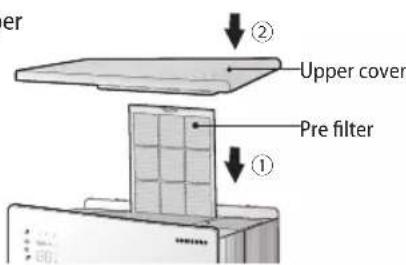
- After putting the pre filter into the pre filter frame(①), close the upper cover(②).

NOTE
- Put the filter into the appliance as the front side look forwards.
- Clean the pre filter every 2 weeks. However, the cleaning period can vary according to the surrounding environment and hours of usage, so the period should be shorter in a dusty area.
ENGLISH-25
Cleaning and maintenance
Changing HEPA filter and deodorization filter
When the filter exchange light is lit up on the control panel, change the HEPA filter and deodorization filter.
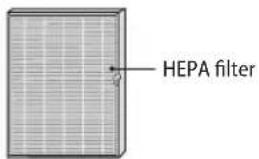
HEPA filter is a highly efficient filter that eliminates fine dust or cigarette particles.

Deodorization filter is a highly efficient filter that eliminates smells from everyday living such as the bathroom or food.
- While the appliance is switched off, detach the upper cover(①) and pull out the filter frame that is in front of pre filter(②).

- Pull out the HEPA filter and deodorization filter from the filter frame.
- After pulling out the HEPA filter, you can pull out the deodorization filter.
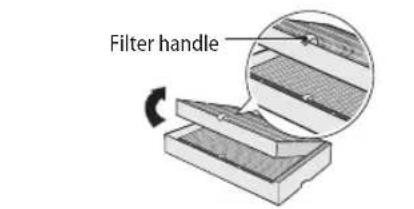
-
Put the new HEPA and deodorization filter into the filter frame.
-
If you touch the deodorization filter by hands, your hands will be dirty. Put on gloves before you change the filters.
-
When putting the HEPA filter and deodorization filter into the filter frame, put the deodorization filter first and then HEPA filter.
-
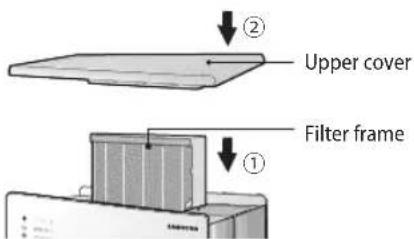
After putting the filter frame back(①), close the upper cover(②).
- When putting the filter frame back, check the inserting direction.
- After turning the appliance on, press ⏻] button and [ ] button at the same time for 3 seconds.
- The filter exchange light on the control panel will go out with a beep sound and the light will be on again for next exchange period.

- Exchange filter can be purchased at a Samsung service center.

- The HEPA filter and deodorization filter shouldn't be cleaned or touched with water.
ENGLISH-26
Troubleshooting
Before reporting the problems of your appliance, please check the trouble shooting table below.
| Problem Solution | |
| The air purifier with humidification function does not work at all. | ·Check if there is a power failure. After checking the status of power supply, operate the appliance again. |
| ·Check if the power plug is properly connected. Insert the power plug into the wall socket correctly and operate the appliance again. | |
| ·Check if the power socket has a problem and use another socket. | |
| ·Check if the upper cover is correctly closed. | |
| HEPA filter or deodorization filter exchange display is on continuously. | ·Check if you pressed the [ ] button and the [ ] button at the same time for more than 3 seconds. When exchanging the filters, press the [ ] button and the [ ] button for 3 seconds until you hear a beep sound. |
| Odor is generated. | ·Check if you haven't cleaned the appliance for a long time or used stale water. Clean the water bottle, humidification filter and the interior of the appliance. |
| ·Check if the odor is similar to that of chlorine. ·The odor may be from the chlorine contained in the water. (Place the water outside for about one day and then supply the water again.) | |
| ·Check if the pre filter is dirty and then clean the pre filter. | |
| ·Check if the odor is generated from HEPA filter or deodorization filter and then change the two filters. | |
ENGLISH-27
Troubleshooting
| Problem Solution | |
| Water is not supplied. | ·Check if the water bottle is properly fitted into the water bottle box.·Check the water supply after removing the purification filter from the water bottle. |
| The humidity level does not go up to set humidity level in humidification mode. | ·Check whether the indoor room is warm or windows are open.·Especially, the humidity level is very low in the winter as the appliance is used in a sealed room. Therefore, the current humidity level might not go up to the high humidity level set by users. *This is not the product malfunction, but just the difference depending on the usage environment. |
| The water bottle runs out of water but [Water supply] light is not lit up. | ·Check if water remains in the tray. When the water in the tray is removed, the water supply light [ ] will be lit up as well as the water bottle. After removing all the water in the tray, operate the appliance and check whether the [ ]light is lit up in 3~5 minutes. |
| Breeze is generated but the moisture is not. | ·Check if the humidification mode is off. If the humidification light is off, the humidification function will not work, so after checking it, change it to the humidification mode. |
| ·Since this appliance is an evaporative air purifier with humidification function, the vapor is invisible. Even if you cannot see the vapor from the appliance, do not worry about product malfunction. | |
ENGLISH-28
| Problem Solution | |
| Less moisture is generated. | ·Check if you used well / spring water and then change it to tap water. |
| ·Check if the water in the water bottle is freezing or too cold. Use water of 7 °C~15 °C after 10~15minutes is passed. When using the water lower than 6 °C, product malfunction may occur. | |
| Strange noise is generated. | ·Check if the hydraulic turbin fits correctly. When putting the turbin into the appliance, the side with toothed wheel should look forward. |
| ·Check if it is electrical noise. The electrical noise may be generated during the ion production. Therefore, do not worry about malfunction with this noise. | |
| ·Check if it is mechanical noise. Check if the hydraulic turbine and tray are dirty with white powder. Purchase a new water purification filter and replace it. Clean the humidification hydraulic turbine and tray on a regular basis. Especially, when there is white powder around the groove of the humidification hydraulic turbine gear part, clean it with a soft brush as the white powder causes a noise. | |
| ·Are the hydraulic turbin or tray dirty with white powder? | |
| Error is indicated. | ·E3,E6messagess are displayed on the timer diplay of the control panel. In this case, the appliance has a certain problem, so contact the service center. |
ENGLISH-29
Memo
ENGLISH-30
Memo
ENGLISH-31

- AIR PURIFIER WITH HUMIDIFICATION FUNCTION USER MANUAL
- FEATURES OF YOUR AIR PURIFIER WITH HUMIDIFICATION FUNCTION
- TOTAL AIR CARE!! PURIFICATION, HUMIDIFICATION, STERILIZATION FUNCTIONS CAN OPERATE WITH ONE APPLIANCE
- HIGH-CLASS DESIGN
- CONTENTS
- PREPARATION
- BASIC FUNCTION
- OTHERS
- ENGLISH
- SAFETY PRECAUTIONS
- FOR INSTALLATION WARNING
- FOR INSTALLATION CAUTION
- FOR POWER SUPPLY WARNING
- FOR POWER SUPPLY CAUTION
- FOR CLEANING WARNING
- CHECK BEFORE USE
- CHECKING INSTALLATION
- CHECK THE POWER PLUG AND SOCKET
- PRODUCT INFORMATION
- TEMPERATURE RANGE FOR OPERATION OF AIR PURIFIER WITH HUMIDIFICATION FUNCTION
- DESIGN INFORMATION
- DISPLAYING CURRENT HUMIDITY
- USING A FILTER
- WATER SUPPLY
- CHECK THE NAME OF THE COMPONENTS
- OPENING THE UPPER COVER
- OPENING THE SIDE COVER
- NOTE
- PURIFICATION DISPLAY
- OPERATION MODE
- HUMIDIFICATION AND PURIFICATION MODE
- PURIFICATION MODE
- SLEEP MODE
- S-PLASMA ION
- CLEANING AND MAINTENANCE
- CLEANING THE EXTERIOR
- MAINTAINING THE APPLIANCE
- MOVING THE APPLIANCE
- CLEANING DUST SENSOR
- CLEANING THE WATER BOTTLE
- CLEANING THE WATER PURIFICATION FILTER
- CLEANING THE HUMIDIFICATION FILTER
- CLEANING THE TRAY AND THE INTERIOR OF THE APPLIANCE
- CLEANING THE PRE FILTER
- CHANGING HEPA FILTER AND DEODORIZATION FILTER
- TROUBLESHOOTING
- MEMO
Brand : SAMSUNG
Model : AX034HPXAWQ
Category : Air purifier