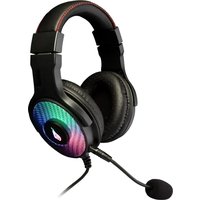
Vinson N1 - Headphones SureFire - Free user manual and instructions
Find the device manual for free Vinson N1 SureFire in PDF.


Pick your language and provide your email: we'll send you a specifically translated version.
| Product Type | Over-ear headphones |
| Brand | SureFire |
| Model | Vinson N1 |
| Driver Size | 40 mm |
| Frequency Response | 20 Hz - 20 kHz |
| Impedance | 32 ohms |
| Sensitivity | 98 dB |
| Connectivity | Bluetooth 5.0, 3.5 mm jack |
| Bluetooth Range | Up to 10 m (33 ft) |
| Battery Type | Rechargeable lithium-ion |
| Battery Life | Up to 20 hours |
| Charging Time | Approximately 2 hours |
| Charging Port | USB-C |
| Noise Cancellation | Active noise cancellation (ANC) |
| Microphone | Built-in with noise reduction |
| Controls | On-ear volume, track, and call buttons |
| Weight | Approximately 250 g (8.8 oz) |
| Dimensions (folded) | 7.5 x 6.5 x 3 in (19 x 16.5 x 7.6 cm) |
| Ear Cushion Material | Memory foam with leatherette |
| Headband Material | Stainless steel with padded headband |
| Foldable Design | Yes, for portability |
| Carrying Case Included | Yes, hard shell case |
| Maintenance | Wipe with a soft, dry cloth; keep away from moisture |
| Replacement Parts | Ear pads and cable available separately |
Frequently Asked Questions - Vinson N1 SureFire
How do I pair the Vinson N1 with my phone?
Ensure headphones are charged. Press and hold the power button until LED flashes red/blue. On your phone, enable Bluetooth and select 'Vinson N1' from the list.
What is the battery life and charging time?
Battery life is up to 20 hours with ANC on. Charging via USB-C takes approximately 2 hours.
Can I use the headphones while charging?
Yes, you can use the headphones in wired mode via the 3.5 mm jack while charging, but Bluetooth operation is disabled during charging.
How do I clean the ear cushions?
Wipe the ear cushions with a soft, dry cloth. For stubborn dirt, use a slightly damp cloth with mild soap. Do not soak or submerge in water.
Are replacement ear pads available?
Yes, replacement ear pads can be purchased separately from SureFire or authorized dealers.
Why is the sound only coming from one side?
Check if the audio cable is fully inserted. For Bluetooth, ensure no earphone is muted. Try resetting by holding power button for 10 seconds.
How do I reset the headphones?
Press and hold the power button and volume up button simultaneously for about 5 seconds until the LED flashes rapidly.
Is the microphone suitable for calls?
Yes, the built-in microphone with noise reduction provides clear call quality even in moderate noise.
What is the warranty period?
SureFire offers a 2-year limited warranty against defects in materials and workmanship. Keep your receipt for proof of purchase.
Can I connect to multiple devices?
The Vinson N1 supports multipoint connection to up to two devices simultaneously. To switch, pause audio on one device and play on the other.
User questions about Vinson N1 SureFire
0 question about this device. Answer the ones you know or ask your own.
Ask a new question about this device
No questions yet. Be the first to ask one.
Download the instructions for your Headphones in PDF format for free! Find your manual Vinson N1 - SureFire and take your electronic device back in hand. On this page are published all the documents necessary for the use of your device. Vinson N1 by SureFire.
USER MANUAL Vinson N1 SureFire

Manual assistant
Powered by Anthropic
Waiting for your message
Product information
Brand : SureFire
Model : Vinson N1
Category : Headphones