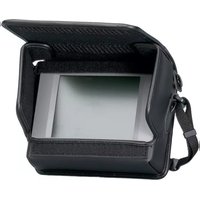
ZM-L304N - Monitor Ganz - Free user manual and instructions
Find the device manual for free ZM-L304N Ganz in PDF.


Pick your language and provide your email: we'll send you a specifically translated version.
| Brand | Ganz |
| Model | ZM-L304N |
| Product Type | Monitor |
| Display Type | LCD |
| Screen Size | 15 inches |
| Aspect Ratio | 4:3 |
| Resolution | 1024 x 768 |
| Brightness | 300 cd/m² |
| Contrast Ratio | 700:1 |
| Viewing Angle | 170° horizontal / 160° vertical |
| Inputs | BNC, VGA |
| Power Supply | AC 100-240V, 50/60Hz |
| Power Consumption | 30W (typical) |
| Dimensions (W x H x D) | 14.2 x 12.5 x 7.8 inches |
| Weight | 8.8 lbs |
| Mounting | Desk stand or wall mount |
| Operating Temperature | 0°C to 40°C |
| Cleaning Instructions | Use a soft, dry cloth. Avoid chemicals. |
| Safety Features | Overvoltage protection, cooling vents |
| Spare Parts Availability | Power adapter, cables, remote available |
| Repairability | Serviceable by qualified technician |
Frequently Asked Questions - ZM-L304N Ganz
How do I connect the Ganz ZM-L304N monitor to a camera?
Connect the camera's video output to the monitor's BNC input using a coaxial cable. Ensure both devices are powered off during connection.
What power adapter does the ZM-L304N require?
The monitor uses an AC 100-240V power adapter with a standard IEC C14 connector. Use only the provided adapter.
How do I adjust brightness and contrast on the monitor?
Use the menu button on the front panel to access on-screen display (OSD) settings. Navigate with arrow keys to adjust brightness and contrast.
The display shows no image. What should I check?
First, verify that the monitor is powered on and the power LED is lit. Check cable connections and ensure the video source is active. Try a different input if available.
Can I wall mount the ZM-L304N?
Yes, the monitor has VESA 75x75 mm mounting holes on the back. Use a compatible wall mount bracket and follow the instructions.
How do I clean the monitor screen?
Use a soft, dry microfiber cloth to gently wipe the screen. Do not use any liquid cleaners or abrasive materials.
What is the power consumption of the monitor?
The typical power consumption is 30W. It may vary slightly based on brightness settings.
Does the ZM-L304N have speakers?
No, the ZM-L304N is a video-only monitor without built-in speakers. For audio, use an external speaker system.
How do I reset the monitor to factory settings?
Access the OSD menu, navigate to the setup or system section, and select factory reset. Confirm the action.
What cables are included with the monitor?
The package includes a power cord and a BNC-to-BNC cable. Other cables may be sold separately.
User questions about ZM-L304N Ganz
0 question about this device. Answer the ones you know or ask your own.
Ask a new question about this device
No questions yet. Be the first to ask one.
Download the instructions for your Monitor in PDF format for free! Find your manual ZM-L304N - Ganz and take your electronic device back in hand. On this page are published all the documents necessary for the use of your device. ZM-L304N by Ganz.
USER MANUAL ZM-L304N Ganz
Manual assistant
Powered by Anthropic
Waiting for your message
Product information
Brand : Ganz
Model : ZM-L304N
Category : Monitor